Thursday, January 31, 2008

Where have all the Mailing Lists Gone?

Way back in the frontier days when we circled the wagons at the end of the day and hooked up our 300 baud modems, mailing lists were one of the first electronic tools we used for genealogy. As far as mailing lists are concerned, FamilySearch was late in and today they announced they would also be one of the first out.

Users of their mailing list system received notification today. "Effective 13 February 2008, the Collaboration E-mail List feature on the FamilySearch.org web site will be discontinued." Users who wished to remain in contact with one another were advised to exchange e-mail addresses.

RootsWeb Mailing Lists

It is only coincidence that today the Utah Valley PAF User Group (UVPAFUG) used RootsWeb's mailing list system for the last time. List members received a message that began, "A Final Message to All Participants in this Mailing List." UVPAFUG has used RootsWeb's system since July 2000 to announce their monthly meetings. UVPAFUG (no, I don't know how they pronounce that) is abandoning RootsWeb's system in favor of a blog and FeedBlitz subscriptions.

The Ancestry Insider has been hearing rumors of dissatisfaction from several groups with the RootsWeb mailing list system. Ignored for many years by RootsWeb owners—the Generations Network (TGN)—the Insider was told that TGN switched the software used for the mailing lists several months ago and list administrators are not happy with the loss of some key features.

HTML E-mail Formatting

While other solutions allow HTML formatting, or rich text as it is sometimes called, TGN has invested very little in upgrading RootsWeb-related e-mails. Mailing lists are still plain text. The RootsWeb Review became available in HTML just last week.

Message board notifications are another ugly step child. In yet another coincidence, at least some of today's notifications went out with bad links. Here's a representative message showing the ugly formatting as well as the link error.

My Notifications

Board : Boards > Surnames > Rencher
Subject : Nancy Rencher, daughter of John Nelson
Author : BMarshall0572
Date : 29 Jan 2008 4:24 AM GMT

http:///mbexec/msg/an/nEB.2ACE/86

Board : Boards > Surnames > Rencher
Subject : Re: Nancy Rencher, daughter of John
Author : brencher
Date : 29 Jan 2008 5:20 AM GMT

http:///mbexec/msg/an/nEB.2ACE/86.1

Board : Boards > Surnames > Rencher
Subject : Re: Nancy Rencher, daughter of John
Author : BMarshall0572
Date : 29 Jan 2008 5:31 AM GMT

http:///mbexec/msg/an/nEB.2ACE/86.1.1

The Message Board Administration Team

It may be that mailing lists powered by genealogy companies may one day soon disappear entirely.

Monday, January 28, 2008

New FamilySearch offered to all consultants

FamilySearch has announced availability of New FamilySearch accounts to any consultant that finishes a 1 hour course. Said the announcement,

FamilySearch Support is pleased to announce that they will be offering all registered Family History Consultants and Priesthood Leaders an opportunity to obtain a new FamilySearch account early. To take advantage of this opportunity we ask that you attend one 1 hour class entitled, "How Consultant's Support the new FamilySearch." After your attendance to the class you will be notified that your account is activated allowing you to register, participate in on-line training and become acquainted with the system.

There are currently 9 times scheduled for the class running from Thursday, 7-February-2008 until the Thursday prior to General Conference weekend. Classes are held on Temple Square in Salt Lake City. You can see the list of available times and register for one by clicking here.

Sunday, January 27, 2008

Gordon B. Hinckley dies at 97

Gordon B. Hinckley

Gordon B. Hinckley, 15th president of the Church of Jesus Christ of Latter-day Saints died tonight at 7 pm MST from causes incident to age. He died in his apartment overlooking the historic Salt Lake Temple with family members at his side. Hinckley presided over the church of about 13 million members for almost 13 years.

One of Hinckley's lasting accomplishments will be the great expansion of temples during his presidency. On 12-March-1995 when he became president, the Church had 47 operating temples. Today there are 124 with another 12 in various stages of construction.

New FamilySearch owes some of its existence to Hinckley's insistence that tools be developed to further genealogy work among Church members, allowing collaboration and preventing duplicate submissions of ancestor names to the Church's temples.

Thursday, January 24, 2008

A Piece of Paper Out of Nowhere

This is another in the Ancestry Insider's series called Serendipity in Genealogy.

Click to enlarge on Featurepics

"When it came time to make a trip to Delaware from our home in Alaska, it was a big adventure, and our main focus was to gather as much information as possible and bring it home to sort out." Steve and Nancy Lealos would spend almost two weeks researching Nancy's genealogy. They called and visited anyone and everyone with any information.

Steve says they would be at libraries, courthouses and other locations from the moment they opened until the moment they closed. He praised the staff of these institutions. "They helped every way they could."

Their hard work hit a dead end with Nancy's great-great grandfather and the time had come to go.

While I was taking some last photographs on a lawn, I happened to see out of the corner of my eye an older piece of yellow legal paper on the ground. As I picked up the paper, I was absolutely stunned to realize that I had in my hand a handwritten document that was at least 50 years old, written in ink without a smudge on it, that listed Nancy's great-great grandfather, his parents, his wife's family and continuing back even further with parents, husbands, wives and children, with dates, places, etc.

To add to the amazement, they could find no reason for the paper to be there. "No one knew about it, no one claimed it." On a lawn in Delaware a piece of paper had appeared out of nowhere.


Adapted from "Out of nowhere," Steve Lealos, LDS Church News, 19-January-2008, p. 16.

Wednesday, January 23, 2008

NFS Update: I'm OK, "Your" OK

Since Monday's update, I've learned a few more things. Snowflake is going live 5-February. (Thanks, E.) Birmingham, Alabama received notification they will go live in the next 4 months, as did Lubbock. (Thanks, C.) If Seattle got their notification as rumored, no one has mentioned it.

Here's an updated map. Green is live; yellow, announced; red, not yet; purple, under construction.

New FamilySearch Rollout Map for 23-Jan-2008

Notice we now have an unbroken band of states with green and yellow dots from one coast to the other: California, Arizona, New Mexico, Texas, Louisiana, (sorry Miss.), Alabama and Florida.

Oklahoma has hit the rumor radar again. As the rumor goes, "your" OK district could be live as soon as March and as late as May. Given the projected pace of the rollout and the size of that window, that's a pretty safe prediction. (See Renee's article, Pace for NFS Roll-out to Quicken.)

Those betting that Las Vegas would go live 5-February received enormously disappointing news last week. Their rollout has been delayed with no word on how long the delay might last! (Thanks, F.) I didn't hear if a reason was given, but I think temple-specific delays might be caused by equipment related issues. I wonder if high growth in the Vegas area, coupled with the Temple's location far from the city center could make it difficult to get the high-speed Internet connectivity required by New FamilySearch.

Monday, January 21, 2008

New FamilySearch Schedule Update

I've updated my Temple Districts Using New FamilySearch article (but not the map) with the following changes:

Gone live: San Antonio, Sacramento, Winter Quarters.

Going live 5-Feb: Mesa, Oakland, Snowflake.

Going live 12-Feb: Boston, Detroit.

Going live 4-Mar: Costa Rica, Houston.

Received their 3 month notification: Halifax, Toronto.

Rumor has it they'll receive their notification this week: Seattle.


"You're Going Live" message

Wonder what the email looks like announcing your temple district is going live with New FamilySearch? Sometimes exactly three weeks before their go-live date, family history consultants are receiving this message:

To: Priesthood leaders, family history center directors and family
history consultants in the ___________ temple district.


Beginning [go-live date], the new process for printing temple name cards using Family Ordinance Requests will be used in the ___________ Temple. New FamilySearch will be available to the general membership of the Church who live in the ___________ temple district early in the morning on the previous [3 days before?]. No additional notice will be sent to priesthood leaders or members of the Church in the __________ temple district concerning these dates.


We ask that family history consultants and center directors encourage members who have existing TempleReady disks to take them to the temple and have their temple name cards printed before [go-live date]. Beginning immediately, please do not create any new TempleReady disks in your family history centers for processing at the ___________ temple.


If you have not done so already, please complete the new FamilySearch online training prior to [go-live date] in preparation for helping members to use new FamilySearch as part of the new process for preparing ancestral names for the temple. Please contact FamilySearch Support by e-mail or phone if you have any questions or problems.


Thank you for your support of temple and family history work.

Sincerely,

FamilySearch Support

The latest go-live dates are all Tuesdays. Sometimes the notifications arrive on a Tuesday. Watch your In-boxes!

Friday, January 18, 2008

New Ancestry TV Ads

Ancestry must have liked the results of their last TV ad campaign. An announcement in their MediaRoom reveals today that they have launched a new set of ads to run throughout 2008.

"The new ads depict how the lives of our ancestors influence our lives today," the press release states. They extend the theme Ancestry has used in previous ads, associating the traits of ancestors with their modern descendants.

One way to see the MediaRoom announcement and the 3 advertisements is to go to www.tgn.com and click on Press Room. In the "Search MediaRoom" box, type Ad Campaign. Select the first item, titled The Generations Network - Ancestry.com Ad Campaign.

Alternately, you can see the old and new commercials on YouTube.

Alternately, click the play button in turn on each ad below to see the ads. If you still can't play the ads, click the link under each.


Gladys (30 sec)

Jane (30 sec)

Robert (30 sec)

The ad campaign is expected to run throughout 2008 on national cable channels including A&E, Food Network, TNT, AMC and many more.

Sunday, January 13, 2008

Part 3: A Virtual Private Hijacking

MyFamily.com's Browser Hijacker

Click to enlarge on Featurepics
"Business Hack," © fluca

The Ancestry Insider suffers from a problem that has affected many: his browser is sometimes hijacked to MyFamily.com. Frustrated to his fill, he finally fixated on finding and fixing this problem.

In part 1, An Unholy Alliance, the Insider investigated his first suspect: TGN's former use of Gator. In part 2, the Insider's second suspect was browser hijackings caused by the MyFamily DNS Poisoning problem.

It wasn't either of these; what, then, is it?

Part 3: A Virtual Private Hijacking

Some Windows operating systems will let you see your DNS cache by running (Start > All Programs > Accessories) Command Prompt and typing this command:

ipconfig /displaydns

Someone with the poisoned cache problem described in part 2 would see this somewhere in their cache:

familysearch.org
----------------------------------------
Record Name . . . . . : familysearch.org
A (Host) Record . . . : 66.43.25.130

What I saw on my laptop was

xyz.familysearch.org
----------------------------------------
Record Name . . . . . : xyz.familysearch.org.cc.myfamily.com
A (Host) Record . . . : 66.43.25.130

My DNS cache was poisoned, but not in the way explained in part 2. When I specified a non-existent domain, somehow my DNS was appending "cc.myfamily.com" on the end. As we learned last time, the misconfigured MyFamily name servers will willingly claim any domain name passed to them and return the address to MyFamily.com[66.43.25.130].

Virtual Private Networks

The diagram below/left shows that companies operate private networks (in green) that connect to the web through a firewall. The firewall blocks access to the private network.

Some companies provide access to their private network to select employee computers outside the firewall by establishing a virtual private network (VPN) as illustrated in the diagram below/right.

To include an employee computer in a VPN, special software is installed on the employee's computer that allows the computer to use the Internet to create a virtual cable that plugs the computer into the company network. Even though the virtual cable actually communicates using the Internet, the information is secured and protected, making it as private as if a real cable had been strung from the employee's home all the way to the employee's workplace where it was plugged directly into the company's private network.

Resolution

I was playing with some of the other name server commands Michael Ditto mentioned in his poisoning article when my computer showed this list of DNS options:

Set options:
  nodebug
  timeout=2
  retry=1
  srchlist=cc.tgn.com/cc.myfamily.com

There it was! "Cc.myfamily.com" was the same string appended to xyz.familysearch.org!

When I installed the TGN VPN software on my laptop, it had added to the srchlist option anything necessary for machines connected directly to the company network. From that point forward, anytime I entered a domain that could not be found, the DNS system searched for it by appending in turn each item in the search list. Once cc.myfamily.com was added, the misconfigured MyFamily name servers would poison my cache. The unintended side-effect was my browser hijacking problem.

My long search was over. I removed cc.myfamily.com from the srchlist and revved up my browser.

I typed xyz.familysearch.org and...

A 404—page not found—error never looked so good!

Sunday, January 6, 2008

Part 2: DNS Poisoning

MyFamily.com's Browser Hijacker

Click to enlarge on Featurepics
"Business Hack," © fluca

The Ancestry Insider suffers from a problem that has affected many: his browser is sometimes hijacked to MyFamily.com. Frustrated to his fill, he finally fixated on finding and fixing this problem.

In part 1, An Unholy Alliance, the Insider investigated his first suspect: TGN's former use of Gator.

What could possibly cause hijacking of multiple browser versions, multiple browsers on both Macs and PCs and not show up in malware scans?!?

Part 2: DNS Poisoning

Computers like numbers. People, on the other hand, don't. Every website on the Internet has a name for people to use and a numeric address for computers to use. The names are called domain names. Some examples are www.ancestry.com and www.familysearch.org. The numeric addresses are called IP addresses. Some examples are [66.43.22.49] and [204.9.225.200], respectively.

Domain name IP Address
www.ancestry.com 66.43.22.49
www.familysearch.org 204.9.225.200

Example showing domain name translations

The domain name system (DNS) in your computer asks a DNS server (at your Internet Service Provider) to translate domain names into IP addresses. To speed up the translation, once a domain name has been translated to an IP address, the pair are saved or cached.

Click to enlarge on Featurepics
© fluca

A DNS cache entry is poisoned if the wrong IP address is saved for a domain name. For example, the IP address for www.myfamily.com is [66.43.25.130]. If a domain name such as xyz.familysearch.org is placed into the cache with the wrong IP address, then the cache has been poisoned.

Domain name IP Address
www.ancestry.com 66.43.22.49
www.familysearch.org 204.9.225.200
xyz.familysearch.org 66.43.25.130
www.myfamily.com 66.43.25.130

Example of a poisoned DNS cache

Ditto's Investigation

Michael Ditto was a senior software engineer with Sun Microsystems nearly 3 years ago when his Linux system started acting weird.

Several people have observed a problem on their networks where various web sites, apparently at random, would be replaced by www.myfamily.com. The problem comes and goes without obvious cause, and affects different web sites at different times. I started encountering this problem a few days ago. I clicked on a link to, say, www.imdb.com, and found myself looking at the home page for www.myfamily.com.

Ditto investigated the situation and wrote an article with his findings. It is titled The myfamily.com DNS poisoning problem.

He found that the mfns*.myfamily.net name servers incorrectly claim the authority to translate any .com domain name. And when asked to do so, they always return the address of MyFamily.com. In Ditto's words,

So, the reason that the problem appeared suddenly one day is that a piece of spam caused my name server to contact the misconfigured myfamily.com name server and thereby become poisoned. Once poisoned, the name server will behave improperly until it is restarted or the cache flushed somehow.

DNS poisoning would explain how the problem could affect all browsers and browser versions, both on Macs and PCs. It would explain why scanners could never detect any malware on my notebook. It seemed I had finally solved my mystery. Now, how do I solve the problem on my laptop?

MyFamily Should Fix the Problem

"Of course the administrator of the myfamily.com domain should fix their DNS and/or server configuration," said Ditto... three years ago.

The Measurement Factory does periodic surveys that look for DNS cache poisoners. Their September 2007 survey found the MyFamily name servers are still poisoning caches for .com, .net and .org domains and gave them an "evilness" rating of 2.0.

Not all current operating systems can be fooled by the errant MyFamily name servers. The Measurement Factory notes that Windows NT 2000 is vulnerable to poisoning while Windows 2003 is not, unless the administrator unchecks the "prevent cache poisoning" option. But even if your computer is immune, you can still be affected by this problem if a cache "upstream" from you gets poisoned.

Following the notes in Ditto's article, I verified that the MyFamily name servers have not been fixed. Mysteriously and unexpectedly, I also found that my laptop, running Windows XP, was unaffected by the MyFamily name servers' erroneous authority claims.

Now that I thought about it, my symptoms were different from those described by Ditto. Instead of the random hijacking of existing websites, I suffer from consistent redirection of nonexistent websites.

What then, is causing my browser hijacking?!?

Next time: A Virtual Private Hijacking.

Thursday, January 3, 2008

Who's In at TGN?

It's that time of year. The time when we find out who's in and who's not at the Generations Network (TGN).

More specifically, it's time for the new RootsWeb Calendar and time to see who is pictured!

The Ancestry Insider is honored to be pictured again in this year's calendar.

Each year Donna puts in hours and hours of work collecting photographs, designing and putting together each month, identifying those pictured, writing up a key identifying each name, getting the calendars printed and then distributed. Whew; it makes me tired just thinking about it.

The previous year's calendar becomes a treasured keepsake, filed close by, as if that will keep cherished coworkers from wandering too far afield.

Thank you, Donna. You are definitely in.

Sunday, December 30, 2007

MyFamily.com's Browser Hijacker

Click to enlarge on Featurepics
"Business Hack," © fluca

Probably unknown to current management of the Generations Network (TGN) and new owners, Spectrum Equity Investors, they have inherited a problem that has affected many: something is sometimes hijacking browsers to MyFamily.com.

The Ancestry Insider suffers from the problem on his laptop. Frustrated to his fill, he's finally fixated on finding and fixing this problem.

Part 1: An Unholy Alliance

On my laptop, when I enter a non-existent domain, say http://xyz.familysearch.org, my browser is redirected to MyFamily.com. Over several years I've tried several respected malware scanners, trying to detect and fix this problem, including Spybot Search and Destroy, Ad-Aware Free and Norton AntiVirus. When I upgraded to Internet Explorer 7, the problem remained. When I downloaded and tried Firefox, the hijacking still occurred.

My investigation thus far has been unable to determine if this situation is an unhappy accidental alignment of technology settings or the last vestige of an unholy alliance the company made years ago with aggressive Internet marketer, Gator.com.

Gator.com

According to Beau Sharbrough in a 2004 article in the Ancestry Daily News,

Spyware is unwanted software, hidden on your computer. It might include the following:

--- Adware. These programs serve you popup ads. They might also send information to advertisers. One of the more insidious examples is Gator. They produce popup ads that don't come from the site you are visiting. For a fee, they will put up Ford ads on pages that have “Honda” on them

Gator's adware technology was installed during the installation of some program offered for free in exchange for the permission to display advertising. Some of Gator's programs were eWallet, GotSmiley, Dashbar, Precision Time, Screenscenes and weatherscope. After installation, a user would be shown popup advertisements that matched their interests, which were inferred from the websites they visited. (Source)

Spyware legal expert, Benjamin Edelman, says,

Users who manage to read the [63-page Gator] license find surprising terms: Users must not run third-party tools (like Ad-Aware or Spybot) to remove Gator, and users must not investigate what personal information Gator tracks and sends.

Because the popups sometimes obscured the websites of competitors, and because Gator fought being described as "spyware", Gator and its software were involved in legal actions with or among: the Internet Advertising Bureau, Virtumundo, L.L. Bean, PriceGrabber, the New York Times, the Washington Post (among other media companies), Weight Watchers, DiscreetDrugs.com, DietWatch.com, Extended Stay America, Hertz, Lending Tree, Metrodate (representing a class of websites), Overstock.com, Quicken Loans, Six Continents Hotels, TigerDirect, UPS, Wells Fargo, Teleflora, Nordstrom's, JC Penney, Atkins, Gevalia, Interlinx (budgetlife.com) and PC Pitstop. (Source)

Paul Allen

In a 2004 Paul Allen, former Ancestry executive, wrote a blog article titled Gator files for IPO as Claria Corporation in which he acknowledged the use of Gator's technology at Ancestry.com.

My team at Ancestry.com used to advertise on Gator. It was cool to think that we could “gator” our competitors web sites and pop-up our advertisement just as a web user was thinking of subscribing to, say, genealogy.com [a competitor at the time]. I don’t think this should be considered illegal. If an end user wants a Gator tool on their machine to monitor what they are doing and save them money by giving them competing offers or coupons just in time, what is wrong with that?

Allen shows a clear understanding of Gator's deceptive practices but still expresses admiration.

Gator [is] much hated in the industry by web site publishers and much beloved by aggressive Internet marketers. ... The numbers are amazing...

Gator has about 43 million customers that have downloaded one of their software applications, knowingly or unknowingly. These applications are mostly completely useless, but they get downloaded inadvertently...

Getting people to download software for free which stays resident and helps Claria make money is actually quite brilliant...

I think they are just taking advantage of the naivety of many web users...

I think Claria has some clever tactics and end users have been gullible.

Claria has since announced exiting the "adware" business, although its software remains on download sites and continues to be installed on computers. Claria also announced it has shut down the servers that supply popup advertisements to the Gator Advertising Network (GAIN).

List of Suspects

I admit Gator was my first suspect. But is it possible that starved of responses from the GAIN ad servers, Gator's software degrades into default or unintentional behavior that causes or contributes to the mysterious MyFamily.com browser redirects?

When I learned that even Mac users have been hijacked to MyFamily.com, I knew it was time to start looking for another suspect.

Next time, we'll look at suspect 2: DNS poisoning.

Tuesday, December 25, 2007

New FamilySearch Update for 25-Dec-2007

I've updated the map and list in Temple Districts Using New FamilySearch.

Newport Beach has been announced, completing announcements for California. Manhattan and Johannesburg have been announced. All have been given the new preparation length: 4 months. We're on a Lubbock watch. Rumor has it that they may be announced by the end of the year. Let me know if you hear anything. (AncestryInsider@gmail.com)

FamilySearch support personnel can share:

  • What new FamilySearch is
  • New FamilySearch is coming
  • Names and dates for temple districts that have gone live

Support can not divulge:

  • Names and dates for temple districts that have not gone live
  • Packet information
  • New FamilySearch Rollout DVD

Google Holiday Logo

Most of you probably know that Google sports specially adapted holiday logos on special days. If you missed the gradual, day-by-day "building" of their Christmas 2007 logo, check out all 5 days at http://www.google.com/doodle13.html.

Wednesday, December 19, 2007

News for 19 December 2007

There are several news items of particular note today. I can't decide whether to post a single article with a little about all of them, or separate articles that go more in-depth and risk not getting to them all.

New Learning Center at Ancestry

Ancestry has launched an all new Learning Center. See it at www.ancestry.com/learn. A moment or two after you arrive on the page, Megan Smolenyak will start moving and speaking to you. There's lots of good information for new genealogists or new users of Ancestry.com. If you're an explorer like me, there's lot's of neat little nooks and crannies to explore.

Ancestry has some nice-looking email newsletters. I used to be embarrassed how poorly they were presented in the learning center. Check it out for yourself. Here's the same article presented with the old design and the new design. Check out this week's Ancestry Weekly Journal.

New Tree Features at Ancestry

You may have noticed last night that Ancestry's Member Trees were inoperable. An announcement on the Ancestry Blog by Kenny Freestone stated, "We're doing this because we are rolling some really cool new features to the site. ... We apologize for the downtime, and hope to delight you with the new features you'll find when we are back up!"

If you were expecting another post on the blog today announcing these great, new features, you were disappointed. Instead of talking about the jaw-dropping new features, Ancestry took the opportunity to announce the March 2008 retirement of Online Family Tree.

Hmmm. Was that really the best way to follow-up the excitement generated by the first post? I am grateful that Ancestry announced beforehand that the Ancestry Trees would be unavailable last night. It always aggravates me when Ancestry has planned downtime and then doesn't tell their users beforehand.

Maybe Freestone is doing a "soft rollout." Ancestry does that quite often. They'll roll something new and not tell anyone so that they can see how it performs under light loading. After they've worked any kinks out, then they tell everyone.

If that's the case, I'm sorry I'm spilling the beans. But after last night's announcement I poked around today until I found something new.

Ancestry trees will now give you hints when it finds individuals in other people's trees that match individuals in your own! I don't know all the ins and outs yet, but I've already located pictures that I don't have of my ancestors in other people's trees.

I'm pretty savvy when it comes to searching Ancestry, so I don't expect to find any ancestry records attached to other people's trees that I haven't attached to my own. Or should I say, I didn't expect to find any. I've already found some that, no doubt, I could have found if I had had the time to work on that line. I can see I'm going to love this new feature.

I still need to try attaching these records from others' trees to see how effortlessly the records and photographs come over. And I don't yet know where the "pay wall" separates functionality offered to subscribers vs. non-subscribers. I know that non-subscribers can build trees, upload photos, and invite other non-subscribers to see, upload to or change trees. So who knows, maybe they'll get most of this new functionality. I'll just have to perform some investigations.

So far, the feature looks terrific. This marks a new (for Ancestry) and interesting way of enabling collaboration that diverges from FamilySearch's strategy of one, shared tree. It will be fun to see how the two play out and how the two might cooperate.

Ancestry and FamilySearch Do a Deal

Speaking of cooperation between the two, The Generations Network (TGN) and FamilySearch announced today an agreement restoring full access to Ancestry.com starting today in the Family History Library in Salt Lake City and the 13 largest regional family history centers (FHCs). While the announcement stated that they "hope to expand access to other family history centers in the future," how would you like to be a patron of the largest FHC that didn't get access?

The agreement comes 8 months after TGN withdrew access of Ancestry.com from FHCs. The move was widely believed to signal a falling out between the two. Officials from both organizations maintained that the two enjoyed good relations.

Terms of the deal were not disclosed, but TGN CEO, Tim Sullivan, said “We’ve enjoyed a ten-year working relationship with FamilySearch, and we look forward to continued collaboration on a number of family history projects.” What would you say if I told you that Tim, my close, personal friend, had taken me into his confidence and told me some of the collaborations being considered?

Fine. If you don't believe I know anything, then I guess I have nothing to say about it.

Still...

Stay tuned...

Fixes Needed in New FamilySearch

Here's my wish list for improvements to New FamilySearch (NFS).

  • Visual interface for Combine, so people will stop combining fathers and sons together.
  • Implement the concept of Groups like Microsoft Office does for graphical elements. In PowerPoint one can not only group several objects together, one can group several groups together. In terms of NFS, it would be nice if combining a father and son together produced a group of two groups which, when ungrouped resulted in the original two groups (the father and the son).
  • Implement Wikipedia's History Tab concept so one can easily Undo or Redo changes made to a person, including combining.
  • Implement Wikipedia's Discussion Tab concept. In particular, a discussion should be created anytime two people are separated so one can leave a message discussing why those two shouldn't be re-combined. Any attempt to re-combine the two would require the user to view the discussion before permitting the combine. After performing the re-combine, the user would be required to add a message to the discussion explaining why.
  • Implement Wikipedia's automatic toggle suspension concept so that once a change has been toggled back and forth a certain number of times, the change is frozen and further toggling is prevented until an administrator intervenes.
  • Implement concepts Wikipedia's uses for quality control. Sometimes thought of only in terms of vandalism prevention, automated agents are important for general quality, detecting unintentional damage, and directing the attention of the community.

If you can't tell, I believe Wikipedia has arrived at a workable model of collaboration on a grand scale and NFS should learn from and follow it as much as they can.

Lab Takes a Whack at New FamilySearch

I'm out of time and I haven't talked about the FamilySearch Labs announcement Monday. I guess you're on your own. Read about it and see sample screens here.

Sunday, December 16, 2007

Updated map and list of tables on NFS

This is just a short note to let you know I've updated the map and list in my article, Temple Districts Using New FamilySearch.

San Diego, Fresno, Baton Rouge and Guatemala City have gone live since the last update. Villahermosa may be live this week. Houston has been announced.

Chattanooga Stake is having a meeting on 19 Jan 2008 about genealogy. Read what you will into that.

Sunday, December 9, 2007

Did Ancestry Remove Census Transcriptions?

Ancestry Complaints, Chapter 1

It was a month ago Suzie Henderson posted her complaints about Ancestry.com and it's only today I'm getting around to responding. Sorry about that, Suzie. I've edited Suzie's comment here for length and clarity.

Dear Ancestry Insider,

I agree with everything you said here. Ancestry offers a fine product and gives free server space to RootsWeb, Cyndi's List, many GenWeb sites [World and U.S.], etc. We all really appreciate that.

Thanks!

First, I would not mind paying Ancestry at all IF they would not remove content from their site so that they could charge me extra to get it back again.

Second, I would not mind paying Ancestry at all IF they did not take my credit card number and hold it hostage.

Let's treat each of these concerns separately. Remember, I do not speak in an official capacity for Ancestry. But these are my understandings and recollections.

Did Ancestry remove census transcriptions?
Did Ancestry remove
census transcriptions?

Census Transcriptions

I originally subscribed to Ancestry.com because they had so many transcribed census records. When they added the Census Images for an additional charge, the transcriptions were removed from the site. Information already on the site that I was paying for was removed. Why?

Ancestry used to have many AIS U.S. Federal Census Indexes (aka transcriptions). Some people quote error rates as high as 15 to 19 percent for these indexes. As part of Ancestry's U.S. Federal Census initiative, Ancestry re-indexed these censuses, replacing the AIS indexes. While the old indexes went away and you would no longer have been able to access them, you would have been able to access the new indexes.

Simplified Subscription System

By the way, you weren't the only customer put off by the requirement to pay additional money for access to census images. Back in the old days the old subscription system was splintered and confusing. There was the U.S. Records Collection, U.S. Census Collection, U.S. Newspaper Collection, U.S. Obituary Collection, U.K. Records Collection, etc. Users were constantly being asked to penny up for additional record sets. Complaints were numerous and satisfaction low.

For these reasons Ancestry introduced what internally we call "New Pricing and Packaging." This consists of a simplified two tiered pricing system. The U.S. Deluxe Subscription consists of all record sets pertaining to the United States, including both census indexes and images. The second tier is the World Deluxe Subscription which gives access to all records.

Canceling Ancestry Subscription

If I could log in with my subscriber name and cancel my subscription, I might then trust Ancestry with my credit card number again. I can sign up online to spend money at Ancestry. But I can only stop spending money at Ancestry.com by making a telephone call and arguing about why I want to stop spending money.

I was assured by Ancestry that I would be reminded annually that my card would soon be charged for an new subscription. I was reminded once in 8 years. The only way I was able to get out from under my subscription was to cancel my credit card and not give Ancestry the new number.

Ancestry has made it clearer during signup that your subscription automatically renews. The notification could be a little more prominent for me, but it is there and it's repeated in the Terms and Conditions.

Ancestry warns
Not quite noticeable enough for me, Ancestry warns users
in plain sight that subscriptions automatically renew

You can cancel the renewal either online or by phone without argument at least two days before the renewal date. You can cancel an initial annual subscription during the first 7 days and receive a full refund.

Ancestry will send an e-mail notice 15 days before your subscription automatically renews (except for monthly subscriptions), but in many cases you will never see it. I'm always surprised how many people forget to tell Ancestry when their e-mail address changes. Also, many e-mail systems will treat the notification as SPAM  and throw it away for you.

(If any of you readers have a notification still around, can you share with us what the sender's e-mail address is? Some e-mail systems allow adding addresses to a list of trusted addresses.)

If you're intent on canceling at a particular time, I advise you not to depend on getting the notification; mark your calendars instead.

Subscribers can cancel online on the My Account page

If Ancestry should ever revert back to its old behavior and make it unnecessarily difficult to cancel a subscription, don't suffer the inconvenience of canceling your credit card. Instead, call up the credit card company and ask them to reverse the first charge that shows up after you have notified Ancestry to cancel your subscription. The credit card companies track such "charge backs" and companies with large charge back rates can lose their ability to accept credit card payments.

But under current management, I don't see that happening. CEO Tim Sullivan has told us internally that if a customer is going to leave us, he wants to be able to win them back later with the great new stuff we are working so hard to provide. We don't want to make enemies out of them. This only makes sense.

Try Us Again

Suzie, I don't blame you or anyone else for having a bad taste in your mouth from previous negative experiences at Ancestry. But if you've been away for a couple of years, it's time for you to come back and give us another try.

We've revamped our subscriptions. We've added exceptional new content. (Everyone always thinks of our U.S. and U.K. census collections, which are unequaled, but our immigration records should knock your socks off! And during 2007 we've made astounding progress adding military, state census and vital records.)

Ancestry Member Trees Have Shaky Leaves
Ancestry Member Trees
Have Shaky Leaves

Our free family tree building software with its shaky leaves is a next-generation feature unmatched by any other. I had my tree in good shape, populated with photographs where ever possible, when Ancestry Press came along. With one click I've produced eye-popping books and large pedigree charts. Our DNA offering is young, but very cool. (To everyone at work, if I've forgotten to mention your personal exceptionally cool accomplishments, my apologies.)

In short, Suzie, while you've been away we've been working our fingers to the bone and we have a lot more to show for it than just bony fingers. Come give us another try. This time, we want you to stay because you want to stay.

Sincerely,
The Ancestry Insider

Thursday, December 6, 2007

Marriage Records Database

Dear Ancestry Insider,

I found a marriage on U.S. and International Marriage Records, 1560-1900 on Ancestry which comes from Yates Publishing Co. Once while searching another line I discovered getting the document from them would cost something like $14. Do you have any way of finding the original source? I am so afraid it is going to be someone's family group sheet and that's not worth the cost.

Signed,
SRJ

Dear SRJ,

You've come to the right place. I have the goods on the aforesaid database. As you mentioned, the marriage records in this database were provided by Yates Publishing. Bill Yates founded Yates Publishing in 1972 and something called the Family Group Sheet Exchange (FGSE) in 1981. You can submit family group data for free and Yates Publishing sells it to others, thus providing you a valuable networking opportunity. (They say sarcasm is especially difficult to detect in the written word. Hmmm.) See the Yates Publishing website for a much longer, elegant way of explaining this.

The Yates database is based on the FGSE and, according to the Ancestry.com database description, "these records were extracted from family group sheets, electronic databases, biographies, wills, and other sources." One can contact Yates Publishing "for more information or to order an original Family Group Sheet [from] the FGSE." Unfortunately, the Ancestry database description gives the wrong contact information and no longer includes the instructions for obtaining source material from Yates. Don't worry. We'll explain how to do that before we're done.

Source Citation

As you mention, it would be great if one could decide before paying if the source materials were worth the cost. Fortunately, there is a way.

Often overlooked, underneath the information given in an Ancestry search result from any database is a section titled "Source Citation" that gives information for locating that particular record or result in Ancestry's database or the original source. An example from the Yates database looks like this.

A result from the Yates Database
An example showing a source citation

The source citation in this example is

Source Citation: Source number: 1345.000; Source type: Electronic Database; Number of Pages: 1; Submitter Code: GCH.

You'll want to look first at the source type to determine if the cost is worthwhile. The different types are shown in the table below. (Subscribers can click on "Example" to see an example of each source type.)

Electronic Database

Example

Family group sheet, FGSE, listed as parents

Example

Pedigree chart

Example

Family group sheet, listed as a child

Example

Family group sheet (from "Gleanings"), listed as parents

Example

Correspondence file (significant amount)

Example

Correspondence file

Example

Manuscript (significant amount)

Example

Genealogy book

Example

Manuscript

Example

Family group sheet (from "Gleanings")

Example

Lineage chart

Example

Will

Example

Subject of a biographical sketch

Example

Family or bible record (significant amount)

Example

Genealogy book (significant amount)

Example

Article

Example

Family or bible record

Example

Lineage chart (significant amount)

Example

Will, made by one of spouses

Example

Article (significant amount)

Example

Mentioned in a biographical sketch

Example

Query (significant amount)

Example

Pedigree chart (significant amount)

Example


I've listed the types in order, from most common to least common. Note that many types are repeated with the notation, "significant amount." Use this and the page count to further judge how valuable the source material might be.

One nice feature of the search form for this Ancestry database is that the Keyword field also searches the source type. With the exact search box checked and "significant" typed in the keyword field, your search will only return results if there is a significant amount of source material for the result.

Finding the Submitter

Yates Publishing has also put the database on the web as The Computerized Ancestor where one can access it for free. Bill Yates told me that the index on the Computerized Ancestor is more current than the one on Ancestry. And as of the publication date of this article one can use this database to find contact information for the submitter of a record found here or on Ancestry.

Let's take the example result above with submitter code GCH. Scroll down to the bottom of The Computerized Ancestor home page and find the section titled "Authors." Click on the Begin Browsing button. The list of authors (submitters) gives last name, first name, middle name, city, state, zip code, submitter code and file. Scroll down to the Search for section.

I tried entering the submitter code and clicking Search, but I couldn't get it to work for me. Instead, I guessed that GCH were initials so I searched for Last Name of "H" and then browsed through the H surnames until I found GCH in the Code column. GCH happens to be George Christian Hamilton of Saudi Arabia.

A more complicated approach probably works more reliably. Say you wish to find submitter code GUI. Change Settings so that the Ordering dropdown is "by Code." Then click Change Settings. Then search for the code of interest. In the search results, the code you searched for is listed 2nd. To get it to the top of the list, search for the code immediately after it. In the case of GUI, this is GV1. Now GUI will be the first result in the list. Change Settings so that the Ordering dropdown is "by Name, City,..." and click Change Settings. In the search results, the code you're interested in is again listed 2nd, but now the submitter's information is displayed with it. In the case of GUI, the submitter is Barbara Hammond of Paris, IL 61944 and the GUI code was derived from the GUINN file name instead of her name.

Contacting Yates Publishing

If you decide to purchase source material from Yates, their current contact information is

Bill Yates
508 Loomis Ave
Melba, ID  83641
208-495-9871
wyates@montana.com
www.yates.montana.com

Provide the source citation and Yates says, "I can provide a copy for a specific reference for $7.50, payable by check or PayPal."

The source material is normally available in surname packets and you may wish to consider purchasing an entire packet.

"We have much data in our collection which is available nowhere else," Yates explained. A catalog containing the size and pricing for the different surname packets is available on the Yates website. Glancing through the catalog, I see packet costs range from $7.50 (for a dozen sheets) to $40 (for 140 sheets).

Hope that helps,
The Ancestry Insider

Thursday, November 29, 2007

Ancestry Slow Today!

If you thought Ancestry.com was slow today (Thursday), you're not alone. Starting some time after 11:00AM Ancestry become, at times, slow to the point of uselessness. As of the time of this posting, the site seems to have returned to normal. If you have further problems tonight, check back here for updates.

Also today mysterious ribbons appeared on three of the Ancestry navigation buttons. Someone expressed concern that clicking the buttons didn't seem to do anything different than before. Be assured, nothing is wrong with your computer. The ribbons illuminate areas of the website where purchases can be made. You may find, as I did, that meaningful gifts can be created or purchased in these areas. (Shhh! Don't tell anyone. I'll tell you more after Christmas, but I don't want to ruin any surprises right now.)

Updated 10:30PM

I spoke too soon. When I started trying to use Ancestry Member Trees, I found they were still suffering from problems. The Family Tree view doesn't work. If you add or change information about a person, the Ancestry Hints "Searching..." never completes. If you try to attach an OWT match, the browser suddenly jumps to the home page. Anyone with an HTTP sniffer can see that this is Ancestry's current response to a 500 error. That means a fatal exception prevented the page from being composed for display. Ancestry Member Trees used to handle 500 errors with a special page. I think it said something like, "something went wrong. Would you like to use RootsWeb or one of our other sites instead."

I wonder if part of the problem this morning was that the home page itself was causing 500 errors. The website handled the exception by sending the user back to the home page, which quickly blew up again. Thus, the behavior caused an endless cascade of errors until the user gave up and closed their browser or went to some other website. Granted, the old 500 error handling page shouldn't have been sending users off to RootsWeb for a once-in-a-blue-moon error. But unceremoniously dumping the user back to the home page is not only a confusing user experience, technically, it can cause an endless escalation of errors. Take my example above. I tried to attach an Ancestry Hint matching record. I would rather I get a message explaining that the operation had failed. Give me a chance to try it again or to go to the home page. The page used to and still should explain that the error had been logged and reported (which actually happens).

Stay tuned...

Wednesday, November 28, 2007

Tonight's Software Disasters

What an awful evening! I had simple plans; write a little review of my positive experience with Ancestry's new passport database. I found an ancestor's brother's file had signature, photograph, birth certification—even his income tax return! But I saw an advertisement for Footnote.com and thought I'd stop by my local Family History Center (FHC) to see if they had access yet.

The first machine I tried (a Windows 98 SE machine) asked me to select a certificate from an empty list. Thirty minutes. No LANDesk. Move on.

Second machine. Expired certificate. Footnote.com wanted newer Flash player. Multiple install failures. Success via 2nd window, but Footnote now gets stuck "Loading" images. Thirty minutes. Move on.

Third machine. Repeat experience of second machine. Repeat thirty wasted minutes.

Back to plan A; write review. Try to connect to Ancestry via my laptop. Can't get through FHC firewall. Thirty more minutes. This happens sometimes and if the staff cycles the power on the firewall, then my laptop gets a lower IP address that works. But why rock the boat? Certainly I could find something else useful to do.

Back to machine #3 which still has IE6 as its browser. Log on to Ancestry. Boy that new footer looks ugly with IE6. And ads were showing up too far to the right. And the "More Options" popup when editing vitals in an Ancestry Tree is partly off-screen. I hope we start testing with IE6. If I remember correctly, we still have about 35% of our users on IE6. And I hope we fix these problems.

John Pitcher arrived in New York on 7 Oct 1869 on the Manhattan. I thought I'd try and find what day he left Liverpool. Ancestry identified the Manhattan as part of the Guion ship line. I tried Googling various combinations of Guion, Manhattan, the date, etc. and gave up after half-an hour when a near miss on the New York Times archives website crashed their search engine. That was after locking up trying to view a PDF document on their site.

(Have you ever met one of those people that can't wear a watch because their body is magnetic or something? That's what I am, only for software. I can locate bugs in anything. But I digress...)

Then it hit me. Why not try searching newspapers on Ancestry? Duh!

I clicked the Search button at the top of the page. In the Browse Records sidebar... But wait. What is this odd advertisement on the far right? Just a picture of mother and daughter with no words. Why? Intrigued, I hover. Nothing. I click. Nothing. I bet that's a bug too. (I find later it is.)

Meanwhile, with time running out before the center closes, I scroll down to the Newspapers & Periodicals section of the Browse Records sidebar and click on Historical Newspaper Collection. "Guion" is a pretty unique word; I should be able to do an Exact Matches Only search for it as a keyword with the year set to 1869 and find what I'm looking for.

I get 139 matches in the New York Herald, 30 in the Edinburgh Evening Courant, and 5 in the New York Times. That's encouraging. I try Edinburgh first. I click the link for one of the dates and nothing happens. I try another and another. Still nothing. Another and another. What is it about this evening that is conspiring against me? Why was the Ancestry Search engine failing on me?

I view the source for the page and discover the bug. Gigantically long URLs are causing the browser to fail. I fiddle for another 30 minutes and give up searching. Time to do it the old fashion way.

I browsed.

Intelligently, of course. Start at Historical Newspaper Collection. At the bottom of the page, click on New York state. I notice the New York Herald has coverage for 1869, so I select it. I again scroll down to browse by date. I select 7 Oct 1869. I start browsing page by page, hoping the information, if present, isn't on page. 24. On the 2nd image, I find page number 6. Great. Another bug. This isn't the first time I've found a newspaper in Ancestry's collection that has the newspaper pages scrambled. I continue. Image 3 is page 9. Image 4 is page...

Wait! A headline that reads "Shipping News." Down a little ways, subheadings reading "Arrivals. Reported by the Herald Steam Vegies." (I might have misread the last word, but I'm getting too excited to care!) Second paragraph starts, "Steamship Manhattan..." I read, "Liverpool Sept 22..." Yahoo! My evening isn't totally wasted! I'll just attach this page to John Pitcher as the source for his Liverpool departure date...

I click on Save and...

and...

And the Save Options popup is missing the option to save to an individual in my tree!

Rats! Another bug thwarts my last attempt at productivity! I've been told this shouldn't be called a "bug" but a feature request.

Whatever. It's late and I'm going to bed.

Monday, November 26, 2007

Cool Stuff in the Works

The Ancestry team is preparing a holiday gift for you. Of course, I can't tell you what it is. Renee Zamora got an early look at the new feature. While she couldn't disclose what it is, Zamora wrote that

It was the best item I have personally ever tested for [Ancestry]. I am really excited to see this new enhancement become available on their site. So look forward to exciting things from Ancestry.

I can't tell you when it's coming. But from all the signs, I expect it soon. So start checking back often and expect to see it some time before Christmas.

Ancestry Will Soon Unveil a New Enhancement
Original animated GIF courtesy www.democrats.org

I love working at Ancestry. We do some really cool stuff, and we do it as quickly as we can. We mess up sometimes; don't hate us.

The great thing about free enterprise is that it is a closed-loop feedback system. (The Ancestry Insider must be channeling Randy's engineering background again.) Ancestry acts. The market reacts. Ancestry provides products and services. The market pays for them. Money talks. More money is positive feedback and less money is negative feedback. (Although in engineer-speak, positive feedback is negative and negative feedback is positive. Engineers... Go figure...)

Others Doing Cool Stuff

Ancestry isn't the only one doing cool stuff. Two extremely significant developments have occurred recently.

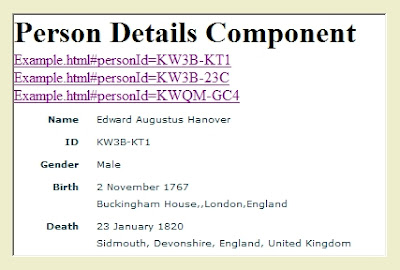
On his blog, Dan Lawyer of FamilySearch Labs demo'ed a simple mashup using the new FamilySearch API. Click one of three links and the component makes an API call to New FamilySearch and displays details about the associated person. Imagine mixing and mashing components from multiple sources to create your own optimized web application. If the general public is allowed access to the FamilySearch APIs, this could be the most significant genealogical technology development of the year.

Simplified rendition of Lawyer's New FamilySearch Mashup

WorldVitalRecords.com (WVR) released a Facebook application which appears to be their FamilyLink.com website packaged as a Facebook app. Properly architected, this is a powerful paradigm. Imagine a website being able to deploy as an application in multiple portals such as Facebook, Yahoo and Google. Enter your data once and leverage it across multiple universes for multiple purposes. This is another significant genealogical technology milestone.

We Relate is World Vital Record's Facebook application

Ya' gotta love technology! Who can predict where all this will lead to!?!Stay tuned!