Wednesday, July 28, 2010

101 Best Free Websites for 2010

101bestwebsites2010 Family Tree Magazine’s September 2010 issue announced their choices for the 101 best websites of the year. This year magazine editors chose to highlight free websites—or at least those that don’t charge for the website’s primary offering.

As the size of the World Wide Web grows boundlessly, I don’t envy the job Family Tree Magazine’s editors face each year. Here’s a brief zip through their categories, with some comments and a couple of additions of my own. Click on the category name to see all the sites on their list.

Best Big Genealogy Sites

Best Records Resources

  • Did you know that not all the free Google newspapers are accessible via the Google News Archive Search webpage? I don’t think that page returns results for the Salt Lake City, Utah Deseret News historic archive, even though it is powered by Google. It contains images of issues from 15 June 1850 to 30 December 1988. The archive includes The Church News insert, which included ministerial appointments for Latter-day Saint congregations (wards and stakes).

Best US Government Sites

Best Sites for Eastern US Research

Best Sites for Western US Research

Best Canadian Resources

Best Sites for African-American Roots

Best History Sites

Best Sites for Immigrant Research

Best for Great Britain and Ireland

Best Sites for Continental Europe

Best Social Networking Sites

Best High-Tech Tools

  1790* 1820* 1850 1880* 1910
  1800* 1830* 1860 1890* 1920
  1810* 1840 1870 1900 1930
          *Not yet available
  • The Ancestry Insider – Wow! This is an honor. Or a typo. Probably the latter. Seriously, Family Tree Magazine editors provided me early encouragement. Their continued support means a great deal.

As does yours.

Monday, July 26, 2010

The Insider Going Outside (Corrected)

Oops! The correct address for the example website is http://claytonraymond.blogspot.com.


2010 Salt Lake Family History Expo Kind readers,

Some of you wrote about the lack of articles last week. No, I haven’t been sick. No, your spam filter did not eat my newsletters last week. But thank you for your concerns. I prepare my articles the weekend before they are published. If I’m booked solid all weekend, you may not hear from me.

Such was the case last week. I was working hard to meet the syllabus deadline for the 2010 Salt Lake Family History Expo. The expo is 27-28 August 2010 at the South Towne Exposition Center in Sandy, Utah.

I am presenting “Blog Your Way to Genealogical Success.” This class is aimed at the super-beginner. It isn’t really about blogging; it is about creating a website to publish information about your genealogy. You will walk out of the class with instructions detailed enough that you will have your own website by the end of the day. In fact, one lucky attendee will have one by the end of the class!

For an example website, I collaborate with Robert Raymond, a coworker at FamilySearch. You can check it out to see if you’d like to attend the class. It is Ancestors of Wickliff Clayton Raymond at http://claytonraymond.blogspot.com.

Look over the presentation schedule and register for the conference.

The Insider Going Outside

2010 Salt Lake Family History Expo Kind readers,

Some of you wrote about the lack of articles last week. No, I haven’t been sick. No, your spam filter did not eat my newsletters last week. But thank you for your concerns. I prepare my articles the weekend before they are published. If I’m booked solid all weekend, you may not hear from me.

Such was the case last week. I was working hard to meet the syllabus deadline for the 2010 Salt Lake Family History Expo. The expo is 27-28 August 2010 at the South Towne Exposition Center in Sandy, Utah.

I am presenting “Blog Your Way to Genealogical Success.” This class is aimed at the super-beginner. It isn’t really about blogging; it is about creating a website to publish information about your genealogy. You will walk out of the class with instructions detailed enough that you will have your own website by the end of the day. In fact, one lucky attendee will have one by the end of the class!

For an example website, I collaborate with Robert Raymond, a coworker at FamilySearch. You can check it out to see if you’d like to attend the class. It is Ancestors of Wickliff Clayton Raymond at http://claytonraymond.blogspot.com.

Look over the presentation schedule and register for the conference.

Friday, July 16, 2010

Links to Individual Collections

Dear Ancestry Insider,

How can a specific database (e.g., "Scandinavia Vital Records Index") be accessed directly without having a link like you have provided in the examples?

Dear Direct and Specific,

The good news is, it is easy to figure out. The bad news is, FamilySearch has never said whether the links will continue to work in the future. Because of the beta and pilot labels, I am not counting on it.

Regardless, here is how you do it.

Record Search Pilot

  1. Start at http://pilot.familysearch.org .
  2. Click on Search or Browse our record collections. (Sorry, there is no direct link to this page.)
  3. Click on Browse Collections or click a continent on the map.
  4. Find the collection of interest and click on its name.

The address bar of your browser now contains a link to the target collection. You can now:

  • Search just that one collection.
  • Add the link to your favorites or bookmark it. (Different browsers use different terminology.)
  • Drag the icon from the address bar onto your desktop.
  • Select the address. Right click on it. Copy it to your clipboard. Paste the address into an e-mail, document, or web application such as Twitter, Facebook, blog, etc.

Beta FamilySearch.org

  1. Start at http://fsbeta.familysearch.org .
  2. Click on All Collections.
  3. Find the collection of interest and click on its name.

The address bar of your browser now contains a link to the target collection and you can do the same things as listed for the RecordSearch Pilot.

So, Direct and Specific, I hope this information is helpful. However, who knows how long the addresses will last.

Ancestry.com

No extra charge for this… Here’s how to get addresses on Ancestry.com.

  1. Click on Search on the menu bar.
  2. Click on Go to the Card Catalog.
  3. At 29,868 databases, Ancestry.com has gone way past listing databases by continent. Use the features of the card catalog to find the database of interest. Click on its name.

The address bar now contains the link to the target database. Do with it what you will.

Incidentally, I notice that the addresses look different than I observed two years ago. Addresses used to look like this:

www.ancestry.com/search/db.aspx?dbid=31500

These addresses still work, but the card catalog now uses addresses like this:

http://search.ancestry.com/search/db.aspx?dbid=31500

As before, I’m probably the only one interested by such trivial technicalities. But in my upcoming series on citations, address changes will be of interest to us all.

Wednesday, July 14, 2010

Reporting Ancestry.com Indexing Errors

Record view - links for report or fixing errorsDear Ancestry Insider,

I am in the FamilySearch indexing project, and am very worried about the incidence of errors in indexing. PLEASE, tell me how I can report the great number of indexing errors I find while using my Ancestry.com account to search U.S. censuses?

I see the link to "report problems", which refers only wrong images or unreadable images - but I need to report obvious errors in indexing as compared to the information easily read on images!

Thanks, M. A. Farrell


Dear M. A.,

You are correct. “Report Problem” (in the image viewer, below) and “Report Image Problem” (in the record view, above) are used to report missing, wrong, or unreadable images.

To report errors in indexing use “Add Update” (below) or “Add Alternate Information” (above). Enter your interpretation of what is written. Yes, Ancestry.com expects you to provide your idea of the correct information. Handwriting interpretation can be a matter of opinion. While it may be obvious to you, keep in mind that it has already been misread by Ancestry.com once. And just in case your opinion is wrong, Ancestry.com will keep both the old and the new values.

I hope that helps.

-- The Ancestry Insider

Image view - links for reporting or fixing errors

Monday, July 12, 2010

IGI on FamilySearch beta/pilot Websites

Randy Seaver recently asked if records from the International Genealogical Index (IGI) are available on the beta FamilySearch.org website. The answer is: partly.

As Randy pointed out, two types of records are present in the IGI.

1. “Records submitted by members of the Church of Jesus Christ of Latter-day Saints.”1

These records have all been loaded into the New FamilySearch Tree. This tree will ultimately become part of the new beta FamilySearch.org website and will be available to the general public.

2. “Many names in the index come from vital records from the early 1500s to 1885.”2

These records are typically called “Extracted Records.” These records are being loaded onto the RecordSearch Pilot or the beta FamilySearch.org website or both, as processing is complete. Extracted records published as “Vital Record Indexes” CDs and on the current FamilySearch.org website are or will also be included.

These records are not being published as one conglomerate database called the IGI. Rather, they are being published by locality. Some examples are:

  • Canada Marriages, 1661-1949 (available on fsbeta)
    • “Name index to marriages from Canada.  Microfilm copies of these records are available at the Family History Library and Family History Centers.  This set contains 268,014 records.  Due to privacy laws, recent records may not be displayed.  The year range represents most of the records.  A few records may be earlier or later.”3
  • England Births and Christenings, 1538-1975
    • “Index to selected England births and christenings.  Only a few localities are included and the time period varies by locality.  This collection contains 65,943,614 records.  Due to privacy laws, recent records may not be displayed.  The year range represents most of the records. A few records may be earlier or later.”4
  • England Deaths and Burials, 1538-1991 (available on fsbeta)
    • “Index to selected England burials.  Only a few localities are included and the time period varies by locality.  This collection contains 16,560,984 records.  Due to privacy laws, recent records may not be displayed.  The year range represents most of the records. A few records may be earlier or later.”5
  • England Marriages, 1538-1973
    • “Index to selected England marriages.  Only a few localities are included and the time period varies by locality.  This collection contains 18,173,712 records.  Due to privacy laws, recent records may not be displayed.  The year range represents most of the records. A few records may be earlier or later.”6

Many (all?) of these collections can be recognized because they follow the naming scheme shown in the examples.

Be careful using these collections. As noted in some of the descriptions, extraction projects did not comprehensively cover the locality or date range.


Notes

     1.  Various authors, “International Genealogy Index (IGI),” FamilySearch Research Wiki (http://wiki.familysearch.org : accessed 12 July 2010).

     2.  Ibid.

     3.  “Canada Marriages, 1661-1949,” RecordSearch Pilot (http://pilot.familysearch.org : accessed 12 July 2010).

     4.  “England Births and Christenings, 1538-1975,” RecordSearch Pilot (http://pilot.familysearch.org : accessed 12 July 2010).

     5.  “England Deaths and Burials, 1538-1991,” RecordSearch Pilot (http://pilot.familysearch.org : accessed 12 July 2010).

     6.  “England Marriages, 1538-1973,” RecordSearch Pilot (http://pilot.familysearch.org : accessed 12 July 2010).

Friday, July 9, 2010

Go Vote… Today!

National Archives Website

The NARA website is getting a new look. Want to give your input? Voting ends this week! For more information or to cast your vote, click here.

Click a thumbnail to see a larger PDF image of the design.

Design A
NARA website redesign proposal A
Design B
Design C
Design D

FamilySearch Wiki

Speaking of new designs, as the FamilySearch Wiki prepares to move into the beta FamilySearch.org website, it also is getting a new look. Give feedback on a forum or on the wiki.

Click a thumbnail to open the page in your browser.

Old state design
Old state design
New state design
New state design
Old country design
Old country design
New country design
New country design

National Archives Wiki

Speaking of wikis… and speaking of the National Archives… The National Archives has started a wiki “for researchers, educators, genealogists, and Archives staff to share information and knowledge about the records of the National Archives and about their research.” Their wiki is located at:

http://www.ourarchives.wikispaces.net

For more information, click here.

Ancestry.com Wiki

Not to be outdone, Ancestry.com has launched their own wiki. This is one of the many NGS conference news items I’m trying to get to. Blame David Rencher. His NGS session inspired my evidence management series, which has kept me busy. But I digress…

In its wiki, Ancestry.com has released two powerhouse genealogy references that together list for over $100: The Red Book and The Source

Wow! The only thing better would be if they were free.

Oh! Wait! The wiki is free! Check it out at:

www.ancestry.com/wiki

Thursday, July 8, 2010

Serendipity in Genealogy: The Lighthouse

The Dutch Island Light Station
The Dutch Island Light Station2

It is as though our ancestors want to be found. Uncanny coincidences Olympian luck. Phenomenal fate. Tremendous intuition. Remarkable miracles. We call It, “Serendipity in Genealogy.”

Fog Shrouds the Lighthouse

“When my father was a young boy, he knew his grandmother,”  said Warren Porter. “And he knew her first name was Catherine and she had a connection in Maine.” But that was all they knew. A thick fog hung about Catherine, wife of Albert H. Porter.1

In the 1910 census,3 Warren discovered a tantalizing, albeit confusing clue.

Albert H. Porter in Fort Greble in 1910

Warren found his great grandfather then lived at Fort Greble in Jamestown, Rhode Island. There, he was practicing the traditional family profession: Albert was the lighthouse keeper on Dutch Island.4

Confusingly, Albert’s wife was not the elusive Catherine, but an Irish woman named Mary. Less than two years after the enumeration, Warren’s grandfather was born. Could Mary be his real mother? Did she pass away soon after the enumerator’s visit? Were Catherine and Mary the same person? Was the Maine connection a North Atlantic red herring?

Utilizing the clue from the census, Warren and father contacted the Dutch Island Lighthouse Society. They traveled to the island several times. “We toiled for years to try to find any record of Catherine,” Warren related. They searched for a decade with no luck.

It was fitting that a visit to the lighthouse illuminated Catherine’s story. By chance, Warren’s uncle visited the lighthouse while the local paper was publishing a series about the keepers of the Dutch Island Light. By chance, he was there for the last in the series. By chance he noticed the article began with a name: “Albert Henry Porter.”5

The article contained the sad story of the years between the census and the birth of Warren’s grandfather. In the spring of 1911 Albert’s father died suddenly. It was perhaps during his travels to settle his father’s affairs that he learned of Mary’s. He confronted her when he returned and she confessed. She admitted to Albert “that before she married me she lead a fast life in New York for ten years.” She left the island in shame.

Albert took in his newly widowed mother and received permission to hire a housekeeper to help her. He turned to a domestic working for the fort’s doctor, Catherine Lyal of Maine.

The military soon lodged a complaint: “For some time Porter has been living in the lighthouse [with] a woman known as Catherine C. Lyal… During the time the woman has been at the Lighthouse with Porter she has had a child and the situation has become notorious.”

No wonder the family had been kept in the dark.

After the discovery, Warren noticed that Catherine Lyal had been hiding all along on the 1910 census, just three households away from Albert.

There she was, listed as a cook at the [Enders] residence and unbeknown to my father and I all these years, she had been the great-grandmother that we had struggled to find.  It seems sort of eerie to look at that form and know that infidelity would soon befall the lighthouse keeper of Dutch Island light.


(Special thanks to Warren Porter for sharing his story. Thanks, Warren! Do you have a story of serendipity that you can share? Send it to AncestryInsider@gmail.com.)


Notes

     1.  Warren Porter, [address withheld for privacy], “Anomalies & Serendipity,” e-mail to Ancestry Insider, AncestryInsider@gmail.com, 24 February 2010.

     2.  “Dutch Island Light Station,” historic photograph, undated, “Dutch Island, RI,” LighthouseFriends.com (accessed 3 July 2010); crediting U.S. Coast Guard.

     3.  1910 U.S. census, Newport County, Rhode Island, population schedule, Jamestown Town, Army Post at Fort Greble, enumeration district 32, sheet 8-A, lines 30-1, Albert H Porter household, also line 21, Catherine L Lyal; digital image, Ancestry.com (accessed 3 July 2010); citing National Archives microfilm publication T624, roll 1437.

     4.  Wikipedia contributors, “Dutch Island (Rhode Island),” Wikipedia, The Free Encyclopedia (www.wikipedia.com : 25 March 2010 at 15:39); a search for “Fort Greble” places Fort Greble on Dutch Island.

     5.  Sue Maden and Rosemary Enright, “Keepers of the Dutch Island Light: The light is Re-lit,” The Jamestown (Rhode Island) Press, 29 October 2009, online edition (www.jamestownpress.com : accessed 3 July 2010).

Tuesday, July 6, 2010

FamilySearch Launches Indexing Newsletter

FamilySearch launched a newsletter for indexers FamilySearch International launched a monthly newsletter last week for indexing volunteers. According to FamilySearch,

This inaugural edition of a monthly newsletter demonstrates an increasing desire to better communicate with the volunteers who participate in this wonderful cause of providing access to the world’s records online.

The newsletter included these statistics:

  • Total Records Indexed: 339,782,331+
  • Total Records Indexed in 2010: 100,795,360+
  • Total Registered Indexers: 340,041+

Among other items, the newsletter pointed out the “FamilySearch Indexing Updates” page on the FamilySearch Wiki. The page highlights new projects and recently completed projects. It includes a table showing the progress of all active projects. It appears similar to the “Latest News” page of http://indexing.familysearch.org.

Rumor has it that the product manager for FamilySearch Indexing is a top notch man who worked for a company I cofounded. I can neither confirm nor deny this rumor (but he is top notch).

To become a volunteer indexer for FamilySearch, click here. To volunteer for Ancestry.com indexing, click here.

Monday, June 28, 2010

Evidence Management Diagram Revisited

Last week I wrote about evidence management and the New FamilySearch Tree. The plan this week was to write about Ancestry.com Member Trees. I struggled as I wrote. I decided Ancestry.com has a piece of evidence management that isn’t represented in my model. It was time to revisit the evidence management diagram.

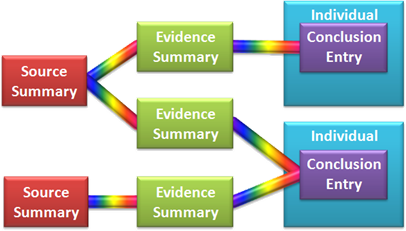
Here is how it has looked:

An old Evidence Management Diagram

Since I’m hardly an expert on genealogical methodology, my model draws heavily on experts. Elizabeth Shown Mills “Evidence Analysis: Research Process Map” has these basic components:

 The Evidence Analysis Research Process Map

From sources we draw information. From information we choose evidence. The proof of a conclusion lies in a careful analysis of the source, the information, and the evidence.

Upon this foundation, I drew upon my technical background for my contribution. What interfaces (technically, user interfaces and underlying objects) does a genealogy program need to implement this? Desktop genealogy programs already have interfaces for entering sources and for displaying individuals. I came up with two more: an evidence summary, and a conclusion entry interface. Here are the four interfaces juxtaposed beneath the evidence analysis components:

Evidence Analysis plus Evidence Management

The bottom row became the evidence management diagram shown at the beginning of this article. Some of the boxes are displayed more than once to communicate some technical stuff that I won’t bore you with.

Writing about Ancestry.com Member Trees, I realize there is another interface that can play an important role in evidence management. I include it in the new evidence management diagram:

 The Evidence Management Diagram

The circular nature of the new diagram evolved (revolved ;-) from the addition of the new Compare interface.

  1. To evaluate a potential source, we compare all the “facts” we believe about an individual with information in the source. If the comparison is favorable, we have identified a new source.
  2. Through a source interface, we enter a citation and other information about the source.
  3. We take information from the source and create an evidence summary.
  4. To help us make a conclusion, the analysis interface displays relevant evidence.
  5. Our conclusion becomes one of the “facts” displayed about a person.

While names may have changed, the function of the red, green, purple, and blue boxes remains the same as before.

What do you think?

  • Are the changes an improvement?
  • Is it easier to understand?
  • Does it meet the needs of newer users? Experienced users? Genealogy program software engineers?
  • Is the circular format appropriate?
  • Have I correctly applied industry terminology?
  • Do the interface names accurately reflect the function of the interface as explained here and in previous articles?
  • There are technical inaccuracies, to be sure. (For example, information comes from the source, not the source interface.) Are there inaccuracies that can be corrected such that the usefulness of the diagram increases?

I have come to depend upon your feedback during this series of articles. After you’ve had a chance to respond, I hope to have the stamina to go back and revise all the previous articles with the new diagram and the new terminology.

Thanks in advance.

With this new model, I am ready to take on Ancestry.com… Next time…

Friday, June 25, 2010

Advisory Notices: Evading Emending?

The National Archives and Records Administration (NARA) invites patrons to inform them of quality problems in NARA collections posted on partner websites. Send information to digitization@nara.gov . Officials point out, however, that some problems are “difficult to resolve in a seamless and timely manner.” In such situations, partners are to post advisory notices.

NARA pointed to the Ancestry.com database, “U.S. World War II Draft Registration Cards, 1942,” as an example.

When these draft cards were filmed in the states of Delaware, Maryland, Pennsylvania, and West Virginia, the front of each card was photographed above the back of the previous card. For an example, the draft card for John Henry Sullivan is circled in red on the microfilm snippet, below. (For legibility I added larger frame numbers.) The front of his draft card is at the top of frame 1307 and the back is at the bottom of frame 1308.

The Delaware World War II draft registration cards were microfilmed with the front next to the wrong back

As NARA states, Ancestry.com has posted an advisory notice in the database description and one in the record display of a registrant from one of the affected states:

Note regarding the images for the states of PA, MD, WV, and DE. These four states were scanned at the National Archives facility in such a way that the back of one person’s draft card appears on the same image as the front of the next individual. The result is that when you click to view the original image, you will see the correct front side of the draft card, but the back of the previous soldier’s card. Ancestry is aware of this problem, and is working to correct this issue.

To put it simply, if you want to see the correct back of a card, go to the next image. How could I tell which direction to go? Among the Wilmington cards after frame 1308 there are a few Kent cards. Compare the registrant's residence on the front with the draft board stamp on the back. But I digress…

To Fix or Not to Fix…

NARA says the notice is to be used when the problem can’t be fixed in a “timely manner.” I assume they expect the vendor to eventually fix the problem. Ancestry.com published this collection in May 2006. In the four years since then Ancestry.com has published billions of records. Isn’t that long enough to address this problem?

Look at Daniel Sullivan’s draft card from New York. The front of the card and the back are on separate images. Would it be so hard to do the same in Delaware?

Thumbs Up and Thumbs Down

A big green-thumbs up to Ancestry.com for keeping the frame numbers. This practice conforms with industry standards I mentioned in archive-quality digital record repository and respect des fonds.

A green-thumbs down to FamilySearch for clipping off frame numbers in their “United States, World War II Draft Registration Cards, 1942.”

Two big green-thumbs up for Ancestry.com digitizing additional states—IN COLOR! Wow. That’s all I can say. Wow!

Tim Sullivan Draft Registration Card in color
(Sorry, Tim; no disrespect intended to you or your namesake.
This was the first card I came across with a dramatic ink color.)

A tiny green-thumbs down to FamilySearch because their collection is too…  down, that is. As I write this their collection is down on the Pilot RecordSearch site and hasn’t been published yet on the Beta Familysearch.org site. But the green thumb is just a tiny bit down; pilots and betas aren’t expected to work all the time.

Finally, a green thumb up and a green thumb down for Ancestry.com.

The issue is frame 1309 in the microfilm snippet, above. It’s missing. How do I know? Because Ancestry.com did the right thing and included frame numbers. That is the point, after all. Give users the wherewithal to independently detect errors. If you view frame frame 1308 and click to the next image, you end up at frame 1310.

Missing a frame could lead a user to associate fronts and backs that don’t belong together.

But wait. This situation is not that simple. I consulted the microfilm and found that frame 1309 is a repeat of 1308. Had Ancestry.com left in frame 1309, users might have associated the front of the green card with the back of the red card!

Frame 1309 is a duplicate of frame 1308

Their solution was to silently remove frame 1309 so fronts and backs were associated correctly. But if a user notices a frame is missing, then without an explanation and without access to the original microfilm, a user must assume that one front and one back are missing, leaving two cards compromised.

The correct solution would be to include an advisory notice on frame 1309.

Here’s my advisory notice to Ancestry.com and FamilySearch: Can you see why industry best practices are “best practices?”

Wednesday, June 23, 2010

What About Current Problems?

Ancestry.com added the missing ship Etruria
Ancestry.com added the missing ship,
Etruria, to Browse of New York pass-
enger arrivals on 13 November 1893.

Ancestry.com has not totally fixed the misspelling of Throop township
Ancestry.com only partially fixed
the misspelling of Throop township.

The National Archives and Records Administration (NARA) recently responded to patron concerns regarding NARA record collections posted by partners such as Ancestry.com.

NARA takes the concerns raised by researchers seriously. We are working with our partners to improve their digital products, including those produced before the partnership agreement, as problems come to our attention. Our partners want to rectify errors and are cooperating in doing so.

Patrons are urged to report specific problems with partner collections by sending e-mail to digitization@nara.gov .

Already Ancestry.com has responded to several cases. In one, Ancestry.com added the ship Etruria, missing from Browse for New York passenger arrivals on 13 November 1893 (see illustration, top-right).

In another case, searches in the 1920 census, Throop township, Lackawanna County, Pennsylvania failed because Throop was misindexed as Throap. Ancestry.com fixed the search index in a timely fashion. However, Ancestry.com has yet to fix the spelling used in the browse menus, district descriptions, and headers above images (see illustration, bottom right).

Officials pointed out that some problems are “difficult to resolve in a seamless and timely manner.” In such situations, partners are to post advisory notices.

Next time, I’ll examine one such advisory notice.

Monday, June 21, 2010

The Evidence Architecture of the New FamilySearch Tree

See “Evidence Management” for an overview of this series and for links to other articles.

Let me show you that the New FamilySearch Tree (NFS) has the architecture needed for evidence management. You may not want to try this at home; I’m a trained professional on a closed course.

Before we dive into New FamilySearch, it will help if you know some NFS technical terminology.1

  • An evidence summary (a green box in the evidence management diagram) is called a persona.
  • An individual (blue box) is called a person.
  • A conclusion (purple box) is called an assertion.

If I specify both my term and the NFS technical term, I will separate the two with a slash, like this:

conclusion (assertion)

Example

To illustrate evidence management in NFS, I again use an example from David Rencher. I created an evidence summary (persona) in NFS for Angeline Clements for each of the five sources, below.

Source Name Persona ID Evidence Summary  
Image 1850 Census Peyton C Clements LWXX-TPN Evidence Summary: 1850 Census Peyton C Clements Link
Image Peyton Clements probate finalized LWXX-5Y3 Evidence Summary: Peyton Clements probate finalized Link
Image 1880 Census W H Goldsmith LWXX-BGT Evidence Summary: 1880 Census W H Goldsmith Link
Image Death certificate A J Goldsmith LWXF-M6T Evidence Summary: Death certificate A J Goldsmith Link
Image Marriage W H Goldsmith LWXF-9ZV Evidence Summary: Marriage W H Goldsmith Link
Source

Click the image link to see a digital copy of the source.

Name (Persona ID)

I included evidence summary names in the table even though NFS doesn’t support them. Instead, NFS uses persona IDs. Remember, a persona in NFS takes the place of an evidence summary.

Evidence Summary and Link

Click the thumbnail to see an image of the evidence summary. Compare a source and summary to see that the two match.

I included the images of the summaries (personas) because once connected—combined as NFS calls it—to an individual (person), NFS provides no way to see just the summary. I included links to the summaries, but once connected (combined), the link brings up the individual rather than the summary.

Creating Evidence Summaries in NFS

With such a perfect architecture under the covers, it is unfortunate that FamilySearch chose to dumb-down the interface to the lowest-common denominator. I think it is possible to adequately serve patrons of all genealogical maturity levels. Because NFS doesn’t give direct access to personas, and because I know that creating an individual (person) also creates an evidence summary (persona), I clicked on Add Information and then Add an Individual That Is Not Connected to My Family Tree.

Then I added the evidence from the source:

Entering evidence for: Peyton Clements probate finalized 
Evidence from the “Peyton Clements probate finalized” source.
Click on this and subsequent images to enlarge.

Since the summary was to be combined with Angeline, I entered only her information. Because it was not obvious how I arrived at a birth date of “Before 25 November 1852,” I clicked on the note icon and entered: “Probate file states Angelina is over 21 years of age.”

For each summary, I clicked on Source details and added a citation. A true evidence summary has but one source for the entire summary. Because NFS doesn’t have true summaries, I clicked the checkbox, Use this source for everything… As mentioned in the past, NFS source templates are inadequate. Consequently, I entered the entire citation in the Comment field, as illustrated below.

Source of evidence summary: Marriage W H Goldsmith
Source for the “Marriage W H Goldsmith”
evidence summary

Once I completed an evidence summary, I clicked Continue. For summaries without death information, NFS gave me the opportunity to enter it.

NFS message: Death info must be added

I appreciate the reminder to enter information that might have been inadvertently missed. But It is unfortunate that NFS insists on adding information—a death flag—even when the source did not contain death information. It seems superfluous, given that NFS is already completely convinced that the person is dead.

NFS then let me review the information.

Review evidence summary: Angeline death certificate 
Reviewing the evidence summary, “Angeline’s death certificate”

Notice that all the information is repeated twice. This is one of the nice features of NFS. I can enter information exactly as it appears in the source document. Below the original text, NFS displays its standardized interpretation so I can see if it understood. Most programs either throw away the original text, or silently—and perhaps incorrectly—interprets it.

If NFS truly supported evidence management I would click Review Possible Duplicates to see if anyone else had already entered an evidence summary for this source and this person. Then I would click Done.

After I clicked Done I saw the completed evidence summary (persona).

Evidence Summary: Peyton Clements probate finalized
The “Peyton Clements probate finalized” evidence summary

Reaching Conclusions

Conclusion entry in NFS for name of Angeline ClementsAs I’ve mentioned, the big payoff for evidence management comes next, when making a conclusion. NFS requires that evidence summaries (personas) be connected (combined) to individuals (persons) prior to using the evidence to make conclusions. The process is messy and reflects the duplication problem that FamilySearch painted itself into. Indulge me if I gloss over it and go right to entering conclusions. Suffice it to say, I connected all the summaries to the individual.

I then clicked on the Summary tab. In the context of evidence management, it could be called the Conclusion tab. The Conclusion tab shows the basic vitals: name, gender, birth/christening, and death/burial. Next to each is a down arrow (pointed out by the mouse pointer in the illustration to the right). I clicked the down arrow and NFS displayed all the values entered into the evidence summaries. I pointed to the one representing my conclusion (pointed out by the hand in the illustration) and clicked it.

Below, compare my suggested conclusion entry (left) with that of NFS (right) for the birth date of Angeline Clements.

Suggested conclusion entry for Angeline Clements birth date  NFS conclusion entry for Angeline Clements birth date

Comparing the two you will notice several shortcomings in NFS conclusion entry:

  • Without a summary name, it is difficult to remember where each piece of evidence came from.
  • The notes I entered in the summary are not displayed.
  • Obviously, since NFS has no provision for recording the attributes of the evidence, none can be displayed.
  • There is no place to enter analysis about each piece of evidence, so other users have no way to know if contrary evidence has been handled.
  • There is no place to enter the overall reasoning used to reach the conclusion.

No Benefits

The evidence management compliant architecture of NFS has given FamilySearch nothing but problems, so I expect they will discard it. One reason it has proven problematic is FamilySearch’s decision to preload millions of junky, sourceless evidence summaries (IGI patron submissions, Ancestral File, and Pedigree Resource File). But I digress.

One reason that NFS users have derived no benefits from the NFS evidence management architecture is that NFS designers failed to give users a way to see whole evidence summaries. Clicking on the  details tab of Angeline Clements doesn’t allow users to see the evidence summaries or even a list of the summaries. Instead, it shows all the evidence interlaced and out of context:

Details of Individual LWFZ-RDZ

Use the Combined records option to see the connected (combined) evidence summaries:

Use the Combined Records option to see NFS evidence summaries

This option gives users the ability to disconnect (separate) summaries (personas) mistakenly connected to the wrong person. When you do this, all the assertions from the source come out in a group. And when the summary is reassigned to the correct person, all the assertions come in as a group.

Conclusion

Because I understand the NFS architecture, I can tap into the strength of its evidence management. But doing so is painful. FamilySearch users have not benefitted from their architecture for two reasons. First, since FamilySearch preloaded garbage into NFS, garbage is what they’re getting out (GIGO). Unfortunately, user interface and architectural decisions are now being driven by the resulting ripples. Second, FamilySearch chose not to provide a different user experience to immature users and mature users. FamilySearch then had to simplify the user experience by hiding the existence of evidence summaries (personas).

To conclude this presentation of the New FamilySearch Tree architecture, let me say that it is extremely impressive and ideally designed for evidence management. Hopefully, FamilySearch will one day leverage their technical superiority by opening up persona management—or, as I call it—evidence management.


Sources

     1.  Rob Lyons, “Family Tree Combine/Separate,” FamilySearch Developers Conference, 2008; online archive, “Recorded Presentations,” FamilySearch Developer Network: for Software Programmers (http://devnet.familysearch.org : accessed 18 June 2010). Also “Glossary,” FamilySearch Developer Network.

Friday, June 18, 2010

NARA Responds to Ancestry.com Issues

Microfilm Documents Missing

The National Archives and Records Administration (NARA) recently responded to accusations that Ancestry.com posts NARA record collections with numerous quality problems, including missing documents.

A spokesperson for NARA wanted to make it clear that Ancestry.com has unilaterally digitized and published more than 300 NARA microfilm collections with over 70 million images prior to entering into a contractual relationship with them.

Ancestry.com digitized, indexed, and placed these images online using NARA microfilm publications that are available to anyone by purchase from NARA.  This was strictly the work of Ancestry[.com], with no involvement, oversight, or quality assurance work by NARA.

NARA has posted a list of all their collections online at partner websites, whether the collection was produced before or after their agreements. The list is at http://www.archives.gov/digitization/digitized-by-partners.html and will be updated on a regular basis. But I digress…

At a digitization facility in Silver Spring the two have started digitizing records per the contractual arrangement. NARA preps records for scanning, Ancestry.com does the scanning, and NARA conducts quality control checks. According to NARA,

Both staffs ensure that every page has been imaged. NARA does a page-by-page quality control check on 5% of the boxes scanned. If a problem arises, mistakes are rectified immediately and the percentage of review on that camera operator’s work is increased. An operator must image two consecutive boxes perfectly before the audit returns to the 5% level.

For a recent project, 9 boxes out of 130 were checked. The highest error rate for any one box was 4 pages missing for every 1,000 pages. Missing pages were immediately digitized before processing continued. The overall error rate for all the boxes reviewed was 7 missing pages out of every 10,000. Most missing documents hadn’t actually been skipped, but scanning failed to pick up a light stamp or mark on an otherwise blank page.

“NARA considers that digitizing thousands of documents and having them available online with unprecedented indexing is worth the small percentage of error.” As one attempts to drive the error rate to 0, the cost explodes exponentially. In other words, dropping the error rate from 0.07% to 0.007% might cost 100 times as much, and dropping to 0.0007% might increase costs 10,000 times.

While NARA seems to feel that the current quality/cost ratio is acceptable, a spokesperson made it clear, “NARA does not want errors.” Next week I’ll tell you what NARA officials recommend you do when you come across problems.

Wednesday, June 16, 2010

Ancestry.com Missing Documents

Microfilm Documents Missing Staff at the National Archives and Records Administration (NARA) recently responded to accusations that Ancestry.com posts NARA record collections that are missing documents.

Earlier this year at the Ancestry.com Annual Bloggers Day Todd Jensen briefed us on their new NARA scanning facility in Washington D.C. (I alluded to the presentation in one of my articles. I was waiting on Ancestry.com for photographs before I wrote my article. Now I probably can’t remember enough to do the presentation justice. But I digress…)

At that time I asked if Ancestry.com still dropped images from NARA collections when they published them. Andrew Wait assured us that their policy has always been to publish every image. Another Ancestry.com employee in the room (I don’t remember who) leaned over and whispered some circumstance in which they had dropped images.

My hearing isn’t all that sharp, so I didn’t hear the circumstances mentioned, but it is well known by most Ancestry.com subscribers that Ancestry.com has always done so. Ancestry.com seems to feel they are doing everyone a favor by chopping and dicing up census microfilms:

  • Dropping images with no legible names:
    • microfilm headers
    • NARA publication booklets
    • covers
    • census totals
    • blank forms
    • pages that can’t be read because they were imaged too dark, too light, or too blurry
  • Rearranging census districts according to alphabetical jurisdictions
  • Preventing going past either end of a group of images

These changes are perfectly reasonable to decision makers that dabble in genealogy just enough to be dangerous.

And, in fact, these changes might indeed be an improvement if Ancestry.com also allowed unimproved access. The former without the latter has serious repercussions:

  • Removing context removes information
  • Tampering with evidence decreases its evidentiary value
  • The changes rob users of any way to detect documents that were inadvertently dropped
  • Removing illegible images gives NARA staff members no way to know that access to the originals is warranted

For these reasons, members of the Association of Professional Genealogists (APG) have criticized Ancestry.com’s practices. Last year Peggy Reeves pointed out that all but one of the first 25 soldiers from roll 402 are missing from Ancestry.com’s publication of T-288, General Index to Pension Files, 1861-1934. If Ancestry.com allowed unimproved access to this NARA publication, Reeves would have discovered one of two things. Either the images were illegible, or Ancestry.com had inadvertently left out all the index cards from “Charles Roe” to “Allen Rogers.”

That’s a lot of missing documents.

Digital publishers might want to take a lesson from microfilming practice. FamilySearch (as the Genealogical Society of Utah) always filmed every document, but when an original document was illegible, included a label indicating “Illegible Original.”

Next time I’ll share what NARA had to say about all this.

Monday, June 14, 2010

Genealogist or Gossip

If they don't depend on true evidence, scientists [including genealogists] are no better than gossips.

Penelope Fitzgerald

In the example presented in “Evidence Management Explained” we saw that the big payoff of using evidence management occurs when a conclusion is drawn. Drawing from the example of Angeline née Clements Goldsmith again, suppose a week or more passed between discovering and entering each piece of evidence. As each piece of evidence about her birth is entered, we might well revisit our conclusion about her birth date. Each time we click to edit the birth date, the evidence manager displays a conclusion entry window.

For convenience I have reproduced the conclusion entry window from the example. I have incorporated most of your feedback. If I didn’t get yours, remember that this example is only conceptual.

Summary Name Asser-tion Evidence Notes Created Date Link Analysis
Automatically Selected Evidence
1850 Census Peyton C Clements Age 2 Image copy of federal copy 1850 Source The earliest record; at just two years of age, it is highly likely that the 1850 census correctly implies 1848.
1860 Census P C Clements Age 12 Image copy of federal copy 1860 Source Next earliest records agrees with 1848
1870 Census P C Clements Jr. Age 18 Image copy of federal copy 1870 Source New orphans with all birth dates wrong suggests a 3rd party supplied the data
Peyton Clements probate finalized Age Over 21 years Image of original. Primary information 25 Nov 1873 Source 1848 and 1850 are consistent with father’s probate record
1880 Census W H Goldsmith Age 25 Image copy of federal copy 1880 Source Census ages ending with 0 or 5 are suspect
Death certificate A J Goldsmith Birth date 5 Feb 1850 Image copy of original. Secondary information 1939 Source There is no reason to doubt 5 February even though the 1850 is not possible according to the 1850 census
Gravestone A J Goldsmith Birth date 1850 Secondary 1939 Source Likely same informant as death certificate
Manually Selected Evidence
Marriage W H Goldsmith Marr-iage Date 15 Jan 1873 Explicit 1873 Source Birth from 1843-1858 is likely.
1850 Census Peyton C Clements Sibling Eleanor Age 1 1850 Source To have a 1 yr old younger sibling in 1850, Angeline must have been born in 1848.
Conclusion for Birth date: 5 February 1848
Reasoning: It is clear that the earliest records have the correct birth year. While there is no collaborating evidence for the day and month, there is currently no reason to doubt it.


How do the vendors do with conclusion entry? Here is what I found:

Features Ancestry.com FamilySearch.org Footnote.com
Conclusion entry facilitates intelligent conclusions by design. No No No
Pertinent assertions from all relevant evidence summaries are gathered together and displayed in one place. Yes-ish Yes Yes (but not grouped together) if a person page is considered a conclusionary person, but no if the person page is an evidentiary person
To encourage critical thinking, notes can be entered for each piece of evidence and for the conclusion. Yes-ish Yes-ish Yes-ish
Evidence is automatically selected for analysis based upon the conclusion type. For a birth date conclusion, evidence about age and birth date are automatically displayed. No Yes Yes (but not grouped together) if a person page is considered a conclusionary person, but no if the person page is an evidentiary person
The user can manually select other evidence. No No All evidence is displayed in all cases.
Attributes are displayed for each piece of evidence and its source. For the source, these might include: original or derivative, derivative type, recording date, and recorder. For the evidence, these might include: informant, primary or secondary, direct or indirect, and supportive or contradictory. No No No


I realize these tables are barely better than nothing. I need to display some screen shots from each of these products to illustrating what I’m talking about. I had planned to start those today, but articles for Wednesday and Friday caused a digression and my weekend is over. Stay tuned…

And just so you (the vendors) know, I’m always open to answer questions you may have regarding evidence management… no extra charge.