Monday, November 29, 2010

Los Angeles Family History Library Opens

LAFHL open house
Photo by Richard Radstone, LDS Church News

When it closed for remodeling, it was the Los Angeles Regional Family History Center. November 6th it reopened as the Los Angeles Family History Library. The facility occupies the basement underneath the visitor center behind the Los Angeles Temple of the Church of Jesus Christ of Latter-day Saints.

The remodel follows the pattern set by the Riverton FamilySearch Library. The library now has 78 computers, access to premium websites, two training classrooms, and a large microfilm collection.

The remodeled LAFHL adds computers, video conference training roomsEach classroom as 24 computers and video conferencing equipment that can either receive or originate real time training lectures, sharing expertise with the Salt Lake City Family History Library, the Riverton FamilySearch Library, and other facilities via video conferencing.

The library’s extensive microfilm and microfiche collections, numbering 56,000 and 40,000 respectively, give it one of the largest permanent collections of any branch of the Salt Lake Family History Library. The library has 18 film readers, three scanners, and a couple of printers.

The library’s website catalogs its current microfilm holdings and gives instructions for ordering additional films by mail. FamilySearch is expanding the Salt Lake FHL Catalog to include holdings of the Los Angeles library. (See example.)

Among the premium websites available free of charge at the library are:

Large numbers of the library’s 30,000 printed volumes have been digitized, cutting the physical collection to 6,000. The library also has maps, reference and rare books, and area-specific collections. The facility includes patron lockers and a snack area. The library is open from 9 am to 5 pm, Monday through Saturday. The library has extended hours Tuesday to Thursday, closing at 9 pm. The library is closed Sundays.

For more information, check these sources:

Wednesday, November 24, 2010

We Want Tech: Stitching Folio Size Documents

Rencher's Photo Stitching ExampleAt the 2010 NGS Conference GenTech Luncheon David Rencher presented “The Top 10 Areas Where Technology Can Still Make a Real Difference in Genealogy : Could You Please Hurry?” David, I have good news. Some are already available, at least in infant form. Today I look at:

#2 - Imaging Folio Size Documents

It’s a common occurrence to find oversized documents that can’t be captured legibly in one photograph, even with today’s high resolution cameras. Genealogists need software that can stitch together photos of parts of the document, such as Rencher’s example (to the right), a map divided into nine individual photographs.

I had previously played with Image Composite Editor (ICE) from Microsoft Research with moderate success. I felt it was up to the task of stitching Rencher’s map. And it is free.

It failed. I was surprised.

Was Image Composite Editor the problem? Or was it the images?

I decided to give the editor a test, a really big test. The descendancy wall mural on the ground floor of the FamilySearch Family History Library seemed a worthy opponent. Some ten feet high and twenty feet wide.

I took 15 photographs and fed them into the editor. The result? Impressive. Here’s a low resolution copy:

Descendants of Robert White and Bridget Allgar

  • The stitching is nearly flawless. (You can see a couple of errors in the border. More subtle errors are not visible above.)
  • Nearly all the text is crisp. (The smallest font furthest from the camera in the darkest areas is marginal. For example, look at the biographical information for Lucille Ball.)
  • Image quality is good (though grainy in places.)

Microsoft Photosynth

Wall Mural Icon on the FHL in Bing MapsThe result of my little experiment was not little: a whopping 49 megapixels! Fortunately, Microsoft Photosynth provided free storage space online. To see the stitched image, click on the image above.

If you don’t have Microsoft Silverlight, you’ll be prompted to install it.

One way to organize and share your images is to assign them to locations in Bing Maps. See a map showing the location of this wall mural. Click the green camera icon on the FHL to open the image.

So what gives? Why did the editor handle this huge test near flawlessly? What about Rencher’s map? If images are not suitable for stitching, are there no alternatives?

Stay tuned… And if I don’t see you again before tomorrow, Happy Thanksgiving!

Monday, November 22, 2010

Monday Mailbox: Indexing Place Names

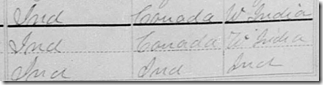
Indexing place name abbreviations“When census enumerators wrote ‘Ind.’ and the person is named Charlotte Smith,” wrote Brad, “and yet the birthplace is transcribed as India, I just have to laugh.”

Brad, you may be interested to learn that Ancestry.com and FamilySearch handle abbreviated place names differently.

Ancestry.com indexers enter abbreviations exactly as written. It is Ancestry.com themselves that erroneously expand “Ind.” to “India.” I understand they have fixed these. If you can find any surviving errors of this type, I would be interested to learn of them. Because indexers were asked to enter the information exactly, Ancestry.com can go back and efficiently reprocess millions of records. Preserving the exact contents of the fields is a best practice in the archival world.

FamilySearch Indexing, on the other hand, asks indexers to interpret place names, correct spelling, and expand abbreviations. This generally produces better results when indexers have sufficient contextual knowledge. But misinterpretations occur, such as picking a far away place in the same state instead of a really close place just across a state line. Because exact contents of records are not captured, errors can not be corrected without re-indexing.

-- The Insider

Mailbox Monday: Family Hydra

Regarding “Family Hydra,” the census family with two heads, thank you all for your comments and John and Joan especially.

Dear Insider,

I find this not strange. This is two family groups living in the same household. The second family is headed by a widow. She might be, or might not be a relative. It would not be impossible for her to be the mother of the wife, at the early age of 15 or 16.

Signed,
Anonymous*

Dear Insider,

Why must we assume this is incorrect. I think it is two family units and each has a head. Maybe this was before the IRS told us there could only be one head (as defined by their rules) in each household.

Signed,
Joan*

Dear Anonymous and Joan,

Your points are well made. Certainly it is not strange to have two families headed by two people in one house. Presumably, that is why column 3, number of dwelling house, wasn’t incremented.

It is the census record that is strange. Each family should have a head and each head should have a family number in column 4. One family should have one number and one head. Two families should have two numbers and two heads. See paragraphs 100-2 and 109 of the 1920 Census Enumerators Instructions.

Here’s part of paragraph 100:

100. Column 4. Number of family in order of visitation.—In this column number the families in your district in the order in which they are enumerated, entering the number opposite the name of the head of EACH family

Keep those comments coming,

-- The Insider

Yes, records say the darnedest things.

Note: Letters and comments are edited for length, clarity, and editorial style.

Friday, November 19, 2010

Can You Say “Surprise Child?”

Records say the darnedest things

We depend upon records to reveal the “truth” about our pasts.

Yet sometimes records have anomalies.
Some are amusing or humorous.
Some are interesting or weird.
Some are peculiar or suspicious.
Some are infuriating, even downright laughable.

Yes, Records Say the Darnedest Things.”

Records Say the Darnedest Things: Can You Say “Surprise Child?”

I recently mentioned the sampler of the Chester Goodale family found in his Revolutionary War pension file. Upon examination the sampler includes a warning to researchers seeking all the children in a family. Chester and Asenath are married in August 1790. The children then come as expected, the first 8 months later, the second two years after that, and the third two years after that. The careless researcher might then give up, missing the last child, Phebe, who is not born for another 9 years.

Sampler from the Chester Goodale pension file

But it seems the Goodale family was not done yet. A closer inspection shows one last child, almost a family footnote, added below the strawberry and vine border. Samuel Goodale was born nine years after Phebe, when his mother was 43 (and two older sisters were in their child-bearing years).

Detail from the Chester Goodale samplerSource: Laura Goodale, “Sampler of Chester Goodale,” ca. 1809; application file of Chester Goodale of Connecticut, Case Files of Pension and Bounty-Land Warrant Applications Based on Revolutionary War Service, Record Group 15; NARA, Washington, DC.; digital image, ARC no. 1656127 (www.archives.gov : accessed 3 October 2010).

Thursday, November 18, 2010

Answers to Indexing Illustration

These are the eight presidents from yesterday’s indexing illustration:

Presidents Answer

How’d you do before knowing something about the names?

How'd you do once you knew they were presidents?

The point is that context makes it easier to read names.

For us less experienced genealogists, the context is usually information known for several family members: names, genders, probable birth states, and estimated birth years. Once you have matched lots of known information with what is written legibly, you start to approach the illegible names with some confidence. You match expected letter forms against what you see. Pretty much without thinking about the complex brain gyrations, you "read" names that cold indexers can not.

For more experienced genealogists, you build up a name probability dictionary in your head for particular times and places. You pull from it to compare names against letter forms, allowing you to "read" names that others can not.

I conclude that cold indexers will never outperform someone with more context.

What do you think?

Wednesday, November 17, 2010

Indexing Errors: Test, Check the Boxes

Last week I talked about Elizabeth Shown Mills's lecture on boxes we trap ourselves in. And I asked that everyone come prepared today to work more boxes.

Did everyone remember to bring your #2 pencil? Good; I’m glad you remembered…

…that you didn’t need to bring one. (Marking a computer screen with a pencil… Well, that’s just silly.)

Remember that Elizabeth Shown Mills illustrated a point in her class with two individuals with the same name, living in the same place, at the same time. When she mentioned that the two were both listed in the census, I opened up Ancestry.com to see for myself. It was a little difficult to find them because…

BOTH WERE MISINEXED! 

Sorry; I didn’t mean to shout. But it just seems like every time I search I find indexing errors.

Then it occurred to me that this would make a good test case. Are the Ancestry.com indexes inferior because they were done by non-English speakers? Will the FamilySearch volunteer indexers do a better job?

The problem may not be non-English indexers. Another possibility to consider is that reading a record cold is not nearly as easy as targeted searching. Contrast the indexer who comes at a record cold with the searcher who examines the record armed with information about the target individual and family members. The targeted searcher has the liberty to ask, "with so many other legible bits of information matching my guy, is the shape of that miserable ink blot—masquerading as handwriting—consistent with the name I am looking for?"

Indexing Illustration

Consider the following illustration. Try to cold-index the following eight names, written by an enumerator who has the worst handwriting in the entire world. I’ll publish the answers tomorrow.

Cold Indexing Challenge

Now try targeted searching. Here’s the context:

A long-lived census employee has enumerated the White House for over 200 years, enumerating presidents from George Washington to Barak Obama. This sample shows eight of the better known presidents.

After writing each character, he drew a box around it and colored it in—perhaps a misguided attempt at security. As you check the boxes, notice some letters descend below the base line (like g, j, p, …), and some ascend higher than others (b, d, f, …). It is really easy to pick out dotted letters (i and j).

Check the boxes again and see how many you can read—despite the atrocious handwriting.

This illustration (hopefully) shows why cold indexers can not match your ability to read the names of your ancestors.

Can FamilySearch indexers do a better job than Ancestry.com indexers? Is the cold indexing handicap sufficient to account for the problems in Ancestry.com’s indexes? Or does the language of the indexer also affect the quality?

What if a native English speaker in Uganda that had never learned anything about U.S. presidents tried the illustration? Perhaps the problem with offshore indexing is not one of language but of historical and cultural knowledge.

Back to My Test Case

That brings us back to my little test case. I didn’t tell you the misindexed name from Elizabeth Shown Mills lecture because I don’t want anyone entering the correction because I think FamilySearch is incorporating corrections on Ancestry.com into their indexes. After FamilySearch publishes the relevant index, I’ll check and see if they did any better.

Stay tuned…

Tuesday, November 16, 2010

New FamilySearch Beta Website

Last Wednesday FamilySearch revised their beta.familysearch.org website. Yesterday I reviewed some of the changes in the library catalog. Today I’ll look at other changes.

More Catalog

At the close of yesterday’s article, I was looking at the search results for Drogheda, Ireland. Next, I clicked on “Ireland, Louth, Drogheda – Church Records.” The old catalog opened a new page and displayed the three titles. The new beta catalog slid the remaining items down and displayed the three titles in it.

List of titles for a record type

Unlike yesterday’s subtle alphabetizing error, here the beta catalog makes no attempt to alphabetize the titles.

I already mentioned yesterday the beta’s weird handling of narrow windows. That is the cause of the brown Feedback button in the middle of the window (above right).

Next I clicked on the parochial registers of St. Peter’s. The old catalog has the annoying habit of showing either title details or film notes. To see both, click to view the printable version (below, left). The new beta catalog displayed all the same information as the old catalog, including film notes, without the extra mouse click.

The new beta catalog contains all the same information as the old catalog

There you have it. The new beta catalog is not the loser that it once was. But FamilySearch is still seeking your feedback. Click the brown feedback button on the right edge of the window and let ‘em have it.

Historical Record Search

A brown bar (circled in yellow, below) separates close matches from partial matches. Made more obvious in this release is the preview arrow (a delta, really) to the right of each result. (See the examples circled in red.) Click the downward arrow to reveal the full content of the record (circled in purple, below) without leaving the results page. Click the upward arrow to re-hide it.

New search features in November 10th beta

Give Back

The Give Back page contains some familiar messages, and something new for FamilySearch.

Beta website revisions seem to be occurring about every four weeks. Slow, but sure, the beta is being readied to replace the old www.familysearch.org.

Don’t rush to conclusions because previous versions were wanting. Rush to beta.familysearch.org instead. Get on. Try it out. Leave feedback. Then stay tuned…

Monday, November 15, 2010

New Family History Library Catalog Beta

Last Wednesday FamilySearch revised their beta.familysearch.org website. Today I’ll review the library catalog. Tomorrow I’ll look at other changes.

Library Catalog Search

In the old catalog, if you click Help in the bottom right corner and scroll down to the bottom of the help, you will see that the catalog user interface was OCLC OLIB WebView. While it was state-of-the-art when first introduced, it has gotten long in the tooth, lacking many of the features we enjoy in other online catalogs. And the look-and-feel never matched the rest of FamilySearch.org.

It looks like this time FamilySearch is implementing their own user interface. This gives FamilySearch much greater control of the design, and can be significantly cheaper. However, not purchasing the software from established experts means you may not understand all the nuances involved.

The library catalog released during this year’s NGS Conference was way worse than mere ignorance of nuance. Because I don’t know, I can speculate that what we saw was rushed to market just for the conference. Unfortunately, some users subsequently rushed to the conclusion that the beta catalog could never replace the old one.

With last week’s beta release, FamilySearch revisited the catalog in a major way. It looks to me like FamilySearch carefully examined how patrons use the old catalog and have reproduced its functionality plus some. Hopefully, users will also revisit the new catalog.

The same familiar search types are present. The old catalog took one click to start any search type. The beta catalog takes no clicks to start the most important search type: place name. Other searches require two clicks.

FHL Catalog search type

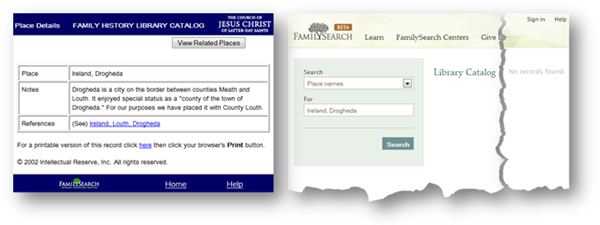
Place name searches have benefited from advances in web technology. In the old catalog I searched for “drogheda” and got the results shown below, left.

Catalog place search

In the beta catalog as I typed each letter the catalog displayed matching locations. By the time I had typed “drogh” the catalog was displaying Drogheda as 1. a county town in Ireland, 2. a town in county Louth (the FHLC’s treatment), 3. the Drogheda hamlets of Colpe, and 4. Duleek (see above, right). That’s a nice feature.

I selected the county town to see what the beta catalog did with the “see” references in the old catalog. Oops. It did nothing (below, right).

The beta catalog does not handle 'see' references

I also found the beta catalog didn’t handle narrow windows (above, right) like the old catalog (above, left). That is a minor annoyance unless no results are found. Then the “No records found” message does not show up without scrolling to the right. (I doctored up the graphic above so the message would show.)

I circled back around and selected “Ireland, Louth, Drogheda” in both catalogs. FamilySearch has gone back to the familiar record type results! Yay! And they’ve one-upped it. Each record type is followed by the number of matching titles. Nice. The text size of the results is larger and dropping the underlines makes the results much easier to read. Very nice.

The new catalog place search results are better than the old

The beta catalog included all the same record types as the old catalog plus one more, “Poor – Ireland – Louth – Drogheda.” That’s intriguing.

Here I ran into what may be a cataloging nuance overlooked by FamilySearch. The beta catalog lists some of the results in a different order than the old catalog. “History – Periodicals” appears before the shorter phrase, “History.” Be careful. This mistake raises the possibility that FamilySearch has overlooked other cataloging conventions.

I’m out of time, so it’s off to bed. Stay tuned.

Friday, November 12, 2010

Family Hydra

Records say the darnedest things

We depend upon records to reveal the “truth” about our pasts.

Yet sometimes records have anomalies.
Some are amusing or humorous.
Some are interesting or weird.
Some are peculiar or suspicious.
Some are infuriating, even downright laughable.

Yes, Records Say the Darnedest Things.”

Records Say the Darnedest Things: Family Hydra

How many heads can a family have? Note below that family 258 has two heads. Family 259, not shown, also has two heads.

Any wagers on which vendors handle this correctly? Perhaps the first question is, are we in agreement as to how this should be handled? (See family 258 on FamilySearch.org and Ancestry.com.)

This family in the 1920 census has two heads

Source: U.S. Federal Census, 1920, population schedules, Massachusetts, Essex County, Lynn City, Ward 2, district 141, sheet 11B; digital images (www.ancestry.com : accessed 3 October 2010).

Thursday, November 11, 2010

Surveys: FamilySearch Wiki

I recently participated in a survey about the FamilySearch Wiki. It was short and sweet:

  • You have been invited to participate in this survey because you are viewing the FamilySearch Wiki. Have you used the FamilySearch Wiki?
  • 1) How likely is it that you would recommend the FamilySearch Wiki to a friend or family member?
  • 2) Please tell us why you chose the level of recommendation above:
  • Why did you visit the FamilySearch Wiki today? (Select all that apply)
    • Find an answer to a question or just browsing
    • Add or edit information
  • Did this Wiki article help solve your problem?
  • Thank you for taking the survey. Your response has been recorded. You can now close this window to return to the Wiki.

Wednesday, November 10, 2010

BCG Lecture: Elizabeth Shown Mills

Elizabeth Shown MillsI wrote last week about the Board for Certification of Genealogists lectures in Salt Lake last month.

I was able to slip away from work to attend Elizabeth Shown Mills's lecture, "Finding Origins and Birth Families." It was fantastic. She used the metaphor of "boxing ourselves in" and "thinking outside the box" to address mistakes we often make in our research.

One common box we get ourselves into is placing implicit trust in any record. Mills illustrated with a case study in which the National Archives had made a mistake in its military pension files. It led to a dead end and a lot of wasted research.

Source Citations

Another common box is weak documentation. She compared the need to document each little bit of information to a garden store's need to document each little seed packet. Without that documentation, you really don't know what you've got.

When Mills and her husband edited the NGS Quarterly a writer submitted an article with a citation that addressed only one of the two basic citation needs. It included enough information to hunt down a copy of the cited periodical. But the writer forgot the other important function of a citation: It gave no indication of quality. When the citation was corrected, it cast considerable doubt on the information provided.

Incomplete Research

Incomplete research can lead researchers to mistakenly conclude that two records refer to the same individual. This happens when they don’t take the time to uniquely identify two individuals. (Sound familiar? The ability to match is difficult, but essential. To see my earlier article on the topic, see “Genealogist-ologist-ologist.”)

Mills’s case study involved two individuals with the same name living in the same place at the same time. She recognized there were two because both were enumerated in the census. I pulled up Ancestry.com to see for myself. The name was…

Wait a minute. This may make a good test…

Thank you, Elizabeth. I’m better prepared now to avoid boxing myself in.


For the rest of you, be prepared to work with boxes of a different sort next time. Learn what kind of test I have in mind. You will not need to bring a #2 pencil. Stay tuned…

Friday, November 5, 2010

“Celebration of Family History” Rebroadcast

A Celebration of Family History, sponsored by FamilySearchBYU-TV is broadcasting “A Celebration of Family History,” the 2010 NGS Conference special event featuring Henry B. Eyring, the Tabernacle Choir, and Pulitzer Prize winning author, David McCullough.

Click here for show times or to watch the broadcast anytime online.

Read my review, “A Celebration of Family History.”

Visit celebration.familysearch.org to order the DVD at cost.


Wednesday, November 3, 2010

A Big, Annual Thank You to BCG

Seal of the Board for Certification of Genealogists
The BCG seal is a service mark of the
Board for Certification of Genealogists
My thanks to the Board for Certification of Genealogists (BCG). Once each year the board meets in Salt Lake City. While in town they take the opportunity to provide three days of free classes to FamilySearch employees and locals pursuing certification. Some of the lectures relate directly to the certification process. (Getting certified is another project on my To-Do list.) Other lectures address methodology. Lectures are taught by experts on the BCG board.

At the end of the three days FamilySearch hosted the BCG board to a reception and a dinner. Jay Verkler, FamilySearch CEO, welcomed the group and introduced David Rencher, CGO, as the dinner speaker.

While I’m thinking about it, I’d like to suggest to Rencher and the BCG Board that next year they meet with FamilySearch product managers. Product managers are always gathering feedback about their products. I think it would be a good opportunity for product managers and professional genealogists to explore making genealogy easier by dealing with complexity instead of ignoring it. But I digress…

In his short presentation Rencher pointed out common goals of FamilySearch and the BCG. Both value genealogy’s contribution to society, helping us understand our history. Both wish to encourage education and skill building.1

“We are an organization about family and about community,” said Rencher about FamilySearch. He reviewed their community offerings, urging the participation of competent genealogists.

“I index to relax,” said Rencher of FamilySearch’s indexing projects. “I may be crazy. My wife certainly thinks I am. [To relax] she reads a book. I index.”

He said the Research Wiki is growing phenomenally. People are creating 40 new pages a day.

The forums allow genealogists to help one another, said Rencher. He showed an example. On the 8th of May, a person asked about divorce records in 1890 for New Mexico and Nevada. A little over three hours later someone posted an extensive answer, to which the questioner replied,

Wow - thank you SO MUCH for your prompt and detailed reply. I was a little bit skeptical at first when I posted the question (newbie here) but your response has proven the power of the community.
Thank you again!2

These new features are not yet integrated into the www.familysearch.org website, but they soon will be. Said Rencher, “It’s a huge ship to turn, but it is turning.”


Next week, I’ll tell you about one of the classes. Stay tuned…


Sources

     1.  “About BCG,” Board for Certification of Genealogists (http://www.bcgcertification.org / aboutbcg : accessed 31 October 2010).
     2.  LynneVC [user name], “New Mexico: Divorce in 1890,” FamilySearch Forums – Beta (http://forums.familysearch.org : accessed 31 October 2010).

Monday, November 1, 2010

Mailbox Monday: GEDCOM

Dear Ancestry Insider,

Hi there, I'm part of the GEDCOM-L mailing list and it was raised 2 days ago whether anyone was working on getting GEDCOM 6.0 "brought to the table" so to speak or at least working on some kind of update to the GEDCOM standard. I myself would love to be involved in such work but I know that such a project would go far beyond the capabilities of one person. Do you know if ancestry or familysearch are working on anything? Or possibly someone else has suggested working on something new.

I look forward to your answer,

all the best,
Ben Clark

Dear Ben,

Your query is quite timely. At the FamilySearch Blogger Day earlier this month the question of GEDCOM came up. Ron Tanner told us that FamilySearch is not working on any updates to GEDCOM.

There was no small dissatisfaction among attendees regarding GEDCOM’s deficiencies. It has not been updated since way back when FamilySearch barely gave source citations any attention. It does not support the best of breed citations supported by FamilySearch’s competitors. Instead, it relies on a single text field, cremating citations that are forced through it.

GEDCOM also does not support transfer of artifacts, images, and attached documents, all of which are misrouted to the great lost-luggage warehouse in the cloud.

Gordon Clarke fielded follow-up questions. My notes are lacking here, but I believe he said that the new FamilySearch Tree web service transfers tree data and supersedes GEDCOM. While I can’t remember if he said he owned GEDCOM, I recommend you direct further questions to him.

Signed,
-- The Insider

Friday, October 29, 2010

Records Say the Darnedest Things: Missed It By That Much

Records say the darnedest thingsWelcome to a new series, “Records Say the Darnedest Things.”

We depend upon records to reveal the “truth” about our pasts.

Yet sometimes records have anomalies.
Some are amusing or humorous.
Some are interesting or weird.
Some are are peculiar or suspicious.
Some are infuriating, even downright laughable.

Yes, records say the darnedest things.

Missed ‘Em By That Much

The transcriber left off two family members doing family #1, below. Fortunately, he discovered the mistake quickly, inserting the two between families 2 and 3.

Any wagers on which vendors handle this correctly?

Check the indexes at FamilySearch.org and Ancestry.com. Then compare Chris Baer’s transcript of the enumerator’s copy. Score one for checking the enumerator’s copy, when available.

Two family members were omitted Source: U.S. Federal Census, 1850, population schedules, Massachusetts, Dukes County, Town of Tisbury, page 419 [stamped]; digital images (www.familysearch.org : accessed 2 October 2010).

Wednesday, October 27, 2010

Genealogist-ologist-ologist

Dan Lawyer explains what it means to be a genealogist-ologist. Church News photo by R. Scott Lloyd.
Dan Lawyer defines Uber-Techno-Genealogist-Ologist
Photo by R. Scott Lloyd, © LDS Church News

Dan Lawyer, FamilySearch.org product manager, calls himself an UTGO, an “uber-techno-genealogist-ologist.” Roughly translated, that means “geek who studies genealogists.”

I guess that makes me a genealogist-ologist-ologist. I’ve been studying genealogy product managers to see what makes them tick—or more to the point—chirp. Prior to our current crop of product managers, why did crop after crop repeat—over and over—the same mistakes?

I have a theory.

Before I share it, let me emphasize that I love FamilySearch’s current crop of product managers because… But I’m getting ahead of myself.

My theory is that genealogy is deceptively complex. To the unlearned, there is no obvious reason why growing a family tree should be difficult in any way. New product managers are tempted to think, “Give people ready access to records and their genealogy will grow faster than weeds.”

Genealogy is Hard

Let me take a stab at convincing non-genealogists that genealogy is hard. I will focus on one prerequisite of growing a family tree: matching.

  • Like a game of Concentration, genealogy involves finding matches. You must reliably match two mentions of one individual in two records. For example, you look at a John Johnson in the 1880 census and a John Johnson in your pedigree and decide if the two are a match.
  • Records include information that identify and characterize individuals. For example, a John Johnson might be characterized in the 1880 census by his name, his age, his birth state, where he was enumerated, and so forth.
  • A definitive match requires that the identifying characteristics from both records must differentiate the individual from every other person that has ever lived.
  • Reliably making a match is extremely difficult because of the amount of information that must be learned:
    • You must learn how common each of the identifying characteristics is. For example, perhaps the name “John Johnson” was extremely common in 1810 Norway.
    • You must learn how common the combination of the characteristics is. For example, you might consider it extremely unlikely that there are two 60 year old John Johnsons with farm name Vedum in 1810 Norway.
    • Short of unique identification, you must know—qualitatively if not quantitatively—the probability that the two mentions match.
    • You must learn and recognize equivalent values of a characteristic. For example, sometimes John matches Johannes. Sometimes it matches Jack. Sometimes Nevada matches Utah. Sometimes 1700 matches 1701. Sometimes Johnson matches Jonsen.
    • You must learn to recognize non-matching values that probably should match. For example, sometimes typists transposed letters. Sometimes census enumerators rounded ages. Sometimes indexers read Lemuel as Samuel.
    • You must learn how to judge the trustworthiness of information in a particular record. For example, the length of time between an event and the recording of the event affects the trustworthiness of the information.

In summary, one reason genealogy is hard is that reliable matching requires years of learning and experience.

How It Plays Out

Given that genealogy is deceptively complex, here’s my theory of why we get genealogically anemic products: 

When some product managers try to extend genealogy’s reach to less experienced audiences, they approach the most knowledgeable genealogists—professionals—and ask,

How can we make genealogy easy?

This is what the genealogists say:

You can’t make genealogy easy. Genealogy is hard. To do it right, you must…

This is what unwise product managers hear:

I don’t know how to make genealogy easy. Since you can see no reason why it has to be hard, you must assume that I do a lot of extra stuff that applies only to professionals. If you wish to make it easy, you must ignore me when I close-mindedly say that the one and only right way to do genealogy is…

Remember, I’m not talking about all product managers. I think both Ancestry.com and FamilySearch currently have a good crop.

But unwise managers proceed under the assumption that genealogy is easy and knowledgeable genealogists make it unnecessarily hard. The managers attempt to make genealogy easy through simplification, eliminating methodology training and gutting products of industry best practices. (Yes, the unwise think they have singlehandedly thought of a better way to do genealogy than the combined learning of tens of thousands of practitioners who have advanced the state of the art for over a century.)

Sadly and ironically, what is eliminated because of perceived complexity are the very practices and tools that have been shown to make genealogy easier!

Genealogist-ologist-ologist

Given my theory, you can well imagine my delight last week at the FamilySearch Blogger Day when Dan Lawyer, displayed a slide that read (in its entirety):

Genealogy is Hard

The rise of genealogist-ologists has given hope to this genealogist-ologist-ologist—hope that product managers will make genealogy easier by dealing with the complexity instead of ignoring it.

Friday, October 22, 2010

Genealogical Maturity Model

The Genealogical Maturity Model is a framework for personal growth
The Genealogical Maturity Model is a
framework for personal growth.
© 1971. All rights reserved.

This is a “table of contents” article to a previously published series of articles.

Want to be a better genealogist? The central skill needed by every genealogist is the ability to produce verifiably correct genealogists. I call that “Genealogical Maturity.” I developed the Genealogical Maturity Model as an easy way to grade your own maturity and to create small, attainable goals for improvement.

Let me be clear. I am no expert in this regard. I have based the model as nearly as I can on broadly acknowledged best practices published in BCG Genealogical Standards Manual, Helen F. M. Leary, editor; Evidence Explained, Elizabeth Shown Mills; and Genealogical Proof Standard, Christine Rose. Anything in the model that is correct you can attribute to these experts. Anything incorrect is... well... me.

To begin, read “Rate Your Genealogical Maturity.” Fill in the self-assessment inventory. If you have questions about the definitions of words, consult “Genealogical Maturity Model (GMM) Definitions.”

After completing the inventory, go back and review the categories. Pick one category to work on. Read the description of the next level. Make that your goal. Don’t try and work on all categories at once. Baby steps. Don’t try to skip levels. Baby steps. Commit to yourself and focus your efforts on that one, little goal.

Once you’ve accomplished that goal, come back and pick another area for improvement.

For a while I considered developing a genealogical maturity model for software programs. I put that on hold after an ad hoc attempt at assigning a maturity to the new FamilySearch Tree. Read the overly critical appraisal at the end of “Vault Vednesday: Last Day to Pre-register.”

In addition to the sources previously noted, I would like to acknowledge the many contributions from my many knowledgeable readers. Some came directly by email, but many can be read online in the comments at the end of each of these articles:

Thank you, again.

Thursday, October 21, 2010

Clip Feature of Google Books

Did you know that you can “clip” portions of public domain Google Books to share in your genealogy on the Internet? The portrait to the right is an example.

Click the Clip icon ( ) above the book page. Select the desired text or image. Then copy one of the URLs from the popup. Paste the URL into your blog, Facebook page, or anywhere else on the web that supports links to images.

I’ve not seen it documented anyway, but you can also change the border. Change the “edge=0” at the end of the URL to “edge=1”.

edge=0
edge=1


A far less useful option is “edge=3d”, shown to the right. But it sounds cool. You’ll need red and blue 3D glasses. I tried it and the image barely seemed to bulge ever-so-slightly towards me (with red over the left eye). I had to compare the upper and lower images to notice any difference.

For less information about the Clip feature, see

  • Manas Tungare, “Share and Enjoy,” Inside Google Books, Google Inc. (http://booksearch.blogspot.com : dated 6 September 2007).

Wednesday, October 20, 2010

We Want Tech and We Want It Now

Facial Recognition and the Ancestry Insider Ancestor At a luncheon during this year’s National Genealogical Society conference David Rencher presented a top 10 list of technologies he wished developers would hurry up and create. Some of these are already available, at least in infant form. I thought you would enjoy seeing some of the list and reviewing the available technologies.

First came two honorable mentions.

Media Migration

“Help me transfer my media to new formats,” plead Rencher. “And could you make it intuitive?”

This is  good wakeup call for me—and probably you—to perform badly needed media migrations. If I weren’t going to be out of town this weekend, I would transfer cassette recordings of my grandparents to CD-ROM. They’ve sat untouched for 20 years, so they have probably deteriorated significantly. I guess one more week won’t make much difference…

What can technology do in this area? Cloud Computing.

One of the advantages of cloud computing is that media migration is handled for you. That should be easy enough for most of us—if we ever get around to migrating photos, recordings, and videos to the cloud to begin with…

Facial Recognition

Rencher wanted facial recognition technology to help identify people in unlabeled photographs.

Google Picasa  offers face recognition for free. Learn more from Kathi Reid, “How Google Picasa Face Recognition Software Can Help Genealogists,” Ancestor Seek Blog.

The MyHeritage.com genealogy website also advertises free face recognition. See http://celebrity.myheritage.com/face-recognition .

I tried uploading my photo to see if they saw any similarity between me and Homer Simpson, but MyHeritage couldn’t pick out my face.

So I tried Tim Sullivan, head of Ancestry.com. With look-alikes Johnny Depp, Pierce Brosnan, Henry Fonda, and Richard Gere, Tim is obviously leading-man material.

His closest match? Johnny Depp, pirate and mad hatter.

Next I had to try Jay Verkler, head of FamilySearch.

Ronald Regan and George W. Bush. Wow. Apparently, Jay looks very presidential. And republican. And apparently, MyHeritage doesn’t have Mitt Romney in their celebrity file.

His closest match? Patrick Swayze, that guy who came back from the dead to dictate his genealogy to Demi Moore. (Hey, you remember the movie the way you want and I’ll remember it the way I want.)

Can’t see Sullivan and Verklers’ celebrity look-alike graphic to the right? Click to see it on the Ancestry Insider website.