Friday, October 28, 2011

Darned Oliver, Kankakee, Illinois

Records say the darnedest things

We depend upon records to reveal the “truth” about our pasts.

Yet sometimes records have anomalies.
Some are amusing or humorous.
Some are interesting or weird.
Some are peculiar or suspicious.
Some are infuriating, even downright laughable.

Yes, Records say the Darnedest Things.”

Records Say the Darnedest Things: Oliver, Kankakee, Illinois

A reader, Jason Thompson, recently wrote and pointed out something unusual about the town of Oliver, Kankakee, Illinois in the FamilySearch collection, “Illinois State Census, 1865.” What’s unusual is, it doesn’t exist.

FamilySearch misread Ganeer as Oliver

Search Engine Optimization

To check it out for myself, I thought I’d take a shortcut to the record collection by Googling the collection title. The Google search results show how much catching-up FamilySearch needs to do. Result #1 is an Ancestry.com collection, “Illinois State Census Collection, 1825-1865.” Result #8 is the first FamilySearch link, to a wiki article about the collection. (I’ve circled both in the screen shot, below.) The actual collection doesn’t show up at all.
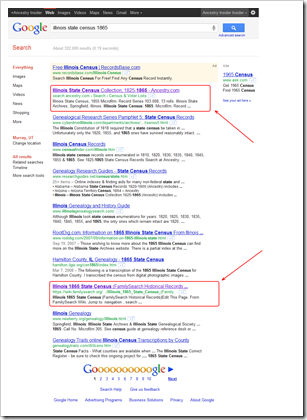
Google search results place Ancestry.com database way above FamilySearch

FamilySearch implemented their collection list in a way that makes the list invisible to Google. Consequently, Google doesn’t know about their collections. Freshman error. They’ll get it fixed soon enough. First they have bigger fish to fry. And I have digressed away from one…

Browse Hierarchy

The Ancestry.com browse hierarchy correctly identifies Ganeer, IllinoisI checked the browse structures on Ancestry and FamilySearch. The two are the same except where FamilySearch has the town of Oliver, Kankakee County (below, left), Ancestry has Ganeer (right).

The FamilySearch.org browse hierarchy incorrectly identifies Ganeer as Oliver, Illinois

Images

Images are available on both websites, so I clicked through to look at the first image on each. I clicked on FamilySearch and saw the image below, left. I clicked on Ancestry.com and saw the image on the right.

The enumerator mispelled Ganeer as Genier The Ancestry.com "pay wall"

Okay, that was a cheap shot. The image is free on FamilySearch and what you see above, right, is the Ancestry.com “pay wall.”

The quality of the image on Ancestry depends a bit on what browser you use. With Internet Explorer, it looks like the image below, left. With other browsers, it looks like the image on the right.

Ancestry.com's advanced image viewer in Internet Explorer displays better image quality Ancestry.com's basic image viewer washes out images

I can see how Ganeer might be misread as Olevier, but Oliver would be a stretch, particularly for someone who has read my articles about the importance of context when indexing. No one with a list of Kankakee County localities (towns, villages, and unincorporated places) is going to come up with Oliver.

Corrections

“I brought this [error] to the attention of FamilySearch,” said Jason Thompson, “and was referred to a web page stating that corrections simply can't be made to their records, no matter the circumstance.” Apparently, the support rep thought this was a run-of-the-mill indexing error.

Browse hierarchy errors are not created by indexers and are far more intrusive.

“This single error impacts 6 census images, 222 records, and 1,341 individuals,” said Thompson.

Thompson “reopened” his question to FamilySearch support. This escalates the issue up the support food chain. This time he was told

We report [these issues] for an engineering fix. When this collection comes up for review...all of the problems ever reported will be fixed and the collection republished. The fixes you are suggesting would require changes to the index, relinking to images and republishing the entire collection. It can't be done piecemeal.

There is a “Known Issues” section in each collection’s wiki article. I think it can be used to report these types of issues. See https://wiki.familysearch.org/en/Illinois_1865_State_Census_(FamilySearch_Historical_Records)#Known_Issues_with_This_Collection where I’ve done just that for the Oliver/Ganeer issue.

Oliver, Kankakee, Illinois? Yes, records say the darnedest things.

Wednesday, October 26, 2011

Information Provenance

Dear Ancestry Insider,

Although I have years of experience with the old FamilySearch, I'm using the new one for the first time. I am getting two nearly identical results for what I presume to be the same records, except for the batch and source film numbers. Why? How do I cite these?

This has happened a number of times in the Virginia Marriages and Virginia Births and Deaths databases. For example, J.H. Holland/S.J. Stringfield marriage in Isle of Wight County, Virginia, 3 March 1898.

One result shows groom's father's name as Ed, the other Elwin. Batch and source film numbers are different. Why?

I'm awfully spoiled being able to contribute corrections to Ancestry's database, can that be done at FamilySearch too?

Signed,
Robin in Short Pump

Dear Sensible Shoe Robin,

Here are the two results in question, with the differences highlighted:

image

Why Two Results?

Why is Some Info Different?

Information passes through different hands along the way from record to ourselves. This is called information provenance. It works much like chain of evidence that you hear about in cop shows.

These two records have batch numbers. That means they were indexed by FamilySearch volunteers. Because there are two different batch numbers, there were two different projects. The system origin is Virginia-EASy. EASy was the Extraction Administration System used before FamilySearch Indexing.

These records have a film number. That makes it easy to find out where the information came from. The film numbers are different, so the information might have come from different records. The possibility also exists that the same record was filmed twice.

  • Can you think of what you might do to further understand the information provenance of these two records?

How are They Cited?

There’s something we should do before thinking about citing these records.

  • Are these original or derivative sources?
  • Which provides stronger evidence, an image copy or a textual derivative?
  • Why is it a very bad idea to cite these sources?

As you can tell from that last question, we won’t be figuring out how to cite these records.

Can a User Contribute Corrections?

Sadly, no. I understand that FamilySearch has this on their roadmap.

After you and your capable co-readers have had a chance to respond, we can review the answers together. Feel free to post comments with your answers. (Scroll to the bottom of this article and click “Comments.”) Don’t send me e-mail; I ignore it.

Signed,
--The Insider

Tuesday, October 25, 2011

FamilySearch Data Centers and Second Vault

FamilySearch disclosed last week that it uses three data centers and is planning a fourth. A data center is a place where an organization can store computer servers, hard disk servers, tape backup servers, web servers, and Internet connection hardware.

image
Data center computers and other components are designed to be
mounted into racks some eight feet tall. Racks were organized
into numerous rows, totally filling large rooms.

A spokesperson from FamilySearch said that the FamilySearch.org website is kept in a data center in Ashburn, Virginia. A smaller datacenter in West Valley City, Utah acts as a backup and as a staging area where changes are tested before rolling them to Ashburn. A yet smaller datacenter is located in downtown Salt Lake City within walking distance of FamilySearch’s corporate offices in the Joseph Smith Memorial Building.

image
Fans force cold air through little holes in the floor into “cold air” aisles.
Computer fans draw the cold air through the electronic hardware, expelling
the now hot air into “hot air” aisles where it returns to the air coolers.

  • The FamilySearch website consists of about 6,000 servers
  • The general public will add 10 to 15 times the users to the new FamilySearch Tree
  • Each center has a robotic tape machine whose size rivals that of a a school bus
  • FamilySearch’s Internet connection is large enough to stream more than 75,000 movies simultaneously
  • FamilySearch volunteers index 1.5 million records a day
  • Each center has miles of cables
  • FamilySearch’s ViaWest data center consumes 5 million kilowatt hours annually
  • To guard against earthquake damage, the ViaWest data center is built on big shock absorbers
  • Instead of the 10 or 20 amp breakers you see in your homes, ViaWest uses a 5,000 amp circuit breaker
FamilySearch’s downtown data center is collocated with C7 Data Centers.

FamilySearch leases space for the West Valley datacenter from a company named ViaWest. It was here that a fire suppression accident destroyed most of the hard drives in the facility. It was this accident that destroyed the Family History Expos website shortly before the St. George Family History Expo. A ViaWest spokesperson did not know how much FamilySearch was affected by the incident. (See “Major Failure of Utah Computer Center.”)

FamilySearch is contemplating another data center facility to be specifically designed as a data preservation center, according to the spokesperson. FamilySearch employees’ families were shown an architectural rendering of the facility during tours of the Salt Lake area data centers.

Jay Verkler alluded to the project during an October 2010 meeting with bloggers. It will be, as he put it, FamilySearch’s second storage vault.

Monday, October 24, 2011

Monday Mailbox: Is FamilySearch a Branch of Ancestry?

Several people pointed out an important place to access the 1870 census that I left out of “Monday Mailbox: Searching the 1870 Census.” Unfortunately, none left a public comment, robbing the rest of you of their insight.

Where else can you access the 1870 census for free? Read on…


Dear Ancestry Insider,

Why did you not recommend searching on HeritageQuest?  It’s free and available from home (through most local library sites).  There are 847 Fanning’s listed in the US in 1870.

Signed,
Jerry

Dear Jerry,

A simple oversight, I assure you. Love the bold blue, btw.

Signed,
--The Insider


Dear Ancestry Insider,

You might also mention that many public library systems also have HeritageQuest which the library system allows one to access from home. It has the 1790-1830 and 1860-1930 (only a few states for 1930 though) censuses. Usually if the library system offers Ancestry, one must go to the public library itself to use it. It's great to be able to use HeritageQuest from the comfort of home. Wonder if you mind suggesting a non-Ancestry product??

Signed,
Same

Dear Sam,

The complete question is, “Wonder if you mind suggesting a non-Ancestry.com and non-FamilySearch product?” I’ve been known to make an except or two, particular for free products. This one seems warranted.

Signed,
--The Insider


Dear Ancestry Insider,

I wish HeritageQuest had not become defunct because they kept Ancestry.com’s transcribers on their toes. Anytime I find a new person I check out on HeritageQuest first. Then I look at Ancestry. HeritageQuest did a much better job on indexing. I don't bother with FamilySearch at all; it appears to be just another branch of Ancestry.com.

Signed,
Lee Elliott

Dear Lee,

I can assure you that FamilySearch is not a branch of Ancestry.com. In fact, I think it fair to say that a certain amount of animosity exists between the two organizations.

But in the context of your statement, your point is a good one. Enough good will exists between the two that they exchanged some census indexes. In general, however, indexes for a record collection on one may not match the other.

Signed,
--The Insider

P.S. Since I’m not mentioning non-Ancestry.com/non-FamilySearch products, I won’t point you to yet another copy of FamilySearch’s U.S. census indexes. But if you happen to click here, I won’t stop you. Interestingly, Archives.com has published copies of FamilySearch census indexes for years that FamilySearch themselves hasn’t.

Friday, October 21, 2011

Booklet Review: German Genealogy at a Glance

Genealogy at a Glance: German Genealogy ResearchOnce again I’ve been asked to review one of Genealogical Publishing Company’s (GPC) “At a Glance” series. Genealogy at a Glance: German Genealogy Research is one of nine in the “At a Glance” series. Each one is printed on a single piece of laminated cardstock which is folded to form a four page booklet.

Once again I’ve had to depend on someone else to glance at the information and provide a review:

For the most part the information is pretty good, except that I am surprised that the “Germans from Russia” weren’t mentioned as a group. Under Places of Origin, Tip, there is sometimes a way to determine the village. The early immigrants many times named their fields after their home villages, and finding the earliest burial/grave marker may also mention their origin in Germany.

Once again, I think GPC is misapplying the 4-page format.

“As surprising as it sounds,” says GPC, “you can learn the basic steps in German genealogy in just a few moments. That’s all it takes to read Genealogy at a Glance, which is designed to cover the basic elements of German genealogical research.”

You pay $7.95 plus $7.50 FedEx shipping for eight pages. Do the math and you will find that you pay a few bucks per moment and nearly $4 per page.

If I am going to pay that price for a single piece of cardstock, I want more than to “learn basic steps…in just a few moments.” I darn well better want to “glance” at it again and again and again.

Genealogy at a Glance: German Genealogy Research
8.5" x 11", 4 pp., folded and laminated. 2011.
ISBN 978-0-8063-1885-1
Genealogical Publishing Company
1-800-296-6687, www.genealogical.com
$7.95 (list) plus shipping.

Wednesday, October 19, 2011

New Pedigree Resource File: Sources and Notes

We saw Barbara’s letter* in yesterday’s “Monday Mailbox” and Friday’s “Darned Records” article.

Barbara may have been using one of the new features in the September 2011 release of FamilySearch.org. Notes and sources are now shown online; there is no need to find and consult the CD–ROM or DVD just to see notes and sources.

Consider the record mentioned in Barbara’s letter. On classic.familysearch.org it looks like this (less some of the note):

image

On the current www.familysearch.org it looks like this:

image

Notice these differences:

  • As previously noted, notes and sources are included online
  • Disk number, PIN, and submitter information are gone
  • Instead, a regularly formatted source citation is given

FamilySearch is trying hard to entice users away from the classic site and onto the current www.familysearch.org. PRF notes and sources are a compelling reason.

Monday, October 17, 2011

Monday Mailbox: How Do I Fix PRF

Dear Insider,

How does one ask Familysearch.org to correct a Pedigree Resource File?

A copy of an obit has been posted to show the death of Henry Farley Byerly for a pedigree under his name.

The obit is from a Clinton, DeWitt County, Illinois newspaper and records HFB's death occurring in Kenney, DeWitt County, Illinois. The Pedigree Resource File shows HFB's death in Austin County, Texas. Texas Cemetery is in DeWitt County, Illinois.

Signed,
Barbara*

Dear Barbara,

According to the classic.familysearch.org website, where Pedigree Resource File (PRF) was born,

Q.
How do I change information in the Pedigree Resource File?

A.
The Pedigree Resource File allows you to submit and preserve your records. … Pedigree Resource File submissions become static once the submission is processed. If you find errors in the data submitted by you, submit the file again, and the second submission will appear on a future compact disc. Your previous submission will also appear.1

At FGS, someone suggested FamilySearch allow annotations. Then you could add your own opinion without compromising the submitter’s submission. RootsWeb’s WorldConnect allows it. We used to do it in pencil in published family trees. It makes sense.

Sorry, but today you can neither fix it nor flag it. If it makes you feel any better, you can fix this in the new FamilySearch Tree (when you get access). There, fixing is enabled and encouraged.

Signed,
--The Insider


Sources

     1. “How Do I Change Information…,” FAQ question, FamilySearch (http://classic.familysearch.org : accessed 6 September 2011); hover over Help, click Product Support, look under Other Products, click Pedigree Resource File, click “How do I change information…”. This webpage is scheduled for termination, so you soon won’t be able to find it.

Friday, October 14, 2011

Darned Pedigree Resource File

Records say the darnedest things

We depend upon records to reveal the “truth” about our pasts.

Yet sometimes records have anomalies.
Some are amusing or humorous.
Some are interesting or weird.
Some are peculiar or suspicious.
Some are infuriating, even downright laughable.

Yes, Records say the Darnedest Things.”

Records Say the Darnedest Things: Pedigree Resource File

Watch “Monday Mailbox” next, for a letter and question from Barbara. (I’m sure there is only one reader of my newsletter named Barbara.:-) Barbara found an interesting entry in FamilySearch’s Pedigree Resource FIle (PRF). Apparently, someone included an obituary in a person’s notes section, then stuck the wrong information in the record!

Here’s bits of the obits:

March 16, 1888

Henry Farley Byerly was born in North Carolina, February 26, 1809. …In October, 1851, he emigrated to DeWitt county, where he has ever since resided…

03/23/1888

Henry F. Byerly died at his home in Kenney the 13th inst., aged 78 years, 8 months and 4 days. The burial took place at the Texas Cemetery the 14th.

According to Barbara, Kenney and Texas Cemetery are in DeWitt county, Illinois.

Here’s the PRF record:

An entry from PRF classic

Lessons learned?

  • Sources are good. Having the text of the obituary was a powerful anecdote [sic] for the error.
  • Compiled trees should be used as finding aids, not sources.

Watch for the full text of Barbara’s letter on Monday. Until then, “records say the darnedest things.”

Wednesday, October 12, 2011

Progress in the War for Columnar Search Results

Tables arrange data into rows and columns. They are a time proven way of organizing and presenting data. Once upon a time, Ancestry.com utilized columnar tables when presenting search results. (Anyone remember how they did it back in ‘97?) Ancestry never mixed search results from different record collections. This presentation was one reason many users preferred “Old Search” over “New.”

Ancestry.com used to have columnar search results
Ancestry users had a clear preference for columnar search results

FamilySearch’s soon-to-be-retired classic.FamilySearch.org website came along in 1999. Its sentence style presentation of results from one or more record collections made scanning results slow and inconvenient.

Class FamilySearch listed search results in sentence format

With the introduction of relevance-ranked search results from multiple record collections, Ancestry succumbed to the dark side, labeling and stacking the information (a tabular column replacing columnar table).

In Ancestry.com search results, they stacked the information

This layout persists in “New Search” today.

In Ancestry.com search results, they stacked the information

FamilySearch came along in 2007 and introduced the Record Search Pilot. It utilized columns!

FamilySearch's Record Search Pilot presented search resuls in columns

The progress was soon lost with the introduction of Beta FamilySearch.org which again stacked search results. FamilySearch improved on the Ancestry display by bolding the principal name, but lost ground by separating it from the rest of the record data.

Beta FamilySearch.org stacked information in search resuls

In the September 2011 release of FamilySearch.org, FamilySearch has introduced a compromise.

September 2011 FamilySearch.org returned to columnar search results layout

FamilySearch made three major changes. They widened the search results to utilize wasted screen space on either side of the results. That gets a thumbs up. They included more information. Also a thumbs up. And they lined up dates, places, and the names of other people. This is a great step in the right direction, but I think more is possible.

Rules for Website Designers

I think lists of search results should follow these requirements:

  • Utilize the entire width of the screen.
  • If something else shares the horizontal space, allow the user to resize the two panes.
  • Allow the user to change column widths, change the order of columns, and add or remove columns dynamically. See Microsoft Outlook or Windows Explorer for examples.
  • Allow the user to sort any column in either direction (such as A to Z or Z to A).
  • The first two columns should be principal name and principal date. For a death record, that is decedent and death date. For a marriage record, it is the individual matching the search result and the marriage date. For a census, it is resident and residence date.
  • Almost never stack or combine data of different types (dates and places, for example) or different semantics (birth and death dates, for example).
  • One instance in which it might be okay to stack, is a column with all the names of others mentioned in the record, labeling them as Ancestry and FamilySearch do today.
  • Another instance might be links and icons associated with actions, such as cameras, permissions, quality, and links to view record or image.
  • In most instances, wrap information that is too long for a column. In some instances, truncate the information, show ellipses, and display complete values when the cursor is placed on top of the truncated information.

Here’s an artist conception of such a layout. The user has squished several columns and sorted by birth date.

The Ancestry Insider's conception of columnar search results from multiple collections

My reference to Windows Explorer (not Internet Explorer, but the computer/folder viewer) raises some interesting possibilities for exploration. Explorer has several views: detail, thumbnails of varying size, icon view, and list view. I can imagine clever web designers tickling additional ways to interact with search results.

What about you? What is your wish list for the layout of search results?

Tuesday, October 11, 2011

Awesome Maps

I’m map folk. Maps run through my veins. So at the Federation of Genealogical Societies annual conference last month when Jake Gehring of FamilySearch showed an awesome color-coded map of their worldwide camera projects (see “FamilySearch Vault Express” for more info), I knew I had to share it with you.

FamilySearch Worldwide Camera Operations Map 2011

The deepness of the color indicates the number of cameras in each country. Click on the map to enlarge it.

Ancestry.com Map

Like a Kung Fu protégé, Ancestry.com has moved beyond digitizing microfilm and is now digitizing original records. I invited Ancestry to supply a map of their own projects. They declined. That left me no choice but to use a map I obtained in 2009.

Ancestry.com Worldwide Digitization Operations Map 2009

The map indicates that Ancestry had scanning operations in what looks to be seven countries. I’m guessing the locations were: the United States (3 locations), Canada, England, Germany, France, Italy, and China. Two of the red dots are keying locations: Uganda and Beijing.

FamilySearch Extraction Map

Devin Ashby, in his FamilySearch Indexing session at FGS, showed another map of interest. It showed how many names have been extracted or indexed from each country across the globe. FamilySearch has been indexing for the last 32 years. Unlike Ancestry, FamilySearch provided a copy.

FamilySearch Worldwide Extraction Totals 2011

Noodling an Ancestry.com Map

I finally decided to put together my own map of Ancestry’s  digitization efforts. After all, I have Insider Sources. You should limit how long you look at the map so you don’t go blind from overexposure to pure awesomeness.

Ancestry.com Worldwide Project Map 2011

I’ve taken Ancestry’s map of their offices (the saplings). They probably digitize in one or more of these offices. Then I’ve added digitization projects (green dots). Last year one of my sources said Ancestry was working in about 20 locations worldwide. My map doesn’t account for that many, but these are the only ones my sources would give up.

To quote an old Chinese (or Panda) proverb, “There is no extra charge for the awesomeness… or attractiveness.”

Monday, October 10, 2011

Monday Mailbox: Searching the 1870 Census

Dear Insider,

Hi there,

Is there any way of searching the 1870 US Census records? Great to be able to view the images especially as I don't have access to Ancestry.com US databases.

I want to find Fannings in this Census and look at the images. Is there any way I can do this?

regards

Kathleen Fanning

Dear Kathleen,

You can search the 1870 US Census without an Ancestry.com subscription. There are several ways to search the 1870 US Census without an Ancestry.com subscription:

  • Use FamilySearch.org. There are two ways to search for Fannings in the 1870 census. First, you could search for Fanning and then use filters to narrow the results to the 1870 census. Second, you could browse to the 1870 census and then search for Fanning.
  • Use Ancestry.com at your local Family History Center.
  • Check for Ancestry.com availability to the larger libraries in your area.
  • Lastly—and this is more academic than practical—search Ancestry.com without a subscription. The results are “masked,” but unmasked information is name, approximate birth year, county, and state. Treat this like the finding aids we used back in microfilm days. Then treat the digitized ACPL census microfilm on the Internet Archive as you would actual microfilm. Crank through the images until you find the pages of interest.

Enjoy!

Signed,
--The Insider

Wednesday, October 5, 2011

FamilySearch Surpasses Ancestry.com?

imageDavid Ouimette of FamilySearch said that their collection of the highest quality genealogy records has surpassed Ancestry.com’s. He made the remarks at the recent Federation of Genealogical Societies (FGS) annual conference. He said FamilySearch has more Images of civil vital records, church records of vital events, and census records. 

300 million

According to Ouimette, every month FamilySearch digitizes tens of millions of the 3.6 billion images in the vault. “We’re going as fast as we can, publishing indexes to high quality records first,” he said. “We have about 200 cameras that are currently active throughout the world,” said Ouimette. They digitize millions of images in archives weekly.

“As of last night,” he said, “FamilySearch has almost 300 million images.”

He showed a table of the number of images and records for each record type. I scribbled down the numbers as fast as I could, so you should probably regard them with suspicion. For one thing, the number of images doesn’t total to 300, so buyer beware. For another, I had to move the decimal point just to get them to add up half-way right.

FamilySearch Records

Images

Keyed Records

Vital Records 122.59 283.1
Church (Vital) Records 92.25 345.9
Military 2.75 34.8
Census 1.71 825.7
Probate 1.24 0.6
Immigration 0.99 37.1
TOTAL

221.53

1,527.2


Acquisition/Publication Strategy

Ouimette explained how FamilySearch selects records to acquire and publish. Much of this part of his presentation was repeated from last year, so I’m not going to repeat it. Instead, in the FamilySearch Wiki see “Digitizing the Records in the Granite Mountain.”

He showed two maps showing states and countries where FamilySearch has current acquisition projects. I’ve permission to show the country map, but I’m going to share it later with matching map from Ancestry. But I digress…

After acquisition, FamilySearch indexes the records using a process which Ouimette described as “A/B double blind plus arbitration,” to turn a phrase. It isn’t “double blind” in the experimentation sense. Rather, each batch of records is indexed by two indexers, an A indexer and a B indexer. Each are “blind” to the results of the other. If the batches differ in any way, the batch is sent to a third person, an arbitrator. While the arbitrator can change any value in the batch, it is anticipated that they will only change values in dispute. The arbitrator can select the value supplied by the A indexer, the B indexer, or supply another value entirely.

Indexers are not keeping up with FamilySearch’s image production. With the size of FamilySearch’s image collection surpassing Ancestry’s (if you exclude enough of Ancestry’s), one must ask the question. Will the number of FamilySearch’s indexed records ever surpass Ancestry’s?

Monday, October 3, 2011

Monday Mailbox: URL Citation Principles

I received the following in response to my article, “It’s Not My Fault! URL Citation Principles.”

Dear Ancestry Insider,

OK - some of us are OLD ladies, who have been grinding microfilm readers since before some of you geeks or nerds [whatever] were born.  What will those numbers tell us?  Yes, indeed, I have been missing some of *sources* of my printouts for quite a time now.  I have had to school myself to grab a pencil real fast.  I found a suspect English born great-aunt's christening in the right county in England, but being familiar with the IGI (even though it is generally a poor source) I deduce the source is the IGI.  Give us old ladies (and a few elderly gentlemen) some clues as to what we do with the numbers.  Is this in Mrs. Mills' book on Evidence (items from the internet)?

E.W.Wallace

Dear Evelyn,

You said “What will those numbers tell us?”  I guess turnabout is fair play because you’ve lost me. I don’t know what you are asking.

I hope your question is not about the section titled “Don’t Try This at Home” I make the statement “If you aren’t technically savvy, skip now to the conclusion.” This is not a question of intelligence or ability to learn. This is a practical matter of prerequisite knowledge.

Perhaps you are wondering what the “right” citations would look like, or maybe even what the “wrong” citations might look like. But don’t miss the point. The article was not about Mills Standard. Yes, Mills’s book, Evidence Explained, can alert you to issues you might not have thought about. Yes, you can probably write shorter citations after reading her book. But what the article talked about was principles you use whether you use Mills of make up your own. The point is that if you want to get back to the source latter, you need more than a URL.

Bad URL, Bad Citation:

https://www.familysearch.org/search/image/show#uri=https%3A%2F%2Fapi.familysearch.org%2Frecords%2Fpal%3A%2FMM9.3.1%2FTH-267-11055-4062-64%3Fcc%3D1438024

Good URL, but still a bad Citation:

https://familysearch.org/pal:/MM9.3.1/TH-267-11055-4062-64?cc=1438024&wc=1588358

Assuming the URL will break (which it will), what information will you need to get back to the record? Here’s a citation that works. I’ve not compared it to Mills, so I wouldn’t publish it in an article or a book. But, hey, it gets you back to the original even if the URL breaks:

The source was an image I found on 30 September 2011 at www.familysearch.org, United States Census, 1870 > New York > New York > New York City, ward 01. Image 396 of 792 was page 2 of the 1st enumeration.

This citation doesn’t fit any particular standard, but it will get you back to the online source even if the website changes somewhat and it indicates the source was digital images.

Does that help? If I still haven’t answered your question, post a comment to this article.

Signed,
-- The Insider

Sunday, October 2, 2011

Leader Calls Upon Church Youth to Research Ancestors

Elder David A Bednar encourages youth to research their family history

“The youth of the rising generation have a key role to play in this great endeavor,” said David A. Bednar. Bednar, an apostle of the Church of Jesus Christ of Latter-day Saints, made the comment during his address in the Saturday afternoon session of the Church’s semi-annual General Conference.

“Many of you may think family history work is to be performed primary by older people,” he said. “But I know of no age limit…restricting this important service to mature adults.”

“I encourage you to study, to search out your ancestors,” he said. “And I urge you to help other people identify their family histories.”

A new FamilySearch website for teenage members of the Church of Jesus Christ of Latter-day SaintsBednar recommended parents and leaders not attempt to force young people. The Church has provided a website that lets teenage members explore, experiment, and learn for themselves. The website, lds.org/familyhistoryyouth, reflects the Church’s belief that members have a religious mandate to “seal” ancestral families together through temple ceremonies. The Church believes that ancestors may accept these ordinances so as to preserve their earthly families into the eternities.

Bednar encouraged teenage members of the Church to apply their computer skills and aptitudes. “It is no coincidence that FamilySearch and other tools have come forth at a time when young people are so familiar with a wide range of information and communication technologies.”

“Parents and leaders, you will ‘stand all amazed’ at how rapidly your children and the youth of the Church become highly skilled with these tools,” he said. “In fact, you will learn valuable lessons from these young people about effectively using these resources.”

Bednar suggested several benefits that result when young people spend more time doing family history. It leaves less time for young people to spend doing less productive activities such as video games and web surfing. And it opens up avenues for helping others.

“The youth can offer much to older individuals who are uncomfortable with or intimidated by technology or are unfamiliar with FamilySearch,” he said.

Doctrinal aspects of Elder Bednar's talk have been excluded from this article out of respect for readers with differing religious views. To read excerpts or view a video that includes doctrinal references click here. To read a full transcript of Bednar’s talk, visit http://gc.lds.org later this week. If you choose to leave a comment about this article, please be respectful. I have a zero tolerance for comments critical of anyone's religious beliefs.

Friday, September 30, 2011

Darned Gender-Specific Names

Records say the darnedest things

We depend upon records to reveal the “truth” about our pasts.

Yet sometimes records have anomalies.
Some are amusing or humorous.
Some are interesting or weird.
Some are peculiar or suspicious.
Some are infuriating, even downright laughable.

Yes, Records Say the Darnedest Things.”

Records Say the Darnedest Things: Darned Gender-Specific Names

With the public slowly getting access to the New FamilySearch Tree, it bears repeating lessons learned.

When I first got access, I went in and started cleaning up the riff raff. The more ancestry you have in the Church of Jesus Christ of Latter-day Saints, the more garbage you will find. For five generations Mormon genealogies were hand copied (or typed) with mistakes (and typos) from parent to child among an ever widening fan of cousins. Reconciling the many different versions is herculean, but to guarantee it would be done wrong, FamilySearch produced the Ancestral File using error-prone machine combinations of patron submissions. Then they provided GEDCOM download and PAF’s hideous merge feature. Lest all this hard-earned garbage die too quickly, FamilySearch preloaded it into the tree and dared participants to clean it up.

That brings me back to my first session in the tree. I only meant to poke around and see what was there. But the errors were obvious (and legion). The temptation was too strong. I started correcting. Just small stuff at first. Several hours passed without notice and I realized I had corrected dozens of errors by sight—without consulting my sources.

Lesson learned? Don’t do that!

FamilySearch Chief Genealogical Officer, David Rencher, suffered the raw end of someone making such a change. The tree says his father’s name is Joy Thomas Rencher even though his grandfather’s name is correctly shown as Thomas Jay Rencher.

image

Some kind soul “fixed” this, changing the son’s name to match his father’s. Like me in my first foray into the new FamilySearch Tree, the person made changes without specifying a source. Had they consulted sources, they would have found Joy’s death certificate:

image

David Rencher confirmed that his father’s name was Joy. He said that Joy is a common male given name among the Danes in the White Mountain area of Northern Arizona in Mormon Settlements. He knows of six men named Joy in that region.

Yes, records say the darnedest things. But they should be consulted prior to making changes in the New FamilySearch Tree.

Wednesday, September 28, 2011

It’s Not My Fault! URL Citation Principles

I apologize about the broken FamilySearch image links in last Friday’s article, “Darned Second Enumerations.” But I must say, IT WAS NOT MY FAULT! At the time I wrote the article, the links worked. Today, they don’t.

Long time Ancestry.com users will recall Ancestry.com has broken links to their images on several occasions. In particular, when Ancestry.com switched image viewers (they used to use a 3rd party viewer called MrSID), all links, favorites, and bookmarks to their census images broke.

The same seems to be true for FamilySearch.org. Since I wrote the article before FamilySearch.org released a new image viewer. The old links still bring up the old viewer—with a message that says, “The image is currently unavailable. Please try again later.” That confused me for several minutes. The message is misleading and should be reworded.

Old FamilySearch links display misleading message

Here are the images from Friday’s article, with the links repaired.

1870 Census, 1st enumeration of New York City 1st Ward, 1st District, page 2 1870 Census, 1st enumeration of New York City 1st Ward, 1st District, page 2
(Links to image: FamilySearch.org, Ancestry.com ($), Internet Archives)

1870 Census, 2nd enumeration of New York City 1st Ward, 1st District, page 1 1870 Census, 2nd enumeration of New York City 1st Ward, 1st District, page 2
(Links to image: FamilySearch.org, Ancestry.com ($), Internet Archives)

Citation Principles

This situation is illustrative of a couple of citation principles.

1. When you print a record, make certain you write a complete citation in the margin. Write it on the front so it isn’t lost when photocopying. The website should do this for you. But if you’re using a lame website, add it when you print it.

2. A web address or URL is never a sufficient citation. Addresses change. And they change more frequently than vendors would like to admit.

I included full citational information in Friday’s article and it certainly saved my bacon.

Repairing Broken FamilySearch Image Links

If you have old links and you didn’t save enough citation information to easily relocate the record, there is an easy way to find it. But you may have to work fast. I fully expect FamilySearch will inadvertently break this workaround when they “fix” the aforesaid misleading message.

When you get to the page with the misleading message, look at the breadcrumb trail and image number. It contains the citational information. Add the information to your citation. To view the record and get the new URL, use the breadcrumb information.

image

In the example above, it is “United States Census, 1870 > New York > New York > New York City, ward 01 > Image 396 of 792.”

Don’t Try This at Home

For the technically savvy, it is possible to directly edit the URL. If you aren’t technically savvy, skip now to the conclusion.

Being able to fix addresses is rare, but in this case it is possible. Consider this a temporary fix to get you to the record. Again, you ought to act fast. Once you’ve found the record, capture the citation. It is only a matter of time before something else changes and this method no longer works.

Follow these steps:

  1. Click the link or otherwise paste the old address into your browser. You will see the error message above (until FamilySearch fixes it).
  2. Delete this part, starting with the slash before search and ending with the word records:

    /search/image/show#uri=https%3A//api.familysearch.org/records
  3. Replace “pal%3A” with “pal:”
  4. Replace “%3Fcc%3D” with “?cc=”
  5. Replace “%26wc%3D” with “&wc=”

For example, the old address of the second image above is

https://www.familysearch.org/search/image/show#uri=https%3A//api.familysearch.org/records/pal%3A/MM9.3.1/TH-266-11929-100221-22%3Fcc%3D1438024%26wc%3D1588358

Deleting this part:

/search/image/show#uri=https%3A//api.familysearch.org/records

leaves

https://www.familysearch.org/pal%3A/MM9.3.1/TH-266-11929-100221-22%3Fcc%3D1438024%26wc%3D1588358

Replacing “pal%3A” with “pal:” gives

https://www.familysearch.org/pal:/MM9.3.1/TH-266-11929-100221-22%3Fcc%3D1438024%26wc%3D1588358

Replacing “%3Fcc%3D” with “?cc=” gives

https://www.familysearch.org/pal:/MM9.3.1/TH-266-11929-100221-22?cc=1438024%26wc%3D1588358

Replacing “%26wc%3D” with “&wc=” gives the address you can use temporarily to see the image and record the necessary citation information.

https://www.familysearch.org/pal:/MM9.3.1/TH-266-11929-100221-22?cc=1438024&wc=1588358

Conclusion

Standards and best practices exist so each of us don’t have to learn the hard way (or should I say, relearn) the mistakes of the past. A web address or URL is never sufficient. If you don’t create a full citation, it is just a matter of time before you regret it.

Monday, September 26, 2011

Ancestry.com Planning New and Expanded Health Offering

imageThe Insider has learned from an undisclosed source that Ancestry.com is planning to rebrand and expand its DNA offerings into genetics and health. The service may be called AncestryHealth or AncestryDNA.

The service will continue to provide DNA testing services and will likely expand scientific analyses and informational reports based on the results. As reported by Dick Eastman, Ancestry.com is “mounting a major effort to use genomics to shed light on human diversity, origins and relatedness.”

The service will continue to provide family group websites and may host a website for others to access and share information and data in the fields of historical data and information, genealogy and family history.

The new offering may add significant educational resources such as articles, journals, newsletters, and guides in the field of genetic and family history. Ancestry.com might also sponsor classes, workshops, and educational conferences.

My source had no information on the timing or eventuality of this new service. Stay tuned…

Friday, September 23, 2011

Darned Second Enumerations

Records say the darnedest things

We depend upon records to reveal the “truth” about our pasts.

Yet sometimes records have anomalies.
Some are amusing or humorous.
Some are interesting or weird.
Some are peculiar or suspicious.
Some are infuriating, even downright laughable.

Yes, Records Say the Darnedest Things.”

Records Say the Darnedest Things: Darned Second Enumerations

Beginning with the 1940 census, the census bureau has formally evaluated the coverage of the census. Certain groups such as indigents, migrants, and minorities are difficult to count accurately.1

One of the largest reasons for under-enumeration is the difficulty in identifying and locating some housing units. While this can occur in either rural or urban environments, major cities have federal block grants at risk and have sued over suspected undercounts.2  In 1870, enumerators failed to record addresses in New York City. Oops. Addresses serve the same purpose for census officials as citations for genealogists. Without documentation, census officials could not refute allegations that households had been missed. Census superintendent Francis A. Walker ordered a recount. (Recounts were also made in Philadelphia and Indianapolis.3) These recounts are known as the 1870 Second Enumeration. The first enumeration occurred in June 1870 and the second about six months later.4  

1870 Census, 1st enumeration of New York City 1st Ward, 1st District, page 2
(Links to image: FamilySearch.org, Ancestry.com ($), Internet Archives)

1870 Census, 2nd enumeration of New York City 1st Ward, 1st District, page 1 
1870 Census, 2nd enumeration of New York City 1st Ward, 1st District, page 2
(Links to image: FamilySearch.org, Ancestry.com ($), Internet Archives)

While Ancestry.com recognizes the difference between the two enumerations in its browse structure, FamilySearch does not:

Ancestry.com accounts for the two enumerations in its browse structure   FamilySearch does not recognize the different enumerations in its browse structure

Curiously, upon first examination the two enumerations of New York City bear little resemblance. The explanation lies in the fact that between enumerations the election districts changed, making it difficult to compare the two. You may have guessed another difference; addresses were recorded the second time.4  

Yes, records say the darnedest things.


Sources

     1.  “Coverage Measurement,” U.S. Census Bureau (http://www.census.gov/coverage_measurement : accessed 9 August 2011).

     2.  William Dollarhide, The Census Book: A Genealogist’s Guide to Federal Census Facts, Schedules, and Indexes (North Salt Lake, Utah: ProQuest, 2001), 2-3; PDF online (http://www.heritagequestonline.com : accessed 9 August 2011).

     3.  Margo J. Anderson, The American Census: A Social History (New Haven: Yale University Press, 1988), 89; online preview, Google Books (http://books.google.com : accessed 9 August 2011).

     4.  Charles Sullivan, “The 1870 Federal Census for New York City,” Brooklyn Genealogy Information Page, compiled by Nancy E. Lutz (http://www.bklyn-genealogy-info.com/Census/1870/1870.CS.NYC.html : accessed 9 August 2011), click “1870 Federal Census Aide,” “New York City 1870 Finding Aid.”

Friday, September 16, 2011

Darned Physicality and Organization

Records say the darnedest things

We depend upon records to reveal the “truth” about our pasts.

Yet sometimes records have anomalies.
Some are amusing or humorous.
Some are interesting or weird.
Some are peculiar or suspicious.
Some are infuriating, even downright laughable.

Yes, Records are the Darnedest Things.”

Records Are the Darnedest Things: Physicality and Organization

Failing to recognize the context within which a record exists is a common mistake made by record publishers and new genealogists. Because microfilm and digital images keep us at arm’s length from the actual record, we must make special efforts to understand its physicality and organization. A single image may look like this:

 The first page of a passenger manifest may be just half of the record

But when combined with the following image, a picture of the original record starts to emerge.Passenger lists commonly run across two pages

To understand a record’s physicality and organization, as a minimum you will want to view a couple of the images beforehand and a couple afterwards. If possible, you should also check front matter, the spine, and front and back covers.

I say “if possible” because record publishers don’t understand the importance of presenting records in context. It is rare to find accessible, legible images of covers, spine, front matter, and pages without names.

Ancestry.com marketing promotion of their U.S. Immigration CollectionI remember an experience at Ancestry.com that illustrates the point (although I don’t remember all the specifics). Someone (marketing perhaps) published something (the website pictured to the right, perhaps) about the U.S. Immigration Collection. When a company genealogist asked about it, the someone was amazed to learn that passenger lists commonly have second pages with lots of juicy information.

For the marketing website pictured to the right, knowing about second pages may not have made a difference. Keeping the handwriting large prevents showing all the columns of one page, let alone two. But I digress…

To understand a record, you must understand its physicality and organization.

Yes, records are the darnedest things...

Tuesday, September 13, 2011

19.40 and Some Change

Ransom Love addresses the 2011 BYU Family History Conference
File photo: Ransom Love conference presentation
“What if we took the 1940 census and made it a community project? Really!” said Ransom Love of FamilySearch. “We believe we can do that, pull these resources together, and have a full index within six months. Do you realize what that would mean?”

Love, Senior Vice President of Strategic Relations at FamilySearch International, made the remarks in a luncheon at the 2011 annual conference of the Federation of Genealogical Societies underway this week in Springfield, Illinois.

Love’s topic was “Creating Change Together” and he spoke of several opportunities to do so, including a community effort to index the 1940 census.

Archives are facing deep challenges and need a change for the better. FamilySearch is offering its technologies so that, together, they are better positioned to deal with the challenges. (See “FamilySearch Embracing the World” for more information.) Among other projects was Italian Civil Registration.

The other day I came across what appears to be another collaboration between FamilySearch (doing business as the Genealogical Society of Utah) and the National Archive of Peru. A webpage on their site states, “El Archivo General de la Nación a través del convenio suscrito con la Sociedad Genealógica de Utah pone a disposición de los usuarios el índice e imágenes digitalizadas de los Registros Civiles de Lima y Callao (1887-1918).”

That’s all Greek to me… or in this case, Greek Spanish… but you can see the results of the project at http://www.agn.gob.pe/portal/instrumentos-descriptivos/dar/registros-civiles-1887-1918.html. Scroll down the page and click one of the “ver” links.

But I digress…

FamilySearch is exploring another collaboration concept: regional digitization centers. FamilySearch is currently working with Fold3.com (formerly Footnote.com) to digitize the Civil War widows pension files. With 2 or 3 cameras, the project will extend over a hundred years. “Now that’s a little depressing,” said Love. If NARA and partners were to establish a regional digitization center equipped with hundreds of cameras, it could cut the time to 6 to 8 years.

For those of you keeping score, it is
   FamilySearch presentations attended: 3
   FamilySearch presentations suggesting participation in indexing the 1940 census: 3

FamilySearch and its many volunteers and partners are creating change.