Thank you, to all the community minded folks who participated. Your contributions enrich us all.
Thank you, to all the community minded folks who participated. Your contributions enrich us all.
Ancestry.com has released a new smartphone app: “We’re Related.” The app appears squarely aimed at capitalizing on social media to spread interest in genealogy in general and Ancestry in particular. Ancestry has tried to do this before. Somehow, sharing census documents hasn’t proven to be a big draw. But they’ve always understood that people are jazzed to find they are related to some big celebrity. Enter: We’re Related.
The We’re Related app will tell you what celebrities you are related to and show if and how you are related to your friends. You don’t need an Ancestry account or tree to sign up. But you will need a Facebook account. This is a social media app, after all. Someone has said (s)he was able to sign in with just an Ancestry account. Either that option has since been eliminated, or (s)he didn’t realize the phone was already signed into Facebook. Mine was already logged in, all I had to do was tap “Continue as Anthony.” Before doing so, however, you can tap “Edit This” and withhold some of your Facebook profile from Ancestry: friends, email address, relationships, or birthdate.


After logging in you can enable notifications of new relatives.
I don’t think it asked me to log into my Ancestry account. Perhaps it was able to piggy-back on my Ancestry app login. Regardless, I could continue with that account or switch to another. The app then invited me to select one or more trees containing relatives. I chose one in which I appear. Despite my having identified myself in that tree, the app double checked my identity.


At this point Ancestry had enough information to search for relatives. There has been conjecture on how Ancestry does this. The app indicates it searches its 70 million public member trees.
However, swinging from tree to tree like some kind of digital Tarzan trying to find connections between you and people hidden in the jungle would be slow and expensive. Surely they have combined all their member trees into a single shadow tree. Long time Ancestry followers know about One World Tree which they created by combining user trees. You may have seen Ancestry Shaky Leaf hints which Ancestry combined from multiple trees. They obviously have the ability to combine multiple trees.
After a short time Ancestry showed my first relative:
That was a shock. Obviously the app gives erroneous results. I scrolled down and my next result was more believable:
I can’t wait to call my ol’ cousin Bill! I’m showing up unannounced for Thanksgiving and I’ve added him to my Christmas card list. And after he passes on, I’ll be contesting the will because my omission will totally be an oversight.
Maybe I’ll invite him to use the app too. In the upper-right corner of the screen you can tap and “Invite” all your Facebook friends to download the app. If each person were to convince five other persons to get the app within 24 hours, then in no more than two weeks there would be 30 billion app users.
In the upper-left you can tap to select categories of famous relatives. I’m guessing Ancestry is still loading more of these or I would have gotten hits in more categories. The categories are: all, favorites, actors, business people, artists, writers, criminals, educators, entertainers, explorers, historical figures, journalists, crime fighters, Medal of Honor recipients, military figures, musicians, rich people, politicians, religious figures, royalty, scientists, reformers, sports figures, presidents and wives, and supreme court justices.
Beneath each relative are three icons: a pedigree, a heart, and the standard share icon. Tap the pedigree icon to see your common relative. In the case of Bill Gates, our common ancestor is, according to his picture, a rock. Tap the generational number to see the chain of descent. At the bottom of the chain are thumbs up and down to allow you to indicate if the path looks correct.


I’ve seen reviews by a couple of popular bloggers who have immediately discovered erroneous lines. Randy Seaver discovered the pedigrees of some well-researched living and deceased famous people are wrong. (See “Fact-Checking My WJB Clinton Relationship - WRONG!”). Judy Russell wrote in “No, Actually, We’re Not Related” that Ancestry found several ancestors who were wrong or dubious. Errors can be introduced when a machine combines trees. More likely, the errors existed in the member trees before combining. After years of encouraging users to willy-nilly add dubious shaky leaves to their trees, Ancestry now reaps the results. But for marketing purposes, growing trees has made new Ancestry.com users happy and finding famous relatives is going to make We’re Related users happy too. For Ancestry, it’s win-win.
Adjacent to the pedigree icon is a heart. Use it to indicate a relative is a favorite. Adjacent to it is the standard sharing icon, allowing you to share your new found famous relative via email, texting, and whatever social media apps you have installed.
After scrolling through all my results, Ancestry dedicated an entire screen to convince me to invite all my friends. One of the goals of social marketing is, after all, to “go viral.” Inviting a circle of friends also allows you to see if and how you are related.
There are four icons along the bottom of the screen. The first, “Insights,” is the page on which I’ve been viewing all my relatives. The second is “Tree.” Here I can edit or extend my Ancestry Member Tree. Ancestry can’t do its magic until my tree goes back far enough to connect to the shadow tree. I can also invite relatives to get the app and edit my Ancestry Member Tree. I imagine if a user doesn’t have an Ancestry tree, We’re Related prompts them through creation of one.
The third icon is “Nearby.” According to the app:
We’re Related Nearby lets you find relatives who are literally close to you. We use your location to check if there are others using this feature within 500 yards of you. If so, we’ll tell you if you’re related. If you don’t want to know, go to “settings” and turn off your location.
The remaining icon accesses sharing and settings. To maximize their viral possibilities, Ancestry allows sharing via Facebook, Instagram, Snapchat, texting, and more.
If you don’t mind helping Ancestry’s marketing efforts, and if you don’t mind sharing personal details from your Facebook profile, and if you want a little gratification at the expense of accuracy, Ancestry’s We’re Related app is a fun bit of entertainment. Download it at www.wererelated.com.

According to the ASG website:
Election to The American Society of Genealogists is based on a genealogist’s published work. Emphasis is upon compiled genealogies and published works that demonstrate an ability to use primary source material; to evaluate and analyze data; to properly document evidence; and to reach sound, logical conclusions presented in a clear and proper manner.
As vacancies occur, any Fellow may propose a genealogist he or she feels meets the Society’s exacting standards. Election requires action by at least half of the membership present at an annual meeting and fails if the affirmative vote is less than eighty percent of those voting. All proceedings of the ASG are privileged and Fellows may not disclose the name of any person under consideration.
Nathan was elected as the society’s 165th member. He has had numerous articles published in the major genealogical journals over a decade and has received numerous awards. Ancestry ProGenealogists employs another fellow, Gordon Remington. Some of the other fellows are Elizabeth Shown Mills, Tom Jones, Hank Jones (who wrote the book—literally—on serendipity in genealogy), and Kip Sperry.
I had the privilege of working with Nathan at FamilySearch. Congratulations!

Dear Ancestry Insider,
I regret to inform you that the Florida Sun Post is a fake or satirical news publication: http://www.dailydot.com/irl/florida-man-granddaughter-marry-hoax/.
Signed,
Joe Lowry
Dear Joe,
Oops.
Signed,
The Ancestry Insider
I have been busy of late and decided after reading [“FamilySearch Adds 141 Million New Record Hints] article that for a few hours today I would have some fun and go back to the LDS site but alas they wouldn't let me sign on so I tried to make a new membership and password and they said I was already a member and to please sign in but when I tried to sign it it said I wasn't a member and would I please create a new password and so I did and on and on and on until I finally thought they got it and a sign came on that said, "timed-Out." I do hope that others don't have as much trouble as I had or they will lose more members than they will ever gain. Trick or treat?
Signed,
Connie
Dear Connie,
If it is still happening, send me your username and email address and I will look into it.
Account management is one of the most difficult aspects of FamilySearch. In fairness, account management is difficult on many websites. Mastering the art of username and password recovery is a good skill to have. For many websites I use infrequently, I don’t bother writing down a password; I just use password recovery every time I use the website. To recover a username or password, you do need to have access to email. And unless you are on your own computer, you will need your email username and password.
I helped a lady in the Family History Library one day. She was in your same predicament, but she could not remember her email password. If you forget both your email password and website password, it can be hard recovering access to that website.
Signed,
---tai
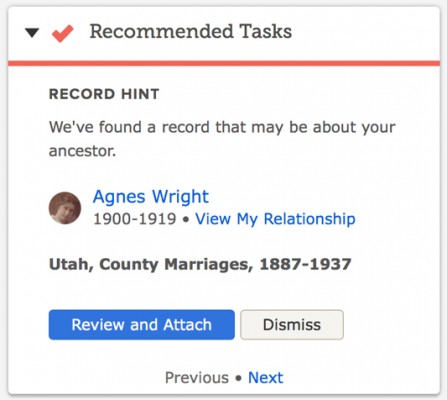 Two years ago FamilySearch added a feature (available on Ancestry.com for many years): record hints. FamilySearch compares names from its historical records with names in FamilySearch Family Tree. “When we put the data together for comparison and find high-scoring matches to people in your family tree, that’s what we call a hint,” explained Robert Kehrer, FamilySearch senior product manager. “In essence, the FamilySearch.org search engine is constantly working to make research discoveries for you without your having to do much more than login, validate what it found, and accept the hints.”
FamilySearch’s historical records contain five billion names. FamilySearch Family Tree contain 1.2 billion. Comparing the two in September, FamilySearch generated an additional 141 million hints over the 1.5 billion already found. Kehrer said 98.5% of the hints are accurate. Errors occur when persons in the tree have common names, are born in populated places, and have few known relatives, according to Kehrer. (I’m not too familiar with urban research, but it seems to me that companies don’t key enough identifying information about people in big cities. If they would key address, occupation, religion, and other differentiating information for people in big cities, it would be easier for users to find people and would improve the accuracy of their hint system. It shouldn’t be too hard to determine population levels necessitating the keying of additional information. FamilySearch and Ancestry don’t seem to understand the cost/benefit analysis.) Noteworthy among the new hints are those from the 1851 and 1881 England and Wales censuses.
To enlist the FamilySearch hinting system to find records of your ancestors, their names must exist in Family Tree. If they are not already there, you can add them at no cost. If you do, be prepared to defend your conclusions to other descendants. That’s not necessarily a bad thing; we should all be able to do that. Also, because of the uneven experience level of tree participants, expect to spend time teaching others with less experience.
For more information, see “FamilySearch Adds 141 Million Family History Record Hints” in the FamilySearch newsroom.
I know nothing about the parents of my 4x-great-grandmother Mrs. Betsey Ann Embody. https://familysearch.org/tree/person/LJG2-R4G/details
However, from a newspaper report shortly prior to her death, I do know that she was visited by a sister, "Mrs. Hodge of Herkimer." I can create a person named "Mrs. Hodge" in the FamilySearch Family Tree, but to link them as siblings, I need to create at least one person who is a parent to both of these women.
Is there a best practice for naming these people so that I don't interfere with other users' searches and with FamilySearch's record hinting and duplicate matching? Or should I not be creating people when I know absolutely nothing about their names, and instead use notes to record this information until I learn more?
Thanks for any insight you can share.
Signed,
Jason Thompson
Dear Jason,
This is, indeed, a quandary. FamilySearch Family Tree—and any other tree system that I’m aware of—doesn’t support a true sister relationship. Under the covers, they only support parent-child and spouse-spouse relationship types. Under the covers, they also don’t have a placeholder feature for a parent of a person without a known surname. That’s not a problem in a personal tree. You do whatever suits you, such as creating a parent named “Parent of Betsey Ann [—?—]” and attaching both children. In a shared tree, you don’t have that latitude. You have a responsibility to the thousands of other users of the tree. Such a construct would be confusing and could lead to disastrous merges.
There’s also the issue of independent verification of the sister relationship. In my experience, people sometimes use relationship terms—like sister—ambiguously. I’ve found that particularly so in newspapers where the local town gossip—um, I mean “Around Town” newspaper reporter—makes unfounded assumptions. Mrs. Hodge may be a step-sister, a sister-in-law, or an organizational sister.
I would use the notes option. Reasonably exhaustive research may uncover Betsey Ann’s surname.
Signed,
The Ancestry Insider
UPDATE 21 OCTOBER 2016:Reader Joe Lowry posted this comment: I regret to inform you that the Florida Sun Post is a fake or satirical news publication: http://www.dailydot.com/irl/florida-man-granddaughter-marry-hoax/.

Certain information flags immediate suspicion in an online tree. Ever see a son who is older than his father? But be careful. One needs to think twice about making assumptions without proof. What would you think if you saw the pedigree of a woman who was her own grandmother? You might be wrong.
According to the Florida Sun Post,
A 68-year old man from Miami’s Golden Beach neighborhood has reportedly had a ‘terrible shock’ after discovering his new bride, a 24-year old woman from Jacksonville, is actually his own biological granddaughter. The couple, who have only been married for three months, made the discovery while looking through a photo album.
When the man showed the woman a photo of his oldest son, the woman identified the son as her father. The man had lost contact with his son when his wife left him. The woman had lost contact with her father when he kicked her out of the house.
Read the entire story on the Florida Sun Post website.

I received this from RootsTech:
Early Bird Discount Expires in Two Weeks!
Save over $100! Regularly priced at $269, you can purchase a RootsTech 2017 4-day pass for ONLY $159. Price expires 2 weeks from today,
October 14. With over 200 classes to choose from, keynote sessions with inspiring speakers, entertaining evening events, huge expo hall, and more, RootsTech 2017 will be THE experience not to be missed.
The cost does not immediately rise to $269. RootsTech uses a stepped approach. The price increases to $189 tomorrow.
Register or get more information about RootsTech 2017 on the RootsTech website.

Ancestry described themselves as “the world’s largest online resource for family history and consumer genetics.” They had $683 million in sales last year. They have 1,000 employees in Utah and 1,400 world-wide. They are located in Lehi, Utah in a new $35 million building. There are 75 million searches on Ancestry.com every day.
“Hire great people from diverse backgrounds and invest in them,” Tim Sullivan advised.
Read the entire article on the Utah Valley 360 website.
Do you happen to know if there is any reason we have to sign in every time we use FamilySearch? Is there any movement afoot to change that?
Signed,
Ellen Barnett Cleary
Dear Ellen,
FamilySearch is owned by The Church of Jesus Christ of Latter-day Saints which holds the reins of the sign in module for FamilySearch.org. The Church takes an aggressive stance on sign in security. FamilySearch previously convinced the Church to allow users to remain signed in for two weeks. However, that feature doesn’t work quite right for me; I am signed out every time I visit FamilySearch.org. Is that what is happening to you? For me, selecting Sign In signs me in again without requiring password entry until the two weeks have expired.
If I recall correctly, someone asked Ron Tanner that same question at RootsTech. If I recall correctly, he said that FamilySearch would like to lengthen out how often one must sign in, but couldn’t say if it would ever happen.
Signed,
---The Ancestry Insider

Don’t forget that after Ancestry.com bought Find A Grave, they created an iPhone app. Ancestry has prepared a PDF download with tips on finding your ancestors’ cemeteries.
For connecting via social media, use the hashtag #FGDay. For more information, visit http://www.ancestry.com/cs/find-a-grave-community-day.
I’m pleased to accept the invitation to be a RootsTech 2017 Ambassador.
Registration is now open for RootsTech 2017. According to the message from RootsTech:
Registration is now open for RootsTech, the world’s largest genealogy and technology conference in the world. Happening February 8–11, 2017, at the Salt Palace Convention Center in Salt Lake City, Utah, RootsTech 2017 will empower you to celebrate your family across generations using the newest technologies available.
For a limited time, the full RootsTech conference pass is available at a discounted price of $159. Regularly priced at $269, that’s over $100 in savings!

Registration is also open for the Innovator Summit and Family Discover Day. All combined, the three conferences, last year had 28,000 attendees.
Family Discover Day is for members of The Church of Jesus Christ of Latter-day Saints. It takes place on Saturday, 11 February 2017. It is free but registration is required. It includes talks from Church leaders; classes for families, youth, and young single adults; and evening entertainment. Event details, including speakers and classes, will be made available soon.
Innovator Summit is a one day conference designed for entrepreneurs and software developers. Associated with the summit is the Innovator Showdown, a contest to see who can come up with the best app or device that solves a real world family history industry need, or uses family history data or services to solve a need in another industry. The showdown awards $100,000 in cash and prizes. The submission deadline is 1 December 2016. The winners will present onstage and be selected by judges and live audience voting at RootsTech 2017 on Friday, 10 February 2017. Go to RootsTech.devpost.com for more information.

Linda K. Gulbrandsen of FamilySearch gave a presentation titled “New Possibilities with FamilySearch Partners” at the recent 2016 BYU Conference on Family History and Genealogy. She is an executive account manager for FamilySearch in the Partner Services Division.
“Partners are very important to us,” Linda said. She talked about how consultants could use tools from FamilySearch partners to help get Church members interested in family history and temple work. She referenced Mike Sandberg’s talk at RootsTech 2016 (see “Begin at the Beginning: Helping Others to Love Family History”) and showed how his approach can be augmented with the inclusion of partner offerings.
The question arises as to when to introduce partner offerings. That depends, she said. Perhaps the person or family needs to start right into FamilySearch.org. For others, the proper approach may be different. In some cases, the consultant may wish to use the app prior to visiting the member. The app gallery (at FamilySearch.org/apps) has over 120 apps for desktop, mobile, and web. Any of these may be helpful.
Linda presented several scenarios, each with an applicable partner app. For a family with young children, she showed Little Family Tree. For other scenarios she showed Relative Finder, MooseRoots, and Hope Chest.
“We have these partner tools that can be helpful in so many ways,” Linda said.

The goals and principles behind New FamilySearch (NFS) were to improve the accuracy, quality, and pace of genealogy work; to reduce duplication of data and effort; to preserve all contributions; to allow only the contributor to change their information; and to encourage addition of sources.
What ended up happening was frustration over duplicates that couldn’t be combined, confusion over using the system, continuation of the “mine” versus “ours” mindset, limits on what could be fixed, collaboration difficulties, and problems introduced by centralized, automated changes.
There were data issues. Some of the records came from Ancestral File and the merge algorithms used back in its time had “splinched” persons [think “Frankenstein monsters”]. There was overwhelming duplication which led to IOUSes (individuals of unusual size). These were terrible for the system. [You may recall when NFS was deployed in Arizona the IOUSes caused the system to continually crash.]
Combines caused problems. There was no attribution for who did the combine. It was much easier to combine than to separate. [I think it could take 10 hours to undo a bad 10 second combine.] Combining multiple persons into one created merge magnets that attracted further combines. FamilySearch found one with more than 50 persons combined together.
FamilySearch had to sit down and decide what to do. They decided to change some of the goals and mindset. The principles of Family Tree are similar to NFS, but FamilySearch really wants sources. And rather than keep every alternative value for an event, they would keep only one conclusion. They would provide better tools for the community to provide evidence and clean up the data. They would allow errors to be fixed and bad changes to be fixed as easily as it was to introduce them. They wanted to provide attribution of changes and impede bad ones.
To build a better tree, you need to act as a community. Be courteous, kind, cheerful, and patient. Be respectful of others. Leave things in a better state than you found them. Communicate and collaborate. Add an email and make it visible. Use the messaging system. If contributors won’t respond to messages, after making efforts to contact them, go ahead and make changes—based on evidence.
Only make changes that you know. Knowing means the best conclusion of the community. If you don’t know something, don’t add, edit, or delete. [I would add to that, if you don’t have evidence and proof.] Before making changes, review the reason statements, sources, discussions, notes, and memories. Contact contributors. Don’t mark persons as dead unless you know they are dead. Don’t add persons you aren’t sure existed. Put them in a personal tree. Keep notes of relevant person IDs when making merges; have the end in mind before starting the merge.
If you want to help people not make changes to your stuff, the best defense is a good offense. Provide good reason statements. There is a great article: “Reason statements for adding, editing, and deleting information” in the FamilySearch Help Center. [I half-way disagree with John’s appraisal. The first half is great. The second half is a great collection of unhelpful reason statements “I attached this birth certificate because it provides evidence about his birth.” As an alternative, I would direct you to a similar article in the wiki: “How to Write Effective "Reason" Statement in the FamilySearch Family Tree.” Or see this article in the FamilySearch blog: “Tips and Tricks: Writing a Good Reason Statement for Changing a Record.” But I digress…]
Search records, including partner websites. FamilySearch provides hints. They work very hard to make the hints good. John thought the accuracy to be about 99%.
Use the watch list. You can filter your watch list by name or ID or location. Search for “DEL” to see all the deletions. You can sort in all sorts of ways. The watch list can also show the changes that were made, including hiding those made by yourself. You can filter to those made by a particular user. You can filter by anything on the page because it actually does a word search.
Use the Possible Duplicates feature. If you indicate a person is not a match, Family Tree will no longer show it as a possibility, but it can be seen under the Not a Match link. Use Dismiss Suggestions and Dismiss Problems. If you see exact duplicate conclusions (such as alternate name), delete all but one.
FamilySearch doesn’t yet have a good answer for how to solve edit wars. They are going to come up with a solution, but there are other things that must be done first. If someone gets abusive, contact support. If you desire to change a read-only person, contact support and request a change. If you find living persons marked deceased, contact support to fix it.
We are working on a way to allow you to share a group of private persons, John said.
It is rare that you need to delete persons. Delete only those who truly never existed. [You can delete persons you create that haven’t been changed by others. Otherwise, contact support.] If you find a person wrongly deleted, it can be found in the change history of the surviving record or if you have the ID.
Deleting relationships is the secret weapon to fixing up family messes. Delete relationships instead of persons. Clean up after yourself. Don’t orphan the persons or they’ll never show up again.
There are a set of cases where you can’t merge. The most common are persons with unknown sex, persons who would have too many things like comments, a few IOUSes, or restricted persons, like Read Only persons.
Remember that the only thing that will be available 100 years from now will be the data, not the system.

FamilySearch announced last week that MyHeritage is providing a button to create a source in FamilySearch’s Family Tree. When viewing a MyHeritage historical record the button is available below the record details.
A single click or tap of the button creates a source in Family Tree. To associate the source with the correct person in Family Tree, you must have initiated the search from the person’s Family Tree page.
Ancestry.com features similar functionality: Attach the record to a person in an Ancestry Member Tree, link that person to a person in FamilySearch Family Tree, and transfer the source. This feature is available only to members of The Church of Jesus Christ of Latter-day Saints.
For more information about the MyHeritage button, see “Family History Easy Button: Create New Sources in Family Tree from MyHeritage” on the FamilySearch blog.
 This story, written by Lee Davidson, originally appeared in the Deseret News in Salt Lake City in 1997.
The woman seemed as different from me as possible when she entered the branch LDS Church Family History Center where I volunteer in suburban Maryland.
I am a white, male Mormon who was wearing a business suit. She is black American and wore Kente cloth (in colorful African tribal designs) with a veil that showed she is Muslim.
But we would soon find that we have everything important in common. And maybe, just maybe, we even tripped into an overlooked key on how America can better overcome racial tension.
To read the rest of the story, see Lee Davidson, “Startling Encounter is Reminder We Are All Family,” Deseret News (18 June 1997), p. A9, cols. 1-5; (https://news.google.com/newspapers?nid=336&dat=19970618&id=cu5LAAAAIBAJ&sjid=mOwDAAAAIBAJ&pg=6551,4479081&hl=en : accessed 20 August 2016).
Credit David Rencher for pointing me to this story.
Image credit: Adam Jones, “File:Kente Kumasi 2010-06-30.jpg,” image, Wikimedia Commons (https://commons.wikimedia.org : 9 November 2014). CC BY-SA 2.0 license.
In my FGS conference bag was information about NGS 2017 and FGS 2017 (and beyond) conferences. In my mailbox, was a message about yet another: RootsTech 2017.
RootsTech 2017 will begin Wednesday, 8 February 2017 at 1:30. Two classes will be held that afternoon. It will end with two class sessions on Saturday, 11 February. Registration opens 15 September. Book your room soon. Click here to visit the RootsTech website for more information.
The 2017 conference of the National Genealogical Society will be in Raleigh, North Carolina from 10 May 2016 to 13 May. Click here to see the 4-page announcement brochure from our FGS conference bag.
The 2017 conference of the Federation of Genealogical Societies will be in Pittsburgh, Pennsylvania from 30 August 2017 to 2 September. Two Pittsburgh hotels are now taking reservations. The conference will be held at the David L. Lawrence Convention Center. The Westin Convention Center and the Omni William Penn Hotel are offering reduced rates from Wednesday, 23 August to Friday, 8 September (subject to availability). Both hotels are conveniently located near the David L. Lawrence Convention Center.
Westin Convention Center (Main Conference Hotel)
1000 Penn Avenue, Pittsburgh, PA 15222
Omni William Penn Hotel
530 William Penn Place, Pittsburgh, PA 15219
Full details and links for FGS discounted reservations can be found on the FGS website.
FGS 2018 will be 22 August 2018 to 25 August in Ft. Wayne, Indiana.
FGS 2019 and FGS 2020 will be held in Washington, DC and Kansas City, Missouri, respectively.

“FGS is thrilled to partner with the Palo Alto Battlefield National Historic Park for this important preservation project,” said FGS President D. Joshua Taylor. “"“We look forward to working with our member societies and volunteers to provide new access to records for those researching the Mexican War.”
The Federation of Genealogical Societies and the National Park Service partnered together in 1999 for the Civil War Soldiers and Sailors database project where FGS volunteers completed data entry for more than five million names. The efforts of the CWSS project can now be experienced on the NPS Civil War website.
Volunteers are needed for three different aspects of the project:
If you are interested in helping out, contact Projects@fgs.org with your name, email, and FamilySearch username (if applicable). Indicate which particular part of the project you are interested in working on.

Most attendees had attended her introductory morning session, but she did a short review of DNA basics for those who hadn’t. For that review, I invite you to see my article “”
“How do I use DNA to solve my research questions?” Anna asked. She illustrated with several scenarios. One was the hard-core kind of example I like. Her friend Nancy (name changed) had figured out all her great-grandparents except for her paternal-line great-grandfather. And all she knew about his spouse was a given name: Rachel.
Nancy went about finding and testing descendants of the known great-grandparents. She pursued traditional research techniques for her paternal grandparents, David Walker and Ellie Roth. She learned that family lore stated that David was named after his father.
And then she waited. (This is why it is important to convince everyone you know to be tested.)
A couple of months later Nancy got a 3rd cousin match with a man named Brent (name changed). His location was promising. The presumed common ancestor would be Thomas Morgan. On the census, one of Thomas’s children was named David.
They found a 1st cousin of Brent and a 1st cousin of Nancy. All proved to be 3rd cousins. Nancy’s cousins through other lines were not.
“There were no fireworks,” Anna said, noting that so far Nancy doesn’t have enough evidence to make a conclusion. But now she has a candidate and a direction to go.
To see AncestryDNA’s brochure from the FGS conference bag, click here and here.


It is as though our ancestors want to be found. Uncanny coincidences. Olympian luck. Phenomenal fate. Tremendous intuition. Remarkable miracles. We call It, “Serendipity in Genealogy.”
Frances Gardner Watkins doesn’t speak Danish. When the bus driver told her to get off the bus on the side of the freeway, somewhere in the middle of Denmark, there was no way to discuss it. And while it was pretty obvious they had not arrived at the bed and breakfast, he insisted.
Subsequent events created a great tale of serendipity.
To read Frances’s story, see “Family History Moment: Miracle in Denmark” on the Deseret News: LDS Church News website.


