Thursday, March 17, 2016

#RootsTech: Ron Tanner – Family Tree in 2016 and Beyond

Ron Tanner addresses RootsTech 2016In Ron Tanner’s RootsTech 2016 presentation about FamilySearch Family Tree, he shared a number of coming improvements.

In 2016 FamilySearch will completely shutdown NFS (the old New.FamilySearch.org). When Family Tree was created, it was not created independently of NFS. The current architecture looks like this:

The current FamilySearch Family Tree architecture synchronizes through New FamilySearch

Even though you can’t directly interact with it, NFS continues to inhibit system functionality. Over several years, FamilySearch engineers have been adding code so Family Tree speaks directly with the backend processes.

Once Family Tree bypasses NFS, it can be retired.

When Family Tree can completely bypass NFS, then it can be shutdown. When it is shutdown, a bunch of issues go away.

  • Because of the current interdiction of NFS, you cannot merge persons that, in NFS, are Individuals of Unusual Size (IOUS). In a list of possible duplicates, you sometimes see the message “Can’t Be Merged At This Time.” (Ron showed an example.) Once NFS is eliminated, you will be able to merge all duplicates.
  • NFS was built so that gender could never be changed. Once NFS is eliminated you will be able to.
  • Today there are times when you delete a relationship and it “magically” reappears, with the change attributed to FamilySearch. This occurs when the NFS architecture prevents the deletion from NFS. When synchronization occurs between Family Tree and NFS, the deleted relationship comes back.

Currently, Family Tree gets really slow on Sundays. That’s when there are the largest number of users. Ron likened it to a crowded freeway. When FamilySearch built Family Tree, they created a system that would handle ten times the traffic of NFS. Now, the traffic is 30 times bigger. That’s why it gets so slow. While they have been moving away from NFS, they have also been converting Family Tree to use cloud-based computing. When they flip the NFS switch off, they will simultaneously move Family Tree to the cloud. By using the cloud, FamilySearch can add lanes to the freeway when necessary, and remove them when not. The expectation is that this will keep the system from getting overly slow.

Ron thinks that it is crazy to think that anyone alive today will have to be researched later. It would be best if they can put up their own sources. However, those sources contain currently confidential information, so FamilySearch does not currently allow attachment of sources to living persons. This is because sources and memories are all completely public, even if attached to a private person. FamilySearch is going to add the ability to mark a memory private.

The system today does not allow shared living persons. Only deceased persons in Family Tree are shared. Ron has a private space (as does each user) containing private copies of the living members of his family. His wife, CheRee, has one as well. She has her own copy of Ron and their children. If she adds information to one of their children, Ron’s copy does not show her changes.

FamilySearch Family Tree private spaces

FamilySearch is designing a concept to allow shared living persons. A group of people would create a shared workspace, like the Tanner Family in the diagram, below. Users invited to the space could copy living persons from their own private space into the shared spaces. Changes made within the shared space would be visible to all. This isn’t guaranteed to be ready for 2016, but they are working on it.

FamilySearch Family Tree proposed shared spaces

FamilySearch is working on code that will be able to show how you are related to anyone else in all 1.1 billion persons in the tree. It will probably be ready this year or next.

Adding lanes to the freeway has kept FamilySearch from making other improvements they wish to make. They wish to encourage correction of bad information and discourage corruption of good information. Ron calls this impedance – “something that slows the change.”

One possibility would be to provide a warning when a user was changing a value. It would indicate how many people were watching that tree person and would warn that all would receive immediate notification of the change. “Be sure your change is accurate and sourced.”

Another possibility is the detection of a deleted value being re-entered. If a user tried to change a value back to a previous value, the system would give a warning and display the reason why that value was deleted.

Ron’s interested in hearing your ideas of other impedance possibilities. Send them to Ron at FamilySearch.org. Don’t suggest that he lock your people so no one can change them; he’s not going to do that. (May I add, that your ideas are best if they avoid manual intervention. We don’t want bottlenecks. Ideas involving competence are also problematic. Who is qualified to determine another person’s competence? Mix the two together, and you have the worst of both worlds: “Have a competent person review each change.”)

“We do recognize that you do good work and you want your good work preserved for future generations,” Ron said. “You want it safe and you want it unchanged from anyone else and we have provided a place for you to put your good work.” That place is Genealogies and it is found in the Historical Records section of FamilySearch. “You can go to this Genealogies section…and submit your GEDCOM and it will be stored into the system for future generations.”

View Ron Tanner’s entire presentation on the RootsTech website.

Wednesday, March 16, 2016

#RootsTech: Ron Tanner – Looking Back at Family Tree

Ron Tanner addresses RootsTech 2016.Ron Tanner began his RootsTech 2016 presentation about FamilySearch Family Tree by reporting some numbers about 2015:

  • 2.5 million persons were added to Family Tree per month.
  • Total number of persons has surpassed 1.1 billion.
  • 8 million sources were added per month.
  • Total number of sources has surpassed 615 million.

Ron reviewed several features added to Family Tree in 2015:

  • Record hints in mobile app
  • Tip tray – Click the lightbulb icon in the bottom-right corner and a tray slides out with tips about the page. More and more pages are supported.
    Tip tray lightbulb icon
  • Dismiss research suggestions – Hover over the message and then click on the X that appears.
    Dismiss research suggestions.
  • Enhanced landscape pedigree view – Provides same amount of information in a smaller area, or optionally show more information than before.
  • Display data problem icons on person page – The problems may apply to anyone in the family, but that may change.
    Data problem icons
  • Search partner records from person page
  • Popup family member updates – No longer need to leave the person page to add marriage event, spouse, or source.
  • User messaging

Ron talked about the “missing standardized place” notification. It is causing confusion because the place matches the standard place exactly. To dismiss the notification, click edit and select the place from the dropdown list. (Another presenter explained that FamilySearch doesn’t do this automatically for an exact match because it would take more computing power than they can afford.) The reason Family Tree insists on standardized place names is so that find, hints, and duplicates function better. However, if the place you need is not in the dropdown list, FamilySearch doesn’t want you to select one anyway. Type the correct, non-standard location and tab out of the field without selecting from the list. Family Tree will do its best to select a corresponding, standardized, location. (In John Huff’s class, someone asked what to do about a person whose death location was “on the boat.” Attendees told her to select “Atlantic Ocean” and then explain the situation in the notes. I wanted to scream “NO, NO, NO!” FamilySearch doesn’t want you to do anything genealogically incorrect just to make the computer happy! The computer was created for you; you weren’t created for the computer.)

I’ll report more about Ron’s Family Tree presentation next time.

Tuesday, March 15, 2016

Beware the Ides of March 2016 News Ketchup

Ancestry Insider Ketchup“Friends, Romans, countrymen, lend me your ears.”

Bullet Ancestry.comAncestry.com forecasted that RootsWeb would be back online about 15 March 2106 (today). I prognosticated it would take longer. Looks like I was mostly wrong as most of RootsWeb is back online. Since I write these articles on the weekend, I can’t give you the current status, but here’s what it was last Saturday:

Since Ancestry isn’t using the established RootsWeb status page (mirrored here), to check availability you must select each URL individually.

Bullet Ancestry.comAncestry DNA is on sale for $89 (a 10% savings), plus shipping and tax. The sale lasts through 17 March 2016. Visit http://dna.ancestry.com for more information.

FamilySearch tree bulletAccording to the US National Archives and Records Administration: “OUR COLLEAGUES AT FAMILYSEARCH.ORG HAVE RECENTLY FINISHED DIGITIZING AND putting online a new original series that will be of interest to genealogists and historians alike—the Massachusetts, Salem, and Beverly Crew Lists and Shipping Articles. This is the first time these records have been captured on microfilm or digitally. The series consists of three original collections from the National Archives at Boston:

FamilySearch combined these three collections as “Massachusetts, Salem and Beverly Crew Lists and Shipping Articles, 1797-1934.” Salem and Beverly were a large port in the early history of the country, so if you have New England roots, you might have relatives in the collection.

FamilySearch tree bulletFamilySearch is updating the FamilySearch Research Wiki this week. To avoid losing any contribution made during the update, editing is not this week. If you wish to contribute to the wiki—which I hope you do regularly—please come back after 9:00am, 21 March 2016. Concerning the update, FamilySearch has said:

  • “All information will be kept and put in the new upgraded version of the wiki.
  • Navigation will change from the right side of the screen to the left.
  • Country and State pages will be redesigned for better use.  This redesign will occur as close to the time of the new release as possible, but may not be completed when the upgrade takes place.
  • The URL for the Wiki on the FamilySearch.org website will be changed for better usability
  • The Rich Text editor will be replaced with Visual Editor.
  • The upgraded version of the Wiki will be editable in all browsers including Chrome.”

FamilySearch tree bulletFamilySearch is hoping to add a feature to Family Tree called Family Projects that will allow users to share living persons in the tree. This allows sharing of documents, pictures, and stories and makes it so families don’t have to reenter each other into Family Tree over and over. Currently, living persons are not shared as is most of the tree. Ron Tanner explains it in a short blurb (1:32) on YouTube.

BulletTreeThe Ancestry Insider is a member of the Official Social Media Press for the NGS 2016 Family History Conference.The National Genealogical Society has announced that it will live stream ten lectures from its 2016 Family History Conference, which will be held 4-7 May 2016, in Fort Lauderdale, Florida. “Details of the live streaming program can be found on the NGS Conference website. NGS members and others across the United States and overseas, who are unable to attend the conference in person, are invited to sign up for these live streaming broadcasts.”

People can sign up for either or both of two tracks of five lectures. Lectures can be viewed for three months after the conference. I know some attendees at last year’s conference bought the streaming lectures for viewing after the conference. The broadcasted lecturers are among the best, so their classes fill quickly onsite. If you can view them after the conference, that frees you up to attend other conference sessions.

One other thing: Remember that the conference discounted Early Bird registration will close on 31 March 2016.

Bullet Ancestry.comAs Kendall Hulet indicated at RootsTech that it was coming, Ancestry has released a feature allowing users to choose a color scheme other than the much maligned funeral colors first released with New Ancestry. For more information, see “Ancestry Product Update: Tree Color Preferences” on the Ancestry Blog.

Bullet Ancestry.comAncestry recently posted their monthly “What’s New at Ancestry” video, March 2016 edition, on YouTube. Crista Cowan talks about conferences Ancestry will be attending this spring and summer, new site changes, product announcements, and new record collections released last month (28 million records). New product features include Continue Searching and LifeStory and Facts View tutorials. New product announcement concerns the availability of Ancestry DNA in 29 additional countries, new course offerings in Ancestry Academy. and desktop support for Family Tree Maker and RootsMagic. Some of the new collections mentioned are

  • “U.S., Definitive List of Slaves and Property, 1827-1828”
  • “Alberta, Canada Homestead Records, 1870-1930”
  • “California, Mortuary Records of Chinese Decedents”
  • “Sydney, Australia Cemetery Headstones, 1867-2002”
  • Two United Methodist Church collections
  • Ireland, Catholic Parish Registers, 1655-1915”
  • “U.S., Selected States Dutch Reformed Church Membership Records, 1701-1995”

That clears out much of my inbox. I hope it made sense, because “it was Greek to me.”

Monday, March 14, 2016

Monday Mailbox: B. Canada is Not British Columbia

The Ancestry Insider's Monday MailboxDear Ancestry Insider,

Robert Henry Kittson was born in what is now the province of Quebec, Canada.

The Ancestry.com indexer of the 1881 census of Sorel, Richelieu County, Quebec, misinterpreted his birthplace, recorded in French as "B. Canada," (abbreviation for "Bas Canada" i.e. Lower Canada) as British Columbia. I was surprised by this, checked the image, then the onscreen index, and lo and behold, everyone recorded as born in Bas Canada, had been interpreted by the indexer as having been born in British Columbia.

Ancestry needs to review the instructions it gives to indexers.

I have corrected the error for all the names on that image. A search for anyone born in British Columbia and living in Sorel in 1881 comes to 1,593 people! This kind of error is egregious, and correcting it should NOT be the job of Ancestry's paying customers. Ancestry needs to make a global correction of this error.

It is also apparent that whoever was doing the indexing had NO knowledge or background regarding Canada's history or geography. Surely it should have occurred to him or her that it was extraordinary that hundreds of people had been born in British Columbia yet by 1881 they had moved to Sorel, in what is now Quebec?

Signed,
Jean F. Milne

Dear Jean,

Since Ancestry.com employs cheap, offshore and sometimes non-English speaking, labor to key its records I believe it employs the rule of “key what you see” with its indexers, precisely to avoid this kind of issue. Database programmers then detect names that don’t match standardized places. The database programmer writes a mass update instruction that replaces all occurrences.

A single database instruction created this mess and a single database instruction can fix it. Hopefully, the people at Ancestry who read this newsletter will inform the appropriate people to have that done.

But why did a database programmer create it in the first place? Genealogical experts warn us that to properly interpret a record, we must first understand it. For example, Elizabeth Shown Mills has written,

Accurate evaluations of evidence require researchers to have a sound technical knowledge of the materials they use. We cannot expect to pull a census and scan names or run statistics without thoroughly understanding the circumstances under which that record was created. [Several factors, including] the abbreviations that differ from modern usage [or in this case, the reader’s own language]…all affect our interpretations.1

Ancestry and FamilySearch have excellent, programmers and publication personnel with lots of genealogical experience. But they need to approach record experts whenever there is any doubt, whatsoever, that they can properly interpret a record.

Elizabeth’s warning applies to each of us as well. I’m a big believer in education. There is always something more to learn that will help us as genealogists. (The more I learn, the more I realize how poorly I measure up to the knowledgeable genealogist I have the honor to work with in this community!)

Signed,

The Ancestry Insider


Sources

     1. Elizabeth Shown Mills, Evidence Explained: Citing History Sources from Artifacts to Cyberspace, third edition, Adobe Digital Edition, (Baltimore, Maryland: Genealogical Publishing, 2015), 21.

Friday, March 11, 2016

Marriage in the Middle of the Night in the Middle of Nowhere

We depend upon records to reveal the “truth” about the past. Yet sometimes records have anomalies. Some are amusing or humorous. Some are interesting or weird. Some are peculiar or suspicious. Some are infuriating, or downright laughable.

Records say the darnedest things!

“Mac,” who shared the following marriage return with me, wrote, “It appears that the good reverend wanted to make very clear in writing that he was within the law in conducting the nuptials.  The ceremony took place late in the evening, in the middle of winter, on a public road between Missouri and Kansas.  There were five (count 'em five) witnesses who attended the 'happy' event (and might have suffered frostbite for their efforts).  We can only hope the marriage lasted after this auspicious beginning.”

image

This is to certify that the undersigned a regular minister of the
Gospel in the Cumberland Presbyterian Church on Wednesday
Feby 10th 1875 at 10 Oclock P M. in Jackson County Missouri
near the state line between the states of Mo. and Kansas
in the Public Road opposite my residence in Johnson Co Kan.
did solemnize the rights of Matrimony between Mr Charles
Caldwell and Miss Fannie P. Robinson in the presense of
Jospeh Bryant, George Caldwell, Thomas W. James, W. F. Morrow and
Mrs. E.C. Morrow                                 J W. Morrow {seal}
  Filed for Records Feby 15th 1875.
                                            C.D.Lucas Recorder
                                            By W.A. Symington D.R

Yes, records say the darnedest things!


IMAGE SOURCE

Jackson County, Missouri, marriage records, v. 7 (1872-1879), p. 224, last paragraph, county clerk’s office, Independence; digital image, “Missouri, County Marriage, Naturalization, and Court Records, 1800-1991,” FamilySearch (https://familysearch.org/pal:/MM9.3.1/TH-1942-35905-7300-67 : accessed 2 January 2016), path: Jackson > Marriage records 1872-1881 vol 7-8 > image 152 of 500; FHL microfilm 1,019,758.

Thursday, March 10, 2016

#RootsTech: Robert Kehrer – #FamilySearch and a Famous Curse

Robert Kehrer presented at RootsTech 2016.“This is an industry in transformation,” Robert Kehrer said.

Robert Kehrer presented the FamilySearch sponsored luncheon on Thursday at RootsTech. Robert is the product manager for Search. He talked about transformations. I’ve reported before on this presentation (see “Kehrer Talks FamilySearch Transformations – #BYUFHGC,” 29 July 2015) so I’ll skip some of what he said.

Robert has witnessed transformations in two previous careers: DNA and Apple. Now at FamilySearch, he’s witnessing another. “My goal is to give you a taste of the transformation that’s been happening,” he said.

The transformation in records:

  PAST PRESENT (Jan 2016)
Record collections 1,033 in Jan 2012 2,062
Indexed names in collections 750 million in 2010 5.42 billion
Countries with records 72 in Jan 2012 91
Camera teams in archives 209 in Jan 2012 318
Records   3.15 billion
Document images   1.12 billion
Catalog titles   1.63 million
Microfilms   3.4 million
Names in Genealogies (GEDCOMs)   975 million
Scanned genealogy books   260,000

The transformation in memories—photos, stories, and digitized documents—started in 2013. Since then users have uploaded over 13 million artifacts. Approximately 20,000 are added per day, of which 76% get attached to Family Tree. Robert showed a story he entered, “Franklin Bernard Allor in Car Accident Dec 7 1941,” about an ancestor.

The FamilySearch Memories team is planning on releasing a gallery view. Robert’s prototype looked like the image below, left (please excuse my shaky photography). It looks like a list view of the gallery view now being rolled out, which looks like the image below, right.

Wireframe of a future FamilySearch memories gallery  User interface of the FamilySearch gallery view currently being rolled out

The transformation in indexing:

  • 1.34 billion records indexed
  • 68,569,328 records indexed in 2015
  • 213,184 total contributors
  • 15,795,814 records awaiting arbitration
  • 450 current projects


The new, web-based indexing program is being rolled out even while it is still being worked on. Someone asked when it would finally be available and everyone laughed. Robert declined to answer, since he is not the indexing product manager. Jason Pierson is the product manager.

FamilySearch is contemplating tools that would speed up certain aspects of indexing. Robert showed a wireframe of a tool where the indexer would be given one, simple task that required just a tap. The user would look at the image and tap to indicate the record type: birth, marriage, death, or other. (Below, left.) With as little information as record type, geography, and date range, blocks of images could be suggested alongside search results of indexed records.

User driven image characterization  Wireframe of image search user interface

Robert showed another wireframe (above, right) that allowed quick perusal of images. As you moved a slider along the bottom you would see popup thumbnails and basic date and place information. The slider might also include date and place ranges. If you found a name you wanted indexed, you immediately indexed it. Robert called it indexing on the fly.

The transformation in hinting:

  • ~98% precision. Out of every 100 hints shown to you, 2 are incorrect.
  • ~65-70% recall. Out of every 100 records in a collection that have your ancestor, the hinting system shows you 65 to 70 of them.
  • ~340,000+ hints attached daily
  • ~34,000+ names added to Family Tree daily
  • 60% of records attached to Family Tree were found via hints


The transformation in Family Tree:

  • 1.1 billion names in the tree
  • 500,000 names added each week
  • 567 million sources attached to Family Tree
  • 2.3 million+ new sources attached weekly
  • 2.8 million+ daily edits to Family Tree persons
  • 30% edits by users who are not members of The Church of Jesus Christ of Latter-day Saints


The transformation in mobile apps:

  • 1.1 million total app downloads
  • 73,000 avg active users
  • 2 million ancestors added
  • 605,000 photos added
  • 41,000 stories added
  • 6.89 million artifacts viewed


The transformation in partnering:

  • 20% of new names added to Family Tree come from partner records
  • 5 out of 10 indexed names on FamilySearch.org come from partners
  • 30 yrs of indexing with partners versus 300 yrs with current volunteers to index what we currently have
  • 75+ software products integrate with FamilySearch (See familysearch.org/apps)


The future of partnering is bringing hundreds of millions of new records (774 million).

  • Ancestry:
  •      Mexico Catholic Church Records: 260M
  •      Mexico Civil Records: 77M
  •      US Probate Project: 73M
  • findmypast
  •      Ireland Court Registers 22M
  •      UK WWI Service Records 4.3M
  •      UK Census Republication: 168M
  •      US Passenger Lists: 91M
  • MyHeritage
  •      Danish Census Records: 32M
  •      Danish Church Records: 25M
  •      Swedish Household Names: 22M


“You know the old curse that says ‘May you live in interesting times’?” Robert asked. “I wouldn’t have it any other way. These are the most interesting times we’ve ever seen in the genealogy market.”

Wednesday, March 9, 2016

Ancestry Insider Member of the #NGS2016GEN Official Social Media Press

The Ancestry Insider is a member of the NGS 2016 Family History Conference social media press.I’m honored to be accepted as an official member of the Social Media Press for this year’s National Genealogical Society Family History Conference. The conference will be held in Fort Lauderdale, Florida 4-7 May 2016.

Yes, that is Fort Lauderdale, Florida. I’m already planning some post-conference archive visits to City Hall on Main Street, USA, and the genealogy reading room at the Hogwarts school library, if you catch my drift.

March is a good month to register, as early-bird pricing saves you $35 through the end of the month.

For more information about the conference, check out the conference brochure at http://goo.gl/w40zSO.

Monday, March 7, 2016

Monday Mailbox: HeritageQuest

Dear Ancestry Insider,

I emailed Ancestry.com support last evening after talking with a support rep. He had no clue about my question.

I found many United States Census Records on HeritageQuest that I cannot find on Ancestry, specifically for Caleb Smith in Hector, NY in 1830 (there are many more).

I had heard that HeritageQuest was the go to place for Rev War records.  I searched Martin Peck and found none on HeritageQuest.  Ancestry shows some, but Fold3 has a lot more. And all three say they are from the National Archives.

Does Ancestry “split-up” which records are available on each of the three services?  HeritageQuest and Ancestry are obviously the same web site, just HeritageQuest saves in My Discoveries where Ancestry will download to my computer.

I am using the remote access feature of HeritageQuest through my local library.

Thanks for any clues you might have on “What is going on?”

Carty Ellis

Dear Carty,

Fold3 is, indeed, owned by Ancestry.com. Ancestry purchased it from iArchives. At the time, it was called footnote.com. Ancestry has positioned Fold3 as a source of original military records and renamed the website to connote military respect and honor. When Ancestry acquires new military records, it usually publishes them on Fold3, although not always.

HeritageQuest is not owned by Ancestry. It is owned by ProQuest. I have unfocused memories of HeritageQuest and microfilm rentals. The Encyclopedia of Genealogy website says that HeritageQuest acquired the American Genealogical Lending Library back in 1998. I can’t remember how HeritageQuest made its way into ProQuest. Anyone know?

So why does most of HeritageQuest look almost exactly like Ancestry.com? ProQuest is licensing most of HeritageQuest from Ancestry, including both website, search engine, and some record collections. Last March Ancestry started “powering” the HeritageQuest website. (See my article “Ancestry.com Did Not Buy HeritageQuest.”) At that time HeritageQuest’s census databases, with their bitonal images and head-of-household census indexes disappeared and Ancestry’s appeared in their place. You should get the exact same search results for census records on both Ancestry and HeritageQuest. If you don’t, I’m guessing there may have been inadvertently different search settings. Send me an example and I’ll look into it.

You had understood the HeritageQuest was a good place to search for Revolutionary War Records. Here is what HeritageQuest looked like before the current arrangement with Ancestry:

image
Source: Kristen McCallum, “Getting the Most Out of Heritage Quest,” slide presentation, In SlideShare (http://www.examiner.com/article/use-your-library-card-to-access-databases-for-free : accessed 1 February 2016), slide 4.

Ancestry doesn’t have a license for PERSI and the U.S. Serial Set, and ProQuest’s license for those collections did not allow it to give them to Ancestry. Consequently, they have quietly disappeared from the Ancestry hosted HeritageQuest. However, the remaining collections, including the Revolutionary War collection, are still present, both on HeritageQuest (and Ancestry).

Signed,
---The Ancestry Insider

Friday, March 4, 2016

Frederic Clift’s Darned First Marriage

We depend upon records to reveal the “truth” about the past. Yet sometimes records have anomalies. Some are amusing or humorous. Some are interesting or weird. Some are peculiar or suspicious. Some are infuriating, or downright laughable. Records say the darnedest things!

By Maurine Clift Nuttall

Frederic Clift married Felicia Victoria Jones June 3, 1872 at the Register Office in Brighton, Sussex, England. The Jones and Clift families were neighbors in Croydon, Surrey, living only three houses apart on Church Road. It is likely this is how the couple met each other. For whatever reason, they married under the fictitious names of “Frederic Nelson” and “Felicia Jones,” and gave fictitious names to their fathers, as well—“Richard Nelson,” deceased Accountant and “Francis Jones,” Stock Dealer.

Click to enlarge
“Darned” Record #1: Marriage Certificate for “Frederic Nelson” and “Felicia Jones.”
With compliments from the Brighton & Hove Registration District, 22 June 2001
The Register Office, Town Hall, Bartholomews, Brighton BN1 1JA
Now indexed: Felicia Jones and Frederic Nelson, June Quarter 1872, Brighton, Sussex, Volume 26, Page 367,
FreeBMD. England & Wales, FreeBMD Marriage Index, 1837-1915 [database on-line].
Provo, UT, USA: Ancestry.com Operations Inc, 2006.

In fact, Richard Clift was alive and well and working as a stockbroker on the London Stock Exchange and Felicia’s father, James Felix Jones, was a retired captain in the Royal Indian Navy and former political agent in Her Majesty’s service at Bagdad and the Persian Gulf.

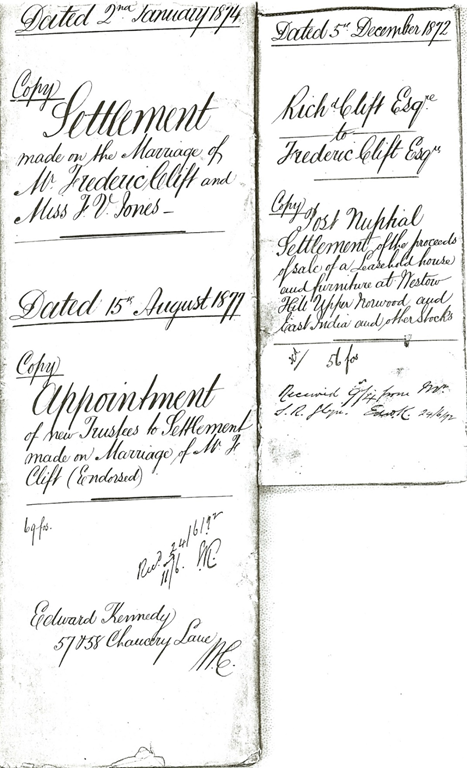
The marriage was legitimate; both parties were of full age. Was it an elopement of sorts? Perhaps the couple had not received the approval of their families? These questions remain unanswered. It appears, however, that Frederic’s parents learned of the union late in 1872. A post-nuptial settlement of the proceeds of sale of a “Leasehold house and furniture at Westow Hill Upper Norwood and East India and other Stocks” was made between Richard and Christian Clift and their son, Frederic Clift. The settlement was dated 5 December 1872 and assigned the family home and furnishings to Frederic Clift with provisions made for the sustenance of his parents.

Here (below, right) is a copy of the face of the legal document which seems to deal with the 1872 marriage under assumed names of Frederic Clift and Felicia Victoria Jones. It is still not quite clear when their parents first learned of the marriage. A partial transcription follows this article.

Post Nuptial Settlement between Rich'd Clift and Frederic Clift

This settlement was later updated 2 January 1874 (pictured above, left). That was the day before Frederic and Felicia were married again—the marriage taking place this time at the Parish Church, All Saints, at Upper Norwood. The couple’s fathers were identified correctly and James Felix Jones signed as a witness.

Click to enlarge
The Second Marriage Certificate for Frederic and Felicia ~ The “Darned” truthful one!
Given at the General Register Office 4th July 2001
Now indexed: Felicia Victoria Jones and Frederic Clift, March Quarter 1874, Croydon, Surrey, Volume 2a, Page 275
FreeBMD. England & Wales, FreeBMD Marriage Index, 1837-1915 [database on-line].
Provo, UT, USA: Ancestry.com Operations Inc, 2006.

Officially now, the couple set out to make a home and a livelihood for themselves.

Yes, records say the darnedest things.


Partial Transcription of the 1872 Settlement

Dated 5th December 1872
Rich’d Clift Esqre
to Frederic Clift Esqre
Copy

Post Nuptial Settlement of the proceeds of sale of a Leasehold house and
furniture at Westow Hill Upper Norwood and East India and other Stocks

“This Indenture made the 5th day of December 1872 between Richard Clift of Westow Hill Upper Norwood in the county of Surrey Esquire of the first part Christian Bottrall Clift his wife of the second part and Frederic Clift of Westow Hill Upper Norwood aforesaid Esquire of the third part. . .”

“. . .said Richard Clift hath assigned certain hereditaments comprised in and expressed to be demised by an Indenture of Lease dated the 12th day of March 1863 and expressed to be made between The Ecclesiastical Commissioners for England of the one part and James Franks therein described of the other part unto the said Frederic Clift his executors administrators and assigns for the residue of the term of Ninety nine years by the said Indenture of Lease expressed to be granted. . .”

“. . .belonging to the said Richard Clift now in or about his present residence at Westow Hill, aforesaid and commonly called or known by the name of “Tusculum” unto the said Frederic Clift his executors administrators and assigns Upon trust that the said Frederic Clift. . .”

Thursday, March 3, 2016

#RootsTech: Anne Mitchell – Become a Master Searcher on #Ancestry.com

Anne Gillespie Mitchell of Ancestry.com addresses RootsTech session

When you know what goes on behind the scenes when you push that search button, you are going to be a much better searcher and you’re going to get better results, said Anne Gillespie Mitchell of Ancestry.com. Anne gave a presentation titled “Become a Master Searcher on Ancestry” at RootsTech 2016. Anne has worked for Ancestry for seven years, including some time as the Search product manager.

Say you search for John Smith, lived in Virginia, and born in 1879. Ancestry searches more than 16 billion records and it finds every record with first name “John.” It finds every record with last name “Smith.” It finds every record mentioning any place in Virginia. And it finds every record with a birthdate close to 1879. Ancestry combines all four of these groups, which is why you get 38 million results. It is possible to get just the results you want by telling the search engine what you want it to do. “You have to know how to talk to the search engine,” she said.

Anne gave us several tips on how to do that.

Tip #1: Start with the basic facts. Starting a search from your family tree has its place, but sometimes it pulls in so many results, it’s hard to find something in particular. There are times when you should start from scratch, specifying just four basic facts: first name, last name, a date, and a place.

Tip #2: Understand how names are searched. “If you know how to control them with filters, you will have control of your results, and you will start finding who you’re looking for,” Anne said. After entering a name, click Exact under the name and set name filtering to work the way you want it to work. The name filters are sticky. Whatever you set them to will continue to be used on subsequent searches.

Be aware that the last name must appear in some form in each result, but the first name doesn’t have to unless you tell it to.

Tip #3: Wildcards are a powerful tool for dealing with name variations. Anne uses “G*L*SP*” to search for variations in her Gillespie maiden name.

Tip #4: Location can be a key search term. The location of an event is often highly accurate. This is because events were usually recorded where they occurred and since indexers are not keying in a different location for every record, Ancestry can set the location without a lot of errors.

When you are searching a census and you know the county, put it in the “Lived In” field. (“Lived in” and “residence” are the same.) Start by specifying your location as exactly as possible. Include district name and number in the keyword field. (Anything that appears anywhere in the record details that can’t be specified in a search field can be searched in the keyword field.)

If you specify location for “Any event,” all records will be returned that specify that location in the record in any capacity.

Tip #5: Filter by location. This is a capability you may not be familiar with because few websites besides Ancestry offer it. Select the location from the dropdown list. Then use the filters to include nearby locations. This helps because our ancestors sometimes crossed county or state lines to do something like marrying or recording a deed.

Tip #6: Limit your scope. At the bottom of the search form you can exclude trees, photos, or stories and publications. The setting is sticky, so it will be used for subsequent searches.

Tip #7: Use Collection priority to set the national focus. This is useful for focusing research in the records of a particular country, such as England or Canada. Be careful, this setting is also sticky.

Anne found her grandfather's signature in a yearbook.Tip #8: Search records by type. Certain types of records, like census records, easily float to the top of Ancestry search results. However, some record types, like military records that lack a birthdate and residence, may never be found by global searches. Anne recommends searching by record type. Census records are a good type to search first.

To search military records by conflict, visit http://www.ancestry.com/cs/militaryrecords. That is the only page on the site where that is possible.

Tip #9: Use the Category result list. Above the top search result is the choice to see results by records or by categories. Select categories to see which collections have matching records.

Tip #10: Search a single collection. Searching a single collection is another good way to avoid thousands of unwanted results. The search form shows what fields were indexed for that collection and often include fields not available in the global search form.

Tip #11: Read the collection description. The collection may not include the records you need; the description may warn you of that. It will tell you where the collection came from, which helps you decide how trustworthy the information is.

Control your results and learn how to do it really well,” Anne said. “You’re going to find more things.”

View Anne’s complete presentation on the RootsTech website.

Wednesday, March 2, 2016

AncestryDNA In 29 Additional Countries

AncestryDNAThere’s great news for those of you who are not descended exclusively from Indian Princesses: Ancestry.com has announced the availability of its AncestryDNA product in 29 additional countries. If you have brickwalls in any of these countries, pray that your cousins will buy AncestryDNA kits. The new countries are:

  • Albania
  • Armenia
  • Austria
  • Belgium
  • Bulgaria
  • Croatia
  • Cyprus
  • Czech Republic
  • Denmark
  • Estonia
  • Finland
  • Georgia
  • Greece
  • Hungary
  • Liechtenstein
  • Lithuania
  • Malta
  • Netherlands
  • Norway
  • Poland
  • Portugal
  • Romania
  • San Marino
  • Slovakia
  • Slovenia
  • South Korea
  • Sweden
  • Turkey
  • Vatican City

AncestryDNA was already available in the United States, United Kingdom, Ireland, Australia, New Zealand, and Canada.

Most new countries are in Europe, so I wondered if the addition was related to the European Union. After all, the European Union and the loss of the safe harbour agreement with the United States have been in the news lately. I compared the EU membership list with the list of newly supported countries and found the following:

These countries are members of the European Union, but AncestryDNA is still not available in them: France, Germany, Italy, Latvia, Luxembourg, Spain, and the Vatican City. On the other hand, Albania, Armenia, Georgia, Liechtenstein, Lithuania, Norway, San Marino, South Korea, and Turkey are not members of the European Union, but AncestryDNA is now available in them. As you can see, there doesn’t seem to be a connection between European Union membership and the list of newly supported countries.

For more information, see “AncestryDNA Now Offered in 29 New Countries” on the Ancestry Blog.

Tuesday, March 1, 2016

RootsWeb Website Update

imageAncestry.com has issued more information regarding the RootsWeb website outage. As many of you had assumed, it was a hardware failure. The message of the RootsWeb home page now reads:

We're currently experiencing a temporary website outage due to Rootsweb [sic] hardware failure. Rest assured, our development and web operations teams are busy working to securely restore the site as quickly as possible. Our initial expectation is to have the site back up and running on or around March 15, 2016.
We apologize for the disruption and thank-you for your patience.
We will provide other updates here as we have them.

It’s never a good sign when a website owner can’t capitalize the name of its own website.

To be fair, the current message was probably placed there by hardware guys scrambling to save the site, not to spell it correctly. Still, how can I pass up an opportunity that good to tease Ancestry. :-)

You may be wondering why Ancestry is thinking it will take two weeks to get the site back up and running. In this sort of situation, it’s dangerous to give any sort of date, as things always take longer than expected, especially under emergency situations. I imagine they have padded the date, thinking it will take less time, and that actually it will take more.

For your flagship product, you are constantly moving, improving, rewriting, and upgrading. The Ancestry.com website will have state of the art tape backup hardware and software. It would be too costly not to. RootsWeb will have been operating in MacGyver mode for some time. There was little money in operating it otherwise. It wouldn’t surprise me if the tape backup system used on RootsWeb will be so old and so slow that using it was a bit like painting the Golden Gate Bridge. Perhaps it was taking a week or more to run a complete backup of the RootsWeb website and it will take a week to completely reload all the tapes. Up to one week of data will not have been backed up, and you may find you’ve lost days of work.

It may be not at all as dire as I’ve outlined. Keep your fingers crossed.

Free Online Education for March

The Family History Library has announced the schedule of its free webinars for March. They have also published several new courses in their free learning center. Ancestry.com has released many new educational videos on its YouTube.

FHL free webinars

Family History Library Webinars

March 2

10:00 A.M.

Spanish Records Indexing Workshop Webinar (1½ hours)

March 5

1:00 P.M.

Improve Your Search Results in FamilySearch Hispanic Records Webinar

March 8

1:00 P.M.

Mid-19th Century England Case Study and Brainstorming Session Webinar

March 9

10:00 A.M.

Portuguese Records Indexing Workshop Webinar (1½ hours)

March 9

1:00 P.M.

Learning to Read German Handwriting Webinar (2 hours)

March 10

10:00 A.M.

Cousin Research Webinar

March 15

2:00 P.M.

America to Norway: A Case Study Finding Your Ancestors Place of Birth Webinar

March 16

10:00 A.M.

Italian Records Indexing Workshop Webinar (1½ hours)

March 17

11:00 A.M.

Where is That? Finding and Understanding Places in Ireland Webinar

March 17

1:00 P.M.

Ireland Census and Census Substitutes Webinar

March 18

11:00 A.M.

Ireland Catholic Church Records Webinar

March 18

1:00 P.M.

Irish Protestant Records Webinar

March 19

1:00 P.M.

Más allá de los registros indexados Webinar

March 23

10:00 A.M.

French Records Indexing Workshop-Webinar (1½ hours)

March 24

1:00 P.M.

British Virtual Specialist Q & A Session Webinar

March 24

6:00 P.M.

Understanding United States Land Records Webinar

March 30

10:00 A.M.

Dutch Records Indexing Workshop Webinar (1½ hours)

March 31

2:00 P.M.

Using Swedish Household Exams and Parish Registers, pt. 1 Webinar

March 31

3:00 P.M.

Using Swedish Household Exams and Parish Registers, pt. 2 Webinar

To attend a Family History Library webinar, go to https://familysearch.org/learn/wiki/en/Family_History_Library_Classes_and_Webinars#Webinar_Information.


FamilySearch Learning Center

FamilySearch recently added these free courses to the FamilySearch Learning Center.

England & Wales Census Records 1841-1911 & IndexesEngland, Wales Research
England & Wales Census Records 1841-1911 & Indexes
England and Wales Civil Registration

Sweden Research
Reading Gothic Handwriting for Swedish Genealogy
Spelling and Phonetics for Swedish Genealogy

Norway Research
How to find ancestors in Digitalarkivet of Norway
Norwegian Emigration: The Experience

Spain, Latin America, Mexico Research
Búsquedas eficaces
Recursos en línea para España
Censos sin secretos
Recursos en Línea para Inmigrantes
Investigación genealógica en Centro y Sudamérica
Recursos en línea para México
Nuevas Herramientas del Árbol Familiar

Various Research Content
Research in Poland
Hansen’s Map Guides: Finding records with parish maps
RootsTech 2016 Videos


Ancestry.com Videos

Ancestry.com has posted several new, instructional videos on the Ancestry YouTube channel this past month.


27:41 - AncestryDNA: How It Can Help With Genealogy Brick Walls


6:41 - Five Minute Finds: Finding Probate Records That Aren't Indexed


18:51 - Ancestry Online Trees: Reflecting Accurate Relationships


5:09 - Five Minute Finds: Adding a Quick Link to Your Ancestry Home Page


27:31 - Genealogy Methodology: Search Then Research


31:01 - What's New at Ancestry: February 2016 Edition


26:51 - Genealogy Methodology: Getting Around Burned Counties


31:31 - AncestryDNA: More Tips for Identifying Biological Family


Ancestry Academy

I don’t highlight new content on Ancestry Academy because I don’t know how to tell what’s been released in the last month and because the really good stuff is not free. But now’s as good a time as any to feature what is free on Ancestry Academy. If you have an Ancestry product or subscription, you may wish to invest some time in these courses:

Meet the Ancestry App: Your Family Story Anytime, Anywhere
Meet the Ancestry App: Your Family Story Anytime, Anywhere with Finn Larson - 41:05

Finding Your Military Veterans on Fold3
Finding Your Military Veterans on Fold3 with Krista Hegerhorst - 39:38

Newspapers.com: Getting the Scoop on Your Ancestors
Newspapers.com: Getting the Scoop on Your Ancestors with Karen Lee - 37:35

DNA 101: An Insider's Scoop on AncestryDNA Testing
DNA 101: An Insider's Scoop on AncestryDNA Testing with Anna Swayne - 52:45

Expand and Support Your Genealogy Research with DNA Circles
Expand and Support Your Genealogy Research with DNA Circles with Ross E. Curtis, PhD - 62:00

Getting the Most Out of Family Tree Maker
Getting the Most Out of Family Tree Maker with Duff Wilson - 74:51

Digging for Answers with Find A Grave
Digging for Answers with Find A Grave with Michael Lawless - 61:48

MyCanvas: Creating Family History Keepsakes
MyCanvas: Creating Family History Keepsakes with Lorilee Wagner - 42:50

Seek and Ye Shall Find: Become an Ancestry Search Expert
Seek and Ye Shall Find: Become an Ancestry Search Expert with Anne Gillespie Mitchell - 68:06

Your Family History Online: Laying the Foundation
Your Family History Online: Laying the Foundation with Anne Gillespie Mitchell - 51:52

Navigating Wills and Probates on Ancestry
Navigating Wills and Probates on Ancestry with Anne Gillespie Mitchell - 53:51


Photo credit: Woman at laptop contributed to FamilySearch Wiki by user Naisbittrl. Used under (CC BY-SA 3.0 US) license. Shadow added.