Wednesday, September 2, 2015

Guiding Principles for Cleaning Up Messes in Family Tree – #BYUFHGC

Ben Baker gave guiding principles about cleaning messes in FamilySearch Family TreeThis is the second of two articles about Ben Baker’s presentation at the 2015 BYU Conference on Family History and Genealogy. Ben’s topic was “Help! My Family is all Messed Up on FamilySearch Family Tree.” His slides and syllabus are available at http://www.slideshare.net/bakers84/help-my-family-is-all-messed-up-on-familysearch-family-tree and http://www.slideshare.net/bakers84/help-my-family-is-all-messed-up-on-familysearch-family-tree-handout, respectively.

Ben presented a list of guiding principles to use when cleaning up messes in Family Tree.

Play Nice With Others

Remember this is a shared tree. Don’t be too bullheaded. Apologize when you’ve messed up. Be nice how you approach people. When people mess up, it’s generally because they don’t realize what they are doing. Some users delete people thinking they are operating in a private tree.

Watch out for mytreeitus. Ron Tanner came up with the term; Ben Baker gave a dictionary-like definition:

mytreeitus \mī-trē-ˈī-təs\ (noun)
An inflammation common to many genealogists,
particularly heavy users of PAF. Symptoms include
extreme anxiety over others modifying their extensive
genealogical research, possessiveness of ancestors,
unwillingness to work in collaborative family trees and
disregard for others when removing erroneous
persons from their family. Usually occurring in more
mature adults and rarely seen in those under 40.
[Ouch! Ben didn’t score any points with his largely older-than-40 audience.]
Learning to use FamilySearch Family Tree has been
shown to be an effective treatment for this affliction.

Make Your email address public. To do so, click on your name in the upper-right corner of the screen. Click settings. Click Contact. Enter your email address and check the Public box next to it. There is a messaging system coming soon that will allow you to send messages to others, even if their email address is not public. [Since the conference, that feature has been released.]

Draw Pictures and Take Notes

Most of the problems that Ben runs into are messed up families. To help sort things out, draw a picture showing the relationships as they should be. Here’s a diagram with a father who fathered his first child with his first wife and his second child with his second wife:

One of Ben's diagrams showing relationships

Pay attention to the PIDs. Each record has a PID. If a person has two different PIDs, then there are two different records that need to be merged. If two different persons have the same PID, then they aren’t really two at all. They are merely showing up twice in the same diagram. I’ve created an example, below. While Imaginary Child (LKPR-R95) and Imaginary Child (LKPR-R9N) are the same person, there are two PIDs. That means there are two records that need to be merged. Also notice that there are two of Imaginary Child (LKPR-R9N). By paying attention to the PIDs, we see that there are not really two; it is the same record showing up twice.

An imaginary family showing 1 person with two PIDs and one person shown in two places

To keep track of things, open up multiple browser tabs. To open a new tab or window when clicking a link, use a middle click or a right click of your mouse [or hold down the control-key while clicking].

If you are really worried about how to do things, try things out on http://beta.familysearch.org. Beta has almost the same information as the real Family Tree, changing stuff on beta doesn’t change the real tree. If you are uncertain how to go about making a change, go over there and try things out. FamilySearch also tests new features there. To see features that might be coming, you can go over there every once in a while and see what looks different.

Family Tree has two relationship types: parent-child and couple. FamilySearch developers call a parent-child relationship a tertiary relationship because there are three people involved: a father, a mother, and a child. Family Tree uses the same innards for a single parent situation, but leaves one parent empty.

Two relationship types in Family Tree

A married couple with one child is represented in Family Tree with two relationships: a couple relationship (because of the marriage) and a parent-child relationship. Ben showed the screen snippet, below, with little icons overlaid showing the couple relationship and the parent-child relationship. To edit or delete the couple relationship, click the pencil icon to their right. To edit or delete the parent-child relationship, click the pencil icon to the child’s right.

Parents and child with relationship icons overlaid

Let me make an aside here. A nuance sometimes lost on people is that there can be a parent-child relationship with parents who don’t have a couple relationship with each other. The biological father might be nothing more than a sperm-donor, for example. In the Imaginary family, above, there is no couple relationship between Imaginary Father and Imaginary Mother. Instead of showing a marriage date between them, Family Tree shows a link to “Add Couple Relationship.”

We return now to Ben’s presentation, already in progress...

“Let me reiterate! Above all! DO NOT CLICK THERE!” [Oops. Makes me wish I had been listening. Oh well.]

Ben showed a family not unlike the imaginary family I showed previously. Imaginary Child (LKPR-R9N) is shown once with both parents and once with just his father. This is a common scenario. Ben asked attendees how to fix it. One suggestion was to add the missing mother. That was not the correct answer. The child is part of two parent-child relationships. The first parent-child relationship has both parents. The second parent-child relationship has just the father. It is incomplete and unnecessary; delete the extra relationship.

Deleting a person, on the other hand, is rarely the right thing to do. When there is an extraneous person in a family, don’t delete him, delete the relationship. (This makes sense when you think about it. Family Tree is intended to be the family tree of all mankind. Everyone who ever lived needs to be in there. Keep the person, just get him out of the family.)

There are probably only two times when you should delete a person: If you find a fictitious person such as the god Odin or Mickey Mouse, you should delete him. Or if you have just barely added a person and realize that was a  dumb thing to do, delete him. In fact, FamilySearch will soon make changes so the latter condition is the only one in which you can delete a person. For a fictitious person, you’ll have to call support and ask them to delete him.

“I think delete person is evil, personally,” Ben said only half-jokingly. “It’s doing really bad stuff in the tree.” Deleting a real person can be a double-whammy (my description, not Ben’s). When you search for a person in the tree, including spouse and parent names is very powerful. When you delete a person’s spouse or parent, that person becomes harder to find. If the person is left with absolutely no relationships, they may never be found again. FamilySearch employees call such persons “dark matter.”

I had to leave early, so I didn’t get to hear the remainder of Ben’s presentation. I’m guessing he didn’t have time to finish all the material he prepared, but it is covered in his slides and syllabus. Let me call out a few more  guiding principles:

  • Base your actions on verifiable sources.
  • Provide good reason statements.
  • Act on icons to achieve regular, small successes with the possibility of adding new persons to the tree.
  • Contact support when you need to and ask to escalate if necessary.
  • Report abuse if you believe someone is purposefully destroying data.
  • Use the Watch List more effectively.
  • Learn to understand and use the Change Log better.
  • Read, maybe even subscribe to, the blog.
  • Embrace change.
  • Realize that some things are not fixable yet.

Well, that’s it for this year’s BYU Conference on Family History and Technology! It only took me a month to cover the small part of it that I attended. I leave you with this photo of conference bloggers, Jana Last, the Ancestry Insider, and Lynn Broderick.

2015 BYU conference bloggers, Jana Last, Ancestry Insider, and Lynn Broderick
Photo credit: random passerby.

Tuesday, September 1, 2015

My Family is all Messed Up on FamilySearch Family Tree – #BYUFHGC

Ben Baker addressing the 2015 BYU Conference on Family History and GenealogyBen Baker spoke at the 2015 BYU Conference on Family History and Genealogy. His topic was “Help! My Family is all Messed Up on FamilySearch Family Tree.” Ben’s presentations are always packed with useful information and this was no exception. Fortunately, he posts his slides. You can see them for yourself at http://www.slideshare.net/bakers84/help-my-family-is-all-messed-up-on-familysearch-family-tree. This is the first of two articles recounting his remarks.

FamilySearch Family Tree is somewhat like a wiki. Anyone can make a change. Everyone sees the changes. It is maintained by volunteers. It’s free. It reduces duplication and encourages collaboration. Your research outlives you. You can link to photos, stories, and sources.

Ben posed the question, “If collaborative family trees are so great, how come everything is so
messed up?” To begin with, Family Tree was created from multiple kinds of sources. And Family Tree has imperfect patrons. It astounds him how “creative” people are when they make changes. “People do really crazy things. It never ceases to amaze me,” he said. The third factor is that FamilySearch has done things in the past to try to clean things up, and sometimes have made them worse.

There are three special usernames that frustrate users when they show up as a contributor in Family Tree. They sometimes introduce or re-introduce errors.

FamilySearch This value means that a FamilySearch administrator, or an automated FamilySearch tool, has changed the information. This happens when someone at FamilySearch is fixing problems that can’t be fixed in any other way.
unknown4470317

This value indicates that Family Tree doesn’t know who the contributor was. On the slides Ben gave Pedigree Resource File contributions as an example. In his presentation, he mentioned the old four generation program (by which, I suppose he meant Ancestral File). I don’t think either of those are correct. I think Family Tree doesn’t know the identity of some contributors to the International Genealogical Index. When FamilySearch keyed in paper submissions to the IGI, they didn’t key in contributor or source information. This value exists for original contributors only; current contributors are all known.

LDS Church Membership

This value means that FamilySearch brought the information into Family Tree from the Church membership system. FamilySearch synchronizes Family Tree with the Church’s membership database on a regular basis.

When you call support, you get different tiers. The first tier consists of volunteer missionaries. They can escalate to  higher tiers. One of the higher levels is the Data Quality team. They can escalate bugs to the software developers; that’s when Ben would get involved. Ask support to escalate if the first tier is not able to solve your issue.

But things are getting better. There are hundreds of millions of sources attached to Family Tree. That is stabilizing things because people are less likely to make changes when there are lots of sources. People are merging duplicates; there are 40,000 merges per day and it has been as high as 50,000. Another sign that things are getting better is the reduced number of times that people undo merges. In the New FamilySearch tree, for every four combines, there was one separate. That was probably a sign that people were making incorrect combines. Today, there are about 30 to 1 merges to restores. Ben takes that as evidence that users feel like most merges are correct. And there are few reports of “edit wars.” That’s when two people disagree about a fact and constantly change it back and forth. There are some. Click the report abuse button if it is happening.

We’ll know Family Tree has “arrived” when it is the first place to go to find out about a historical person. “That’s not true today,” Ben admitted. We want people to say, “Wow, this is amazing. Why would I want to go make my own tree somewhere else?”

Stay tuned for more…

Powerful FamilySearch Partner Apps – #BYUFHGC

Jimmy Zimmerman presenting at RootsTech 2015“Have you ever said to yourself, ‘If only FamilySearch would do this one thing?’ ” asked Jimmy Zimmerman, product manager for FamilySearch Family Tree. Jimmy spoke to the topic “Powerful Partner Apps for FamilySearch” at the 2015 BYU Conference on Family History and Genealogy.

“There are an infinite number of ideas out there,” Jimmy said, “and FamilySearch has finite resources.” But what if others could add features? Well, FamilySearch has something called an API which allows that.

Diagram showing arrows between apps, through the Internet, to the FamilySearch API

[Insider’s note: An API is like a wall with holes in it set aside for particular actions. An app or website writes information on a piece of paper and, holding the paper in hand, sticks their hand through a specific hole in the wall. On the other side FamilySearch notices the hand sticking through the wall, reads the information on the piece of paper, writes a reply, and shoves the hand back through the wall. For example, an app might write a person identifier (PID) on a piece of paper and stick itthrough a hole labeled “fetch information about a person in Family Tree.” FamilySearch writes the information on the piece of paper and shoves the hand back through the hole.]

To use the API, companies must adhere to a strict set of rules. These are designed to protect the integrity of data in FamilySearch Family Tree and to guarantee best security practices. The rules are so voluminous they are jokingly referred to as “the tax code.” In the FamilySearch App Gallery, each app page indicates capabilities that the app can exercise within the information at FamilySearch.org. Writing and modifying Family Tree requires far more rules than just reading Family Tree.

Jimmy talked about finding available apps in the App Gallery. If you can’t find a way to get to the App Gallery, you can always go to FamilySearch.org/apps. Find apps by searching for the name or description, specifying category, filtering by platform (Windows, iPhone, web, etc.), price option (free, purchase, or subscription), free trial availability, language, FamilySearch capability (read-only, update), and if a FamilySearch login is required.

Some apps are listed without any certification. According to Jimmy, these have been found to be so helpful, FamilySearch lists them despite the lack of certification. He pointed out Ancestry.com’s Family Tree Maker as one example. An audience member asked when MyHeritage will be interacting with FamilySearch Family Tree. Jimmy said that while he couldn’t say, he could tell us it is in progress.

Users can rate apps and write reviews. Please leave reviews. It helps others find the really good apps and it encourages the developers to improve. If you find problems with an app, first contact the company. App reviews may not be a fair place to report problems, as the problems might actually be a FamilySearch API issue.

Some apps with high ratings are:

Jimmy demonstrated a few of the apps. Kinpoint was one that I had not seen before.

Explore Chart of Kinpoint.com

Kinpoint.com displays a fan chart, or Explorer Chart as they call it. Dots on the Explorer Chart are like a to-do list. They mark things like missing vital information, timeline issues, duplicates, lacking sources, and record hints, although some of these are available only with a subscription. The pane on the left displays information about the focus person. A summary pane on the right-hand side shows interesting facts about the persons displayed in the Explore chart, such as the number of countries of origin, number of children per family, youngest and oldest ages, and range of birth dates. Most of these are available only by subscription. Facts can be used to highlight persons on the chart according to available filters. For example, you could see all ancestors highlighted who were 25-30 years of age at the time of their death. The chart can show ancestors or descendants. The subscription features are available for free in a Family History Center.

Jimmy showed MooseRoots.com, a website with census and vital records. MooseRoots is a new company in the family history space, but has its roots in the ability to pull together lots of information. [Insider’s note: The parent company is the newly named Graphiq, a data visualization company, with many vertical search engines.] For example, their census records are married to aggregate census statistics, name origins and meanings, historical stock performance, historical place information, and economic data. [Insider’s note: Some of their data looks pretty rough, like the WWII army enlistment records for The first five names from Cache County, Utah are Edson Bcnson, On Roy Pehr, Meroill W Glevn, Grant C Jarsvn, and Eewzp Thompkwo. If I had to guess, I would say they used OCR on a typed or printed source. No images were available.]

Jimmy wanted to show us their Civil War Soldiers collection, but couldn’t find the link to it. I stumbled across it at http://civil-war-soldiers.findthebest.com/ after a lot of poking around. Graphiq has married the standard Civil War Soldiers database with information about the infantry, battles, and casualty counts.

The same section of the Graphiq website contains information about battles, generals, sailors, and war statistics. They credit the National Park Service for the data and Hal Jespersen (www.cwmaps.com) for the maps.

Monday, August 31, 2015

Monday Mailbox: How Fast Was the 1860 Census Indexed

Howland Davis sent a question in response to my article, “FamilySearch Indexing Not Keeping Up.”

Dear Ancestry Insider,

Interesting article, thank you.  I have a question about the comparison of the indexing the 1860 and the 1940 censuses.  I am fairly sure that the 1940 index was completed 1650 days after its release in 2012.  Was the 1860 census indexed 17 years after its release in 1932(?) or did the work start some years after that?

Just curious, not important.

Howland Davis

Dear Howland,

Ooooh. Something shiny.

It took Ancestry.com four months and one day to finish its 1940 index. (See my article of 6 August 2012, “Census Indexing Update: And It’s Over.”) FamilySearch published the 50 states a while later, but I think it took them a considerable amount of time to finish the territories.

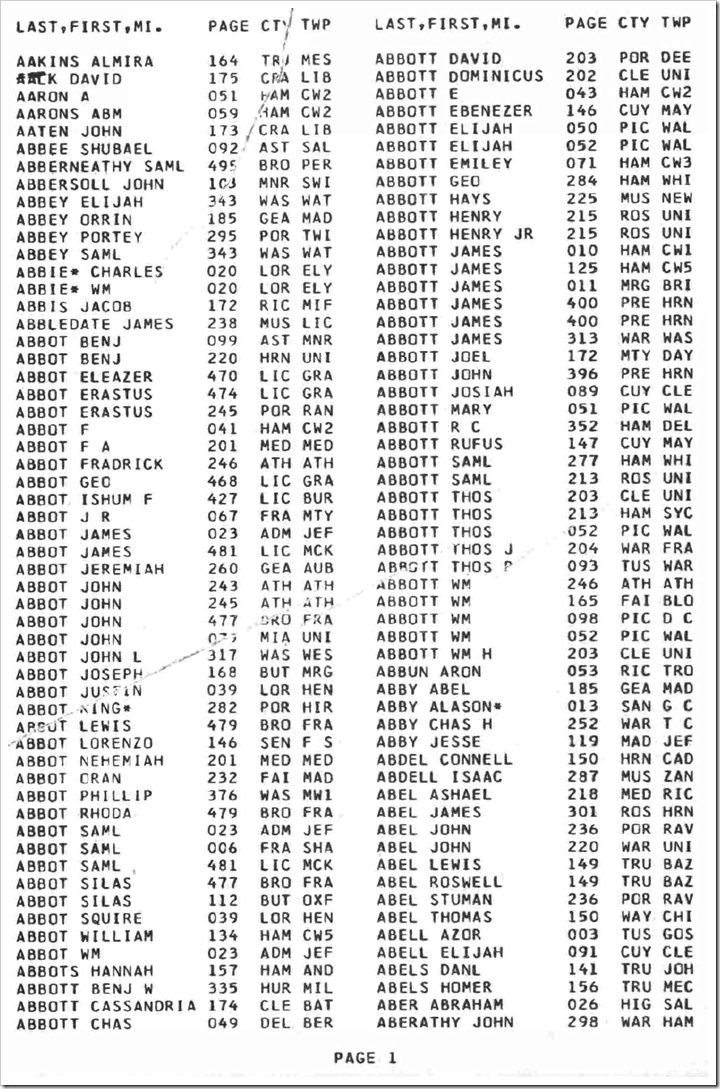
I believe the first large-scale effort to index the U.S. censuses was made by Ronald Vern Jackson and Accelerated Indexing Systems (AIS) in the late 1970s through the early 1990s. I believe he indexed heads-of-households only, and just the names, so the amount of work was more manageable. These were true indexes, not the census databases we use today. Where did he get his keyers? Does anyone know? He published the indexes as bound books of computer printouts.

A page from the 1976 AIS index to the Louisianna 1820 census
Ronald Vern Jackson, et. al, eds., Louisiana 1820 Census Index (Bountiful, Utah: Accelerated Indexing Systems, 1976), 1.

According to Thomas Jay Kemp’s The American Census Handbook (Wilmington, Delaware: Scholarly Resources, 2001), here are the publication years for a sampling of states:

Census Publication year
1790 New York: 1990
Ohio: 1984
1800 Ohio: 1986
Vermont: 1976
1810 Virginia: 1978
1820 Iowa: 1977
Indiana: 1976
1830 Indiana: 1976
1840 Iowa: 1979
1850 Iowa: 1976
1860 Iowa: 1987
North Dakota: 1980
Virginia: 1988
Washington: 1979
1870 Iowa: 1990

Notice all were done after the widespread availability of computers.

In 1984 AIS published on microfiche what it had completed. Ancestry.com published AIS indexes online in 1999.

Some limited scope indexes were published earlier. For example, in 1964 the Ohio Library Foundation published an index of the 1830 Ohio census. This, too, was a computer printout. Volunteer family historians extracted the names of heads of households onto index cards. The cards were keyed onto punch cards, which were then sorted by an IBM mainframe computer.

A page from the Ohio Library Foundation's 1964 index of the 1830 Ohio census
Ohio Library Foundation, ed., 1830 Federal Population Census Index, vol. 1 (Columbus, Ohio: Ohio Library Foundation, 1964), 1.

So the answer to your question is, that indexing the 1860 census took about a decade and was finished around 1990.

Signed,
---tai

Thursday, August 27, 2015

The Future Will Bring Automated Indexing Tools – #BYUFHGC

Jake Gehring presenting at the 2015 BYU Conference on Family History and Genealogy“It’s not that we don’t like our [indexing] volunteers,” said Jake Gehring. “We would just rather have them work on things that only [humans] can do.” Jake is director of content development for FamilySearch and presented at the BYU Conference on Family History and Genealogy last month. This article is the third and last article about his presentation. In the first article I reported on Jake’s premise that FamilySearch Indexing is not keeping up with the number of records FamilySearch is acquiring and additional means are needed. In the second article I reported about two of those means: increasing the efficiency of human indexers and working with commercial partners. In today’s article I will report on the third means: increased automation via computers.

In the third part of his presentation, Jake spoke about “the really far-out stuff, HAL9000 kind of stuff.”

Jake showed a screen shot that we saw in Robert Kehrer’s keynote. (See “Kehrer Talks FamilySearch Transformations” on my blog.) The screen showed a color-coded obituary.

Obituary with parts of speech color coded by FamilySearch automated obituary indexing system

FamilySearch trained a computer to identify the different parts of speech. They trained the computer how to discern meaning out of a bunch of words. Notice in the example above that names of people are identified in dark green, places in brown, dates in dark blue, relationships in salmon, events in pale green, clock times in a steel blue (or would you call that a dark sky blue?), organizations in red, and buildings in goldenrod (or would you call that a mustard?).

They basically teach the computer to read. The computer is willing to extract a lot more detail from an obituary than a volunteer can easily do. And it can work really, really fast. For obituaries, computers can do in about a week and a half what it takes all of FamilySearch’s volunteers three and a half years to do. This is why in a few weeks FamilySearch is going to stop having volunteers index the current obituary project. In fact, FamilySearch has already published about 37 million obituaries this way. You may already have found and used an obituary that was indexed by a smart computer.

This applies to obituaries published since about 1977. Since that time, most obituaries have been published and stored digitally. Pre-1977 it looks a lot differently. Because the obituaries are not already digital, it is a pretty nasty OCR problem. [OCR converts the printed page to text so that the computer can subsequently try to make sense of it.] The problem is so severe, computers can recognize only about half of the words in pre-1900 newspapers.

If you were at RootsTech you may have seen the last thing Jake showed. A company named Planet entered its ArgusSearch into the Innovator Challenge. ArgusSearch is a system that reads the handwriting of documents that have not been indexed. You type in something like “Steinberg” and the program shows some records that might match that name. It won’t find all the matches. And it may return some results that aren’t matches. But this is still useful. This technology is still young, but an application like this is likely to hit real life in the next ten years.

Planet's ArgusSearch automatically read handwritten names in census records without an index.

Jake summarized by saying that while indexing is going really well—never better—unfortunately, it is just not good enough to give us all the records you need. [FamilySearch does not index all the records they acquire.] “We need to do much better. It’s not that we are not quite there; we are way behind and getting further behind every year,” he said. There are three areas that FamilySearch needs to utilize. FamilySearch needs to increase the efficiency of its indexing volunteers. FamilySearch needs more help from for-profit publishers who can bring more resources to the table. And FamilySearch needs to use computer technology to make images searchable with little or no human intervention.

“It’s an exciting time to be alive. Can you imagine the explosion of document availability once we make a bit more headway in a few of these areas?”

Jake took a couple of questions:

Q. How easy is it to use tools like Google Translate to translate Spanish records?

A. Google Translate is better at modern, generic words. If you type in the text of a letter, you would be able to get the gist of it, but it may not handle archaic words or words specific to a vital record. As long as you know a small set of terms, you can usually get by without a computerized translator. There is no magic tool currently available.

Q. Why do we sometimes key so very little from a record? While we have someone looking at the document, shouldn’t they be extracting more?

A. Because we publish both indexes and images, we index the minimal amount necessary to find the image. Why index something that no one will ever use in a search? Cook County, Illinois death certificates are an example where we indexed something that didn’t need to be. We indexed the deceased’s address, but who will ever search using the address? Sometimes we don’t get it quite right, but that’s the general principle.

Q. When will we be able to correct published indexes?

A. We’re starting now after ten years of being in the top three requested features, we’re starting to implement the feature to allow you to contribute corrections. We are rapidly approaching the point when this will be available. I’m not really authorized to say “soon,” but we have our eyes on that feature.

Wednesday, August 26, 2015

FamilySearch Should Increase Indexing Efficiency and Utilize Partnerships

Jake Gehring presenting at the 2015 BYU Conference on Family History and GenealogyFamilySearch is not keeping up with indexing the records it digitizes and improvements in three ways could help fix this, according to FamilySearch director of content development, Jake Gehring. Yesterday I presented the first part of my remarks about his presentation at the 2015 BYU Conference on Family History and Genealogy (#BYUFHGC). Today I’ll present the second part, covering the first two of the three ways, increasing efficiency and partnering. Tomorrow I’ll present the third way, increased use of computerization.

Today’s FamilySearch Indexing (FSI) system is somewhat inefficient. FSI primarily utilizes a double-blind indexing methodology, sometimes described as A+B+arbitrate. Two indexers independently index a batch of records. If there are any differences, even one letter in one record, the entire batch is sent to a third person to arbitrate between the two values, or supply a value of their own. It turns out that 97% of all batches have at least one difference, even though what is keyed is the same for 70% of the fields. As a result, almost all records are looked at by three people. There’s a good argument that that is wasteful. For certain kinds of records and certain kinds of people [and certain kinds of fields, I might add], only one keyer is sufficient. The accuracy doesn’t get any better when involving two more people. FamilySearch has recently switched to single keying for newspapers in the last year since reading typeset material can usually be done without error. You wouldn’t want to do this for certain types of records or for beginning indexers.

A more efficient methodology is referred to as A+review. One person keys the information and a second person reviews what is keyed. All the reviewer does is indicate whether the information is correct or not. This could easily be done, even on a cell phone. This method is about 40% more efficient than the double-blind methodology because FamilySearch knows when a record needs to be keyed a second time. FamilySearch is actively working on this kind of methodology to increase the efficiency of indexing.

Jake showed three, entirely new, experimental types of indexing. Some do not even have working prototypes: keyboardless indexing, free-form indexing, and casual “micro-indexing.”

Jake showed an indexing system that allows productive use of devices without keyboards, such as smart phones. If you’ve used photo recognition in Photoshop, you have seen the paradigm before. He showed a slide showing 12 snippets of a name, such as “Henry.” (See my version, below.) These had been read from documents by a computerized handwriting recognition system. But since computers aren’t too good at reading handwriting, it presents its results to a person for verification. The person marks any that the computer got wrong. Where the computer had a good second guess, it could present that as well, allowing the person to select an alternate name, such as “Kerry.” For pre-printed forms, this works great and allows easy indexing on devices without keyboards, such as cell phones.

Snippet of name indexed as Henry

Shippet of a name that was indexed as Henry or Kerry Snippet of name indexed as Kerry
Snippet of a name that was indexed as Kerry Snippet from a page wherein one name was indexed as Kerry Snippet of a name that was indexed as Kerry
Snippet of a name that was indexed as Kerry Snippet from a page wherein one name was indexed as Kerry Snippet from a page wherein one name was indexed as Kerry

Snippet of a name that was indexed as Kerry

Snippet of name indexed as Henry Snippet of a name indexed as Kerry

Jake showed the FamilySearch Pilot Tool, another indexing system for free-form indexing. It is currently live, as a pilot. A large portion of the screen is a browser showing a record on FamilySearch.org. Along the right side is a pane where an indexer can enter names, dates, and places extracted from the document. (See the screen shot, below.) A person would use the tool to index any record that they care about and a short time later the record would be searchable. You wouldn’t have to ask for anyone’s permission. You wouldn’t have to index all the names. Anyone could take any collection desired and do some indexing. This tool is in pilot right now. FamilySearch is very interested in tools that let you index as you go. To join the pilot, send Jake an email. (I see someone has also posted the link online. See “FamilySearch Pilots Web-Based Indexing Extension” on the Tennessee GenWeb website.) There is no arbitration. If you care enough to index the image, you probably care enough to be accurate. But that supposition is something yet to be validated.

The FamilySearch Pilot Tool for indexing - Click to englarge

“Micro-indexing” could be used to make images more usable. It would be nice to be able to browse unindexed images easier. FamilySearch is very interested in an upgrade to the current browse experience. Jake showed an animated artist’s rendition of a tool, reminding us that this is just a research and development idea.

FamilySearch is interested in making it easier to find records in images that have not yet been indexed.

In micro-indexing the system might ask you really simple questions, like, “What kind of record is this?” and have you click the record type. By asking volunteers to do tiny tasks, FamilySearch might be able to gather information to make browsing images easier to find my record type, locality, and time. Just because FamilySearch doesn’t have the time to index the images, doesn’t mean they can’t be made easy to browse.

This is a mock-up of what a micro-indexing tool might look like.

In addition to talking about increasing the efficiency of indexing, Jake talked about partnering. FamilySearch is fine with the concept of trading data with other companies. FamilySearch provides images and the partner creates indexes. They may even get exclusive use of the indexes for awhile. For example, a lot of Mexico church and civil records are being indexed right now by Ancestry.com. We all get the value of it eventually. FamilySearch has similar projects going on with Findmypast (I didn’t catch the projects names) and MyHeritage (Danish census and church records, and Swedish household names). This increases the rate of indexing by bringing more indexers to the table.

Tuesday, August 25, 2015

FamilySearch Indexing Not Keeping Up – #BYUFHGC

Jake Gehring presenting at the 2015 BYU Conference on Family History and Genealogy“FamilySearch just isn’t indexing records fast enough,” said Jake Gehring. “If that is the case,…then what do we do about it?” Jake is director of content development for FamilySearch and presented at the BYU Conference on Family History and Genealogy last month. Jake’s presentation was titled “FamilySearch Indexing, Robo-keying, and Partnering, Oh My!”

In the last little while Jake has been involved in some research and development, which is really rewarding. It’s fun to work on some things that may become real someday. He emphasized to me that these things may never become real, so keep that in mind as you read.

Back in the old days an index was that thing in the back of the book, not some multi-billion name index you can search from your home. “We index records so that they get used more,” he said. We gather records for the same purpose and have been doing so since 1938, he said. FamilySearch has about 280 cameras, roughly 40 in the United States and the rest abroad.

There have been huge improvements in the technology for capturing records and making them available. Jake showed an example, a Weber County, Utah marriage license. It is one of the rare collections that FamilySearch has captured twice. A scan from microfilm looks like this:

Weber County, Utah marriage license scanned from microfilm

FamilySearch went back recently and captured the records digitally, in color.

A Weber County, Utah marriage license that was digitized in color

Granted, viewing a record scanned from microfilm is often less clear than viewing it on a microfilm reader, but you can see the huge improvement.

FamilySearch does things so the captured images are easier to use. One of the things they have done from early on with books and microfilm was catalog them. A catalog entry can specify locations, authors, subjects, and so forth. For family histories, they might put in a list of surnames, but that was about it. You had to know what you were looking for to find the records you needed.

When you think about what we do now, things are quite a bit different. Indexes contain full names and direct you to individual images. We index (as FamilySearch calls extracting) more than names. We also capture dates and places and relationships. By doing this, not only can you search for them, but FamilySearch can recommend records to you. FamilySearch calls these hints.

There is a range of things that FamilySearch can do to make records more accessible. Some can be done with less cost than others. Jake showed a diagram showing treatments that can be made to a collection. With added accessibility comes added cost. Here is my version of his diagram, including my own definitions:

Increasing the usability of a digitized genealogy record increases the cost of publishing it.

Definitions:

  • catalog entry: a single entry for an entire collection
  • film notes: individual notes for each film
  • light waypointing: dividing the images of an entire collection into a few groups containing a large number of images
  • heavy waypointing: dividing the images into more specific groups with fewer images
  • light indexing: extracting a few, basic pieces of information from an image, perhaps just a name or a name and date
  • heavy indexing: extracting most genealogically significant information
  • lineage-linkage: using the record extracts to reconstruct families with links between parents, spouses, and children

Resources are limited. The more work invested in collections, the easier it is to use them, but the number of collections that can be published decreases. “The truth is that it is quite expensive to make collections very, conveniently searchable,” Jake said. “But it is still worth doing. In fact, we want to do it faster.”

The Church of Jesus Christ of Latter-day Saints, FamilySearch owner, has been indexing for a long time in one way or another.

  • 1922 – Church employees started extracting information for the TIB, an early predecessor of the IGI. [I added this bullet point.]
  • 1961 – Church employees started extracted names from historical records at Church headquarters.
  • 1977 – Church members started extracting records at Church buildings via the stake records extraction program.
  • 1986 – Church members began the family records extraction program (FREP) which used data entry by members using home computers.
  • 1994 – The stake and family record extraction programs were consolidated.
  • 2006 – FamilySearch began using the current FamilySearch Indexing tool, utilizing Church members and the general public.

Jake showed the current application, FamilySearch Indexing. He then showed the new, browser-based tool that is now being rolled out. The tool allows the data entry pane to be positioned in various places, such as the left of the screen or the top. One data entry mode, when field positions are well defined, allows data entry overtop of the image itself.

Jake showed statistics of the number of indexing volunteers since 2006.

FamilySearch Indexing Volunteers, by Year

This graph should be encouraging to everyone. Compare this to the number of people—probably 15,000—indexing the 1880 census some 20 to 25 years ago. The big explosion in indexers in 2012 was because of the 1940 census. This year FamilySearch is on track to have more volunteers than for the 1940 census project.

“It is a wonderful, exciting program to be a part of. You have the satisfaction of knowing that you and 350,000 of your closest friends are all working together to make documents more usable,” Jake said.

He compared the indexing project of the 1880 census to that of the 1940.

1880 US Census Index

1940 US Census Index

Index only

Index and images

56 CD-ROMs

Web

50 million records

132 million records

17 years to complete

150 days

But this amount of indexing is not good enough.

“Do the math,” Jake said. FamilySearch captures about 150 million images in the field each year. FamilySearch is also scanning the microfilm out of the Granite Mountain Record Vault. This year FamilySearch expects to scan about 300 million images. On average there are four to five records per image. That amounts to about 2 billion records digitized just this year. And Jake expects to have the same amount next year. But we are only indexing about 250 million per year. That’s only 12% of the records “brought in the door.”

“Now do you see why I say, we’re not going fast enough?”

Additionally, FamilySearch is trying to increase the number of cameras. Then they will be even more in the hole. Since 90% of indexing is English, the situation is far worse for other non-English records.

“If we want genealogy records to be more helpful more quickly to more people, we need to look at other ways of indexing,” Jake said. He spoke about three ways that might accelerate the number of indexed records: efficiency, collaboration, and computerized assistance.

Tomorrow I’ll report on what Jake said about increasing efficiency and using collaboration. Thursday I’ll finish reporting about his presentation.

Thursday, August 20, 2015

Lisa Elzey #BYUFHGC Presentation, Part 2

Yesterday I wrote the first part of my report about Lisa Elzey’s presentation at the 2015 BYU Conference on Family History and Genealogy. She titled her presentation, “Ancestry.com: How the Records Tell the Story.” Today, I continue with part 2.

3. Analyze the Details

Timelines, dates, and historical events can be used to analyze the details.

Lisa used an Excel spreadsheet for one example timeline. She had columns for dates, places, comments, and sources. It looked like some of her sources hyperlinked right to the sources. The new Ancestry has a built-in timeline which can be helpful.

Analyze why dates are important. Compare to calendar events, major holidays, community events, and seasons. Compare dates to those of historical events. In the new Ancestry, Life Story includes historical events.

Always ask yourself why your family members did what they did. Look for changes, such as disappearance, immigration, change in economics, and first-time occurrences such as literacy and property ownership. Look for differences, such as religion, ethnicity, language, economic standing, race, and age. As an example, Lisa showed the family of John and Tersa Flynn in the 1900 census in Seattle. John was a master mariner. His oldest son, George, was born at sea. The next two children, Maud and Marguerita, were born off the coast of Peru. Next, Evelin was born at sea, Edeth in Calcutta, and Henry at sea. The last child, Grace, was born back in John and Tersa’s native England. Do you see what probably happened? Apparently, he took his entire family on ship. Eventually they went back to England before Grace was born. From there they retired in Seattle at a time when many from England were going there.

Jno Flynn and family in the 1900 census courtesy Ancestry.com

4. Tell the story

Lisa showed us a case study about Leland Wright who appears in the 1930 U.S. census in Miami, Dade, Florida with his family, Leath, Juanita, Cora, George, and Roy. If I recall correctly, the case study arose out of what initially appeared to be a simple question from a user. And if memory serves, the question was: What ever happened to Leland? What appeared to be a straightforward question evolved into a tale so fascinating, Lisa is writing it up. Watch for the story coming soon to the Ancestry Blog.

Leland Wright and family in the 1930 U.S. census, courtesy Ancestry.com

5. Purpose + Audience = Project

Lisa quoted from the results of an Emory University study. “Children understand who they are in the world not only through their individual experience, but through the filters of family stories that provide a sense of identity through historical time,” says the study. (See “Children Benefit if They Know About Their Relatives, Study Finds,” Emory University [http://www.emory.edu : accessed 15 August 2015], path: News & Events > News Releases > 2010 > Archives > March. The link to the paper is no longer functional. See a PDF copy at “History Relevance Campaign,” Public History Commons [http://publichistorycommons.org/history-relevance-campaign : accessed 15 August 2015], hotlink titled “‘Do You Know…’ The Power of Family History in Adolescent Identity and Well-being.”)

6. Share the Story

Lisa had a video conference with the great-grandson of James Wright and shared the documents and what she had learned about the Wright family. The results were pretty touching. Watch for Lisa’s blog article to hear the rest of the story.

To ask for a copy of the flyer from Lisa’s class, write conferences@ancestry.com. Some Who Do You Think You Are? episodes are available for free on the WDYTYA website. Seasons four, five, and six are available for purchase on YouTube or iTunes.

Wednesday, August 19, 2015

Lisa Elzey Talks WDYTYA and Story Telling - #BYUFHGC

“A lot of the questions I get about my job are about how we do the research for WDYTYA,” said Lisa Elzey at the 2015 BYU Conference on Family History and Genealogy. In her presentation, “Ancestry.com: How the Records Tell the Story,” she not only shared some of the details, she shared how we could apply the principles in our own research. Lisa explained the process which Ancestry employees lovingly call the “Who Do You Machine.”

Ancestry.com uses a "Who Do You Machine" to crank out an episode of WDYTYA.

Lisa Elzey teaches a session at the 2015 BYU Conference on Family History and Technology.Casting is not done by Ancestry, but by Shed Media and The Learning Channel. Some stars come through referrals. You may have noticed that sometimes when a star is featured, you’ll see a costar or a friend in a later episode. For example, Kelly Clarkston is the daughter-in-law of Reba McIntire.

Some celebrities know a lot about their ancestors and some know very little. Once stars are selected we start building their tree, Lisa said. They use all of the basic records that can frame a story. Notice on the machine diagram, below, that some stars fall out. Sometimes it is because of scheduling. Sometimes they’ll come back later. Sometimes the research doesn’t get past a certain point.

After we get a solid foundation of a tree, we start exploring it, Lisa said. We look for compelling stories, such as Christina Applegate’s story about her father. “Beautiful episode,” Lisa said. Once we’ve found what we think is a compelling story, we start crafting the story together. To fill 42 minutes we need about 17 documents.

Once the story is done, then we film, she said. This can be tricky if the star is in a current project.

When that is done, you get the awesome show, Who Do You Think You Are.

You can use the same model as the Who-Do-You Machine to tell your own story.

1. Do the research.

  • Use primary source material whenever possible to authenticate your story. It’s like the difference between fresh peas and green pea soup.
  • Use census records. They create an arc of an individual’s life. They give you potential story clues. Plus, they are easy to find and use.
  • Use birth, marriage, and death records. They help establish relationships and give you even more potential story clues.
  • Then take a deeper dive. Use records such as pension files, newspapers, city directories, grave stones, deeds, probate (Ancestry has a huge collection coming out quite soon), histories, [and many more that I didn’t write down quickly enough].
  • Research complete families. It is like having trees versus poles. Everything that happened in that family affected your tree. I have found amazing stories about my ancestors by researching their entire families, Lisa said.

2. Gather and organize your information.

You will hurt your ability to find stories if you aren’t building a family tree. You also need to keep a research journal and keep a simple documents folder. Adopt a naming convention for images, such as: surname-first name-birth year-document year-document type. If you’ve inherited a messy stack of research, start over, realizing you’re not starting from scratch. Learn about and use the Genealogical Proof Standard. I recommend Tom Jones’s book, Mastering Genealogical Proof, she said.

Lisa uses the Ancestry Shoebox app. When she visits a relative, if she sees a photograph see doesn’t have, she takes a photograph. It’s easy to add notes and attach it to your tree.

The new Ancestry website has a new Sources column. It makes sources easy to see. Clicking a fact shows visually what sources are attached to that fact. It also has a new Notes tool panel. It’s helpful for abstracts, journaling, and many other functions.

As an aside at the beginning of her presentation, Lisa mentioned the What’s New or Updated collection list on Ancestry.com. At the top of the list was “U.S., Social Security Applications and Claims Index, 1936-2007.” A nice thing about the page is that along the side it lists what collections are coming up soon. Keep going back, because Ancestry is constantly adding new records.

Tomorrow I’ll continue my article about Lisa’s presentation.

Tuesday, August 18, 2015

Ron Tanner Fields Questions at - #BYUFHGC

Ron Tanner at RootsTech 2015Ron Tanner, product manager for FamilySearch Family Tree fielded questions during his presentation, “FamilySearch Family Tree Road Map,” at the 2015 BYU Conference on Family History and Genealogy. Last week I wrote about his presentation. See “Ron Tanner Discusses Family Tree Road Map at - #BYUFHGC.” Today, I’ll present the questions and answers. These are not exact quotes.

Q: Performance of FamilySearch.org is so bad on Sunday, it makes us want to stop doing genealogy. What are you doing to fix it?

A: The trick is, don’t do all your genealogy on Sunday. Seriously, we don’t want to discourage that. We’re working very hard to get off of New FamilySearch (NFS). Family Tree was designed for 10 times the capacity. Now we are running at 18 times. We are converting every system that we have to a new database and new technologies in order to make the site more responsive, no matter what day you come.

Q: Are you going to preserve the combine page of New FamilySearch?

A: We’re getting rid of NFS.

The usual intent of users of that page arose from the belief that a person miscombined. In reality, the machine did a lot of combining. I apologize for our past sins. People assumed they’d see their past contributions to Ancestral File and Pedigree Resource File, so we preloaded them. Since that resulted in lots of duplicates, we ran computer algorithms to combine them. That’s where most of the bad combines happened.

[Another use of the combine page was to see the original information. There is a better way to do that.] What was NFS made up of? The IGI, Ancestral File, Pedigree Resource File, and Church [of Jesus Christ of Latter-day Saints] membership records. That information [except membership records] is now sitting under the Records section of FamilySearch.org. We are planning on adding sources for Ancestral File and Pedigree Resource File like we’ve done for the IGI.

There are generally two situations causing issues today: someone working from old GEDCOM files or two lines incorrectly coming together. If you find an incorrect ancestor, correct it. If two of you using the same [PID for two] persons, create a new person with your ancestor’s information. Do this only when you find two lines combined.

We will not preserve the combine page of NFS. We will not make a copy of it. It would take 20 terabytes of data if we made it available as another tree.

Q. Are you through changing the colors of the icons?

A. I can neither confirm nor deny that we are done changing anything. Seriously, we wanted the hint icon to pop out. Blue stands out more.

Q. Should we dismiss duplicate hints?

A. When FamilySearch captured records, sometimes they microfilmed a record twice. Accept both so you don’t mess up the hinting algorithm. When you indicate a record is not a match, when actually it is but is just a duplicate, you confuse the system. Specify Not a Match only when it is truly not a match.
[Ed.: Duplicate filming s is probably not the source of the duplicate records. The common scenario is a record that was filmed once, indexed once, but migrated twice. The two migration paths, EASy and ODM, preserved different information. Consequently, FamilySearch decided to publish both until such time as the two could be detected and merged.]

Q. When will there be a new handbook for teachers?

A. They are expensive and must be translated into all FamilySearch languages. We will start to work on something that will be available online. Until then, look for help online.)

Q. My mother died last year. Duplicates of her record keep popping up in the Tree. What should we do when family members die?

A. You have a copy. Mark them deceased. It will become public. A bunch of duplicates can pop up if relatives do the same. Merge them together. By the way, there is an issue you should know about. If there is a member of the Church who has been deceased for some time but whose record doesn’t show up, call support. There has been an issue in Family Tree for the last ten months or so. If the clerk enters death information on their Church membership record, they aren’t marked dead in Family Tree. We are currently rewriting the membership system interaction to move it from NFS to Family Tree.

Q. A lot of work from the past doesn’t have sources. Should we add sources?

A. Absolutely.

Friday, August 14, 2015

Last Day of “Fuel the Find”

Today’s the last day to participate in the FamilySearch Worldwide Indexing Event, “Fuel the Find.” The goal is to have 100,000 people index a record during the week. The current count of participants as I write this is 74,476. If FamilySearch is going to reach the goal, we all need to step up.

Visit https://familysearch.org/indexingevent2015 for more information and to participate.

What does it mean to "Fuel the Find?"

Thursday, August 13, 2015

Ron Tanner Discusses Family Tree Road Map at - #BYUFHGC

Ron Tanner at RootsTech 2015Ron Tanner, product manager for FamilySearch Family Tree spoke to the topic “FamilySearch Family Tree Road Map” at the 2015 BYU Conference on Family History and Genealogy. Perhaps because of his no nonsense presentation style, attendees also peppered him with a lot of tough questions. Today I’ll present his prepared material. Next week I’ll share the questions and answers.

FamilySearch Family Tree is different from any other tree on the Internet, Ron said. The Tree is open. Anyone can fix errors. Someone new reaps the benefits of all the work that has come before. Some studies say as much as 80% of research is duplicate work. We are running about 500 thousand new persons added to the Tree every week. There are now about 1.1 billion people in the tree. The duplication rate is monitored very closely.

In 2015 FamilySearch has added many new features.

Tip tray. Down in the bottom right hand corner is a light bulb icon. Click the icon and a tray slides in from the right with tips for using the page. Not every page has one.

Landscape tree view. FamilySearch put in pictures and marriage information. They get complaints that because of these additions users cannot see as many people on screen. Click Show in the upper right corner to turn these on and off. If you turn everything off, you can see more than before these changes.

Dismiss suggestions. Suggested record hints can be dismissed. Click “Not a Match.” This dismisses it for everyone.

Ron shared features planned for Family Tree.

User messaging. Collaboration in Family Tree is extremely important. One change can affect hundreds of people working on that line. But some people can’t be contacted because they are not comfortable sharing their email address. FamilySearch is very close to releasing a messaging system that allows users to exchange messages without revealing email addresses. The messaging system is currently available on beta.familysearch.org. Ron invited attendees to get a friend and send some messages back and forth. To send a message, go to a conclusion, click on the name of the contributor. At the bottom of the person’s information is a link to send a message. The system adds a link to the person in question. You add a message. When the recipient logs onto FamilySearch, at the top they will see the number of messages they have received, but not read. Click messages to go to your Inbox. Both sent and received messages are shown in the Inbox, but you can delete them.

Stop synchronizing with NFS. Family Tree synchronizes with New FamilySearch (NFS) because NFS contains some code not yet implemented in Family Tree. Once synchronization between the two has ceased, there will be no issues preventing merging of duplicate records, there will be no automated contributions attributed to FamilySearch, and performance will improve.

Impendence features. FamilySearch is working on ways to discourage or impede improper changes, without preventing proper ones. Here are several under consideration:

  • Allow you to delete a person only if you are the creator and only contributor. Otherwise, you must submit a support request.
  • Show a list of all those watching a person. List the contact names. The idea is that a user, seeing all the people watching a person, will think twice before making changes.
  • Provide faster change notifications, perhaps daily or immediately.

Sharing of living persons. Today, persons in the tree exist in either a public space or a private space. Each user has their own private space containing all the living persons they created or FamilySearch created for them. When you change a living person’s record, it changes only the copy in your private space. No one else sees the changes. FamilySearch is planning to create a third type of view: a shared view. You create another space and invite others to see it. Participants can be given moderator, read/write, or read-only access. Participants can put stories and photos on the living family members in the shared view. Everyone sees everything in the shared view.

Hinting on mobile app. Users of the Family Tree mobile app will be able to see and accept hints.

Wednesday, August 12, 2015

Book Your Conference Hotels Early

NGS 2016 Family History Conference#NGS2016GEN - I see that the NGS 2016 conference website is now live. Registration doesn’t open until 1 December 2015, but as the website states, “it is not too soon to think about hotel reservations.” The hotel adjacent to the conference center and the most inexpensive hotel both sell out well before the conference.

The conference will be held 4-7 May 2016 in Ft. Lauderdale, Florida. For more information, about accommodations, see http://conference.ngsgenealogy.org/accommodations/.

#RootsTech - Book your RootsTech hotel soonRootsTech 2016 is even sooner and is also coming fast. Between skiers (Salt Lake ski resorts are really close to the city), FHL patrons, attendees of other conferences at the Salt Palace, and the huge crowd drawn by RootsTech, adjacent hotels fill quickly. RootsTech will be held 3-6 February 2016 at the Salt Palace convention center in Salt Lake City. Registration opens 15 September 2015. While maintaining the number of classes, RootsTech is shifting its schedule to begin with two classes Wednesday afternoon and end with two classes on Saturday. This allows you to fly in Wednesday morning and fly out Saturday evening, thus saving one hotel night.

Speaking of hotels, for more information about RootsTech lodging, see http://rootstech.org/attend/hotels.

Tuesday, August 11, 2015

Ancestry.com Hiring Shows Future Plans

Ancestry.com careersI happened across Ancestry.com’s job listing site. According to one job listing, Ancestry’s employee count is 1,400. Many of the job openings look like they are expanding. And they reveal some of Ancestry’s future plans.

They are hiring scanning technicians in various places: Honolulu, Hawaii; Richmond Virginia; Toronto, Ontario; and Dallas/Ft. Worth, Texas. One can only guess what records they are acquiring at those locations. Another set of scanning technician listings is for scanning technicians for two different shifts in Provo, Utah; a third shift in Provo; and a fourth shift in Provo. It’s apparent that Ancestry is scanning records in Provo from 6 am to 10 pm! These listings also indicate Ancestry is utilizing part time labor in the Provo area, which is abundant due in part to the presence of 53,000 students at two large universities.

The job listings also reveal that “while most of Ancestry's subscribers are in the US, the company has a strong presence in the UK, Canada, and Australia, and is in the process of a large international expansion into Eastern Europe and Mexico.” They are hiring a marketing manager for Mexico. They are hiring a senior manager for global marketing campaigns. Other international hires are for one employee in Munich, Germany and two in Dublin, Ireland.

As a former software engineer at Ancestry’s Provo location, I find it interesting that they are expanding their software development at their San Francisco office with ten open positions, including two Android developers.

Their ProGenealogists division seems to be doing well. They have open positions for a genealogist account manager, an associate genealogist, a genealogist research manager, and an assistant genealogist.

A variety of positions show Ancestry’s interest in expanding their direct to consumer DNA and health offerings: an epidemiologist to manage large genetics studies, a director of genomics, a clinical genomics scientist to do computational algorithms, a vice president of business development to lead licensing and partnerships, a senior data scientist, and various software development positions explicitly for AncestryHealth.

With hackers accomplishing major incursions in companies around the world, Ancestry is hiring a Chief Information Security Officer as well as a senior engineer for information security. Given Ancestry’s possession of customers’ intimate DNA data, this seems prudent. Thank you, Ancestry!