Wednesday, February 11, 2015

FamilySearch Opens First Discovery Center at #RootsTech/#FGS2015 (#RTATEAM)

Last night I was treated to an advanced showing of a FamilySearch Discover Center—a new type of family history center. “The Family Discovery Center offers…families simple yet powerful in-person experiences to discover their heritage and have their hearts turned to their ancestors,” said Merrill White. White, a FamilySearch spokesperson, made the remarks at the FGS conference in 2013. (See “Über Cool Family History Center of the Future Shown at FGS 2013.”) This first Discovery Center is a test facility located in a room adjacent to the FamilySearch Center on the first floor of the Joseph Smith Memorial Building. FamilySearch is testing and refining the concept here.

I visited the center with several other social media writers. The hope is that entire families will be their chief audience, although youth groups are welcome, too. Upon arrival, I was given (translate: loaned) an iPad with custom software and magnets for docking at various stations. The experience is designed to be personalized for each visitor. That personalization began with a prompt to login to my FamilySearch account and take a selfie. The iPad remembered as I visited each station, accumulating facts and photos to help me remember my visit.

Several stations have large touchscreen displays next to the docking station. At one station, the screens presented interesting, but generic facts about my given name, my surname, and my birth year.

FamilySearch Discovery Center - Station 2? Discovery Center Name Frequency

Another station tapped into FamilySearch Family Tree to get information about my ancestors. This station was phenomenal. It showed migration patterns, percentages of national origin, photos, and stories. If you have a richly populated tree on Family Tree, this station is fantastic. Navigation was easy, for the most part, although two-hand gestures took me some getting used to. (And the software kept wanting to flip my head upside down. That might have been just me. Non-cartoon characters didn’t seem to have that problem.)

FamilySearch Discovery Center - Ethnicity pie chartFamilySearch Discovery Center
FamilySearch Discovery Center - Migration Map

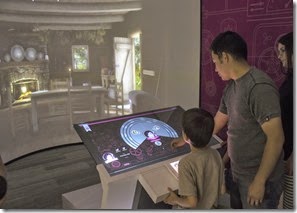
They called another station “the time machine.” The station projects on image of the inside of a 19th century home onto a large, curved screen. I brought up my fan chart on the large, starship worthy console and clicked on an ancestor. The image animated, showing year-by-year how the room would have looked, until it reached the birth year of my ancestor. (In the photo, below-left, the console obstructs half the screen. Sorry about that. To steady my hands, I had to rest the camera on the console.) I clicked on the photo count for my ancestor and the station projected them onto the big screen.
FamilySearch Discovery Center - Time Machine
FamilySearch Discovery Center - Time Machine 

FamilySearch Discovery Center - Time Machine

This station would be pretty cool if the operation was more intuitive and if it didn’t suffer from an unresponsive interface. It took me five minutes to stumble upon the best way to use the station. And I had a hard time getting it to reliably respond to my touches.

The period-costume photography booth was a hoot. The camera takes a picture of your face and superimposes it on a figure in period/cultural dress. The booth has but three walls, allowing your family to gawk and laugh at you as you put your face onto a gladiator, a Maori warrior, or a mariachi musician.

FamilySearch Discovery Center - Photo in historic costume FamilySearch Discovery Center - Photo in historic costume 
FamilySearch Discovery Center - Photo in historic costume

I didn’t try the personal or family video recording booths.

FamilySearch Discovery Center - Video Recording Booth

At the conclusion of the visit, we docked our iPads in front of a large tree. The station projected our facts and photos onto the tree.

FamilySearch Discovery Center - Photo Tree
(Oops. Paul, Pat, and Gordon: I forgot to ask. May I have permission to publish your photos? :-)

After I returned my iPad, the Discovery Center emailed those same images to my inbox.

Email and attachments from the FamilySearch Discovery Center

I admit I was dubious when discovery centers were announced at FGS two years ago. It sounded really expensive to develop. Some of what they hoped to do didn’t seem feasible. For visitors without a tree, I thought the experience would be lame. I thought about the many museums I’d visited with broken technology. (I gather it is really costly to maintain exhibits based on technical gadgetry. In three or four years, the manufacturer has moved on to new things and you can’t get parts or support. After a few years, the gadgets break down so frequently, museum owners leave them to rot.) And I thought a visit would have little ability to spread the genealogy bug.

I was glad to see survey questions on the iPads, before and after our visit. FamilySearch appears intent on measuring the effect of these discovery centers to see if they are worth the expense. I don’t know if they will, but since a full-experience includes logging into your FamilySearch account, FamilySearch could compare your degree of involvement before and after the visit. They can see if the centers are increasing engagement in family history. I’m glad to see that FamilySearch isn’t rushing into this blindly.

I remember as a little boy, our cub scout pack got up very early and made the long trip to the big city. How the city folk must have gawked at a gaggle of little guys stumbling on and off escalators, having never seen one before in our entire lives! We visited a planetarium. With wonder and awe my eight year old eyes saw scientific gadgets and gizmos. That was a defining moment in my life. It determined my hobbies, my jobs, my merit badges, my school classes, my grades, my major, my degree, and my profession. Big doors swing on little hinges.

I still have my doubts, but I hope FamilySearch can make this work.


FamilySearch is officially announcing the centers at 2:00 pm this afternoon. For more information, visit familysearch.org/discoverycenter. For a two minute promo, see “FamilySearch Discovery Centers - Discover Your Story” on the FamilySearch YouTube channel.

Watch #RootsTech Free, Online (#RTATeam)

RootsTech: Celebrating Families Across GenerationsRootsTech is striving to be a family conference, said FamilySearch spokesperson, Paul Nauta. Strengthening the family is at its core.

Speaking of families, they say raising a child takes a village? Well RootsTech is going to be a bit bigger. Nauta says they are expecting 9,000 to 10,000 paid registrants. And just to clarify, that does not include FGS attendees. Ratchet that up on Saturday. For Family Discovery Day they are expecting an additional 13,000 to 20,000 people! Another 50,000 to 125,000 are expected to watch keynotes and select sessions online. Now that’s a village.

You can be part of that last group. Show up on the RootsTech.org home page on Thursday morning and you can watch keynotes and select sessions online—for free. To watch Family Discovery Day sessions on Saturday, go to www.lds.org. (The Family Discovery Day track is for members of the Church of Jesus Christ of Latter-day Saints.)

The Ancestry Insider is an official RootsTech ambassadorWondering what #RTATeam means in today’s headline? That’s the tag used by official RootsTech Ambassadors. Follow it if you wish to pick out posts by the RootsTech ambassador team.

The White House on Tuesday, #RootsTech and #FGS2015 on Friday (#RTATEAM)

imageJenna Bush Hager, who reported from the White House earlier this week, will be in Salt Lake City on Friday. That morning she will present the RootsTech/FGS keynote along with her mother, Laura Bush. Laura, too, knows the White House well, but she hasn’t been there as recently as her daughter.

Unfortunately, it looks like they won’t allow their talks to be streamed. I don’t know if you can still buy a day pass, but if you want to see them, that’s your best bet.

Speaking of streaming: you can watch the other keynotes, as well as select sessions, on RootsTech.org. Visit the Streaming Schedule online to see what will be available.

Broadcasts start with the keynote, Thursday morning. I think you visit the RootsTech.org homepage to see the broadcasts.

Tuesday, February 10, 2015

Ancestry.com Revamping Website

Last Wednesday I published an announcement from Ancestry.com saying that they are undertaking a groundbreaking initiative to improve their website. The site will have a fresh, new user interface. According to Ancestry.com,

You’ll find a simplified site that’s easier to use and puts the focus on what’s most important— your family story. And it’s been designed to work well on your tablet and smart phone so you can enjoy Ancestry no matter where you are.

Ancestry.com's new LifeStory is coming soonLifeStory is a dramatic addition to Member Tree person pages. It seems to have replaced *Story View. A header sits at the top with name, portrait, and life span (see number 1 in the screen capture to the right). The page is organized in chronological order, with a timeline running down the left of the page (number 2). Beneath the header is a short narrative of the vital events of the person’s life (number 3). Such narratives are pooh-poohed by genealogists as cookie cutter. The two I checked both suffer from run-on sentences. Beneath the narrative is a succinct pedigree (which I forgot to number). Beneath that is a map marking the locations of the person’s vital events (number 4).

Each fact from the old fact page (which is still available by clicking a link in the header) is displayed with white background in its proper chronology (number 5). Optionally, LifeStory can display vital events from the person’s immediate family. I like that, but it can be turned off.

LifeStory displays possibly pertinent historical events (number 6). These Historical Insights are presented as hints and can be reviewed and accepted, or ignored and hidden. I saw several while poking about. There was an extremely bad blizzard that affected Utah which I didn’t know about. Nor was I aware of the Yankee-Pennamite War that may have affected my ancestors living in Little Britain, Pennsylvania. Click Review and LifeStory displays a bunch of additional information about the event, including paintings, photographs, and documents. I assume this is the same information available via the Ancestry Mobile App. (See “Ancestry.com Releases Historical Insights.”)

LifeStory displays attached media files at their respective dates in the timeline. (I didn’t show an example in the screen capture.)

The new website design includes an enhanced message center. It looks nice. In my first experience, I didn’t find a way to drag and drop messages into folders like I could in the old design. Here’s my wish list for the message center: I’d like to be able to forward a message to another Ancestry.com user. My family shares an Ancestry.com Member Tree, but it is in my name. I receive all the messages about persons in the tree, even if it is a sibling working that part of our ancestry. Ancestry.com provides no easy way to forward messages so that my sibling can respond directly to the message. I also wish I could forward a message to a regular email address, perhaps by launching the message in my regular email program.

Ancestry.com indicated that one of the improvements coming in this initiative is a new media gallery. I was under the impression that it was already present, but I was unable to locate it. This is sorely needed. I have nearly 1,500 media files on Ancestry.com. Some were uploaded in bulk and aren’t attached to anyone. I need to find those and link them. The media gallery needs to allow me to sort the photos and stories in different ways: title, place, date, name of one of the attached persons, upload date, or filename. It would also be nice to have an every field search. Ancestry.com, I hope you’re listening.

Come by the Ancestry.com booth at the RootsTech Expo Hall to see the new website design in action. And to be considered to participate in the beta, visit http://home.ancestry.com/beta.

Speaking of Ancestry.com listening, they issued an appeal to RootsTech attendees, concluding with an e-mail address for those not attending:

Ancestry depends on user input to help mold the future generation of [our] offerings. A range of opportunities are being planned here at RootsTech for participants to share their impressions of upcoming Ancestry features across multiple products.  These will include both focus groups and individual interviews during the conference.

[We] are looking for subscribers of all levels of expertise, membership tenure, and tree size. To be considered, please fill out the following online questionnaire and members of Ancestry’s User Research team will reach out to you for scheduling. Incentives will include a 6 month subscription extension to your membership, or a $50 Amazon gift card for an hour of your time. Research sessions will take place Thursday through Saturday in the Hilton across from the conference center.

Please access the [questionnaire] here: http://ancestry.az1.qualtrics.com/SE/?SID=SV_3lv4vGiz9N9Qh1P

Please reach out to Ancestry directly if you have any concerns: User-Research@ancestry.com

RootsTech is upon us. See you there!

Saturday, February 7, 2015

Ancestry.com UK Collection Free Through February 8th

The Ancestry.com UK Collection is free through 8 February 2015This is a special weekend edition of the Ancestry Insider. This free offer from Ancestry.com expires Sunday night, 8 February 2015, and I thought you’d want to hear about.

To access the free records, visit www.ancestry.com/cs/free-access. According to that page, “*Access to the records in the featured collections will be free until February 8, 2015 at 11:59 p.m. ET. After the free access period ends, you will only be able to view the records in the featured collections using an Ancestry.com World Explorer paid membership. To see a full list of the records in the featured collections please click here.

The list is too substantial to include here, but it includes the England and Scotland census collection, civil registration indexes for Ireland (1864-1958), civil registration indexes for England & Wales (1837-2005), select births and christenings, select marriages, and select deaths and burials.

Friday, February 6, 2015

DNA Serendipity in Michigan

This week’s story of serendipity is for members of the Church of Jesus Christ of Latter-day Saints. While all are welcome to read it, it only seems miraculous if you believe the Church is led by prophecy and revelation.

Christopher Burton, a member of the Church living in Utah, related a story of serendipity and DNA.

imageMore than 20 years after I returned home from serving in the Michigan Lansing Mission, my neighbor invited me to take a DNA test offered by the family history company he worked for. I had been adopted and had no idea of my biological ancestry. As far as I knew, my children were the only blood relatives I had ever seen, so the invitation appealed to me.[1]

Read his story on pages 70-72 of the January 2015 Ensign (a publication for members of the Church).

If you don’t have a printed copy, download a PDF here. (25.2 MB)


Sources

     1.  Christopher Burton, “Why Michigan?” Ensign, January 2015, 70-2.
     The pull quote image is taken from the same source.

Thursday, February 5, 2015

Ancestry.com Featured on the Discovery Channel

The Discovery Channel's "Treding Today" highlights Ancestry.comElectric Productions recently produced a piece for Ancestry.com and broadcast it in their “Trending Today” show on the Discovery Channel. According to Ancestry.com,

[The] episode…includes an exclusive "behind the scenes" look at the technology involved in our AncestryDNA product. [In a YouTube clip,] hear from AncestryDNA team members, Ken Chahine, Sr. Vice President & General Manager, along with Cathy Ball, Vice President of Geonomics & Bioinformatics on the science of genetic genealogy.

Ancestry.com spokesperson, Jennifer Utley, gave some company background and numbers. Ancestry.com started in 1983 as a publishing company. Since 1996, when they published their first records online, Ancestry.com has put 14 billion records online. They add about two million records each day. They have 30 scanning facilities throughout the world. Ancestry.com has 60 million family trees. They have more than 2.7 million subscribers. Catherine Ball, a vice president at AncestryDNA, talked about their DNA offering. She said AncestryDNA tests examine 700,000 regions, called single nucleotide polymorphisms (SNPs), throughout your genome.

Watch the seven minute video clip, “Trending Today Ep:12/16/14 Highlighting Incredible Innovators Across America,” on the Ancestry YouTube Channel.

Wednesday, February 4, 2015

Late Breaking News: Ancestry.com to Release Enhanced Website

Ancestry.com issued the following statement this morning:

Over the past year, we have been conducting extensive research and testing to gather user feedback on our existing Ancestry website and to identify critical pain points. As a result, we have been working on a groundbreaking initiative to evolve the Ancestry website to meet the needs of our users. We will introduce a new and improved Ancestry experience that makes it easier for anyone to discover and tell the rich, unique story of their family. 

The improved Ancestry website includes:

  • A new LifeStory view to transform your ancestors’ facts and events into engaging, unique stories
  • A new, intuitive, modern look to streamline your work flows and make your family story the focus
  • Historical Insights to discover significant historical events that your ancestors may have experienced
  • A new Facts View to make it easier to validate facts with sources, and edit and review facts contextually
  • A new Media Gallery where you can consolidate all your media in one place

We will be showcasing the Ancestry beta at RootsTech, Feb. 12-14. Visitors to the Ancestry booth will be able to opt in to participate in the beta.

For those not at RootsTech who would like to be invited to the beta, visit this link to request to be on the waitlist:

http://home.ancestry.com/beta

We will be inviting new participants off the waitlist to join the beta over the next few months.


I’ll have more to say about this next week, when I have a weekend to write up a column.

Insider Ketchup—RootsTech/FGS

Ancestry Insider KetchupWith no time over the weekend, and a bunch of RootsTech and FGS conference news, I’m way behind. Time to ketchup…
Innovator’s Challenge to Aware $25,000

RootsTech has announced the eight semifinalists for the Innovator’s Challenge. The Challenge is to encourage innovation in the creation of new family history apps, websites, and technology. These eight were chosen from 51 entries. There will be $25,000 awarded to the finalists. The cash is offered by MyHeritage (a platinum sponsor), Grow Utah Ventures, Hero Partners, IPOP Foundation, Sprint, STG, and the Utah Technology Council. RootsTech attendees can attend the live finals and vote for the People’s Choice award.

For the names and technology innovations of the semifinalists, see “Announcing the Eight Semifinalists for the $25,000 RootsTech Innovator Challenge,” on the FamilySearch blog.

FGS Luncheons Opened to RootsTech Attendees

The FGS luncheons are now open for purchase on the RootsTech.org website. FGS lunches are $29. Seating is limited. The scheduled lunches are

Wednesday (Feb. 11)

  • Sponsor: FGS
    Speakers: FGS Leadership
    Topic: The State of Our Societies - 2015 Update

Thursday (Feb. 12)

  • Sponsored by NGS
    Speaker: Diane Florence Gravel, CG
    Topic: Biblical Breakthrough! How I came to Love the NGS Online Bible Collection
  • Sponsored by GSG & ISFHWE
    Speaker: Warren Bittner, CG, MS
    Topic: Tales Grandma Didn't Tell

Friday (Feb. 13)

  • Sponsored by Board for Certification of Genealogists
    Sponsored Lunch Speaker: J. Mark Lowe, CG, FUGA BIA
    Topic: What Did You Do When You Were A Kid? or Strategies for Gathering Family Stories
  • Sponsored by New York Genealogical and Biographical Society
    Speaker: Pamela Weisberger
    Topic: Holly Golightly Was a Nice Jewish Girl: Our Ancestors Reinvented

Saturday (Feb. 14)

  • Sponsored by Association of Professional Genealogists
    Speaker: CeCe Moore
    Topic: DNA Discoveries: Hidden African Ancestry and Jefferson’s Blood

Photo Scanning and Audio Recording

In the Expo Hall, FamilySearch has a “Family Discovery Zone.” It includes:

  • a photo scanning area
  • a recording booth
  • telephone call recording

FamilySearch is also offering family history book scanning. (You must own the copyright, or have permission from the copyright holder.)

E-Z Photo Scan (booth 1343) is also offering a free photo scanning service. You can learn more on their blog. (See “New Photo Scan Kiosk to Help Scan 100,000 Photos at RootsTech 2015.”)

ACK!!! I’m out of time. See you next week at RootsTech and FGS!

Monday, February 2, 2015

Insider Ketchup–-Ancestry.com

Ancestry Insider KetchupI was on the road last weekend. I had little time. There were several news items about Ancestry.com that I wanted to write about. Time to ketchup…

AncestryDNA Available

AncestryDNA testing is now available in the United Kingdom and Ireland. One of the advantages this brings to American researchers is the possibility of jumping the pond. Since autosomal DNA matching is only effective for recent generations, this works if you have dead ends that occur in the mid- to late-1800s. As the pool of testers increases in the UK and Ireland, your chances of finding a cousin that didn’t immigrate gets better and better. The current size of the American pool has grown to more than 700,000. For more information, read “Get Ready To Meet Your European Cousins with AncestryDNA” on the Ancestry.com blog or read the press release on the Ancestry.com corporate website.

Ancestry YouTube Channel

FamilySearch isn’t the only publisher with an extensive set of learning videos. The Ancestry YouTube Channel contains many. According to Ancestry.com,

t Ancestry, we work hard to provide you with the best educational tools available through our Learning Center and our Social Media networks. One of our most popular destinations is our YouTube channel where there are hundreds of videos available to view free, on demand.

For a five minute introduction, view “Exploring the Ancestry YouTube Channel” on the Ancestry YouTube Channel.

Ancestry.com Announces New Corporate Headquarters

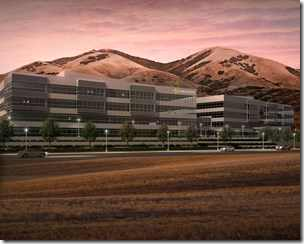
Architect's rendition of new Ancestry.com headquartersLast week, Ancestry.com announced that they will build a new corporate headquarters in Lehi, Utah. The area in Lehi has become very popular among local businesses. It is situated at the far north end of Utah Valley, which makes it easier to draw employees from both the Salt Lake and Utah valleys. It is closer to the freeway than Ancestry.com’s current office. And it cuts travel time to the Salt Lake City International Airport by 15 minutes. MyHeritage, who used to have an office across the street from Ancestry.com’s Provo headquarters, previously made the move to Lehi.

For more information, see the press release on the Ancestry.com corporate website.

Ancestry iOS App Upgrade

The latest update to the Ancestry iOS App, version 6.3, offers some improvements to the process of attaching records to your tree. Titled “Smart Matching,” the App now uses the same algorithms as the web version when searching for possible matches. When attaching a record to a person in your tree, new facts are automatically selected for copying into your tree. Conflicting facts do not replace the values in the tree, although you can make that happen. New people are not automatically added to your tree, although you can make that happen, also. The record comparison screen shows the information side-by-side and highlights differences. Tap a record icon to see the full record. Tap a person’s name to see full information from the tree.

For more information, read “Better Tools on Ancestry iOS App for Saving Records” on the Ancestry.com Blog.

Friday, January 30, 2015

No Posterity? Buy Some!

I regularly get chided for my failure to proofread. I guess I’m not the only one blind to my own typos. A friend forwarded this email to me.

Typo: Only 100 kids available!

Gosh! I’ll say that’s miraculous!

Wednesday, January 28, 2015

Personal Message from Tim Sullivan

2015 New Year's message from Ancestry.com's Tim SullivanI logged into my Ancestry.com account recently and received a personal greeting from Tim Sullivan, sent just to me and 2.7 million of his closest friends.

To the Ancestry community,

You had an incredible year in 2014, showing more commitment and passion than ever for discovering your family story.

Here at Ancestry, we worked hard this past year to make our service even more useful, rewarding, and fun for you. Last year, we launched more than 2 billion new global records, helping fuel discoveries in over 67 countries. Nearly half a million people took an AncestryDNA test to learn about their unique ethnic mix and to connect to hundreds … or even thousands of newfound genetic cousins. And more people than ever enjoyed the convenience of discovering and sharing their stories on the go with the Ancestry mobile app.

Good News: 2015 promises to be one of the most exciting in our own family history.

In the coming months, we’ll be introducing features that let you tell richer, more personal life stories about your ancestors, adding historical context around the times and events that shaped their lives. You’ll also see a new way to engage with other Ancestry members around a shared ancestor, helping you make new discoveries and collaborate like never before. If you’ve taken a DNA test, you’ll experience some new types of discoveries made possible by the groundbreaking DNA science and research teams. And everyone who visits Ancestry will find a simplified, easier-to-use site that puts important information front and center to make family stories the focus.

Most importantly, we will continue to add to the world’s largest online collection of family history records and content. Look for exciting additions like 170 million searchable images of probate records and wills that might reveal your ancestor’s dying wishes, all vital records from Virginia since 1900, substantial releases from Germany, and a milestone collection of almost 80 million Mexico Civil Birth, Marriage and Death records spanning from 1860 to modern day.

At Ancestry, we’re proud of all that we do to help you bring your family story to life. We think that this year’s new content and features are going to make the world’s leading online family history service even better.

Best wishes for the year ahead,

Tim Sullivan

Dear Tim,

Thanks for the message. Hope you and I and all Ancestry.com subscribers have a great year.

Signed,
---The Ancestry Insider

Monday, January 26, 2015

Attention Impulse Buyers: End of #FGS2015 and #RootsTech Discounts

The Ancestry Insider is an official RootsTech ambassador
The Ancestry Insider is an official FGS Conferrence Ambassador

If you’re an impulse buyer who has been waffling over attending either the FGS or RootsTech conferences, I’ve got news.

Today is the last day to obtain early registration discounts! Both conferences extended their deadlines from last Friday until today, 26 January 2015. Both conferences are being held at the same time (February 12th to 14th) in Salt Lake City, Utah.

For FGS conference registration, today’s discounted price of $159 will save you $30 over registering tomorrow and $80 over registering at the conference. (That’s an important point for you procrastinators. If you decide to attend at the last minute, you can show up and register at the conference.) FGS also offers a one day pass for $89.

For RootsTech registration, today’s discounted price of $159 for a 3-day pass is an $80 savings over registering later. I’m sad to report that the popular—and free—RootsTech Family Discover Day is sold out. (Family Discover Day is a program for members of FamilySearch’s sponsor, the Church of Jesus Christ of Latter-day Saints.) RootsTech offers other registration options, such as a $19 one-day pass for a “Getting Started” track. See a table of offerings on the RootsTech website.

Which conference should you attend? Consult the class schedules to see what topics each conference offers. You can download preliminary (meaning a few things may have changed) class lists in PDF format for either the FGS conference or RootsTech. You can read current schedules online. The RootsTech schedule page is capable of showing both RootsTech and FGS classes, although I would consult the FGS conference schedule page as the final authority. And you can read the schedules on the FGS app (iOS or Android) or the RootsTech 2015 app (smartphone or laptop).

Special topics may inform your choice of conferences. If you are an officer of a genealogical society, consider attending the FGS conference’s society day. (FGS stands for Federation of Genealogical Societies.) If you are a librarian, consider attending the FGS conference’s librarians’ day. If you are a technologist or businessman, consider attending the RootsTech Innovators’ Summit. If you are a beginner wanting an inexpensive option, consider RootsTech’s Getting Started track. The Getting Started pass is also the way to go if you’re only interested in attending the keynote sessions and the RootsTech evening entertainment. (All FGS and RootsTech attendees can attend the keynote sessions and the RootsTech evening entertainment.)

If you can’t decide between the conferences, you can sign up for both by paying an extra $39.

The keynote speakers are Tan Le on Thursday, Laura W. Bush and daughter Jenna Hager on Friday, and Donny Osmond and A.J. Jacobs on Saturday. The evening entertainers are Alex Boye, One Voice Children’s Choir, the cast of BYUtv’s Studio C, and American Idol runner-up David Archuleta.

RootsTech/FGS speakers and entertainers include Laura Bush, Jenna Hager, Donny Osmond, David Archuleta, and the cast of Studio C.

Other News

I have other news for FGS conference attendees. FGS has fixed the problem that prevented some registrants from using the Plan Your Sessions option on the account page. Look for the button underneath the list of purchased items. And the FGS syllabus is already available for download. Look for the button above the list of purchased items.

Location of buttons for syllabus download and session planner

The WDYTYA Live conference in London has been the biggest family history conference in the world, with onsite attendance of up to 15,000 attendees. Last year, FamilySearch said there were 13,000 people in attendance onsite at RootsTech 2014, over 10,000 more online, and an anticipated 130,000 additional attendees at local, RootsTech-affiliated conferences. Add FGS conference attendees, and this year will be the largest family history event of all time!

Friday, January 23, 2015

Darned Records: Mickey Mouse’s Vitals

If you thought Mickey Mouse was born at the Disney Studios in California in 1928, the Disneyland Hospital in Chicago, Illinois may beg to differ. He was born there in 1918. And who knew that he’s dating a mouse with the same name as his mother. The registrar, perhaps fearing his job, chose to remain anonymous. (Thank you, Sarah Stoddard, for providing this birth certificate.)

A parody of a birth certificate of Mickey Mouse

Next is Mickey’s obituary. Mickey Mouse is very much alive, so Ancestry.com’s record of his obituary is very much in error.

Ancestry.com has erroneously posted an obituary of Mickey Mouse.

You might ask yourself how this happened.

Over the years, companies have tried to develop automated algorithms that allowed machines to read and understand text. This is more than OCR. It is more than Word putting blue wavy lines under common grammatical errors. It is called natural language processing. And it is really, really difficult. Mickey’s obituary is a case in point. The software took an obituary of Ralph Kent and turned it into an obituary of Mickey Mouse. I would have provided a hotlink to the botched obituary, but, as I’ve pointed out before, many of the links in the Ancestry.com United States Obituary Collection are broken.

Lessons learned:

  • You can’t safely use a record unless you understand it. In this case, knowing that a machine used natural language processing to extract information from free form text is key in understanding its evidentiary value.
  • Record abstracts are suspect. Like any derivative, consult the original.

Yes, “Records Say the Darnedest Things!”


Sources

     Birth certificate image: Cook County, Illinois, birth certificate no. 6153 (1 January 1918), Mickey Mouse, County Clerk, Chicago; image provided by Sarah Stoddard. This birth certificate is a parody of Mickey Mouse. See “Fair Use,” Wikipedia: The Free Encyclopedia (http://en.wikipedia.org/w/index.php?title=Fair_use&oldid=641591802#Fair_use_and_parody : 8 January 2015, 16:06 revision), “Fair Use and Parody.”
     Obituary image: “United States Obituary Collection,” automated extract, Ancestry (http://search.ancestry.com/cgi-bin/sse.dll?indiv=try&db=web-obituary&h=15878266 : accessed 10 January 2015), search for Mickey Mouse; citing Boston Herald, online edition (http://www.bostonherald.com/news/obituaries/general/view.bg?articleid=1031680&format=text : 16 September 2007); the link did not work on 10 January 2015.

Thursday, January 22, 2015

FamilySearch Releases More Record Hints

FamilySearch releases new record hints

On 23 December 2014 FamilySearch released new record hints. “Users of the Family Tree may wish to visit their ancestor pages again and see if any new hints are displayed,” said Robert Kehrer, FamilySearch product manager. Unlike Ancestry.com’s system which continuously updates record hints (its shaky leaves), FamilySearch record hints are calculated at one point in time and then released to the public. The new release includes 14 million new hints reflecting:

  • new or updated persons in FamilySearch Family Tree
  • new or updated record collections
  • improved algorithms

“In the days since this data release, users have set new daily highs in the number of sources they have attached to the Family Tree and the number of new persons added to the tree from historical records. With the vast number of daily additions to the Family Tree tied to historical documents, the Family Tree is becoming one of the largest and most accurate genealogical trees in the world,” said Kehrer.

For more information, see “More Names Now Available with Family Tree Hinting Updates” on the FamilySearch Blog.

Wednesday, January 21, 2015

FamilySearch Clarifies? New.FamilySearch.org Shutdown

Some of you are aware that FamilySearch Family Tree has a predecessor: new.FamilySearch.org (NFS). NFS is not used much, as it was never available to the general public and has been read-only for more than a year. Last November, FamilySearch announced it would turn off NFS on 1 February 2015. (See my blog article, “FamilySearch Announces Retirement of New.FamilySearch.org.”)

Consequently, I was surprised when FamilySearch announced last week that “the new.FamilySearch.org website was recently closed down.” I checked the URL (https://new.familysearch.org/) and found that was not true. It was still there and still bore the announcement of a 1 February 2015 shutdown:

Message currently on new.FamilySearch.org

I thought last week’s announcement was confusing in another way, as well. The Q & A portion of the announcement starts with this:

Q: Why have the engineers decided to shut down new.FamilySearch.org before it and Family Tree are separated[?]

A: The new.FamilySearch database and Family Tree have always been separate databases. We cannot shut down one and start the other, especially when they are so different. To address this issue, we’ve allowed a period of time where the two databases are synchronized. This means that data can be entered in one and it will show up in both databases…

I think FamilySearch is really trying to answer two questions at once. Here’s what I think they are trying to say:

Q: Why have the engineers decided to shut down new.FamilySearch.org before it and Family Tree have separate databases?

A: New.FamilySearch.org and Family Tree already have separate databases. However, the two databases are synchronized. This means that data can be entered in one and it will show up in both databases.

Q: Why are the two synchronized?

A: Using Family Tree is very different from using new.FamilySearch.org. We could not shut down and start the other without confusing users, especially since the two are so different…

I wish the Q & A had several more questions and answers.

Q: Will shutting down new.FamilySearch.org remove the limitations that synchronization has imposed upon Family Tree?

According to the message currently on http://new.familysearch.org, the answer is “no.”

In early 2016, new.FamilySearch.org will be completely shut down.

It is important to note that many highly desired features of FamilySearch Family Tree cannot begin to be developed until new.FamilySearch.org has reached the final milestone and is completely shut-off. Once that has happened, work can begin on features such as:

  1. Merging of gateway ancestors and other people with large records. [The public calls such a person an IOUS.
  2. Highlighting and fixing other data eccentricities, such as when a person appears to have been married before birth, a child older than a parent, a child who is the spouse of parent or grandparent, and so on.
  3. The ability for users to change the gender of an ancestor.
  4. The ability to see a spouse’s ancestral line by default.

That leads me to ask another question:

Q: What is the difference between shutting down new.familysearch.org and completely shutting down new.familysearch.org?

The message currently on http://new.familysearch.org again provides the answer:

On February 1, [2015] all public … interfaces…will be turned off, as will be the ability to access the program. [In other words, new.familysearch.org isn’t going away, just public access to it.] This step is necessary as we enter the final phase, which is to transfer and synchronize all of the remaining data from new.FamilySearch.org to FamilySearch Family Tree. It is anticipated that this final phase of data testing, transfer, and retesting will require a year to complete. Once this phase is completed in early 2016, new.FamilySearch.org will be completely shut down.

That leads me to my final question:

Q: What is the “remaining data” to be transferred and synchronized?

The answer might be this information from the Q & A and a comment posted online by Ron Tanner.

To help users identify the actual individuals who were combined in new.FamilySearch, we are planning to create sources on each person in Family Tree that refer to the original AF, PRF, and IGI records. (Q & A.)

We will be migrating the IGI sources from NFS over into Family Tree. These sources will link over to the records which contain the film and batch numbers. (Ron Tanner.)

That’s exciting. I can’t wait for these sources to be added to Family Tree, as well as the ability to clean up the problems in Family Tree.

To see the remaining questions and answers, see “Why Was new.FamilySearch.org Turned Off: Frequently Asked Questions.”

Tuesday, January 20, 2015

FGS/RootsTech Conference Preparation

RootsTech App ImageSmart phone apps are available now to help you plan your time at the 2015 FGS and RootsTech family history conferences, 11-14 February, in Salt Lake City.

According to FamilySearch,

The new RootsTech 2015 conference app is now available to download, giving you access to all of the conference information, including classes, exhibitors, speakers, and more.

With the conference app, you can:

  • Create a personalized class schedule.
  • Find speaker information.
  • Discover exhibitor details
  • Connect with other conference attendees.
  • Tweet and post your favorite quotes and pictures at RootsTech.
  • And more!

Plan for RootsTech 2015, and download the RootsTech 2015 conference app today at the [Apple] App Store and Google Play.1

I tried out the app with good success. They need to increase the resolution of the map of the exhibition hall; as is, it is illegible. Last year the app was also available via HTML, which was nice for laptops or Windows mobile phones. I didn’t see any mention of that this year.

View the entire announcement on the FamilySearch blog.

There’s been no announcement about the conference section of the FGS app, although it does exist. But it may not be ready for prime time. As I write this, the app has a couple of problems. The session schedule doesn’t show Saturday. And the session planner locked up. The app is available for iOS and Android.

The lock up was probably because I added the FGS conference to my RootsTech registration. I asked FGS about not being able to use Plan My Sessions in this situation. The conference registrar informed me that she can do nothing for me.

If you plan to attend the FGS 2015 conference (remember it is co-located with RootsTech this year), now’s the time to register. FGS recently reminded us that

The early registration discount for the 2015 Federation of Genealogical Societies Conference ends January 23. Early registrants pay $159 for the full four days. The online registration price increases to $189 after January 23. The cost to add-on RootsTech remains $39. Register now to pay the lowest registration price.2

That’s this Friday, so don’t delay. As you make your travel arrangements, be aware that the FGS classes on Wednesday are genealogical society related. View the entire press release on the FGS conference website.

Genealogical conferences are an important education opportunity and these are two of the best. I hope to see you there!

The Ancestry Insider is an official RootsTech ambassadorThe Ancestry Insider is an official FGS Conferrence Ambassador


Sources

     1.  Chad K, Schumacher, “New Scheduling Tools are Now Available for RootsTech 2015,” FamilySearch (https://familysearch.org/blog/en/scheduling-tools-rootstech-2015/ : 9 January 2015).
     2.  “2015 FGS Conference Early Registration Discount Ends January 2,” PDF file, Federation of Genealogical Societies Conference 2015 (https://www.fgsconference.org : 9 January 2015) > press releases.

Friday, January 16, 2015

Actual Cause of Death

It is well understood that birth information on death certificates is secondary. But for death and burial information, they generally provide primary information. Does that mean they are always right?

Consider the case of William Henry Malloch, died 10 August 1920 in Milltown, Charlotte, New Brunswick. The death certificate specifies one cause of death. His burial date suggests quite another.

Death certificate of William Henry Malloch of New Brunswick

Which date is wrong? How do you know?

As Tom Jones has said, “Conclusions about whether evidence is or is not correct results from aggregated evidence, not source-by-source assessment… A source’s accuracy is unknown until the researcher has accumulated enough evidence for tests of correlation—the comparison and contrasting of sources and information to reveal points of agreement and disagreement.”1

Darned clerking errors! Yes, records say the darnedest things!

Thank you, William Romanski, for this example.


Sources

     Image: “New Brunswick Provincial Deaths, 1815-1938,” index and image, FamilySearch (https://familysearch.org/pal:/MM9.1.1/XGCR-X9F : accessed 1 January 2015), William Henry Malloch, 10 Aug 1920; citing Milltown, Charlotte, New Brunswick, death certificate 004641, Provincial Archives, Fredericton; FHL microfilm 2,134,614.
     1.  Thomas W. Jones, “Skillbuilding: Perils of Source Snobbery,” Board for Certification of Genealogists (http://www.bcgcertification.org/skillbuilders/skbld135b.html : accessed 1 January 2015); citing OnBoard 18 (May 2012): 9-10, 15. See also, “The Genealogical Proof Standard,” Board for Certification of Genealogists (http://bcgcertification.org/resources/standard.html : accessed 1 January 2015).

Wednesday, January 14, 2015

Reconstructing the DNA Past

Reconstructing the Genome - AncestryDNAAs DNA becomes an ever more important tool, some of us are wishing we had a DNA sample from a long gone ancestor. But using DNA of enough of their descendants, it is possible to partial reconstruct their DNA. Ancestry.con recently talked about an example.

“By using genetic material of living people, AncestryDNA has reassembled pieces of the human genome from a man named David Speegle and his successive spouses…who lived in the early 1800's Alabama,” said the AncestryDNA press release. “The team was able to piece together fragments of genetic code from David Speegle and his spouses Winifred and Nancy for roughly 50 percent of the length of the human genome.”

To learn more, watch a video explanation by AncestryDNA’s Julie Granka and Catherine Ball.

Julie Granka explains identification of David Speelge DNA fragments

For more information about the science behind AncestryDNA, see a page on their website.

Tuesday, January 13, 2015

Ancestry.com Releases Android Find A Grave App

“We’re in the holiday spirit today so what better way to celebrate that spirit than to announce our official release of the 1.0 version of Find A Grave for Android, free in the Google Play store,” said Michael Lawless of Ancestry.com. “With nearly half of our users having a preference for Android devices, we hope this release will unleash your inner graver.”

Cemetery map from Ancestry.com Find A Grave app for Android  Memorial photos from Ancestry.com Find A Grave app for Android

Read the announcement yourself on the Ancestry.com blog.