Monday, October 19, 2015

Monday Mailbox: RootsTech 2016 Conference Class Schedule

Dear Ancestry Insider,

I can't seem to find a [RootsTech 2016 class] schedule online. I'm wondering if there's anything I'd want to attend on Wednesday.

Thanks,
Heidi C.

Dear Heidi,

This is a case where they’ve hidden the link to the schedule in plain sight. Go to RootsTech.org. In the middle of the page are three pictures. For a year my brain dismissed these as window dressing, but I finally noticed they are clickable. Click the one on the left labeled “2016 Classes” (marked by the yellow arrow, below).

The three photos in the middle are clickable.

Or you can click Schedule at the top of the page. Here the challenge is the wording in the box on the left. Click “Browse & Search.”

Or just click here.

Remember, today’s the last day to register for the early bird discount.

Signed,
---The Ancestry Insider

Friday, October 16, 2015

RootsTech 2016 Early Bird Pricing Ends Monday

The Ancestry Insider is a RootsTech 2016 AmbassadorRootsTech announced earlier this week that they have extended the early bird pricing deadline to Monday, 19 October 2015. Purchase a full, 4-day RootsTech Pass at the early bird price of $149. It will be priced at $249 afterwards. That’s a $100 savings.

RootsTech 2016 will be held 3-6 February. Is that a little earlier than last time? RootsTech organizers don’t want you to miss Valentine’s Day with your sweetheart in 2016. (Or maybe it was determined by scheduling limitations at the venue, the Salt Lake City Salt Palace Convention Center.)

A full RootsTech conference pass includes:

  • Over 200 RootsTech classes of all experience levels taught by industry leaders
  • Daily keynote sessions with inspiring and well-known speakers.
  • Evening events with popular entertainers.

A few select RootsTech classes will begin on Wednesday, February 3 at 3:00 p.m. (Wednesday classes do not include Getting Started classes. The Getting Started track of classes will start on Thursday, 4 February 2016.) Click here for more information and registration options.

Attend RootsTech 2016, the largest genealogy conference on the planet.

You can add on the Innovator’s Summit day an additional $20. Innovator Summit is a one-day event for software engineers, entrepreneurs, and innovators. It is held on Wednesday, 3 February 2016. They will be awarding $100,000 in prize money to winners of this year’s Innovators Showdown. Click here for more information.

RootsTech's Innovator Summit is for software engineers, entrepreneurs, and innovators.

Thursday, October 15, 2015

New Ancestry: Bug or Odd Behavior?

The author composed this image from public domain clipart.Here’s a bad behavior of the New Ancestry. You’ll recall that Family Events are births and deaths of family members that show up in a person’s timeline. Some people don’t like this at all and turn them all off via settings. I happen to like them. But they don’t always show up and it sounds like the much disdained LifeStory narrative is to blame.

Let me lay out my situation. Here are some of the events showing up in Caroline’s timeline, in the order they occurred. There are residence events that I’ve left out for clarity:

  1. Birth
  2. (There is no marriage event with Daniel)
  3. Family event: Birth of first son of Caroline and Daniel
  4. Family event IS MISSING: Daniel dies
  5. 1882 Marriage to John
  6. Family event IS MISSING: John dies
  7. Death

To understand Caroline’s life, it would really be helpful to see when the husbands’ deaths occurred relative to the other events of her life. I asked Ancestry if this was a bug and this was their reply:

We will not show death of a first spouse if they remarried.  This is because we include in the narrative text that lists how many years they had been married (now we only do this on the LifeStory, not Facts View).  Pretty awkward-sounding when you have a marriage that ended in divorce and remarriage.

In cases where we don’t have marriage events for more than one spouse or if we only have one marriage event, we don’t know which marriage came first, so we err on the safe side and just don’t list either death of spouse. 

As serious genealogists don’t like the artificial, machine generated narratives, it is unfortunate that Ancestry cripples the Facts view for the sake of LifeStory’s machine-generated narrative.

Ancestry continued:

In this particular case, if you remove one of the spouses, the death of husband will show up.  Now, Caroline does have a marriage date of 1882 listed with John….  If a marriage were added in with the other spouse, Daniel… of 1880, the death of John… would show up.  If you added in a marriage to Daniel of 1885, the death of Daniel would show up.

I initially thought they were seriously suggesting that I solve the problem by removing a known spouse or adding a marriage event that may not have occurred. Then I realized they were simply explaining the behavior of the system, from which I take it that there is nothing I can do to fix it.

Ancestry wants to avoid an awkward sounding machine generated narrative should a divorce have occurred. I want to see if I should look for a divorce record. The latter favors the discovery of new genealogy. The former favors the discovery of new customers.

Wednesday, October 14, 2015

Riverton, Utah Seminar to Address Using Family History to Help the Incarcerated

The Riverton, Utah FamilySearch LibraryI received this press release from FamilySearch:

Riverton, Utah (October 1, 2015)—The Riverton FamilySearch Library has announced a free family discovery day and seminar on Saturday, October 17, from 9:00 a.m. to 12:20 p.m. Dr. Paul J. McCarty will be the keynote speaker at the seminar. He will focus on how those who are incarcerated or are in self-inflicted prisons resulting from choices or circumstances can share in the blessings, protection, and healing that come from seeking after their kindred dead or getting involved in indexing. The family discovery day is for families and youth (8 years and older) and will include fun activities to engage the entire family in family history. Registration is not required.

9:00–10:00—Keynote Speaker

Paul McCarty is currently the transition director for LDS Correctional Services, Region 3. For the past eight years, he has worked with the Utah Department of Corrections prisons and jails in successful offender release and behavior change programs. He is an adjunct professor of abnormal psychology and marriage and family studies at Brigham Young University and is a principal in the Granite School District. 

Following the keynote presentation from 9:00 to 10:00 a.m., two blocks of four classes each are offered that cover topics of interest for all levels of family history enthusiasts.

10:10–11:10 a.m. Choose one of the following four classes:

  • “Deciphering Handwriting” by Colleen Stutz
  • “Like a Game: Family History for Youth” by Jimmy Zimmerman
  • “How to Puzzilla” by Bill Harten
  • “Grandpa Is on My iPod: Sharing Your Family History with Your Family Using Social Networking” by Janet Hovorka

11:20 a.m.–12:20 p.m. Choose one of the following four classes: 

  • “Interactive Timelines: Using Freeware and File Naming” by Don Snow and Linda Westover
  • “Power Apps for FamilySearch” by Jimmy Zimmerman
  • “Successful Ways to Conduct British Research” by Joni Kesler
  • “Family Links: Easy Interactive Online Activities to Explore Your History Together” by Janet Hovorka

The Riverton FamilySearch Library is also hosting a family discovery day in conjunction with the monthly seminar. Families will participate in fun activities used in family history. Youth and adults of all ages are invited.

9:00 a.m.–12:20 p.m.

  • Replace a Face
  • Story Room
  • From Your Smartphone Straight to Family Tree with Memories
  • Discover Your Pioneer Ancestors
  • Fan Charts, the Year You Were Born, Pedigrees, and Family Group Sheets
  • What Does Your Last Name Mean?

Class and activity changes are shown on the library website at FamilySearch.org/fhc/riverton.

Registration is not required for the free seminar and family discovery day. The Riverton FamilySearch Library is located in the Riverton Office Building at 3740 West Market Center Drive (13175 South), Riverton, Utah, 1-801-240-9601. 

About FamilySearch

FamilySearch International is the largest genealogy organization in the world. Millions of people use FamilySearch records, resources, and services to learn more about their family history. To help in this great pursuit, FamilySearch and its predecessors have been actively gathering, preserving, and sharing genealogical records worldwide for over 100 years. FamilySearch is a nonprofit organization sponsored by The Church of Jesus Christ of Latter-day Saints. Patrons may access FamilySearch services and resources free online at FamilySearch.org or through over 4,800 family history centers in 132 countries, including the renowned Family History Library in Salt Lake City.

Media Contacts:

Brad and Pat Jensen
Directors, Riverton FamilySearch Library
1-801-240-9625
bejensen@ldschurch.org
pjensen@familysearch.org

© 2015 by Intellectual Reserve, Inc. All rights reserved. A service provided by The Church of Jesus Christ of Latter-day Saints.

Tuesday, October 13, 2015

Ancestry Deletes Hundreds of Databases

Red delete key by GDJ on OpenClipArt.orgFellow blogger, Rander Seavers, discovered last month that Ancestry.com had deleted over 500 databases. (See Randy’s “Where Did 567 Databases on Ancestry.com Go?” and the follow up, “Where Did 567 Databases on Ancestry.com Go? An Answer. UPDATED!”) I’m not overly concerned, and I’ll explain why in a moment.

Randy asked for an explanation of the deletions on the Ancestry Global Facebook group. That’s a secret group that the Ancestry Insider is not a member of. Not to worry. He has his own sources. <wink> <wink>. But I digress. You can see Ancestry’s two replies in Randy’s second article. Among other things, Ancestry said that the databases they deleted were

  • really old
  • mostly available elsewhere
  • text-only copies of books, city directories, and records that they have made available elsewhere with both text and images
  • seldom used
  • in a format that is not currently supported
  • databases being considered for re-keying

They also provided particular examples, which I found and verified using Google.

True to their word, some of these databases were really old, some were mostly available elsewhere, and some were text-only copies that were sometimes available elsewhere with both text and images.

Were they seldom used? I’ve done enough web analytics that I know that each record on Ancestry.com or FamilySearch.org is used about the same amount as any other. A collection twice as big as another gets about twice the usage. Huge collections get used a lot. Were these databases seldom used? Yup; a collection with 600 pages seldom gets used. (I had to roll my eyes several years ago when I learned that Ancestry had combined into one state collection, all the small city directories for the state. “They weren’t being used much. Now that they are in one collection, they are being used!” Well, if you add up all the small usages, it would about equal the amount the combined collection was used. Still, it made the executives feel better about their investment in city directories. But I digress…) Also, several of these databases didn’t have name indexes, so they would have been pretty much invisible.

Were some in a format that is not currently supported?

I remember when Ancestry implemented New Search. They wrecked the display of a bunch of databases they used to offer on DVD in the Ancestry LDS Family History Suite 2.

LDS Family History Suite Database List
A partial list of databases available on the Ancestry LDS Family History Suite 2

These databases used a technology called Infobases and Ancestry’s New Search didn’t support it. I begged until they added rudimentary support, a band aid. But the results were substandard.

So were some of these databases in an unsupported format? Yes and no. The Source and the Red Book were a nightmare to use, but they were usable. But since Ancestry seems to be rewriting some website code, they may be trying to avoid supporting Infobase databases by retiring them. Here’s a snippet of what an Infobase looks like when displayed by New Search code. Notice that some information is meaningless because the Infobase paragraph titles were not preserved. Also, notice that photograph links are all broken.

Snippet of the display of a database originating from an Infobase

Snippet of the display of a database originating from an Infobase

At the end of their first reply regarding the removed databases, Ancestry stated, “We are not able to provide other details.” They then turned around and provided other details, after which they said, “This is as much as I can say on the matter.” This refusal to provide a full list has really irked users. I have to agree on that point.

Ancestry LDS Family History Suite 2Using the clues above, it is possible to establish other retired databases. Use a Google search such as [site:search.ancestry.com/search/db.aspx "title" ] (replace title) to search for LDS Infobases from the list above. I tried a few. Once I found one, I tried it. I could tell that a database had been removed because it was inoperable.

To establish other retired databases, use a Google search such as [site:search.ancestry.com "Generations Network, Inc., 1997"] to search for really old databases. I tried a few:

While I’m not willing to spend enough time to look for all five hundred deleted data bases, it certainly looks like many are Mormon-related, and many are old, tiny, text-only, poorly formatted, and pretty-much invisible databases. But Ancestry’s silence makes it seem that the list contains one or more that would embarrass Ancestry, cause them legal problems, or anger its customers.

Monday, October 12, 2015

Monday Mailbox: Square Portraits Are Back!

The Ancestry Insider's Monday MailboxWho says Ancestry.com is not listening? In a major reversal, Ancestry has reverted portrait photos to squares, similar to Old Ancestry. They are also adding a cropping tool, a feature not available in Old Ancestry. That makes it convenient to use a single group photograph as a source for multiple portraits.

They have also tweaked readability by bolding the name of the person and adjusted some spacing issues. They acknowledge the user complaints about white on black text, but haven’t indicated any plans to address it.

I don’t have a clear before shot, but here is an old, low resolution one from the Ancestry Blog:

The old oval portrait on the New Ancestry

The portrait is now square and the text is bolded:

The new square portrait on the New Ancestry

For more information, see “The New Ancestry: October 8th Feature Update” on the Ancestry Blog.

Monday Mailbox: Adding Media as a Source

The Ancestry Insider's Monday MailboxDear Ancestry Insider,

Hi,
I'm puzzled by your comment [in “News Ketchup for 8 October 2015”] that New Ancestry doesn't support non-Ancestry media items to be attached to source citations in the Facts Timeline. I attach a JPEG version of a non-Ancestry media item within FTM for Mac and then sync it with my online tree and I can see the non-Ancestry media item associated with a fact on the Facts Timeline view. But, perhaps I misunderstood your comment?

Signed,
CSK

Dear CSK,

This past week I listened to one of Crista Cowan’s videos (couldn’t watch while driving) and it sounded like maybe it is possible online, but I wasn’t getting it by just listening. Guess I’ll have to go back and watch it. Regardless, here’s the workflow that doesn’t work. Perhaps Ancestry can fix it.

1. I upload a scan of a source.

2. Enter a fact.

image

(Hmmm. I can’t remember for sure which order I did 1 and 2.)

3. Associate the fact with the media.

4. Click Edit on the Fact.

image

5. Click Source Citations.

image

There is no option to create a non-Ancestry source here, with or without a media object attached. The only choices are Ancestry’s own records.

I can do it on FamilySearch’s Family Tree and I find it a very natural workflow. Ancestry, consider this an official feature request.

Signed,
The Ancestry Insider

Saturday, October 10, 2015

Star in an Ancestry.com Commercial

Star in an Ancestry.com CommercialThis is pretty short notice, but I only learned of the offer today. The submission deadline is Tuesday, 13 October 2015.

Ancestry.com is running a campaign. The winner gets to star in an Ancestry TV commercial. To enter, send them a video, three minutes or less, sharing how you got started with Ancestry.com. To be eligible you must be available for filming the commercial 26 October to 28 October. It sounds like they may choose a few winners, but I’m not certain.


For more information, visit http://ancestry.sonichaus.com/experience/.

Friday, October 9, 2015

Darned, Stout Rope

Records are the darnedest things. And one in particular is particularly darned. It is, perhaps, the most famous will in American genealogy. And with the new Ancestry.com will and probate collection, it is easy to access.

Perform an exact search of the “Pennsylvania, Wills and Probate Records, 1683-1993” collection for George S Wolff, probate year 1908. Select the view images icon for George S Wolff, Philadelphia County. View image 158.

The top portion of the will appears as follows:

"a good stout rope with which to hang himself"

Page 1             The sentence scratched out was scratch
                       ed by me. George S. Wolff

                  George S Wolff
               Summerdale, Phila.

                                                Dec. 4th 1906

      I the undersigned George S Wolff being
of sound mind & body write this my last will
and testament :
      I first direct that all my debts be paid and
all my affairs be adjusted to establish the value
of my estate. When this is done  I direct that,
before anything else is done, ---------------------
Fifty cents (50 ¢) be paid to my son-in-law
Chas. W. Wensel  a native of Huntingdon, Pa. to
enable him to buy for himself a good stout rope
with which to hang himself & thus rid mankind
of one of the most infamous scoundrels that
ever roamed this broad land, or dwelt outside of
a penitentiary, [several words scratched out]
[several words scratched out] -------------------
    I next direct that all of my estate after
having paid my debts and said fifty cents
be held in trust until my youngest daughter
Irene is of age and when she has reached
her legal maturity an equal division of share
and share alike is to be made between all
of my children, six in number, provided however
                      Continued on P. 2

What adds to the amusement for me is that in his description of his son-in-law, George had to censor himself!

If Mariette doesn't divorce him, she gets nothing.

Continuation of my will  (P. 2)
       from P.1
  that my daughter Mariette now married to
before named Chas. W. Wensel is then divorced
from him & have full and absolute control of
her only child Robert or other children she may
have by that man before her divorce. -----------
  If however she is not divorced from Wensel then
the division shall only be share & share alike
between my five remaining children, and Mariette
now Mrs. Wensel is not to share in any form
part or manner in any property that I have
left behind. ------ …
[remainder of document is not shown.]

From the 1910 census of Huntingdon, Pennsylvania:

Detail from 1910 census showing Charles W Wensel is divorced and living with his parents.

Yes, records say the darnedest things.


Image Sources

Will: Portions of Philadelphia County, Pennsylvania, Wills 2238-2261, 1908, book 56, page 395, will 2249, 4 December 1906, George S Wolff; images (http://ancestry.com : accessed 4 October 2015). Subscription required.

Census: Detail from Huntingdon County, Pennsylvania, 1910 U.S. Federal Census, enumeration district 67, Huntingdon Borough, sheet 6A, family 136; image (http://www.mocavo.com : accessed 4 October 2015), path: Research:Records, Books and Datasets > U.S. Census > 1910 > Charles W Wensel.

Thursday, October 8, 2015

News Ketchup for 8 October 2015

Ancestry Insider KetchupTime to ketchup…

Bullet Ancestry.comOctober is Family History Month and Ancestry.com is sponsoring a number of activities to celebrate. Besides the Find A Grave Community Day on 17 October 2015 (see “Find A Grave’s Community Day 17 October 2015”), they are broadcasting several webinars, doing some social media giveaways (follow their Facebook page), and sponsoring a Pinterest contest. For more information, see “Welcome to October Family History Month 2015” on the Ancestry Blog.

Bullet Ancestry.comI have a lot of interest in source citations. And I’m not a fan of the citation capabilities of Ancestry.com. So I hope to find some time to watch Ancestry’s YouTube video: “Crafting Source Citations in Your Ancestry Tree.” I’m especially disappointed that New Ancestry doesn’t support non-Ancestry sources in the facts timeline. You’d think they would want people to contribute their scans of source documents.

FamilySearch tree bulletFamilySearch’s new Indexing program has been “almost here” for several years. FamilySearch has now said that starting in June they’ve been rolling the system out to a limited set of users. That number is up to 4,000. This number is gradually growing, but by invitation only. For more information, see “What’s Happening to the New Indexing Program?” on the FamilySearch blog.

FamilySearch tree bullet

FamilySearch has added logo buttons on the person pages of Family Tree that launch record searches on partner websites: Ancestry.com, FindMyPast.com, and MyHeritage.com. For more information, see “New Feature: Search Genealogy Records on the Web’s Largest Sites” on the FamilySearch.org blog.

SearchRecords1


Bullet Ancestry.com

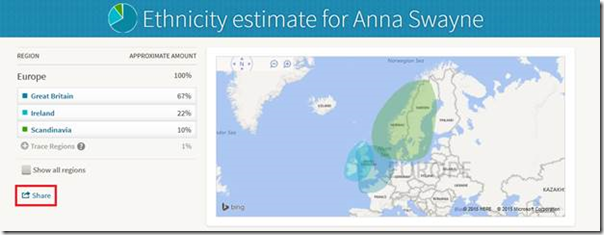
Ancestry spokesperson Matthew Deighton announced that AncestryDNA users can now share their ethnicity results.

AncestryDNA ethnicity results can be shared with others. AncestryDNA ethnicity results can be shared with others. AncestryDNA ethnicity results can be shared with others.


FamilySearch tree bullet

I’ve not yet reported on the results of the FamilySearch Indexing global “Fuel the Find” event held back in August. While they fell short of their 100,000 indexers goal (they had 82,039), they achieved several milestones: 12,251,870 records indexed and 2,307,876 records arbitrated. Volunteers achieved an 89% increase in non-English indexing.

“We are thrilled with the number of people who are fluent in a non-English language who accepted the challenge to index records in that language,” said Courtney Connolly, FamilySearch digital marketing manager. “If volunteers will keep up this rate of non-English indexing and arbitration, we’ll soon see people everywhere experiencing the same success in finding their ancestors that English-language researchers enjoy.” Volunteers did 2,183,212 non-English records including 1,380,684 in Spanish, 147,568 in Portuguese, 226,734 in French, and 116,835 in Italian.

FamilySearch.org has twenty times more records in English than in all other languages combined. “There is a huge and growing need for English speakers who are fluent in a second language, and native speakers of non-English languages to learn how to index. Tens of thousands of new volunteers are needed to keep up with the opportunity to index the world’s records,” said Connolly.

FamilySearch shared accomplishments in a PDF file. Here’s a snippet:

FamilySearch 2015 Indexing Worldwide event participants by language

NARA Renews Ancestry.com Partnership Agreement

NARA Digitization Project Manager, Erin Townsend
2010 photograph of NARA Digitization Project Manager, Erin Townsend,
viewing newly digitized and published records on Ancestry.com.
Image credit: NARA. 
“We are pleased to announce the renewal of our digitization partnership agreement with the National Archives and Record Administration,” said Matthew Deighton, Ancestry.com spokesperson. The essence of the agreement is that Ancestry pays for, digitizes, and indexes records for the National Archives and Records Administration (NARA). Ancestry’s subscribers and NARA visitors get exclusive access to the digitized records for five years. NARA calls it an embargo period. Then NARA can release the records free to everyone.

Embargos are already starting to expire on  early partnership projects. According to NARA, they have published 5.25 million images on their website. NARA uses a different paradigm than other companies for publishing online record collections. If I understand correctly, records must be accessed through their catalog.

Digitizing originals can be quite expensive, so Ancestry, and by extension all you Ancestry subscribers, are to be applauded. You’re making a difference. “With investments in scanning and indexing reaching more than 1 billion records, we have saved taxpayers more than $100 million dollars at commercial digitization rates,” said Matthew. If my math is correct, that means it would cost NARA $10 to scan and index each record. (Wow! If that is the case, FamilySearch is underpaying its indexers. Oh, wait… Never mind.)

The renewal comes despite an incident in March. An Ancestry employee was caught throwing away NARA documents rather than digitizing them. (See “NARA Suspends Ancestry.com Scanning Operation” on my blog.) I’ve never seen any other public information on the incident. Obviously, if NARA has renewed the agreement, Ancestry must have cured any weaknesses in their processes.

Ancestry began digitizing NARA microfilm back in 2000. They began scanning original paper documents in 2008. In that time they have published 1,371 collections from NARA collections, containing over 170 million images and more than 1 billion records.

“This agreement marks the renewing of a great partnership and we are proud to continue our relationship with the United States National Archives and Record Administration,” Matthew said.

Partnerships are a key part of NARA’s digitization plan. More than 97% of the documents scanned at NARA are done by partners. It appears genealogy companies are doing the lions’ share of that. That mirrors user requests. NARA recently asked what people wanted digitized the most. “Overwhelmingly, people asked us to digitize records of genealogical interest,” said NARA’s Denise M. Henderson. “[Requests] include… immigration and ethnic heritage records; [and] military and veterans records, especially those from World War I and II.”

Among the records NARA will focus on (not necessary via Ancestry) for the next 18-24 months are:

    Record Group              Title 21                              All Naturalization Records 21                              Bankruptcy Dockets (within certain parameters) 26/36                        Seamen Records / Crew Lists 24                              Naval Muster Rolls 24                              Logbooks of U.S. Navy Ships, 1801-1940 24                              Logbooks of U.S. Navy Ships and Stations, 1941-1978 24                              Bureau of Naval Personnel Casualty Case Cards, 1964-1977 129                            Inmate Case Files (Leavenworth) – first 10,000 case files only 226                            Office of Strategic Services Personnel Files, 1942-1945 59                              Department of State Name Index, 1910-1959 59                              Department of State Central Decimal Files, 1910-1929 15                              Case Files of Disapproved Pension Applications of Veterans of the Army and the Navy Who Served Mainly in the Civil War and the War with Spain, 1861-1934 15                              Case Files of Disapproved Pension Applications of Widows and Other Dependents of Veterans of the Army and Navy, 1861-1934 109                            Record Books of Executive, Legislative, and Judicial Offices of the Confederate Government, 1874-1899 498                           Helper Files, ca. 1945 – 1947 – 19 series/multiple countries 407                           World War II Operations Reports, 1940-1948 29                             1950 Census Enumeration District Maps

Tuesday, October 6, 2015

Ancestry.com at Banking Conference – Part 1

Howard Hochhauser, Ancestry.com chief operating officer (COO) and chief financial officer (CFO)On 30 September 2015 Ancestry.com’s Howard Hochhauser gave a presentation at the Deutsche Bank Leveraged Finance Conference. I took extensive notes, approaching a full transcription. I’ve reordered and gathered the material into subjects and left out most of the financial information. I’ve divided my report into two. This is the first part. The second part will come next week.

Howard Hochhauser is the company’s chief operating officer (COO) and chief financial officer (CFO). As COO he runs the company under the leadership of the chief executive officer (CEO), Tim Sullivan. Howard has been with the company for about three years now. Their mission is to help everybody discover, preserve, and share their family history. While he feels like they’re not very good yet with the share part, they are working on it. Ancestry created and leads the family history category.

Subscribers

They have 2.2 million subscribers. Over the holiday weekend alone they acquired 10 thousand new customers. Customers pay, on average, between $19 and $20 a month. More than half of the subscribers have subscription lengths of 6 months or longer. Ancestry’s lifetime revenue from subscribers is about $250. A third of the people that come to the service have previously been with them.

Demographics are biased towards female. In the US, more than 60% of subscribers are female and that continues to grow. The average age is over 55.

The business is somewhat seasonal. Over the summer people tend to tune out. That gets worse in the 4th quarter as people focus on the holidays. That’s the slowest time of year. It’s not unusual for their total number of subscribers to go down during December. Right after Christmas there is a massive uptake, which continues through the winter. TV shows and marketing efforts tend to move that around a bit. They sponsor four of them, most notably Who Do You Think You Are. That has made August a great month.

Roughly 50% of those that try out the 14 day free subscription continue as a paid subscriber. (That’s called bill-through.) Retention rates among the higher costing subscriptions are not materially different.

Finances

Revenues are $644 million. EBIITDA margins approach 40% (which most of you are not familiar with nor care about). This is a very high margin business. Compounded annual growth rate is mid- to high-teens with expanding EBITDA margins.

Marketing costs are roughly $150 million a year. They feel like they’ve made some marketing missteps this year that affected revenues. (He didn’t share what those were.)

They recently posted a dividend. Since being private they have paid out over $260 million to shareholders. Tim and Howard own upwards of 10% of the company. (You do the math.)

International

They do about 30% of their business internationally. The UK is about half of that, generating roughly $70 million in revenue. The rest is Canada, Australia, and the rest of the world. (I wish I could have seen the slides, so I would know the shares for those last components.)

Mexico and Germany are the next two markets they are going to enter. (I see that http://www.ancestry.mx/ and http://www.ancestry.de websites are already live.) Ancestry launched the Germany product on 1 October 2015, Unification Day. The launch into Mexico and Germany is mostly to appeal to those new markets and partly to benefit existing markets. Germany is the largest source of US immigrants. Over time, they predict that the size of their business in Germany should mirror that of the UK. They’d love to create another $50 to 70 million business.

Next week I’ll present part 2. Stay tuned.

Monday, October 5, 2015

Monday Mailbox: Ronald Vern Jackson and AIS

The Ancestry Insider's Monday MailboxDear Readers,

In my article “Monday Mailbox: How Fast Was the 1860 Census Indexed” I talked a bit about Ronald Vern Jackson and Accelerated Indexing Systems (AIS). I solicited additional information and several readers came through.

Dear Ancestry Insider,

Ron hired BYU [Brigham Young University] students to extract the census records as well as others.  Others created the sort cards sometimes using BYU sorters to alphabetize the indexes.  I believe it was the 1830 census that I obtained for him which had already been published.  He used this book to publish his own.

Signed,
Msmyph (mjsmyth@….com)

Dear Ancestry Insider,

Those AIS indexes in the big heavy volumes were an absolute lifesaver in their day!!   They helped me solve quite a few puzzling lines of my ancestry.   Now I'm thinking that maybe they would help overcome the occasional riddle as to why I can't find a particular name in a census on FS or Ancestry.com, because of bad handwriting or errors in indexing.   Are they available anywhere electronically?    I'm not sure the microfiche are still known by current FHC staff?

Signed,
Marcia Green

Dear Marcia,

That’s a great idea. There’s a definite advantage to multiple indexes, and with HeritageQuest retiring their indexes in favor of Ancestry’s, we’ve recently lost a valuable “second opinion.”

You might be right about new family history center staff members, but many staffers are in their older years and well remember the AIS fiche. The real problem will be centers that threw out the fiche or fiche viewers, not having the insight you’ve just shared.

Signed,
---The Ancestry Insider

Another reader, Kath Baker, sent me an email pointing to three sources of information.

His obituary appeared in the Salt Lake City Deseret News:

SALT LAKE CITY-Ronald Vern Jackson, age 53, died Wednesday, Nov. 4, 1999 at his home in Salt Lake City, Utah.… He was a world renowned expert in genealogy and was the author of numerous publications. He loved his grandchildren and cherished the time he spent with them…1

Ronald Vern Jackson, noted genealogical data publisherKath sent a link to Ron’s persona in FamilySearch Family Tree: Ronald Vern Jackson (KW4T-DLD). It includes several photographs, including the one to the right.2

An article concerning his estate was published in a Texas newspaper:

Regarded as probably the best-known of American genealogists, very little is known about Ronald Vern Jackson. Save for one thing.

When the Salt Lake City, Utah resident died in 1999, he left a percentage of his business fortune to the genealogy division of Montgomery County's library system. But it wasn't until 2004 that the county became aware of the gift.

Two years of legal wrangling between Montgomery County and Jackson's heirs ended Monday when County Commissioners agreed in executive session to accept a settlement of $128,773…

“I do not know what the size of the estate was, but I do know the will was not probated” by Jackson's six heirs, [County Attorney David] Walker said.3

Rest in peace, Ron.


Sources

     1.  “Obituary: Ronald Vern Jackson,” (Salt Lake City, Utah) Deseret News, 7 November 1999; text archived online (http://www.deseretnews.com/article/726804/Obituary-Ronald-Vern-Jackson.html?pg=all : accessed 12 September 2015).
     2.  Detail of Ronald Vern Jackson from a photograph including his father, Leslie Vern Jackson, and his brother, Raymond Leon Jackson, standing in front of the Salt Lake Temple; uploaded by Heather Denise Turley, 10 March 2015, untitled image, FamilySearch (https://familysearch.org/photos/images/14135374 : accessed 12 September 2015), attached to Ronald Vern Jackson (KW4T-DLD).
     3.  Howard Roden, “County Gets $128,773 in Settlement,” The Courier of Montgomery County (Texas), 9 January 2007; text archived online, Houston Community News and Media Group (http://www.yourhoustonnews.com/archives/county-gets-in-settlement/article_f97e616e-952f-5adb-9238-52ee316d7ed7.html : accessed 12 September 2015).

Thursday, October 1, 2015

Find A Grave’s Community Day 17 October 2015

The Find a Grave Community Day is 17 October 2015.Ancestry.com has announced that this year’s Find A Grave Community Day is scheduled for 17 October 2015. Ancestry’s Jessica Murray said “Last year was an amazing success thanks to you, our incredible volunteers, who visited over 100 cemeteries and contributed more than 250,000 photos on the days leading up to, and on, Find A Grave Community Day 2014.” They hope to break that record this year.

If you wish to participate, check the Find A Grave event list on Facebook for something near you. If you find one that interests you, click the Join button.

If you wish to organize an effort to photograph a cemetery, Ancestry reminds you to get permission from the cemetery first. Once you have permission, register your event. Once a day Ancestry will take the new cemeteries and create corresponding Facebook events. As you make plans, keep an eye open for unfulfilled photo requests for nearby cemeteries.

Ancestry has created a page of resources for you to consult. See http://www.ancestry.com/cs/find-a-grave-community-day.

I was doing some research the other day and came across a book of transcriptions of cemetery markers. It gave me the marker I needed, but it was only a transcription. I immediately pulled up Find A Grave, just like any of you would. And I immediately found a photograph of the marker I needed. Find a Grave just keeps getting better and better.

Wednesday, September 30, 2015

Comments about the New Ancestry

Screen shot from the Facts page of a person in New AncestryThank you to everyone for your comments. I have gotten stricter on comments about other commenters. I’m no longer accepting comments that characterize groups of other people in a bad light. I have appreciated commenters helping other commenters. For example, having several of you share your experiences with Family Tree Maker gives other readers a wider sampling than my personal experience.

I realize some of you are dissuaded from commenting because I require that you have an account with one of several systems. I apologize but that is one of several methodologies I have had to employ to avoid a growing number of spam posters.

Some of you make comments by replying to my newsletter emails. I encourage you to leave a comment instead so that others can benefit from your wisdom. Click the title in the newsletter and scroll down to the comments. Or click the comments link near the bottom of the email.

I see in Ancestry.com’s 19th September New Ancestry update that they have noticed several of the issues you’ve raised here. They have acted on one of them (contrast), plan to act on a couple more (member connect and linking multiple people to an image), and have acknowledged one other (oval profile pictures).

While I encourage you to continue to share your thoughts through this forum, I see that Ancestry now solicits feedback through their established suggestion box. For New Ancestry feedback, they are suggesting the “General Feedback” category:

https://ancestry.az1.qualtrics.com/jfe/form/SV_bEi2G4scYqbsntP?ucdmid=003cc7cb-0006-0000-0000-000000000000

Regarding the feedback that there is far too much whitespace: I yearn for the good old days of 24 lines by 80 characters. Screen real estate was so valuable, programmers packed features into every square inch. I feel like you got far more functionality in that itty bitty space than you do in one screen today. I’m afraid utilitarian programmers have been replaced by graphic designers. It is true that interfaces are prettier, and more importantly, intuitive and easier for beginners. But my hands used to fly across the keyboard much faster than moving back and forth to the mouse. And I remember printing 12 generation pedigrees from PAF on 9 sheets of paper. No way it can be done now, despite better printer technology. , Much has been gained, but much has been lost for the experienced person, those willing to get over that initial learning curve.

The motel replaced the heat lamp bulb with a cool florescent bulb.Not to change the subject, but I had an interesting experience over the weekend. I was staying in a motel and awoke to a crisp, cool, September morning. As I left my warm bed, I looked forward to the bathroom heat lamp. The first switch turned on the regular light. When I flipped the second switch I was disappointed, but amused. The motel had replaced the heat lamp bulb with an energy efficient, long lasting, cool-to-the touch florescent bulb.

In our rush to improve upon the past, do we sometimes overlook why things were the way they were?

Tuesday, September 29, 2015

How to Navigate Around the Internet Archive Search Bug

There is a bug in Internet Archive’s “Search Inside” a book feature. Don’t trust it. Let me tell you what to do instead.

Let’s say you found your way to a book on Internet Archive (IA). It is A Complete History of Fairfield County, Ohio (at https://archive.org/details/cu31924028848483) by Hervey Scott. You want to see if Jonas Messerly is mentioned in it. You select the search magnifying glass up in the upper-right corner.

Internet Archive's title search icon

You search for “Messerly” and, oops, you just searched IA for titles rather than searching inside that single title.

Internet Archive's title search results

Wait, don’t cuss me out yet; that’s not the bug. That’s just user error and a user interface annoyance.

You find another search magnifying glass icon on the right-hand side about half way down the page. The context help popup says “search inside.” You select the icon.

Internet Archive's search inside icon

The page changes a bit and the search icon disappears.

The search inside icon is in a different place in the Internet Archive's full screen view.

Instead of instigating a search, what you’ve just done is switched from one book viewer to another. People  in the know tell me that this failure to search is not a bug. Because the design is supposed to do this, it is a WAD, “working as designed.” Fine. Let’s compromise and call it a user interface flaw. But this is still not the bug of which I speak.

The search inside icon has disappeared. The search-all-of-IA box is still up in the upper-right corner of the screen. You fell for that one once before. “Fool me once…” After looking in vain for another search icon, you notice that the search box you previously dismissed, the one that searched for book titles, is now labeled “Search inside”.

The search inside box is at the top in the Internet Archive's full screen view.

Also not the bug of which I speak. It’s another user error and user interface annoyance.

Now comes the bug. You search for “Messerly” and IA erroneously states “No matches were found.”

The Internet Archive's full screen view with no matches found message 

Rather than depend on just the “Search Inside” results, check the raw text. To do this, select the italic I—the “About this book” icon. In the popup, select Plain Text. That brings you to a page containing the raw text from the book. Now use your browser search (^F) to search for Messerly.

Some raw text from an Internet Archive book

There he is on page 73. Now back up to the book viewer and advance to page 73.

Mention of Jonas Messerly in a history of Fairfield County, Ohio

One of the distinct advantages of Internet Archive over Google Books is that downloaded PDF files are searchable. I tested the above book and found that Adobe Reader is not affected by the search bug. You can download from IA with the confidence that your offline study will not be affected.

Mention of Jonas Messerly in a history of Fairfield County, Ohio

Be aware that OCR errors are unaffected by any of this. If a word was not recognized when scanned, then all of these methods will fail to find it.

Finally, the Internet Archive is a non-profit organization that accomplishes amazing things with very little money. No one should be surprised that there are flaws in their software. We are all in their debt. They accept contributions at https://archive.org/donate.