Tuesday, October 21, 2008

Shootout at the OK Corral

License by Devin Ford (Kingdafy on Flickr). Click for a link to the Creative Commons license.I got upset in a recent discussion on Ancestry.com's new search interface. I usually wait a day or two before responding. This time, I didn't and I thought you might be amused by part of my reply.

I'm going to generalize and combine several recent encounters into one. This no longer accurately represents the position of any single individual. The criticisms go something like this:

The new search is a step backwards and they shouldn't be pushing it on us. They obviously don't understand how real genealogists do their work. They don't listen to their customers.

I always use exact searches because the other kind [ranked searches] doesn't work. It returns so many results as to be neither manageable nor credible. Even a simple perusal shows that after a few correct results at the top, the remaining search results are preposterous, falling outside the person's lifetime or physical location.

Tree-based searching? I will never enter a tree on Ancestry.com because they will use it to make money.

My reply wasn't completely rational, but I had fun writing it. What you see below is also an combination of a couple of replies.

My reply

Some people didn't want to switch from DOS and WordPerfect to Word and Windows. That doesn't mean that Windows and Word should not have been developed. When it comes to new tools, the customer is not always right. It is painful to stop and learn how to use a drill, let alone stop to sharpen the saw, when there is so much research to do and so little money or time to do it. That doesn't mean there isn't a place for drills.

I recently attended an hour long class on search techniques for genealogy databases like Ancestry. The instructor spent 2 minutes announcing that one should never use relevance ranked searches on Ancestry and 58 minutes teaching us how to work around the problems caused by exact searches: soundex, wild cards, nicknames, multiple searches with all known alternate spellings, searching for family members, mis-filed dates, etc.

Not to be too immodest, but I'm pretty much the fastest Ancestry.com searcher on the planet and I can tell you that sometimes I prefer exact searching and sometimes I prefer ranked. Sometimes I prefer the old search and sometimes I prefer the new. I'll face anybody at the OK Coral for a shootout. You use your single shot, one gun and I'll use all four of mine. I've got to warn you, that I'm also going to attach results into a tree and hit you with a tree-based search assault. I'll be firing off rounds, moving generation to generation faster than you can perform all 38 searches on the common misspellings of just one of your ancestors.

Put up or shut up

Further, I can communicate clearly and accurately enough to convince the new search team what the problems are so they can be fixed. Let me say, and I mean this in the least rude, most kind way possible, put up or shut up. Give exact use cases comparing old and new search that show how new search is inferior.

Here's an example showing what I mean by an exact case.

Steps with old search:

  • Click on the Search tab.
  • If Historical Records is not selected, select it.
  • Check the Exact matches only box.
  • Enter the name Benjamin Wiser.
  • Search.
  • Click on Massachusetts Town Birth Records.
  • Expected result: see the 5 children of Benjamin Wiser.

Steps with new search:

  • Click on Search tab (or link).
  • Click on Show Advanced.
  • Result: list of results from all sorts of databases.

With exact instructions, Ancestry can see what they have messed up. In my example, once they realized they had dropped the ability to view exact results summarized by category, they added that capability back in.

So give actionable examples. Or buckle on your holster and grab your single-shot, old, exact search. You know where to find me. And you know what heat I'll be packing.

Monday, October 20, 2008

Yearbooks free thru October 30

An example yearbook page from Ancestry.com Ancestry.com has announced that access to their yearbooks is free through October 30 as part of a promotion highlighting the doubling of the size of their yearbook collection to 6 million names. (The card catalog shows a size of 2,909,046. Is that the number of pages?) Click here to start searching. You will need a free account, so don't be surprised if you are asked for your name and e-mail address. However, you won't need a credit card number. If you've already got an account, you can access the yearbooks with or without a current subscription.

Ancestry.com has decided to build their yearbook collection as large as possible. Its value thus far has been limited by the sparse coverage it provides in any generation or locale. So they've started a program to digitize any yearbooks not under copyright that you're willing to donate. If you have a collection of 25 or more, they'll accept a loan rather than a donation.

The following yearbooks are eligible:

  • Yearbooks printed before 1963. These are now in the public domain unless copyrighted in the name of an individual author.
  • Yearbooks printed between 1963 and 1977 without a copyright notice. During this period, a notice was required to create copyright protection; without the notice, the yearbook is in the public domain.
  • Other yearbooks have copyright protection and are not eligible without signed permission from the copyright holder. These are yearbooks printed after 1977 of with a copyright notice after 1963 or before 1963 with a copyright notice in the name of an individual.

Click here for more information.

Friday, October 17, 2008

Visiting NARA: Staging a visit to Archives I

I recently made my first visit to the National Archives and Record Administration (NARA). This is one in a series of articles inspired by that visit to help you make your first visit to the National Archives. Last time I talked about Archives I vs. Archives II. This time I'll talk about where I stayed and how I got to Archives I, which is the main National Archives location in downtown District of Columbia.

Staging a visit to Archives I

Archive I - The National Archives building in downtown Washington DC I’m a westerner. It doesn’t matter where I go, I rent a car. Out west one can’t so much as stop at a gas station without a car. I doubt I could brush my teeth without a car sitting outside. So after flying into Baltimore Washington International (BWI) airport, we rented a car. I'm glad we did.

We stayed at the Greenbelt Courtyard Marriott. Did it seem a little below par because our room had been smoked in recently? Or was it just a little lower quality than I prefer? There are other choices nearby. While I didn't care much for the room, I did like the price: $109 a night. And the location. It was close to highway 295, which provides quick and ready access to BWI airport. There were familiar fast food and chain restaurants along Greenbelt Road. Since we had a rental car, it was easy to zip up and down the road without needing a GPS unit.

And, it was just a short drive to the Greenbelt station on the Green Line of the D.C. Metro.

The D.C. Metro subway system is a fast, clean, safe way to get to the National Archives. The Archives station on the Green Line is—surprise, surprise—directly across Pennsylvania Ave. from Archives I. We picked our lodging so that we were close to a green line station far enough out of the city to get lodging rates that we liked.

We purchased a SmarTrip® card when we entered the metro station because it is required to pay the parking fee (currently $4.25 for the Greenbelt station) when you exit the metro station parking lot. If you arrive at the parking lot prior to 10:00am on a weekday, be careful not to park in a Reserved space. The card costs $5 plus whatever amount you put on the card for paying parking and metro fares. A very courteous metro employee stepped us through the process of buying one using a credit card.

A postcard showing a metro train, a message board and the ceiling of an undergrand station Fare amounts are posted on the vending machine so that you can figure out beforehand how much money to put on the SmarTrip card. If special arrangements are made, seniors and the disabled can ride at half the regular fare. Reduced fare is charged on weekends. Currently, Greenbelt to Archives is regularly $3.70, $1.85 senior/disabled and $2.35 reduced fare. The distance is 11.51 miles and the expected travel time is 33 minutes.

It's all pretty straight forward and there are nice people to help you out if need it. So! Am I tempting any of you to attempt a trip some day? The economic circumstances might not allow it at the moment. I'll talk about some of the preparation you'll want to do before waltzing off to Washington. There's no reason you can't start preparing now!

What arrangements have you used to visit the National Archives? Do you have a favorite hotel? Mass transit line? What tips can you share about arrangements?

Thursday, October 16, 2008

NFS Rollout update for 14-Oct-2008

New FamilySearch Rollout Map for 14-Oct-2008

Salt Lake City ran into winter this week like a brick wall. There's a lot of people walking around with red noses. Speaking of red, the only remaining red--or yellow for that matter--left on the map is in two groups: the "extended" Wasatch Front (what I call the red zone) and the Orient (where red is considered the color of good fortune).

Since the last map update six temples have gone live with New FamilySearch (NFS):

  • 7-Oct-2008: Anchorage, Montreal, Oklahoma and Portland
  • 14-Oct-2008: Nigeria and New Zealand

The major milestones reached since the last map update are

  • With New Zealand live, the isles of the Pacific and the southern hemisphere are both done.
  • Nigeria went live, so Africa is complete.
  • Montreal was the last temple needed to complete Canada.
  • Other than the red zone, the conversion of Anchorage, Oklahoma and Portland completes the United States.

Other map changes:

  • I added the new temples announced in conference (albeit without temple names in hover help).
  • I moved Edmonton a bit, as I may have had it in the wrong spot.
  • I fixed a couple of temples that should have been green in the last map.

I misspoke last time about the timing of the next release. If there is a release at the midpoint of each quarter, then the next two releases of NFS will be mid-November 2008 and mid-February 2009. I'm not certain when the next release of FamilySearch Family Tree (now on labs.familysearch.org) will be. It's just as well; since the release schedule has never been shared publicly, even if I knew I wouldn't be able to tell you.

Here's something I do know. A meeting was held this morning to discuss the release of NFS to the red zone!!! Yahoo!

That's it...

That's all...

I mean that's all I know.

What! You don't think they would tell the Ancestry Insider what they decided, do you? Duh!

If you hear anything that you're at liberty to share, give me a shout at AncestryInsider@gmail.com .

Papeete TahitiApia SamoaNuku alofa TongaSuva FijiJohannesburg South AfricaAba NigeriaAccra GhanaAnchorage AlaskaEdmonton AlbertaCardston AlbertaKona HawaiiManila PhilippinesHong Kong ChinaTaipei TaiwanSeoul KoreaFukuoka JapanTokyo JapanCebu PhilippinesHamilton New ZealandMelbourne AustraliaAdelaide AustraliaPerth AustraliaBrisbane AustraliaSydney AustraliaLaie HawaiiSantiago ChileMontevideo UruguayBuenos Aires ArgentinaAsunción ParaguayPorto Alegre BrazilCuritiba BrazilCampinas BrazilSão Paulo BrazilRecife BrazilCochabamba BoliviaLima PeruGuayaquil EcuadorBogotá ColombiaCaracas VenezuelaManaus BrazilSanto Domingo Dominican RepublicGuatemala City GuatemalaSan Jose Costa RicaPanama City PanamaQuetzaltenango GuatemalaSan Salvador El SalvadorTegucigalpa HondurasMérida MéxicoVillahermosa MéxicoTuxtla Gutiérrez MéxicoOaxaca MéxicoVeracruz MéxicoMéxico City MéxicoGuadalajara MéxicoTampico MéxicoMonterrey MéxicoHermosillo Sonora MéxicoColonia Juárez Chihuahua MéxicoCiudad Juárez MéxicoMadrid SpainBern SwitzerlandThe Hague NetherlandsPreston EnglandLondon EnglandFrankfurt GermanyFreiberg GermanyKiev UkraineCopenhagen DenmarkStockholm SwedenHelsinki FinlandVancouver British ColumbiaRegina SaskatchewanHalifax Nova ScotiaMontreal QuebecToronto OntarioPalmyra New YorkBoston MassachusettsManhattan New YorkWashington D.C.Louisville KentuckyMemphis TennesseeNashville TennesseeRaleigh North CarolinaColumbia South CarolinaAtlanta GeorgiaBirmingham AlabamaOrlando FloridaDetroit MichiganKirtlandColumbus OhioChicago IllinoisNauvoo IllinoisSt. Louis MissouriWinter Quarters NebraskaSt. Paul MinnesotaBismarck North DakotaOklahoma City OklahomaLubbock TexasDallas TexasHouston TexasSan Antonio TexasBaton Rouge LouisianaDenver ColoradoBillings MontanaBoise IdahoTwin Falls IdahoRexburg IdahoIdaho Falls IdahoAlbuquerque New MexicoSnowflake ArizonaGila Valley ArizonaGilbert ArizonaPhoenix ArizonaMesa ArizonaSpokane WashingtonColumbia River WashingtonSeattle WashingtonPortland OregonMedford OregonReno NevadaLas Vegas NevadaFresno CaliforniaSacramento CaliforniaOakland CalifornaiRedlands CalifornaiLos Angeles CaliforniaNewport Beach CalifornaiSan Diego CaliforniaSt. George UtahMonticello UtahVernal UtahLogan UtahManti UtahProvo UtahMount Timpanogos UtahDraper UtahSalt LakeBountiful UtahOgden UtahJordan River UtahOquirrh Mountain Utah

Wednesday, October 15, 2008

Hot Keys in the Ancestry.com New Search User Interface

Ancestry.com has added hot keys in the New Search User Interface. Hot keys are a common means of adding power tools for power users. In this case, Ancestry.com is using hot keys to make it possible to be as productive in the new search interface as one could be in the old.

A common criticism of the new search interface is the additional mouse clicks required in iterative searching. Some difficult to locate records require iteratively refining the search parameters. In the old search interface, a single click on Refine your search takes you to a full search form, pre-populated with the information from your previous search. You can then switch surnames or locales or any other information that might bring up that elusive record. With new search, all the parameters were buried in the interface and had to be individually clicked before changes could be made.

With this new change, users of the new search can now match the productivity of old search for iterative searching. Further, by assigning the action to a keystroke, Ancestry allows users to iterate without the need to lift one hand off the keyboard and move it to the mouse--an operation that is surprisingly time-expensive, as indexers have learned.

The hot keys are

Hot Key Action
r Refine the current search
n start a New search
p show first Preview
< key (comma) show Previous preview
> key (period) show Next preview

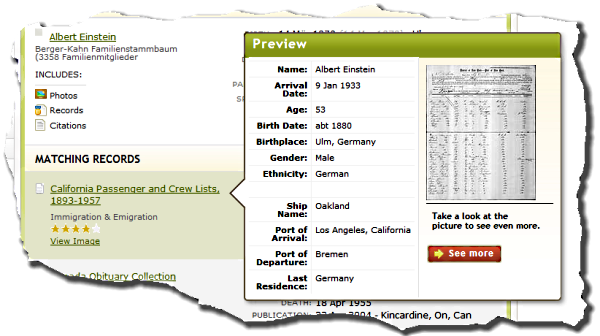
A preview is the popup you get when you hover your mouse cursor over the title of a record in the list of matching results. Yet again, this gives you a keyboard substitute for an operation normally requiring you move your hand from the keyboard to the mouse.

A preview is the popup you get when you hover your mouse over a result

Press P to bring up the first preview. Thereafter use the period key to move to the next record and the comma key to move to the previous record. These were chosen so the < and > symbols on those keys can serve as mnemonics for moving back and forth, respectively. The J and K keys also work for forward and back.

A little known extra provided by the Preview is that it presents a bit more information to non-subscribers than is shown in the result list. (It used to show all the information that only subscribers were supposed to see. Sorry! Ancestry.com fixed that bug.)

I hope Ancestry.com will add the < and > keys also, in case someone forgets and uses the shift key along with the mnemonic key.

Monday, October 13, 2008

Visiting NARA: The Insider goes inside the National Archives

I recently made my first visit to the National Archives and Record Administration (NARA). This is the first in a series of articles inspired by that visit to help you make your first visit to the National Archives.

The National Archives Building in Washington D.C. Have you ever thought about visiting the National Archives and Records Administration (a.k.a. the National Archives, or simply, NARA) in Washington DC? I have for years. When a job assignment took me to Washington DC, I took the opportunity to make my first visit. I thought if I shared what I learned, maybe some of you might be emboldened enough to try it also. I learned a lot. There is so much to share; where should I begin?

I and II

In my riddle last week I pointed out that NARA has two locations in the Washington DC area. Archives I is the original NARA building downtown where Nicholas Cage stole the Declaration of Independence. Archives I contains virtually all collections of use to genealogists. These collections include census, military (pre-WWI and WWI Navy, immigration, naturalization and other records.

NARA’s collection became too large for their downtown facility. Some libraries switch from open stacks to closed stacks when running out of space. NARA may have always had closed stacks to protect and preserve the precious records of our nation’s past. (If you know, leave us a comment.) To deal with their space issues and to handle new technologies, NARA built a second facility in the greater DC area on land provided by the University of Maryland (UM) in College Park. An official at the conference last week thought that NARA might be paying a dollar a year, or some arrangement like that, for use of the land. (I gathered from the conference that UM has excellent library and/or archive programs and that the two have a lot of synergy.)

The National Archives Building in College Park, Maryland Archives II, as the College Park location is known, houses collections in photographic, audio, video and electronic formats as well as old technologies such as architectural drawings and maps. This doesn’t mean there isn’t anything useful for genealogists at Archives II. But a typical patron is not typically going to find information specific to a typical ancestor.

During normal business hours (M-F, 8am-5pm), a staff shuttle runs every hour, on the hour, from each location to the other. On a space-available basis, researchers can also use this free service. I never rode the bus, so I can't give you exact information. Catch the shuttle at Archives I at the Metrobus shelter located on 7th Street between Pennsylvania and Constitution Avenues. At Archives II, use the shuttle bus stop adjacent to the archives building. The two locations are 10 miles apart. Google estimates the travel time to be about 24 minutes, but I imagine it actually takes 30 minutes or more.

Friday, October 10, 2008

Answer: Where's the Insider?

Where is the Ancestry Insider?

Pennsylvanians are in me.
But I am not in Pennsylvania.

I am not the one ("Archive I") on Pennsylvania;
I am north of Pennsylvania, too ("Archive II").

The answer? I've been at the National Archives at College Park, Maryland for Partnerships in Innovation (2008) II: From Vision to Reality and Beyond.

The Pennsylvania of the first couplet is the state. The Pennsylvania of the second couplet is Pennsylvania Avenue.

So, how'd you do? See ya' next week.

Thursday, October 9, 2008

Where's the Insider? Clue 4

Where is the Ancestry Insider?

Clue 4:

Pennsylvanians are in me.
But I am not in Pennsylvania.

I am not the one on Pennsylvania;
I am north of Pennsylvania, too.


This is your last clue. Part of the riddle is that I am not the "I" speaking the riddle. Post your official guess to the first message on Monday. (Click here to post your guess.) If you change your mind, post the new guess. Your latest dated answer will be your official entry. The earliest dated correct answer wins. I'll announce where I was on Friday. Stay tuned...

Wednesday, October 8, 2008

Where's the Insider? Clue 3

Where's the Ancestry Insider?

Clue 3:

Pennsylvanians are in me.
But I am not in Pennsylvania.

I am north of Pennsylvania.


I'll give you one clue per day, posted at noon Utah time. Post your one official guess to the first message on Monday. If you change your mind, delete the old guess and post the new guess. The earliest dated correct answer wins. I'll announce where I was on Friday. Stay tuned...

Tuesday, October 7, 2008

Where's the Insider? Clue 2

Where is the Ancestry Insider?

Clue 2:

Pennsylvanians are in me.
But I am not in Pennsylvania.

I'll give you one clue per day, posted at noon Utah time. Post your one official guess to the first message on Monday. If you change your mind, delete the old guess and post the new guess. The earliest dated correct answer wins. I'll announce where I was on Friday. Stay tuned...

Monday, October 6, 2008

Where's Waldo... er... the Ancestry Insider? Clue 1

The Ancestry Insider's appearance in Waldo style

A year ago the Family Tree Magazine staff Simpsonized themselves and then challenged me to reveal my Simpsonized appearance. My Simpsonized self does not meet the FamilySearch dress code, so when I came across http://www.findwaldo.com/avatar, I took the opportunity to Waldo-ize myself with white shirt and tie. Say, I look like I'm on my way somewhere.

Which I am. I'm on my way to... Well... Maybe I'll let you guess. I'll give you one clue per day, posted at noon Utah time. Respond to this message with your one official guess. If you change your mind, delete the old guess and post the new guess. The earliest dated correct answer wins. I'll announce where I was on Friday.

Clue 1: Pennsylvanians are in me.

Stay tuned...

Name counts in table-style databases

In my article about Ancestry.com database records, we saw that Ancestry.com databases usually contain more than one name in each database record. The same will be true of other vendors as well. For this reason, Ancestry.com and other vendors like to communicate the size of database by talking about name counts rather than record counts. Unfortunately, name counts are more open to interpretation than database record counts.

Table-style databases

In my article on records I referred to table-style databases. I've also heard them called fielded databases. These are databases stored like tables or spreadsheets. Census databases are table-style and are stored internally in tables not unlike the ones the enumerators filled out.

Table-style databases are stored internally in tables not unlike census forms 
Table-style databases are stored internally in tables not unlike census forms.
The example, above, shows President Bush ancestors in 1900.
Image courtesy FamilySearch. © 2008 by Intellectual Reserve, Inc. All rights reserved.

When Ancestry.com first started reporting database sizes by name counts, it had to rely on estimates of the number of names in each record because they had no mechanism to count the number of names actually present. For example, the "U.S. Phone and Address Directories, 1993-2002" database is a table-style database that has 313,282,124 records. Each record can contain two names since a telephone listing can include a spouse name. In the table there is one column for the primary name and another for a second name.

USPhoneDirectories

A simple estimate of the name count would be to multiply the number of records by two, which would give 626,564,248 names, the number reported by the new card catalog. But many, maybe most, telephone listings don't include a second name. If one were to assume that 1/3 of the listings contain a second name, then the actual name count would be smaller than what is reported by some 200 million names!

Name counts are open to abuse because the term is open to interpretation. Look up the U.S. Phone Directories in the old card catalog and you'll find the number of names estimated to be 862,075,337! That's more names than there are places in the database to store names! And it's probably about 400 million more names than are present in the database. That's 100 million names short of an over-count of a half-billion names for a single database!

I recommend that any vendors that publish name counts for table-style databases report the actual number of names present. And when an estimated count is published, the vendor should plainly designate it as such. I wouldn't mind seeing the math symbol (≈) meaning about before estimated numbers.

When I return, I'll talk about database types that require estimated name counts. (You may recall a previous article on that topic, Unbelievable Name Count Claims.)

Friday, October 3, 2008

FamilySearch Record Search Update: 29 Million New Records Added

FamilySearch released this message earlier this week.

29 Million More Records Added to Record Search Pilot

02 October 2008

Over 29 million names or record images were added this week to FamilySearch’s Record Search pilot. Significant data was published from 2 indexing projects (1860 and 1870 U.S. Censuses), 3 digital image collections (Vermont Probate Files, Quebec Parish Registers, and Cheshire Church Records), and 3 enhanced vital record index collections (Mexico and Germany Baptisms).

The entire collection can be searched for free directly online at http://pilot.familysearch.org or through the Search Records feature at FamilySearch.org.

Following is a chart of the new data added the week of September 29, 2008.

Collection Name

Indexed Records

Digital Images

Comments

1860 US Census

7,015,614

7,015,614

Updated – Illinois reworked; added 22 New states with image links to Footnote.com

1870 US Census

3,308,819

Updated - 3 new states (MA,NJ,MS)

Vermont Probate Files

205,527

New

Quebec Parish Registers

1,361,289

New

Cheshire Church Records

698,970

New

Mexico Baptisms

17,038,268 New, 19,682,189 reloaded

N/A

Updated - reworked to improve search experience with surnames, dates, etc.

Germany Baptisms

20,626,866 reloaded

N/A

Updated - reworked to improve search experience with surnames, dates, etc.

Germany Marriages

4,439,954 reloaded

N/A

Updated - reworked to improve search experience with surnames, dates, etc.

FamilySearch Indexing Update

FamilySearch Logo FamilySearch released this message today:
FamilySearch Indexing Update

3 October 2008

Over 29 million new names were posted this past week on the FamilySearch Record Search pilot. Kudos to the FamilySearch volunteer indexers for their monumental contributions! The chart below lists the current indexing projects and their completion status. Volunteers can help any time by registering or downloading a current project at www.familysearch.org (click on Index Records>Volunteer or Start Indexing) or www.familysearchindexing.org.

Project Spotlight: United Kingdom, Cheshire Poor Law

The United Kingdom, Cheshire Poor Law indexing project is currently 82% complete. We would like to finish this project by the end of next week, 10 October 2008. If volunteers have time to donate before October 10th, try doing at least a batch or two (or more) from this project. (To download a batch from a specific project, click the Download From… button in the My Work section of the indexing application’s start page, select the project from the list, and click Download.)

The Cheshire project includes several types of records kept by the workhouses in Cheshire County, including the Chester Union Workhouse at Hoole, from 1848-1967. Some of the poor in the community would go to the workhouses for only a short time. Some ended up spending the rest of their lives there.

We are indexing birth and baptism records, death and burial records, admission registers, and creed registers. The information gathered depends upon the record type and includes the names of those admitted, admission dates, religion, names of children, names of parents, birth dates, baptism dates, names of the deceased, death and burial dates.

These are not all of the Poor Law records but a significant portion of them. It is estimated that these records include 500,000 names. [The population of Cheshire County during the time period of these records is uncertain, but the population in 2001 was 673,781—so a significant portion of the community is represented in these records.]

Current Projects, Record Language, and Percent Completion Status

Alabama - 1920 US Federal Census

English - 1920

79%

Argentina Censo 1869 - Buenos Aires

Spanish - 1869

66%

Brandenburg Kirchenbücher

German - 1789-1875

8%

California - 1920 US Federal Census

English - 1920

28%

España Lugo Registros Parroquiales

Spanish - 1530-1930

6%

Florida 1945 Census

English - 1945

24%

France, Coutances, Paroisses de la Manche

French - 1792-1906

7%

Guanajuato Censo de Mexico de 1930

Spanish - 1930

56%

Guerrero - Censo de Mexico de 1930

Spanish - 1930

35%

Illinois - 1920 US Federal Census

English - 1920

15%

Massachusetts - 1920 US Federal Census

English - 1920

15%

Morelos - Censo de Mexico de 1930

Spanish - 1930

68%

New York - 1870 US Federal Census

English - 1870

55%

Nicaragua, Managua Civil Records

Spanish - 1879 - present

8%

Quintana Roo - Censo de Mexico de 1930

Spanish - 1930

88%

Trento, Italy Baptism Records

Italian - 1784-1924

7%

UK - Cheshire - Poor Law

English - 1848 -1967

82%

Venezuela Mérida Registros Parroquiales

Spanish - 1654 - 1992

0.3%

Extras in the Ancestry.com New Card Catalog

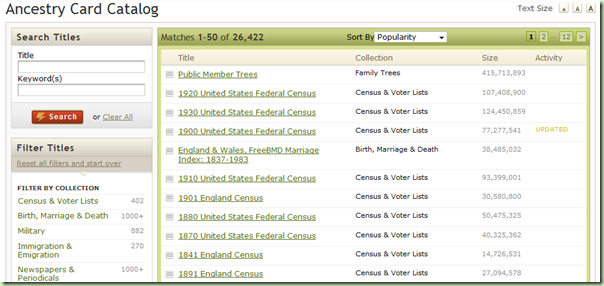
The New Ancestry Card Catalog is not only useful for finding titles of interest, it conveys an amazing amount of information. To search for a title, enter important words from the title or one or more keywords in the Search Titles box in the upper-left corner. Alternately, one can browse a list of titles shown on the right side of the page. Ancestry.com has historically used the term databases, but with the addition of book and newspaper images, title is a better way to talk about their databases. (Oops. I can see it's going to take me a while to break that habit.)

The new card catalog conveys an amazing amount of information

When you first come to the card catalog, the number of matches indicates the number of titles (databases) on Ancestry.com. At the time of the screen shot above, there were 26,422.

The list can be sorted a number of interesting ways. You may sort by Date Added and see the most recent new databases (I mean titles). You may sort by Date Updated to have updated titles added to the list of new titles.

Unlike the recent database list, some aspects of the card catalog are not updated in real-time. For example, an odd book titled "not listed" was published during the day of 1-Oct-2008 and was not yet in either old or new catalogs. (That's a bug. Once Ancestry.com removes that database, the link might not work any longer. At that point, try searching the catalog for the most recent database.)

I also noticed that database size was set to zero for all book titles going back from 1-Oct-2008 (the day I'm writing this part) back to 30-Aug-2008. Either that's another bug, or they have a process that updates name counts once a month for books.

Sort by popularity and see what are the most popular titles on Ancestry.com. As of the time of the illustration above, they were

  • Public Member Trees
  • 1920 United States Federal Census
  • 1930 United States Federal Census
  • 1900 United States Federal Census
  • England & Wales, FreeBMD Marriage Index: 1837-1983
  • 1910 United States Federal Census
  • 1901 England Census
  • 1880 United States Federal Census
  • 1870 United States Federal Census
  • 1841 England Census

Sort by Record Count and you can see the largest databases. On the day I tried it, they were

Title

Size

Ancestry World Tree

467,671,004

Public Member Trees

415,713,893

U.S. Phone and Address Directories, 1993-2002

626,564,248

British Phone Books, 1880-1984

278,407,920

OneWorldTree

192,141,453

1930 United States Federal Census

124,450,859

Private Member Trees

109,439,127

1920 United States Federal Census

107,408,900

1910 United States Federal Census

93,399,001

New York Passenger Lists, 1820-1957

82,888,619

Having sorted by record count, one would assume that the Size column shows the number of database records. Notice, however, the anomalously large size of "U.S. Phone and Address Directories, 1993-2002." That appears to be a name count, rather than a record count. Divide it by two and you'll get the record count. (Don't worry, I'll explain why in the future.) The other databases appear to have one name per record, so after converting the counts to record counts, they are sorted in record count order, as requested.

I assume this will also get fixed once it is noticed. One article, three bugs. When I was an Ancestry.com employee, I would have reported these directly to the responsible individual who often would have them fixed before my article "went to press." Sorry, ol' friends; I'll have to air a little dirty laundry now. Hopefully you're following my column and will have these bugs fixed before half my audience gets around to seeing if they still exist.

Wednesday, October 1, 2008

NFS Rollout Update: An Even 100

New FamilySearch Rollout Map for 30-Sep-2008

I'm happy to provide an updated New FamilySearch (NFS) rollout map and announce that Elvis has left the building! And since the last map update six temples have gone live, bringing the total number of temples using NFS to an even 100! Lastly, we've learned the release dates for the last two non-red-zone temples.

The six temples that went live were

  • 23-Sep-2008: Saskatchewan, Seattle and Washington D.C.
  • 30-Sep-2008: Medford Oregon, Memphis and Spokane

The schedule for the remaining non-red-zone temples is

  • 7-Oct-2008: Anchorage, Montreal, Oklahoma and Portland
  • 14-Oct-2008: Nigeria and New Zealand
  • 16-Nov-2008: Mexico City temple is rededicated.

As for the red zone, you'll remember my feeling that if the red zone (Utah, Idaho and Vegas) were to get NFS in 2008 that we would receive word soon after the release of version 0.94. Since no one received word, I assume that version 0.94 did not "patch" the IOUS issue well enough to allow the release to the red zone. The next release, 0.95, if scheduled as normal, will be mid-February 2009.

I suppose I should pass on a rumor floating around the Internet. It states that the red zone will not get NFS until the version known as Family Tree on labs.familysearch.org is available. Will there be a release of FamilySearch Family Tree before the end of the year? Will it allow the red zone to enter the transition phase of the roll out? Stay tuned...

Day to day updates will be posted on Temple Districts Using New FamilySearch as they occur. As always, if you hear anything, give me a shout at AncestryInsider@gmail.com

Papeete Tahiti Apia Samoa Nuku alofa Tonga Suva Fiji Johannesburg South Africa Aba Nigeria Accra Ghana Anchorage Alaska Edmonton Alberta Cardston Alberta Kona Hawaii Manila Philippines Hong Kong China Taipei Taiwan Seoul Korea Fukuoka Japan Tokyo Japan Cebu Philippines Hamilton New Zealand Melbourne Australia Adelaide Australia Perth Australia Brisbane Australia Sydney Australia Laie Hawaii Santiago Chile Montevideo Uruguay Buenos Aires Argentina Asunción Paraguay Porto Alegre Brazil Curitiba Brazil Campinas Brazil São Paulo Brazil Recife Brazil Cochabamba Bolivia Lima Peru Guayaquil Ecuador Bogotá Colombia Caracas Venezuela Manaus Brazil Santo Domingo Dominican Republic Guatemala City Guatemala San Jose Costa Rica Panama City Panama Quetzaltenango Guatemala San Salvador El Salvador Tegucigalpa Honduras Mérida México Villahermosa México Tuxtla Gutiérrez México Oaxaca México Veracruz México México City México Guadalajara México Tampico México Monterrey México Hermosillo Sonora México Colonia Juárez Chihuahua México Ciudad Juárez México Madrid Spain Bern Switzerland The Hague Netherlands Preston England London England Frankfurt Germany Freiberg Germany Kiev Ukraine Copenhagen Denmark Stockholm Sweden Helsinki Finland Vancouver British Columbia Regina Saskatchewan Halifax Nova Scotia Montreal Quebec Toronto Ontario Palmyra New York Boston Massachusetts Manhattan New York Washington D.C. Louisville Kentucky Memphis Tennessee Nashville Tennessee Raleigh North Carolina Columbia South Carolina Atlanta Georgia Birmingham Alabama Orlando Florida Detroit Michigan Kirtland Columbus Ohio Chicago Illinois Nauvoo Illinois St. Louis Missouri Winter Quarters Nebraska St. Paul Minnesota Bismarck North Dakota Oklahoma City Oklahoma Lubbock Texas Dallas Texas Houston Texas San Antonio Texas Baton Rouge Louisiana Denver Colorado Billings Montana Boise Idaho Twin Falls Idaho Rexburg Idaho Idaho Falls Idaho Albuquerque New Mexico Snowflake Arizona Gila Valley Arizona Gilbert Arizona Phoenix Arizona Mesa Arizona Spokane Washington Columbia River Washington Seattle Washington Portland Oregon Medford Oregon Reno Nevada Las Vegas Nevada Fresno California Sacramento California Oakland Californai Redlands Californai Los Angeles California Newport Beach Californai San Diego California St. George Utah Monticello Utah Vernal Utah Logan Utah Manti Utah Provo Utah Mount Timpanogos Utah Draper Utah Salt Lake Bountiful Utah Ogden Utah Jordan River Utah Oquirrh Mountain Utah