Showing posts with label indexing. Show all posts

Thursday, February 2, 2017

FamilySearch Plans for 2017

6 things to look for from FamilySearch in 2017Here are several things FamilySearch says you can look for from FamilySearch In 2017:

A customized home home. The year has hardly even started and they’ve already delivered on this one. You must sign up for a FamilySearch account (it’s free, and gets you access to other things, like more record images) and you must sign in. FamilySearch is calling it a dashboard. The content is driven by what you do in FamilySearch Family Tree. The dashboard will

  • recommend research opportunities
  • list hints about your ancestors and their close relatives
  • list recently viewed tree persons
  • provide a to-do list feature that you can use to create your own task list, and
  • show you new memories—photos, documents, stories, and audio recordings—that others have added about your ancestors.

To learn more, visit “New FamilySearch Design: Log In to Try It Out” published back in September in the FamilySearch Blog.

Improvements to the FamilySearch apps. The FamilyTree or Memories app will have the ability to launch record searching on Ancestry.com in addition to the current ability to search FamilySearch historical records. One or the other will support addition of notes in the descendency view, seeing the change log, downloading of user memories, and multiple windows.

Search Improvements. The FamilySearch.org historical records search will be faster for newly published records. Hints from those records will be available more quickly. And FamilySearch will join Ancestry in offering hints to user-contributed trees.

Web Based Indexing Tool. FamilySearch has announced that their web-based indexing tool will be released this year. (Wait a minute… What do they think this is? Ground Hog Day?!)

“We are really excited to launch the web-based version of our successful indexing software in 2017," said Craig Miller, FamilySearch's senior vice president of product development and engineering.  "It will be easy to use and will work on any digital device with a web browser (excluding cell phones), eliminating the need to download the indexing software. That means more volunteers worldwide will be able to contribute in making more of the world’s historical records searchable by name online, and more quickly.”

Improvements in 2017 include rapid completion of tasks and improved help.

FamilySearch will continue to utilize automation to index obituaries.

New Discovery Center. Within days FamilySearch is opening another Discovery Center. This one has replaced the first floor of the Family History Library. This center is four times larger than the old one in the Joseph Smith Memorial Building. (See a 360 degree VR of that center on YouTube.) The same discovery experiences will be implemented in select locations worldwide in 2017. For more information, see “Family History Library Discovery Center” in the FamilySearch Wiki.

To read FamilySearch’s original posting, see “6 Things to Look for in FamilySearch in 2017” in the FamilySearch blog.

Tuesday, January 10, 2017

FamilySearch Reviews 2016 Accomplishments – Part 1

FamilySearch 2016 accomplishments relative to: Family Tree[THE INDICATED BULLET WAS UPDATED 14 JANUARY 2017 TO ELIMINATE MY BAD MATH.]
FamilySearch recently published a review of their 2016 accomplishments, just as they did last year for 2015. As I did last year, I thought I’d present the information here, along with commentary, and a comparison with their 2015 accomplishments. I found a few surprises.

FamilySearch organized the accomplishments around the five discovery experiences presented in Steve Rockwood’s 2016 RootsTech presentation.

Family Tree

In 2016, FamilySearch made Family Tree more stable, made it possible to merge duplicates, added more record hints, made record hints more accurate, added user-to-user messaging, and broadened the ability to identify your relationships to persons in Family Tree.

Facts and figures:

  • 1.1 billion persons in FamilySearch Family Tree.  FamilySearch has previously reported that 28 billion people have lived since 1500 AD. Few records exist that uniquely identify people who lived prior to that date. Had FamilySearch met their objective that there be no duplication in Family Tree, then the Tree would contain 4% of all the recorded people in the world’s history. However, there is a lot of duplication in the Tree. 1.1 billion is the same size reported last year, so the number of new persons must be less than 100 million.
  • 561,759 new contributors in 2016. This is up from 120,000 in 2015. I think this includes those who contribute in any way, not just the addition of persons.
  • [Updated 14 January 2017]3.45 million total contributors. That sounds high, even though participation is considered a mandate for members of The Church of Jesus Christ of Latter-day Saints. Current Church membership stands at 15,634,199. Total contributors was up from 2.47 million in 2015.

FamilySearch 2016 accomplishments relative to: Searchable RecordsSearchable Records

“Millions more searchable records were added this year as employees and volunteers digitally converted FamilySearch’s vaults of microfilm for online viewing and added millions of new record images from archives across the globe,” wrote FamilySearch’s Diane Sagers. “Partnerships formed with other genealogy search companies, such as Ancestry.com, FindMyPast.com, and MyHeritage.com, broaden its searchable databases.”

Around the world, 320 camera teams digitally preserved over 60 million records in 45 countries. FamilySearch reworked the U.S. census collections in 2016.

FamilySearch, along with the Smithsonian National Museum of African American History and Culture, other organizations, and 25,000 volunteers, indexed and published records from the Freedmen’s Bureau. “These records are pivotal for African American research because they document freed slaves and others who struggled to redefine themselves after the Civil War.”

Facts and figures:

  • 5.57 billion total searchable records online. This is 260 million more than the 5.31 billion reported last year.
  • 275 million total records indexed [during 2016]. This is up from 110 million in 2015. According to the math, volunteers indexed 15 million more names than FamilySearch published. Makes you wonder if they have a growing backlog.
  • 37 million non-English records indexed. FamilySearch must be having trouble recruiting non-English language indexers, since that is just 13% of the total. On the positive side, 37 is up quite a bit from 19 million in 2015.
  • 125 new 2016 historic records collections. This is down from 158 the previous year.
  • 2,174 total collections. It was 2,049 at the end of 2015.
  • 60 million record images published. FamilySearch cut in half the number of images, 122 million, published in 2015. That is disappointing. One possible explanation is that FamilySearch now publishes some record images exclusively through their catalog—much the same way that NARA does with their catalog. If you are not using the catalog as your primary search mechanism, you are missing out on what looks to be millions of records.

See tomorrow's article for more information.

Monday, December 5, 2016

Insider Ketchup for 5 December 2016

Insider KetchupEach December I try to take the month off. Ancestry.com and FamilySearch respond by doing lots of interesting things. Still, I’ll try to write as little as possible. Here are the topics I would have liked to write about this week.

Bullet Ancestry.comAncestry is offering free access to WWII records on Fold3 in December to commemorate the 75th anniversary of Pearl Harbor this Wednesday. “Go to fold3.com/pearlharbor to explore. Then build a memorial page for your ancestor for free, so that their memory may never be forgotten.”

BulletTreeMike Provard shared an interesting link about the 2020 census. Thanks, Mike.

FamilySearch tree bulletLooking for service opportunities this December? FamilySearch suggests that you consider indexing. See “Indexing Goal in December to #LIGHTtheWORLD” on the FamilySearch blog.

FamilySearch tree bulletSick of duplicate persons in FamilySearch Family Tree? They published a good article on their blog. See “Merging People in FamilySearch’s Family Tree.”

Bullet Ancestry.comExploring Your DNA Results Further” on the Ancestry blog describes two features of your DNA results you may missed.

FamilySearch tree bulletWatch online the celebration of the completion of the Freedmen’s Bureau project. It will be held at the National Museum of African American History and Culture on Tuesday, December 6, at 9:00 a.m. eastern standard time. The broadcast will be streamed live at DiscoverFreedmen.org.

FamilySearch Indexing numbersFamilySearch tree bulletFamilySearch is celebrating today the 10th anniversary of Internet-based, volunteer-driven indexing. FamilySearch (and the Family History Department of The Church of Jesus Christ of Latter-day Saints) had previously used CD-ROM, paper, and microfilm based images in its (more properly named) extraction program. As a thank you of sorts, FamilySearch has provided “I HEART families” images that you can use as computer or phone wallpaper or Facebook profile images. See “Celebrating 10 Years of Indexing” on the FamilySearch blog.

Bullet Ancestry.comAncestry ProGenealogists is sponsoring scholarships to the major U.S. genealogical institutes. According to their website, “the AncestryProGenealogists Scholarship Program will provide four scholarships that will cover tuition, round-trip standard economy airfare (Ancestry may substitute appropriate ground transportation for awardees who live within 300 miles of the applicable institute), and hotel expenses for one individual each to attend one of the four institutes”

To enter, visit https://www.progenealogists.com/scholarship.

Monday, August 29, 2016

Monday Mailbox: FamilySearch Indexing

The Ancestry Insider's Monday MailboxIn response to my article about Jim Ericson’s frank talk about FamilySearch Indexing, several readers posed some frank questions. In the spirit of Jim’s talk, I’m going to give some frank answers.

Dear Ancestry Insider,

Are any records going to be every-name indexed, such as (say) partitions in Chancery, petitions for administration listing (perhaps dozens of) heirs, wills, or deeds?

Signed,
Geolover

Dear Geolover,

I noticed this morning in the Kentucky marriage record project in FamilySearch Indexing that FamilySearch is not indexing the birth places of the bride, her parents, the groom, or his parents. Because it is cheaper to leave out some of the vital information, FamilySearch volunteers are able to achieve the big numbers Jim showed. Picking out all the names from a free-form record is even more expensive than indexing all the birthplaces from a form.

Does that answer your question?

Signed,
The Ancestry Insider


Dear Ancestry Insider,

I tried to get FamilySearch to correct an error on the 1940 Census. Well I was pretty much informed that even if it was wrong it would stay because 3 people had looked at it. Never mind that is was my aunt and uncle that I had been aware of and knew their names the error is still there.

Signed,
Gale Nash

Dear Gale,

Whoever told you that names could not be corrected in the 1940 census because three people had already looked at them was unauthorized and incorrect (and was, frankly, a little “up in the night”). The real reason is that FamilySearch has no mechanism (like Ancestry.com does) allowing error corrections. FamilySearch has said publicly that they will provide that mechanism someday, but haven’t said whether or not they are currently working on it. One can imagine that preventing their website from pulling a Hindenburg pulled their attention elsewhere.

Signed,
The Ancestry Insider


Dear Ancestry Insider,

I think that FamilySearch should let volunteers pick projects that they are familiar with, such as transcribing foreign countries where they are familiar with surnames. The Croatian church is one example where I am researching. I don't care if 3 people looked at it, they have all butchered the names.

Signed,
Alojzija

Dear Alojzija,

You are absolutely right. People do a terrible job indexing unfamiliar names. In 2010 I wrote “Indexing Errors: Test, Check the Boxes” about “cold indexing.” Frankly, I would expect a 5th generation Utahn of English extraction to butcher Croatian names worse than a highly trained Chinese keyer.

However, FamilySearch does allow volunteers to pick projects. But to be frank, most non-English language speakers aren’t indexing. (If you are one of the few, good on ya, mate.) FamilySearch isn’t going to provide lots of non-English FamilySearch Indexing projects to choose from if they are just going to sit there glacially indexed.

I think the solution is “Laissez Faire Indexing,” as I called it back in 2011. FamilySearch should scan everything in the vault and take everything they are currently photographing and throw it immediately, unindexed, on their website. Then let anyone index anything, anytime. Don’t require any involvement from FamilySearch, or they become the bottleneck. Don’t require them to set up projects or write indexing instructions or block images or anything else. Sure, they can organize formal projects like they do now; but don’t require it. There are downsides, to be sure. See the referenced article for more information.

Signed,
The Ancestry Insider


One reader gave me a friendly jab over a typo in the first article about Jim’s talk: “Jim provided some tips for success. Work with a fried or get some training.”

Dear Insider

I hope we don't all have to work "fried." Winking smile I sincerely appreciate all of your messages -- THANKS for all you do !!!!!

Signed,
Phil Besselievre

Dear Phil,

That was on purpose. It’s state fair time. Everything is served up fried. Winking smile

Signed,
The Ancestry Insider

Thursday, August 25, 2016

Jim Ericson and FamilySearch Indexing (Part 2) – #BYUFHGC

Jim Ericson of FamilySearch addressed the 2016 BYU Conference on Family History and GenealogyThis is the second of two articles about Jim’s presentation.

Jim Ericson of FamilySearch gave a presentation titled “Straight Talk about the State of Indexing” at the 2016 BYU Conference on Family History and Genealogy. His purpose was to “answer several key questions related to FamilySearch indexing and the program’s future in a direct, no nonsense way.”

Where is indexing headed in the future?

FamilySearch is preparing a new indexing system. Jim said the new system is up and running but FamilySearch is still testing and figuring things out. It will probably be after the beginning of 2017 before it is available.

[At this point I have to poke fun at FamilySearch not about you, Jim. FamilySearch has been saying “this year” or “next year” for a long time. Here’s what they’ve said at several dates in the past:

My first career was as a software engineer and my managers were always asking, “How long will it take you to do this thing that no one has ever done before? And I was always thinking, “Are you listening to what you are saying?” I would dutifully try to figure out how long it would take me. Then I would tell my boss twice that long. Without me knowing it, he would double the number before telling the director, who would double it before reporting to the vice president. In the end, the project would take twice that long.

What moving target will I make light of after FamilySearch really release this program? Hmmm. I guess there is always: “We will be done scanning the vault in five years.”]

In the new indexing program FamilySearch will not use double keying. There are a lot of projects that are simple forms and it doesn’t make sense to have 3 people key them. So when it is appropriate, FamilySearch may have single key indexing for an entire record, or for just select fields. A field like gender is probably okay having just one person key the field, while the name should be indexed by two indexers. A qualified volunteer might be able to produce a better index than 3 people.

Another model FamilySearch will use is single-key indexing plus peer review. One person keys the work, but another person reviews it for correctness. This eliminates the problem of arbitrators working in isolation. This is not another name for arbitration. The reviewer doesn’t have to have more competence than the original indexers. It’s like checking a classmate’s homework. It eliminates the adversarial relationship between volunteers.

Coming in the future is the deployment of new technologies.

For things that are typewritten it is really easy for the computer to read those characters. Another technology is something FamilySearch calls robokeying. It reads and interprets text and “indexes” it. It goes beyond OCR. The results are audited. FamilySearch has done extensive testing of the results. There are technologies for recognizing all alphabets.

FamilySearch is testing with Kanji the ability to do handwriting recognition. That is the holy grail of the future.

However, we will always need volunteers, Jim said, not just for indexing, but other tasks like zoning areas of a news page for indexing to work with.

Microtasking is something FamilySearch could employee in the future. There would be specialized tasks like zoning, blocking fields in a form, or recognizing where names are in a record. A microtask could be to identify data types. A microtask could be keying specific fields, like just the name. A microtask could be verifying names. The microtasking system could use a personalized page that directs efforts towards currently needed tasks. This is the direction we are trying to go, he said.

In the future, we are headed towards more difficult projects, Jim said. The biggest factor for indexing volume is currently how easy or interesting the project is. “We’ve done a lot of the easy ones,” he said. The U.S. census only comes once per decade. The Freedmen’s bureau project is an example of a really difficult record type that the future holds. These records are going to be increasingly complex. About 60% of all the really valuable US collections have been completed, and about 40% in the UK. That leaves us with spotty coverage for the rest of the world, so we have huge needs when it comes to indexing in other languages, he said.

Jim took a number of questions.

Q. Will you allow people to be signed in for more than one day at a time?

Yes. That is one of the things we are working on. The Church of Jesus Christ of Latter-day Saints is very sensitive when it comes to security. The online version will allow two weeks like Family Tree.

Q. When can I do indexing on my smart phone?

“No time soon.” The new online indexing program can be done on a tablet, but requires more real estate than available on a phone. We want to do it. We are evaluating doing it. But it would be irresponsible for me to give a date.

Q. When will the indexing effort be done?

Never. Only about 30% of published records on FamilySearch.org are indexed. And we are still going to be acquiring records. And we have ongoing partnerships with organizations with projects for records we want access to. And new records are created every day. A big problem we have today is getting images imaged before the records are destroyed.

Q. From the time a project is indexed, how long does it take before the collection is published?

The 1940 census was the best we had ever done. Within days we were putting up states. Most projects are more complex and require more auditing and review. A project can get stuck in arbitration, quality assurance, or reindexing. We have some projects that have been hanging at 99% for more than a year. The model is to shorten that time.

Q. Once in a while you find a record that was misindexed, but there is no way to go back and correct it.

The number one question is, by far, “how do I fix a record that has been indexed incorrectly?” One solution we are considering is in the indexing step: preserve both a and b key. The other side is post-publication. That is the holy grail that we want to fix.

Q. Ancestry has had it for years.

Q. I’ve been arbitrating Kentucky marriage records. No one is following the rules. Should I do the job for them or send it back?

If they are done incorrectly, it depends on how diligent you are. If you want to send it back, that would be fine. If they are missing records from part of the image, send it back and indexers can see what they are missing.

Let me finish off with some recent indexing numbers. I received an email recently with this information:

FamilySearch Indexing English records indexed

And the FamilySearch Indexing page has this information as of 13 August 2016:

FamilySearch Indexing Statistics

Wednesday, August 24, 2016

Jim Ericson and FamilySearch Indexing (Part 1) – #BYUFHGC

Jim Ericson of FamilySearch gave a presentation titled “Straight Talk about the State of Indexing” at the 2016 BYU Conference on Family History and Genealogy. His purpose was to “answer several key questions related to FamilySearch indexing and the program’s future in a direct, no nonsense way.” [It’s been so long since the conference, I’m starting to forget things that aren’t in my notes. Hopefully I don’t mess it up too badly. This will be the first of two articles about Jim’s presentation. Here goes…]

To lead off, Jim thanked those who have indexed. There have been 3 billion names indexed in 1.4 billion records through the FamilySearch indexing program. There have been nearly 250,000 indexers so far in 2016. [Since Jim’s presentation, that number has grown to 262,868 according to the FamilySearch Indexing website.]

For the recent world-wide indexing event 116,000 people indexed 10 million records. Participants represented 110 different countries. While some, like Tonga and Samoa had only a few, this is amazing.

FamilySearch's Jim Erickson talks about the world-wide indexing event.

There were 10,000 youth ages 8 to 17 who participated. FamilySearch likes to get youth involved. Youth indexers come and go, Jim said.

FamilySearch's Jim Erickson talks about the world-wide indexing event.

More than 23,000 (19%) participants were not members of The Church of Jesus Christ of Latter-day Saints. On Facebook there was huge interest by the general public. First time indexers composed 23% of participants. Jim said that is why they do these events. It extends the number of indexers.

Jim told his indexing story. He searched for hours and hours to find the maiden name of William Worley’s wife, Betsy G. He finally found their marriage record and learned it was Gilson.

Jim Erickson spent hours and hours searching for the marriage record of William Worley and Betsy Gilson.

Since then, FamilySearch volunteers have indexed that record and Jim has attached it to Family Tree. “Now people don’t have to go through the process I went through to find Betsy G.,” he said.

Jim said indexing helps us all personally. We learn about family history and learn how to read handwriting. We serve others. We belong to an amazing volunteer community. We improve data entry skills. We increase unity with family and friends and we gain a deeper appreciate for the worth of all men. FamilySearch doesn’t recommend that children start indexing records on their own, but it is a way to collaborate and build family unity, Jim said.

What are the biggest challenges of indexing?

Indexing can be really challenging, especially for beginners. It has an unintuitive software interface. People’s expectation is that you should be able to get started without helps or hints. The handwriting is difficult to read has sometimes has poor legibility. The last few batches often take a long time until researchers buckle down and do the last, hard batches. Instructions vary by project, which is a problem if arbitrators don’t read the instructions and change batches that had been done right. There can be a variety of records, even within the same project.

The software FamilySearch is using can be a challenge. It has had a long, miraculous journey, Jim said. There was a small company called iArchives that was providing software for commercial offshore keying companies. FamilySearch took that software, meant for a trained workforce working on a few projects, and deployed it to a large, diverse workforce. Even though FamilySearch is coming out with web-based indexing, the current software will be used for a long, long time. Some projects have to be offline. But it is now an amazing effort to keep this legacy system running. During the world-wide indexing event an engineer was restarting the server every 10 minutes to prevent it from crashing.

A big challenge of indexing involves human factors. For example, the indexing program used to have a screen showing the percentage of an indexer’s work that was not changed by arbitrators. We’ve removed that because it was causing friction, Jim said. (See “What’s New with Indexing—June 2016” on the FamilySearch blog for more information.) If the indexer has really studied and the arbitrator hasn’t and overrides the correct information, it is really frustrating. You have to remember that indexers and arbitrators are volunteers, Jim said. “We can’t fire them for not doing a good job.” They are doing their best and FamilySearch Indexing is achieving mid-to-high 90th percentile accuracy.

Jim provided some tips for success. Work with a fried or get some training. Focus on a single project at a time for quality and efficiency. Follow the directions. Reach out and help others. Be patient. And stretch yourself into harder projects. “That which we persist in doing becomes easier for us to do—not that the nature of the thing is changed, but that our power to do is increased.” (Attributed to Ralph Waldo Emerson, quoted by Heber J. Grant.)

Tune in next time to learn what is coming in the future and to answers to attendees’ questions.

Thursday, July 14, 2016

History’s Future Depends on You - #TheWorldsRecords

FamilySearch Worldwide Indexing Event 2016I received the following announcement from FamilySearch:

From July 15-17, [2016] FamilySearch International and supporting organizations are coordinating the single largest gathering of volunteers online from around the world to help in the noble effort to save, and increase access to, the world’s genealogically significant historical records. With a target of 75,000 online volunteers for the weekend event and a stretch goal of more than 200,000, you and your network of friends and colleagues can make a real difference. Remember, every historic record tells the unique story of someone’s ancestor and helps make a personal connection. Until that record is easily discoverable online, that ancestor’s story and their place in the family tree, remains untold.

Please visit https://familysearch.org/worldsrecords for information on the world indexing event and how you can participate this weekend.

If you’ve ever used the historical records on FamilySearch.org, now’s your chance to pay back other volunteers who made that possible. If you haven’t, now’s your chance to pay it forward. Index some records you think others—or even yourself—will find helpful. If nothing else, check out the cute, interactive animation found on https://familysearch.org/worldsrecords. Look down the page for this graphic:

FamilySearch 2016 Indexing Event: History's future depends on you!

Tuesday, June 7, 2016

FamilySearch 2016 Summer Events

imageFamilySearch has announced two events for later this summer.

FamilySearch Indexing has announced their 2016 event is to be held 15 July at 12 AM to 17 July at 11:59 PM. Tapping into the concept of the Summer Olympics, the goal is not setting records, but preserving records. The goal is to involve 72,000 people—teammates—in a 72 hour period.

A promotion page for the event can be found on the FamilySearch website and on Facebook.


Family History Library Block Party

The FamilySearch Family History Library is having a block party in Salt Lake City and you’re invited! They are blocking off the street in front of the library on 11 June 2016 from 10 AM to 2 PM. There will be free activities, live entertainment, Family Discovery activities, and Family history classes.

Free activities include face painting, a rock climbing wall and bounce houses. Snow cones are included on the list of freebies, but food trucks will charge as normal. Entertainment includes pioneers playing pioneer games, bagpipers, and Polynesian dancers. Family Discover activities include photo scanning (bring your photos with you), green screen photos, photos of you in your ancestors’ clothing, and the My Family Booklet, If you’ve added your relatives to FamilySearch Family Tree, you can see photos and stories you and your relatives have uploaded; you can see a map showing your ancestors migrations; and you can see what famous people you are related to (assuming there are no errors in Family Tree—hmmm). The two classes for the general public are Getting Started and Exploring FamilySearch apps.

More information can be found on a page in the FamilySearch Wiki.

Monday, April 11, 2016

Monday Mailbox: A Banns Date Does Not a Marriage Make

The Ancestry Insider's Monday MailboxDear Ancestry Insider,

What is the difference between the third date of calling banns and a date of marriage? Nothing, according to the indexing projects at FamilySearch, the genealogy side of the Church of Jesus Christ of Latter-Day Saints.

A few days ago, I downloaded a batch of marriage records to transcribe from the “UK, Cornwall-Pariah Registers, 1538-1900” project in FamilySearch Indexing. Upon looking at the register images, I immediately spotted that these were banns rather than marriage entries. The project expects the indexer to enter the third date of calling the banns as the date of marriage! Having transcribed many thousands of banns and marriages for parishes in Cornwall, I know that a number of these proposed marriages never actually took place at all—so how could FamilySearch allow this to happen?

I decided to email the support team at FamilySearch. The reply was not very helpful:

“…The completed index and links to digital images to this project will be freely accessible online to the general public when the collection is published.  Researchers will be able to pull up the image and see that the marriage date is actually the third banns date instead of the actual date of marriage.”

The inexperienced or those perhaps in a hurry to solve a problem may just take the marriage details as being exactly what FamilySearch indicates—a marriage—and not just the calling of banns for a proposed marriage. FamilySearch appears to be happy to accept incorrect and quite simply misleading indexing to appear on their website.

I’m interested in your views.

Regards,
Mark

FamilySearch has made the decision that minor compromises in genealogical integrity allow it to publish a greater quantity of records and access to images offsets the decrease in integrity. By carefully making these compromises, the overall value delivered to the public is increased.

There is another ramification that FamilySearch may not have considered. FamilySearch provides hints in FamilySearch Family Tree to its historical records. When the record is attached, the user has the option of adding record information to the tree. The banns date is added to the tree as a marriage date. So while the FamilySearch Trees team is busy taking steps to improve the quality of data in Family Tree, the Records team is taking steps that degrade it.

Signed,
---The Ancestry Insider

As is the usual practice, the Ancestry Insider edited Mark’s message before publication.

Thursday, September 17, 2015

News Ketchup for 17 September 2015

Ancestry Insider Ketchup

I’ve got a zillion article ideas I don’t have time to act upon. Time to ketchup.

FamilySearch tree bulletFamilySearch recently announced a partnership with the Arizona State Library, Archives and Public Records to digitize their 5,000 genealogy book collection. Like other books on the books.FamilySearch.org website, they will be available for use 24 x 7. Scanning is expected to take six months. For more information, see “State Library, FamilySearch Partner to Make Genealogy Records Accessible” on the FamilySearch Blog.

Leaf bulletRootsTech has announced that the prize package for the 2016 RootsTech Innovator Showdown will total $100,000! “Innovator Showdown seeks to support, foster, and inspire innovation within the family history marketplace,” said the press release. For more information, see “2016 RootsTech Innovator Showdown Offering $100,000 in Prizes!” on the FamilySearch Blog.

As an aside, I was amused that Gmail warned me that the Innovator Showdown press release might be a phishing scheme. They thought someone might be trying to scam me with an offer of $100,000. <smile>

Gmail warning of suspicious message

FamilySearch tree bulletA reader alerted me that she received an email from a sender named “big foot pilot” concerning the FamilySearch Pilot indexing tool. You’ll recall Jake Gehring introduced the FamilySearch Pilot indexing tool at the 2015 BYU conference. (See “FamilySearch Should Increase Indexing Efficiency and Utilize Partnerships” on my blog.) This email invited the reader to share information about the tool with anyone, so I’m sharing with you. A new update has added the following features to the tool:

  • Search – the Family Search Pilot tool database
  • Instant publication – of data entered into the Family Search Pilot tool database
  • Download – your own data
  • User Edits – on the individual record page
  • Direct link – to the Family Search Records Search webpage

It will be exciting to see where this pilot goes, if anywhere. That’s the nature of pilots, afterall.

FamilySearch tree bulletThis next feature really deserves an article all its own, but I just don’t have time. It just kills me. FamilySearch has released a feature allowing you to send messages to those scoundrels who are changing your ancestors! Prior to this feature, you could discuss changes only with persons who disclosed their email addresses. Now, you can send a message to anyone who changes anything. To read more about this new feature, see “FamilySearch Messaging on FamilySearch.org” on the FamilySearch blog.

FamilySearch tree bulletFamilySearch recently published a list of the new features released in August. They are:

  • Added 300,000 places to the list of places known by Family Tree.
  • Updated the Family Members section of the person page.
  • Added ability to add a child from the Landscape Pedigree view of Family Tree.
  • Added some features previously missing from the mobile app.
  • Added ability in mobile app to “receive notifications from FamilySearch.org when a photo, story, or audio file is uploaded or updated for people in your scope of interest. (The scope of interest is 4 generations of ancestors and 1 generation of their descendants.)”
  • Updated the Memories Person page (not to be confused with the Tree Person page).
  • Added true thumbnails for historical record images.
  • Created a web page containing some of the functionality available at FamilySearch Discovery Centers, such as meaning of surname, and so forth. (See https://familysearch.org/campaign/discover.)

For more information, see “What’s New on FamilySearch—August, 2015” on the FamilySearch blog.

Bullet Ancestry.comAncestry.com shared a little more information about Cathy Petti, their new Chief Health Officer (CHO) and posted a link to a Fortune article about her. See the short posting, “Cathy Petti Joins Ancestry Leadership,” on the Ancestry Tech Roots Blog and “Meet the Woman Leading Ancestry.com Into the World of Personal Genetics” on the Fortune website. There are clues in the article, for sure, about what Ancestry may have up its DNA sleeve.

Bullet Ancestry.comAncestryDNA has released a new feature that lets you “See Your DNA Matches in a Whole New Way.” It is a tool called “Shared Matches.” I don’t have much time to research or write about it, but here’s what I know thus far. I checked out my list of matches and picked out one, PPatricia…, who hasn’t linked her results to a tree. Consequently, I don’t know how we are related. I selected the Shared Matches feature and AncestryDNA listed all the people who exist in both her list of matches and my list. One of them, cooperjh, had a shaky leaf, so I checked it out and found a probable common ancestor between cooperjh and myself. That ancestor was surnamed Pitcher. That common ancestor may or may not be a common ancestor between PPatricia… and myself. It’s an important clue. Even without a shaky leaf, standard triangulation techniques using surnames, locales, and time frames can help identify common ancestors.

I next utilized another feature I hadn’t noticed before. While PPatricia… had not linked her results to a tree, AncestryDNA showed that she has a tree. She just hasn’t linked to it. Guess what the name of the tree is? Yup, “Pitcher-something-or-another.”

AncestryDNA is utilizing the same technology to provide an additional filter for your match list: father/mother. If one or both of your parents have been tested, then AncestryDNA can filter your results according to the matches shared between your parent and yourself. (Here’s a private message for Ancestry: you provide both father and mother filters only if both have been tested. If only my mother has been tested, can you provide a “Not Your Mother” filter? Hmmm. Now that I think about it, it would be useful even if both parents have been tested.)

For more information, see “See Your DNA Matches in a Whole New Way” on the Ancestry Blog.

Bullet Ancestry.com

If you’ve ever considered working for Ancestry, you may be interested in a post by Ancestry’s Jeremy Johnson. He first joined Ancestry as a  software engineer in 2006. After leaving briefly, he came back in 2008. “Like many of my colleagues at Ancestry who pursue work elsewhere, I came back.” I know a couple of people that fall into that category. Jeremy’s post has an unabashed agenda. But if you’re thinking about it, check out “Insights on Culture and Events at Ancestry” on the Ancestry Tech Roots blog.

FamilySearch tree bulletFamilySearch announced the results of their “Fuel the Find” campaign. There were 82,039 people who contributed at least one batch during the weeklong event. There were 12,251,870 records indexed and 2,307,876 records arbitrated. There were 221 volunteers on the African continent. south America rang in with an amazing 12,571 volunteers. Polish language batches drew out 64 volunteers. English, Spanish, Portuguese, and French were the top four languages.

For more information, see “Thank You for Helping to Fuel the Find!” on the FamilySearch blog.

Bullet Ancestry.comWhen NARA was preparing to renew its partnership with Ancestry it solicited comments. The partnership agreement has several key changes:

  • The five year embargo period—that’s the period that NARA has to wait before publishing its records for free to the public—is effectively shortened by 12-24 months. NARA accomplishes this by starting the clock when Ancestry digitizes the records rather than publishes them. This incents Ancestry to publish quickly, perhaps not waiting for an entire collection to be digitized.
  • This makes it easier for NARA to know when it can publish. It doesn’t have to wait for Ancestry to say when the publication occurred.
  • NARA is given the ability to recover costs associated with supporting Ancestry, while allowing them the choice of not recovering costs.
  • Outlines procedures for protecting personably identifiable information.

There were 52 comments to a NARA blog post on the topic. You may find them interesting reading. See “Ancestry.com Partnership Agreement for Public Comment” on the NARAtions blog.

FamilySearch tree bulletI’ve noticed that FamilySearch URLs of records and images all contain “/ark:/61903/”. Wikipedia contains some information about this form of URL. See https://en.wikipedia.org/wiki/Archival_Resource_Key. FamilySearch seems to be switching from PAL (persistent archival links) to ARK (archival resource key) URLs. I’ve tried a few old PAL URLs and they still work.

FamilySearch tree bullet

FamilySearch announced last month that they had opened a second discovery center. Its Seattle Discovery Center is located in Bellevue, Washington. At RootsTech earlier this year, Dennis Brimhall called discovery centers “a museum of you.” According to the announcement,

The Seattle Family Discovery Center is a free community attraction funded entirely by The Church of Jesus Christ of Latter-day Saints, of which FamilySearch International is a nonprofit subsidiary.  “We believe our precious family relationships and experiences in this life do not end with death,” said Dennis Brimhall, CEO of FamilySearch International and managing director of the Family History Department of The Church of Jesus Christ of Latter-Day Saints.

For more information, read the press release on the Church’s news website.

Leaf bullet Jason Chaffetz is a congressman from Utah. Every year or two he introduces a bill to kill or damage the National Historical Publications and Records Commission (NHPRC). I think there is no doubt that there are more genealogists in Chaffetz’s district than in any other congressional district in the nation, per capita if not outright.

It’s late, I’m tired. I better go to bed.

Monday, September 7, 2015

Monday Mailbox: When Will FamilySearch Post Italian Films?

The Ancestry Insider's Monday MailboxDear Ancestry Insider,

Does anyone know when Family Search will digitize more of it's microfilms. I have hundreds of relatives from Sant' Angelo dei lombardi, Italy. Family Search put a few of that regions films online, not indexed. But the rest of the films for earlier dates have not been put on line. While indexing is nice to have, my main concern is that they put the rest of Sant' Angelo dei Lombardi's films online. Many of us cannot access a family history center. The films are just sitting there...Please Family Search put the films online.

Signed,
Patricia Ann Kellner

Dear Patricia,

From what I’ve seen FamilySearch rarely publishes unindexed Italian records except for civil registration records. From all external indications, you’re out of luck. There might be something you can do. FamilySearch has a project to index Italian civil registration records. I’m guessing that the faster they get the project done, the faster they will move on to other records. For more information visit https://familysearch.org/italian-ancestors/.

Signed,
tai

Monday, August 31, 2015

Monday Mailbox: How Fast Was the 1860 Census Indexed

Howland Davis sent a question in response to my article, “FamilySearch Indexing Not Keeping Up.”

Dear Ancestry Insider,

Interesting article, thank you.  I have a question about the comparison of the indexing the 1860 and the 1940 censuses.  I am fairly sure that the 1940 index was completed 1650 days after its release in 2012.  Was the 1860 census indexed 17 years after its release in 1932(?) or did the work start some years after that?

Just curious, not important.

Howland Davis

Dear Howland,

Ooooh. Something shiny.

It took Ancestry.com four months and one day to finish its 1940 index. (See my article of 6 August 2012, “Census Indexing Update: And It’s Over.”) FamilySearch published the 50 states a while later, but I think it took them a considerable amount of time to finish the territories.

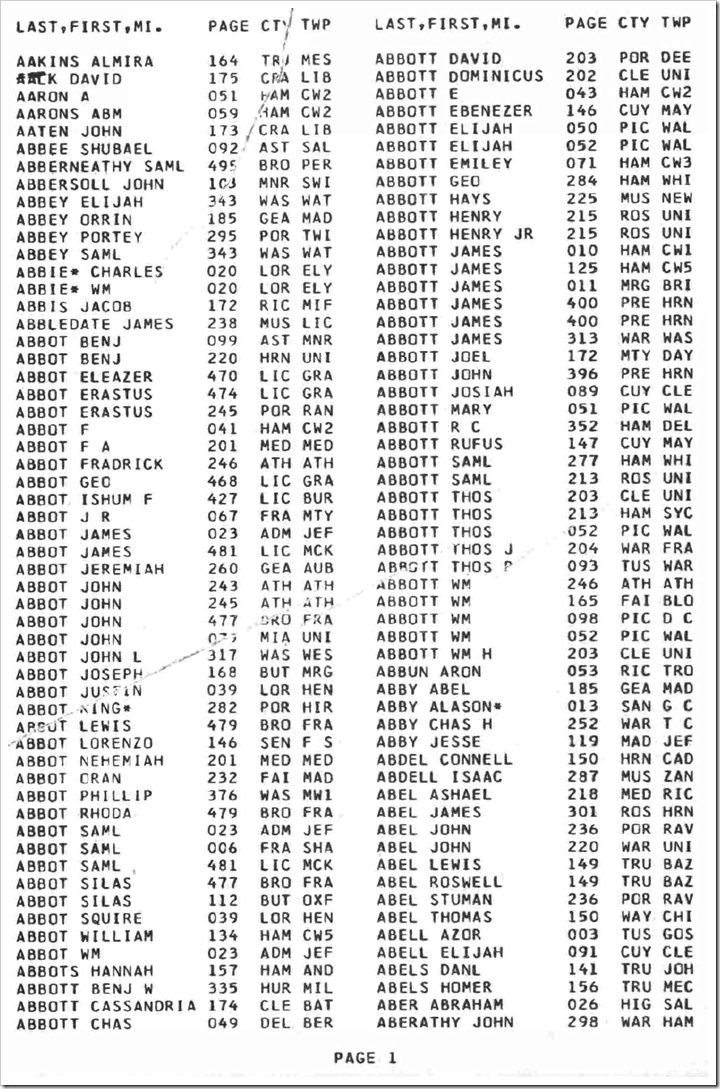
I believe the first large-scale effort to index the U.S. censuses was made by Ronald Vern Jackson and Accelerated Indexing Systems (AIS) in the late 1970s through the early 1990s. I believe he indexed heads-of-households only, and just the names, so the amount of work was more manageable. These were true indexes, not the census databases we use today. Where did he get his keyers? Does anyone know? He published the indexes as bound books of computer printouts.

A page from the 1976 AIS index to the Louisianna 1820 census
Ronald Vern Jackson, et. al, eds., Louisiana 1820 Census Index (Bountiful, Utah: Accelerated Indexing Systems, 1976), 1.

According to Thomas Jay Kemp’s The American Census Handbook (Wilmington, Delaware: Scholarly Resources, 2001), here are the publication years for a sampling of states:

Census Publication year
1790 New York: 1990
Ohio: 1984
1800 Ohio: 1986
Vermont: 1976
1810 Virginia: 1978
1820 Iowa: 1977
Indiana: 1976
1830 Indiana: 1976
1840 Iowa: 1979
1850 Iowa: 1976
1860 Iowa: 1987
North Dakota: 1980
Virginia: 1988
Washington: 1979
1870 Iowa: 1990

Notice all were done after the widespread availability of computers.

In 1984 AIS published on microfiche what it had completed. Ancestry.com published AIS indexes online in 1999.

Some limited scope indexes were published earlier. For example, in 1964 the Ohio Library Foundation published an index of the 1830 Ohio census. This, too, was a computer printout. Volunteer family historians extracted the names of heads of households onto index cards. The cards were keyed onto punch cards, which were then sorted by an IBM mainframe computer.

A page from the Ohio Library Foundation's 1964 index of the 1830 Ohio census
Ohio Library Foundation, ed., 1830 Federal Population Census Index, vol. 1 (Columbus, Ohio: Ohio Library Foundation, 1964), 1.

So the answer to your question is, that indexing the 1860 census took about a decade and was finished around 1990.

Signed,
---tai

Thursday, August 27, 2015

The Future Will Bring Automated Indexing Tools – #BYUFHGC

Jake Gehring presenting at the 2015 BYU Conference on Family History and Genealogy“It’s not that we don’t like our [indexing] volunteers,” said Jake Gehring. “We would just rather have them work on things that only [humans] can do.” Jake is director of content development for FamilySearch and presented at the BYU Conference on Family History and Genealogy last month. This article is the third and last article about his presentation. In the first article I reported on Jake’s premise that FamilySearch Indexing is not keeping up with the number of records FamilySearch is acquiring and additional means are needed. In the second article I reported about two of those means: increasing the efficiency of human indexers and working with commercial partners. In today’s article I will report on the third means: increased automation via computers.

In the third part of his presentation, Jake spoke about “the really far-out stuff, HAL9000 kind of stuff.”

Jake showed a screen shot that we saw in Robert Kehrer’s keynote. (See “Kehrer Talks FamilySearch Transformations” on my blog.) The screen showed a color-coded obituary.

Obituary with parts of speech color coded by FamilySearch automated obituary indexing system

FamilySearch trained a computer to identify the different parts of speech. They trained the computer how to discern meaning out of a bunch of words. Notice in the example above that names of people are identified in dark green, places in brown, dates in dark blue, relationships in salmon, events in pale green, clock times in a steel blue (or would you call that a dark sky blue?), organizations in red, and buildings in goldenrod (or would you call that a mustard?).

They basically teach the computer to read. The computer is willing to extract a lot more detail from an obituary than a volunteer can easily do. And it can work really, really fast. For obituaries, computers can do in about a week and a half what it takes all of FamilySearch’s volunteers three and a half years to do. This is why in a few weeks FamilySearch is going to stop having volunteers index the current obituary project. In fact, FamilySearch has already published about 37 million obituaries this way. You may already have found and used an obituary that was indexed by a smart computer.

This applies to obituaries published since about 1977. Since that time, most obituaries have been published and stored digitally. Pre-1977 it looks a lot differently. Because the obituaries are not already digital, it is a pretty nasty OCR problem. [OCR converts the printed page to text so that the computer can subsequently try to make sense of it.] The problem is so severe, computers can recognize only about half of the words in pre-1900 newspapers.

If you were at RootsTech you may have seen the last thing Jake showed. A company named Planet entered its ArgusSearch into the Innovator Challenge. ArgusSearch is a system that reads the handwriting of documents that have not been indexed. You type in something like “Steinberg” and the program shows some records that might match that name. It won’t find all the matches. And it may return some results that aren’t matches. But this is still useful. This technology is still young, but an application like this is likely to hit real life in the next ten years.

Planet's ArgusSearch automatically read handwritten names in census records without an index.

Jake summarized by saying that while indexing is going really well—never better—unfortunately, it is just not good enough to give us all the records you need. [FamilySearch does not index all the records they acquire.] “We need to do much better. It’s not that we are not quite there; we are way behind and getting further behind every year,” he said. There are three areas that FamilySearch needs to utilize. FamilySearch needs to increase the efficiency of its indexing volunteers. FamilySearch needs more help from for-profit publishers who can bring more resources to the table. And FamilySearch needs to use computer technology to make images searchable with little or no human intervention.

“It’s an exciting time to be alive. Can you imagine the explosion of document availability once we make a bit more headway in a few of these areas?”

Jake took a couple of questions:

Q. How easy is it to use tools like Google Translate to translate Spanish records?

A. Google Translate is better at modern, generic words. If you type in the text of a letter, you would be able to get the gist of it, but it may not handle archaic words or words specific to a vital record. As long as you know a small set of terms, you can usually get by without a computerized translator. There is no magic tool currently available.

Q. Why do we sometimes key so very little from a record? While we have someone looking at the document, shouldn’t they be extracting more?

A. Because we publish both indexes and images, we index the minimal amount necessary to find the image. Why index something that no one will ever use in a search? Cook County, Illinois death certificates are an example where we indexed something that didn’t need to be. We indexed the deceased’s address, but who will ever search using the address? Sometimes we don’t get it quite right, but that’s the general principle.

Q. When will we be able to correct published indexes?

A. We’re starting now after ten years of being in the top three requested features, we’re starting to implement the feature to allow you to contribute corrections. We are rapidly approaching the point when this will be available. I’m not really authorized to say “soon,” but we have our eyes on that feature.

Wednesday, August 26, 2015

FamilySearch Should Increase Indexing Efficiency and Utilize Partnerships

Jake Gehring presenting at the 2015 BYU Conference on Family History and GenealogyFamilySearch is not keeping up with indexing the records it digitizes and improvements in three ways could help fix this, according to FamilySearch director of content development, Jake Gehring. Yesterday I presented the first part of my remarks about his presentation at the 2015 BYU Conference on Family History and Genealogy (#BYUFHGC). Today I’ll present the second part, covering the first two of the three ways, increasing efficiency and partnering. Tomorrow I’ll present the third way, increased use of computerization.

Today’s FamilySearch Indexing (FSI) system is somewhat inefficient. FSI primarily utilizes a double-blind indexing methodology, sometimes described as A+B+arbitrate. Two indexers independently index a batch of records. If there are any differences, even one letter in one record, the entire batch is sent to a third person to arbitrate between the two values, or supply a value of their own. It turns out that 97% of all batches have at least one difference, even though what is keyed is the same for 70% of the fields. As a result, almost all records are looked at by three people. There’s a good argument that that is wasteful. For certain kinds of records and certain kinds of people [and certain kinds of fields, I might add], only one keyer is sufficient. The accuracy doesn’t get any better when involving two more people. FamilySearch has recently switched to single keying for newspapers in the last year since reading typeset material can usually be done without error. You wouldn’t want to do this for certain types of records or for beginning indexers.

A more efficient methodology is referred to as A+review. One person keys the information and a second person reviews what is keyed. All the reviewer does is indicate whether the information is correct or not. This could easily be done, even on a cell phone. This method is about 40% more efficient than the double-blind methodology because FamilySearch knows when a record needs to be keyed a second time. FamilySearch is actively working on this kind of methodology to increase the efficiency of indexing.

Jake showed three, entirely new, experimental types of indexing. Some do not even have working prototypes: keyboardless indexing, free-form indexing, and casual “micro-indexing.”

Jake showed an indexing system that allows productive use of devices without keyboards, such as smart phones. If you’ve used photo recognition in Photoshop, you have seen the paradigm before. He showed a slide showing 12 snippets of a name, such as “Henry.” (See my version, below.) These had been read from documents by a computerized handwriting recognition system. But since computers aren’t too good at reading handwriting, it presents its results to a person for verification. The person marks any that the computer got wrong. Where the computer had a good second guess, it could present that as well, allowing the person to select an alternate name, such as “Kerry.” For pre-printed forms, this works great and allows easy indexing on devices without keyboards, such as cell phones.

Snippet of name indexed as Henry

Shippet of a name that was indexed as Henry or Kerry Snippet of name indexed as Kerry
Snippet of a name that was indexed as Kerry Snippet from a page wherein one name was indexed as Kerry Snippet of a name that was indexed as Kerry
Snippet of a name that was indexed as Kerry Snippet from a page wherein one name was indexed as Kerry Snippet from a page wherein one name was indexed as Kerry

Snippet of a name that was indexed as Kerry

Snippet of name indexed as Henry Snippet of a name indexed as Kerry

Jake showed the FamilySearch Pilot Tool, another indexing system for free-form indexing. It is currently live, as a pilot. A large portion of the screen is a browser showing a record on FamilySearch.org. Along the right side is a pane where an indexer can enter names, dates, and places extracted from the document. (See the screen shot, below.) A person would use the tool to index any record that they care about and a short time later the record would be searchable. You wouldn’t have to ask for anyone’s permission. You wouldn’t have to index all the names. Anyone could take any collection desired and do some indexing. This tool is in pilot right now. FamilySearch is very interested in tools that let you index as you go. To join the pilot, send Jake an email. (I see someone has also posted the link online. See “FamilySearch Pilots Web-Based Indexing Extension” on the Tennessee GenWeb website.) There is no arbitration. If you care enough to index the image, you probably care enough to be accurate. But that supposition is something yet to be validated.

The FamilySearch Pilot Tool for indexing - Click to englarge

“Micro-indexing” could be used to make images more usable. It would be nice to be able to browse unindexed images easier. FamilySearch is very interested in an upgrade to the current browse experience. Jake showed an animated artist’s rendition of a tool, reminding us that this is just a research and development idea.

FamilySearch is interested in making it easier to find records in images that have not yet been indexed.

In micro-indexing the system might ask you really simple questions, like, “What kind of record is this?” and have you click the record type. By asking volunteers to do tiny tasks, FamilySearch might be able to gather information to make browsing images easier to find my record type, locality, and time. Just because FamilySearch doesn’t have the time to index the images, doesn’t mean they can’t be made easy to browse.

This is a mock-up of what a micro-indexing tool might look like.

In addition to talking about increasing the efficiency of indexing, Jake talked about partnering. FamilySearch is fine with the concept of trading data with other companies. FamilySearch provides images and the partner creates indexes. They may even get exclusive use of the indexes for awhile. For example, a lot of Mexico church and civil records are being indexed right now by Ancestry.com. We all get the value of it eventually. FamilySearch has similar projects going on with Findmypast (I didn’t catch the projects names) and MyHeritage (Danish census and church records, and Swedish household names). This increases the rate of indexing by bringing more indexers to the table.