Showing posts with label FamilySearch Affiliates. Show all posts

Thursday, September 22, 2016

Linda K. Gulbrandsen and FamilySearch Partners – #BYUFHGC

Linda Gulbrandsen addresses the 2016 BYU Conference on Family History and GenealogyThis article will be of interest mostly to members of The Church of Jesus Christ of Latter-day Saints.

Linda K. Gulbrandsen of FamilySearch gave a presentation titled “New Possibilities with FamilySearch Partners” at the recent 2016 BYU Conference on Family History and Genealogy. She is an executive account manager for FamilySearch in the Partner Services Division.

“Partners are very important to us,” Linda said. She talked about how consultants could use tools from FamilySearch partners to help get Church members interested in family history and temple work. She referenced Mike Sandberg’s talk at RootsTech 2016 (see “Begin at the Beginning: Helping Others to Love Family History”) and showed how his approach can be augmented with the inclusion of partner offerings.

The question arises as to when to introduce partner offerings. That depends, she said. Perhaps the person or family needs to start right into FamilySearch.org. For others, the proper approach may be different. In some cases, the consultant may wish to use the app prior to visiting the member. The app gallery (at FamilySearch.org/apps) has over 120 apps for desktop, mobile, and web. Any of these may be helpful.

Linda presented several scenarios, each with an applicable partner app. For a family with young children, she showed Little Family Tree. For other scenarios she showed Relative Finder, MooseRoots, and Hope Chest.

“We have these partner tools that can be helpful in so many ways,” Linda said.

Tuesday, September 20, 2016

MyHeritage Provides FamilySearch Source Button

Click to view an infographic

FamilySearch announced last week that MyHeritage is providing a button to create a source in FamilySearch’s Family Tree. When viewing a MyHeritage historical record the button is available below the record details.

A single click or tap of the button creates a source in Family Tree. To associate the source with the correct person in Family Tree, you must have initiated the search from the person’s Family Tree page.

Ancestry.com features similar functionality: Attach the record to a person in an Ancestry Member Tree, link that person to a person in FamilySearch Family Tree, and transfer the source. This feature is available only to members of The Church of Jesus Christ of Latter-day Saints.

For more information about the MyHeritage button, see “Family History Easy Button: Create New Sources in Family Tree from MyHeritage” on the FamilySearch blog.

Wednesday, August 31, 2016

Beta Test to Earn Free Year Subscription to Twile

I received the following invitation from FamilySearch:

image

As someone who attended last year’s Innovator Summit at RootsTech, you may remember Twile, who was featured in the Innovator Showdown. They’d like your help to test an exciting new integration with FamilySearch.

Twile (www.twile.com) allows you to build an interactive time line of your family's past, present, and future, made up of milestones—such as births, marriages and deaths—allowing you to tell the story of your family from your earliest known ancestor right through to today. The UK-based startup went home with two awards in February, including People's Choice (if you missed it, watch it again here.)

FAMILYSEARCH INTEGRATION

Over the past few months, we have been working closely to support Twile with a significant piece of development to integrate their service with FamilySearch. The integration will allow FamilySearch users to import their trees and memories into Twile and keep their files all up to date as research continues. Photos and events will be automatically added to a private Twile time line for users to share with their family.

TWILE NEEDS YOUR HELP TO MAKE IT AWESOME!

We know you support innovation and product development, so we're asking for your help. Twile has a beta version of the service and is looking for some feedback on how user-friendly the process is before the software goes live. If you would be interested in helping out, let us know!

Send an email to Twile Co-Founder Kelly at kelly.marsden@twile.com, and she will be in touch to arrange a date and time to contact you during September.

TO SAY THANKS...

Twile will be offering all beta testers a 12-month Twile family package worth $129.99.

ALL YOU WILL NEED:

  • A laptop
  • A FamilySearch tree
  • Skype
  • Thoughts, opinions, and suggestions about the new features. Please “speak aloud” and be honest!

Many thanks!

Tuesday, September 1, 2015

Powerful FamilySearch Partner Apps – #BYUFHGC

Jimmy Zimmerman presenting at RootsTech 2015“Have you ever said to yourself, ‘If only FamilySearch would do this one thing?’ ” asked Jimmy Zimmerman, product manager for FamilySearch Family Tree. Jimmy spoke to the topic “Powerful Partner Apps for FamilySearch” at the 2015 BYU Conference on Family History and Genealogy.

“There are an infinite number of ideas out there,” Jimmy said, “and FamilySearch has finite resources.” But what if others could add features? Well, FamilySearch has something called an API which allows that.

Diagram showing arrows between apps, through the Internet, to the FamilySearch API

[Insider’s note: An API is like a wall with holes in it set aside for particular actions. An app or website writes information on a piece of paper and, holding the paper in hand, sticks their hand through a specific hole in the wall. On the other side FamilySearch notices the hand sticking through the wall, reads the information on the piece of paper, writes a reply, and shoves the hand back through the wall. For example, an app might write a person identifier (PID) on a piece of paper and stick itthrough a hole labeled “fetch information about a person in Family Tree.” FamilySearch writes the information on the piece of paper and shoves the hand back through the hole.]

To use the API, companies must adhere to a strict set of rules. These are designed to protect the integrity of data in FamilySearch Family Tree and to guarantee best security practices. The rules are so voluminous they are jokingly referred to as “the tax code.” In the FamilySearch App Gallery, each app page indicates capabilities that the app can exercise within the information at FamilySearch.org. Writing and modifying Family Tree requires far more rules than just reading Family Tree.

Jimmy talked about finding available apps in the App Gallery. If you can’t find a way to get to the App Gallery, you can always go to FamilySearch.org/apps. Find apps by searching for the name or description, specifying category, filtering by platform (Windows, iPhone, web, etc.), price option (free, purchase, or subscription), free trial availability, language, FamilySearch capability (read-only, update), and if a FamilySearch login is required.

Some apps are listed without any certification. According to Jimmy, these have been found to be so helpful, FamilySearch lists them despite the lack of certification. He pointed out Ancestry.com’s Family Tree Maker as one example. An audience member asked when MyHeritage will be interacting with FamilySearch Family Tree. Jimmy said that while he couldn’t say, he could tell us it is in progress.

Users can rate apps and write reviews. Please leave reviews. It helps others find the really good apps and it encourages the developers to improve. If you find problems with an app, first contact the company. App reviews may not be a fair place to report problems, as the problems might actually be a FamilySearch API issue.

Some apps with high ratings are:

Jimmy demonstrated a few of the apps. Kinpoint was one that I had not seen before.

Explore Chart of Kinpoint.com

Kinpoint.com displays a fan chart, or Explorer Chart as they call it. Dots on the Explorer Chart are like a to-do list. They mark things like missing vital information, timeline issues, duplicates, lacking sources, and record hints, although some of these are available only with a subscription. The pane on the left displays information about the focus person. A summary pane on the right-hand side shows interesting facts about the persons displayed in the Explore chart, such as the number of countries of origin, number of children per family, youngest and oldest ages, and range of birth dates. Most of these are available only by subscription. Facts can be used to highlight persons on the chart according to available filters. For example, you could see all ancestors highlighted who were 25-30 years of age at the time of their death. The chart can show ancestors or descendants. The subscription features are available for free in a Family History Center.

Jimmy showed MooseRoots.com, a website with census and vital records. MooseRoots is a new company in the family history space, but has its roots in the ability to pull together lots of information. [Insider’s note: The parent company is the newly named Graphiq, a data visualization company, with many vertical search engines.] For example, their census records are married to aggregate census statistics, name origins and meanings, historical stock performance, historical place information, and economic data. [Insider’s note: Some of their data looks pretty rough, like the WWII army enlistment records for The first five names from Cache County, Utah are Edson Bcnson, On Roy Pehr, Meroill W Glevn, Grant C Jarsvn, and Eewzp Thompkwo. If I had to guess, I would say they used OCR on a typed or printed source. No images were available.]

Jimmy wanted to show us their Civil War Soldiers collection, but couldn’t find the link to it. I stumbled across it at http://civil-war-soldiers.findthebest.com/ after a lot of poking around. Graphiq has married the standard Civil War Soldiers database with information about the infantry, battles, and casualty counts.

The same section of the Graphiq website contains information about battles, generals, sailors, and war statistics. They credit the National Park Service for the data and Hal Jespersen (www.cwmaps.com) for the maps.

Wednesday, March 4, 2015

Partnership Town Hall with FamilySearch Executives: Partnerships (#RootsTech #RTATEAM)

Rod DeGiulio
Craig Miller
Don Anderson

At RootsTech three executives from FamilySearch answered questions about partnerships. Bruce Brand was the moderator. Don Anderson is over the partner and patron services divisions, Rod DeGiulio is over the records division, and Craig Miller is over the product management and engineering divisions.

I’m at the point in my RootsTech reporting that I can’t understand all my notes, so I’m presenting them pretty much as-is. Text in square brackets [like this] are my editorial insertions or supplements not contained in my notes.

Brand asked a question about the original iPhone 2007. What was missing the first year? There were no apps. The next year they opened it up to third parties. A year ago, they had over 1,000,000 apps. [What about FamilySearch?] “Our core strategy is partnering and collaboration.”

Q; Why don’t you offer an API to allow uploading trees?

A; We have one for Family Tree, now. We will later have an API to upload a single tree.

Q; Why does Family Tree Maker not sync to FamilySearch Family Tree?

Don; That’s a question for them, rather than me. I’m hopeful they will soon sync.

Q; Are there any plans for those who have forgotten where we’ve searched?

Craig: That’s a ways out. Our priority list this year is

1. Plumbing
2. Make hints more real-time. Pretty much when you put people in you’ll see hints updated.

Don: Attach your sources. You’ll have a sense of where you have been. There are some 3rd party products.

Bruce; If you go to Person, you’ll see the last 20 persons you touched.

Don: It wouldn’t show the searches you’ve done.

Q; In my Ancestry.com tree and in FamilySearch Family Tree I have different records attached. Is there a way to synchronize them?

Don: For members of the Church of Jesus Christ of Latter day Saints, there is a synchronize sources. It is not quite done but will be done in the next month or two. For the general public, it not available right now.

Q; When I link a record to Family Tree for a marriage, I don’t want to link to the parents.

Craig; We’re looking at having a specific template for those types of records. After we do the plumbing we’ll work towards templatizing that work.

Q; What’s an upcoming feature you’re excited about?

Rod: First of all, this year, sometime, we’ll have our new indexing platform. It will enable more flexibility for choosing projects, or even a county within a project. And more and more partnering allowing access of their records on our site; that will enable hinting.

Don: The most exciting to me is the new companies with apps. I think we’ll see the most growth in the app gallery. I’m particularly excited about family.me and [somebody else that I didn’t capture in my notes]. Lastly, I’m very excited that within the next six months we’ll have synch with Findmypast and MyHeritage trees.

Craig: My most exciting feature is what Don just mentioned, having all the trees coming to a common base. It’s staggering in vision. That’s mind blowing. Second Is real-time hinting. Another is a novelty coming sometime during the year. It’s the notion of how we’re related. There’s a number of privacy concerns that need to be worked out.

Q; in New FamilySearch we had the ability to uncombine. Is that going to be added back in?

Craig: The ability to unmerge currently exists. We’ll enhance it to take care of IOUSes. That will be in about a year and a half.

Q; is there a plan to require people who sign up to provide contact information?

Craig: We use the Church’s system of authentication. The Church’s membership system does not require an email address because many Church members across the world don’t have access to computers. That’s one of the hundreds of reasons why. If you’re not a member of the Church, you have to have an email. Later on this year we’ll have a system of internal messages [Instead of needing to send emails]. You’ll be able to send them a message and talk to them. Whether they get back to you is their choice. We hope that will open the doors of communication.

Q; Legacy Family Tree has a sharing mechanism. It is not working right now. And when will we be able to share…[I didn’t get this down. Sources?].

Don: It is possible to fully synchronize, including sources. The only area we haven’t fully released is the Memories area. The end of the 2nd quarter or so is the timeframe for that.

Q; On living people in Family Tree, changes are made that were attributed to FamilySearch, and odd changes to names [are being made].

Craig: A lot of our information about living [persons] comes from the [Church] Membership Department. Occasionally they make a change that pulls the person from Family Tree, and then puts it back. [Occasionally this causes the problem you’re seeing.] We’re having a terrible time figuring out this plumbing problem between the Tree and the Membership Department.

Q; Sometimes you can’t combine people because of a membership record…

Craig: The two most common reasons [you can’t combine is because the merge would create an IOUS and] because in the membership system there are two membership records.

Don: When that happens, you should have an option to shoot a message to support who can approach the Membership Department about getting it fixed.

Q; You mentioned the ability to find relationships. We recently used a tool from an employee within FamilySearch, I think. Lots of people in the ward turned in membership numbers and the system found a bunch of 4th cousins. Everyone got excited about family history.

Bruce: it is called Relative finder. It is from Brigham Young University. [See https://roots-fb.cs.byu.edu/. It requires a FamilySearch account. If multiple people join a group, the website can look for relationships among the group. For example, I am 10th cousins with Rod DeGuilio.]

Rod: That will be a fun capability once it is introduced. I found one of my direct reports was a 3rd cousin.

Q; There is a lot of talk about ideas about storing structured citations and reasoning. Programmers say it isn’t a priority. What is the long term strategy?

Craig: We have an ongoing standard called GEDCOM X. We’re using that as a standard to transfer information. The developer you talked to is right. We’re working on lots of plumbing problems. Once that is done, we’ll be able to work on these types of problems.

Don: We are watching the quality of the tree. […] It creates the right environment to have sticky conclusions. Sources are showing up more prominently. How do we [encourage quality] without discouraging new users. We actively monitor the tree for quality measures. We have a great deal of dialog and future roadmap.

Q; The portion of the tree I see has a lot of blocked records. What is the long term plan?

Don: Records are locked for a number of reasons: IOUSes, famous individuals, early church leaders, and those before 1500s. There are processes of getting changes by involving support.

Q; What about adding impedance changes in the future to discourage bad changes?

Don: [Sorry, Don. I missed so much of your reply, I can’t understand my notes.] 

Q; How are we doing getting rights to records that custodians won’t give us access to?

Rod: It is largely a matter of prioritization. We’ve been gathering records since 1894. We are adding about 450 million images a year. We’re anticipating being able to double that. It will take a few decades before we get to all the records that members need. The work we are doing with partners certainly […]. We signed 345 contracts last year for an additional nearly 1 billion records. The rate is accelerating.

Craig is fond of saying that on June 17th, 2014 the world changed. [That’s when FamilySearch released hinting.] I believe because of improvements to the Tree, getting records online will eventually become the bottleneck.

Don: We added about 500 million additional hints a couple of weeks ago. Currently they are about 98% accuracy. On top of that we’re continuing to improve that accuracy by getting better and better cross referencing algorithms. As well as that, we’re getting new records. i hope you’re enjoying it. I hope it is improving your research; it is helping mine.

Craig: When we added the ½ billion hints, it added 100 million hints to people in the tree who had never had hints before. Go back and look in your tree, if you haven’t in the last couple of weeks. As we analyze the attached hints, we have found that one out of every ten hints extends the line.

Rod: You can tell we’re pretty excited about hints. I’ve yet to find anyone who through hinting we haven’t been able to add someone to the tree.

Craig: So please index!!

Q; Does the engineering department have enough to do, or do they accept requests? As a partner, can we make suggestions on API changes or request features?

Don: Absolutely. (Send it into Dev Support.) It will get prioritized. We love to hear the feedback.

Q; When hinting tells me it has a new person to add, it creates a duplicate that has to be merged.

Craig; What happens with the system now, when you add a person from a hint we don’t look for duplicates. In the future we will try to do that. Before you accept a hint, check for duplicates. I bring up two screens and before I add a person through record hint attach, I check to see what the situation is with that person.

Q; One of my friends found a PAF file for a Mac. She wants to add it to Family Tree. How can she do that?

Don: There is no such thing as PAF for Mac. [Someone mentioned there was a really old version.] What is my advice if you are using a MAC? Convert. There are lots of choices. Contact support. We have a team that can do conversions. Then almost any of the current programs can import that.

Q; Sometimes we’re the victims of our own success. Congratulations on dealing with the number of users. Is there a way to see how bad the latency of the system is?

Craig: Saturday and Sunday from 9 am to 9 pm is the heaviest usage by far, probably by double. Then evenings. Hopefully in about a year and a half you wont even be thinking about this. [My notes don’t say it, but he may have mentioned the “plumbing changes” again.]

Q; What kind of contracts do we have [with partners for LDS memberships]? We’ve been hearing one year, five years?

Don: We don’t reveal those. Things are going very well. I don’t see any reason why the relationships won’t continue into the foreseeable future.

[I’m guessing the next and final question came from a member of the FamilySearch staff:]

Q; Will you comment on the need for camera crews?

Rod: We have a dire need for more camera volunteers. We could double the number of cameras if we had the volunteers. Go to the volunteer section of familysearch.org and it will give a number of ways you can help.

Thursday, March 13, 2014

RootsMapper: Another FamilySearch Family Tree Extension

Dennis Brimhall mentioned a couple of FamilySearch Family Tree extensions, FamilyMap and Puzilla, in his RootsTech keynote address. (See “RootsTech Thursday’s Opening Session.”)

The ecosystem growing up around FamilySearch Family Tree is an increasingly compelling reason to add your data. Here’s another interesting program and an interesting way to visualize your data.

RootsMapper.com is a free website that shows your “pedigree” in geographical format. For the map below I mapped myself, although I could have specified any Family Tree PID (person identifier).  I specified four generations (which doesn’t include the root person.) RootsMapper then animated backwards the migration of my ancestors.

A circle with a generation number indicates the birthplace of each ancestor. Blue indicates male, and pink, female. The root person is indicated with numeral “0” (which is currently highlighted in yellow in the map below). Parents are indicated with the numeral “1,” grandparents with “2,” and so on. Just like a pedigree chart, lines link each person to their parents (although they can be turned off).

Hover over a circle and RootsMapper pops up a box with the person’s name, birth year, and death year. Click on a circle and it pops up a person card with name, full birth and death information, a photograph (if available), the PID, and options to remove that circle or extend the pedigree beyond that point.

RootsMapper shows a geographic map of your pedigree

The first time I ran this four generation map several points jumped out at me.

I have southern roots! Lots of them! I have an Irish line! And I have a Scandinavian line! Of course I already knew all that, but I’ve been suppressing it to avoid collisions with burned counties, Irish research, and patronymic names. (You’d think someone comfortable with pseudonymic names would be fine with patronymic names, but apparently not.)

The program can map up to eight generations of all ancestral lines, but that takes an extremely long time. A better approach is to map several generations and then extend particular lines. That can be done up to 20 generations.

The program has several options. One displays the number of births per country. Another displays a small pedigree of the mapped generations. Another isolates the display to only one line.

To run the program, you’ll need a (free) FamilySearch account. And of course, you’ll only see what information you or a relative have added to Family Tree. If there are errors in your tree you’ll have to fix them in Family Tree before the RootsMapper map is accurate. While free, donations are accepted.

Thursday, February 13, 2014

#RootsTech Brimhall Town Meeting

Dennis Brimhall, president of FamilySearch, InternationalThursday at RootsTech I attended a question and answer session with Dennis Brimhall, CEO of FamilySearch. Here’s some of what was said. Sorry about my English. I could take notes only so fast, so I am sometimes quoting and sometimes paraphrasing. That raises the possibility of misquotes, so take everything with a little caution.

Q. Can you clarify the contract with ancestry.com [and FindMyPast and MyHeritage]?

A. We have limits on how much we can do and we realize there are other companies that are also good at what we do. We approached them and they said, “We’d like access to your records, on our site. We don’t want them to leave our site to go to yours.” The deal: “We’ll let you have access to our records on your site. In return, we’d like to have access for our members [of the Church of Jesus Christ of Latter-day Saints] who paid for our records with their tithing. It will be on their site. [I didn’t give FamilySearch an opportunity to edit this before I published it, but I’m sure they would point out at this point, that FamilySearch will give the general public access to these sites at FamilySearch’s family history centers.]

The other part of the deal is to coordinate in more acquisition. They image and we index, or we image and they index. In some cases, they pay to have the records indexed. After some embargo, the records would be opened up to everyone.

Q. When does it start?

A. The complicated part is how do you log into one account and end up being logged onto another site. The engineers are working it out to allow you to log on to their site with your LDS account. It might be 2nd quarter of this year. In the future, you’ll be able to search their records on our site.

Q. [Some question about using family history with missionary work.]

A. Many people who don’t know much about the Church know that the Church is interested in family history. What we’ve found is that it is kind of wonderful to ask people about their ancestors. We’ve found the My Family booklet, we’ve tested what happens when instead of talking about the doctrines of the Church, you spark an interest in family and then their interest might grow from there.

Q. What is the purpose of photos and the stories regarding the living?

A. We don’t share this often, but here is an interesting fact. Every member of Church members pays for FamilySearch.org, but only a fraction use it. “Every organization is perfectly designed to get the results it gets.” If we want to get more people to use it, something has to change. I’m going to offend some people but I have to say it. Who was the website designed for? The genealogists. So we begin to see what invites people in. You go to a cemetery and see two dates. What’s between the two dates? The dash. We’ve got to start concentrating on the dash. Do you know that until a year ago April, you could not add the story of an ancestor on FamilySearch.org?

Here’s an aside from the Ancestry Insider: You’re right. That does offend me. Now I’m going to offend some people, but I have to say it.

Let me quote from the BCG Genealogical Standards Manual, millennium edition, p. 18:  “Descriptive biographical information is provided for individuals in the lineage, pedigree, or genealogy. In addition to vital statistics, the compilation includes sufficient information about each person’s activities, residences, circumstances, contributions, and lifestyle to place them within the context of their historical era, society, and geographic place.”

That sounds a little clinical. Standards usually do. Nationally recognized genealogist, John Colletta, says it pretty well. “Creating a family tree is only half the goal. The other half is learning about your ancestors as men and women with personalities, character traits, motives and aspirations, joys and disappointments, just like you.”

Do you know that until a year ago April, you could not add the story of an ancestor on FamilySearch.org?

Back to your question, how do we address the living. We’re addressing the problem of not being able to see your spouse. You’re going to be able to see that before long.

We’re going to have an app available in the 2nd quarter where you can go to grandma and ask her a question and then post the recording online.

Outside North America many members of the Church haven’t entered both parents into Family Tree. Many more haven’t entered grandparents, and even more haven’t entered all their great-grandparents. The My Family booklet is trying to capture that living memory. That then becomes the basis for the family history research that is to come.

The good news is, its working. We’re seeing significant improvements in the number of people using the website.

Q. Oral histories. Is there a vision or a goal? Native Americans?

A. We are setting up in the family history centers recording booths to record oral histories. In St. George we have a green screen and you can show photos as you talk about your history.

We’ve been capturing histories in Africa for a number of years now, but it is very expensive to do it. We probably will not expand beyond Africa what we are doing there. It is not scalable. We don’t have enough missionaries to make it work.

We have some good collections for native Americans. I’ve met with five tribes in the last six months. They are good at cultural history, but how can we help them preserve their family histories? We’ll meet with them over the coming months to see how best to do this.

Q. [There was a long exposition. I kept waiting for the question, so I wasn’t writing anything. It was something about members finding information in the tree and assuming it must be true because it is an official Church website.]

A. We’re trying to answer this question. How are we going to address this issue of data integrity? People often write and complains to me that someone has changed their ancestor’s data. I don’t know what is the truth. So how do we solve the problem? The only way to deal with this is to create an expectation in the minds of people that you need to check. The first expectation is that you need to source it. The second expectation is that members check for duplication before you submit a name to the temple. The duplication rate has gone down from around 30% to under 10% in the last several years.

We’re beginning to see very gradually that the database is going to clean itself up. The number one complaint used to be, “I cant fix the information.” Now the number one complaint is that someone is changing my information.

We think we’ve bottomed out. We’ve seen a decrease in duplication and an increase in sourcing.

Q. How do you decide what records to obtain?

A. We have a whole team that looks at this. They look at where the greatest demand is for records and where the records are available. We have a deal to acquire 400 million records in Italy. We have 267 camera crews with a goal to increase that to 500. We do a million images a day around the world. A significant portion is imaging records from out of the vault. There are 80 GB of images of the whole [didn’t hear this part]. In seven years we’ll be done with imaging all the records in the vault. Then how do we make up for no longer getting records out of the vault? [The increase in cameras.]

Q. Just finished serving a mission in Taiwan. There is a need for genealogy resources.

A. We have a robust strategy for dealing with Chinese. It is part of our ten core languages. This is not an announcement. We’ve had some discussions on how we might collaborate with records. We’ve had lots of dialog. [Something I didn’t catch], but it is on our radar.

In India they take a census every ten years. It results in 35 linear miles of shelf space. Seven years later they destroy it all to make room for the next one. Our first break in india, one state is allowing us to come in and image records. We’re in this for a long time. We’re in for the very long haul.

Q. [Some question about sources?]

There’s something that will be on the website very, very quickly. When you attach a census record to the tree, we have a feature that will be coming out, maybe next quarter, that when you attach a child from the census, it will present all the other people in the household and allow you to attach them. [Big applause.]

Q. When I add sources to the tree and then you image and index those records, will those be merged?

A. If one is digital and one is image, they will not be matched up. There is no way electronically to match them up.

There is something we’re going to try, one of the things we’ve been toying with. You know we’re coming out with a new indexing system. One of the things we’re considering is called indexing on the fly. If you find information in a record, why wouldn’t we allow you to index that record?

Q. I wrote a story and scanned some photos and I can’t get the photos into the story?

A. [Answer from David Burggraaf] Put them together in a PDF and upload them together.

Q. [Question about trees]

A. We are not generally promoting alternatives to the public tree. We are trying to get a common family tree. FindMyPast has agreed to use our Family Tree. [Answer from David Burggraaf:] Going forward we intend to continue to capture separate trees, but it is our intent that [users] merge and link [them] into the main tree.

Q. When President Hinckley announced the New FamilySearch software he said it was to reduce duplication and increase collaboration. But many people are not sharing their email address, so it is impossible to collaborate.

A. We have been toying with—and we don’t want to be too heavy handed—but one thing we’ve been discussing is that you have to give a valid email address. But half the church doesn’t have them.

Q. [Didn’t write it down.]

A. There’s a fine line between informing and not informing people. We think it would be nice if when anyone added a photo, we notified you. It starts to become spam very quickly. We might take 3% of registered users and turn that feature on and test it.

Q. [Didn’t write it down.]

A. We probably make three or four changes to the site every day. It’s the only way we get better.

Tuesday, February 11, 2014

#RootsTech - FindMyPast’s Annelies van den Belt Encourages Participation

Annelies van den BeltFindMyPast.com is owned by DC Thomson Family History (formerly brightsolid) and Annelies van den Belt is its CEO. She was one of the three keynote speakers on Thursday, along with FamilySearch’s Dennis Brimhall and Ree Drummond. Drummond is a popular (non-genealogical) blogger known as the Pioneer Woman for her adventures married to a cowboy on a ranch out in the sticks. She shared her history, including her growing family. (See her blog article, “Love, Mama of Four.”) RootsTech has a penchant for bringing in non-genealogical bloggers, I think to attract potential, new genealogists. Drummond was one of them.

She spoke about blogging, her family, photography, her cookbooks, her cooking show, and her new series of children’s books. I had blogger envy. I wish I could take photos like she does. (My familial tremors prevent it.) I wish I had interesting stories from my life to share. I suppose I could write about food—recipes using chocolate or reviews of chocolate desserts at restaurants around town. No one is likely to publish a cookbook from my blog posts. I suppose my blog could be the basis of a series of children’s books. (Careful what you say. I suppose I set myself up for that.)

Watch Drummon’s address on the RootsTech website.

Van den Belt has big expectations for the growth potential of the genealogical community. She’d like to grow the industry to 89 million people. She quoted the figure that 99.9% of people say they are interested in genealogy and 25% of people say they want to know where they’ve come from. When I was an executive of a private company, I learned that market potential was a big factor in determining what a company was worth. Stating it a little simplistically, if you currently have 2 million customers with the potential of growing it to 80 million, you are looking at a company valuation multiplier of 40. That makes even a small company worth a lot to potential investors or buyers. When I was at Ancestry.com, there was unusually high pressure (in my opinion) on employees to acquire new users. I felt it was at the expense of current customers. I think it was precisely to grow the valuation of company value. (Thank goodness Tim Sullivan came along with added emphasis on retaining current customers.) In my experience, you’re not going to get market growth of tens of percentages, but fractions of one percent. Investors don’t want to hear that. Nevertheless, I believe it is true.

I applaud efforts to grow the size of the industry. Ancestry.com’s Who Do You Think You Are, FamilySearch’s RootsTech Conference, FamilySearch efforts within the Church of Jesus Christ of Latter-day Saints, and FindMyPast’s Lives of the First World War memorial website have no doubt reached new individuals who catch the bug, who are here to stay. But in some ways involvement in genealogy feels more like a calling, like the feeling that drives some to become clergy. We all look for that individual in our families; someone we can pass our research down to, lest it be lost.

She noted that Facebook timelines are today’s personal histories. That’s a neat observation. (Maybe FindMyPast will provide a way to externally capture and preserve that story of our lives, lest Facebook lose it or dismiss it.)

Van den Belt announced that FindMyPast is working on three new mobile apps. She emphasized the importance of partnerships. Like FamilySearch, they are creating APIs that allow partners to utilize their resources and technologies. They are working on a new partnership with the Imperial War Museum to produce a website, Lives of the First World War.

She pointed out the power of wider involvement in stories and photographs. Scour your attic, she challenged us. The more people who are engaged, uploading, and sharing, the more we find records about our own ancestors. That’s another great observation. These activities will surely attract a wider audience. We should all join FindMyPast’s efforts to involve more people in genealogy.

Wednesday, February 5, 2014

#RootsTech FamilySearch Blogger Dinner Report

imageRootsTech began for me last evening, with the FamilySearch blogger dinner. I should have taken a count. This was the largest group I’ve ever seen at this event. FamilySearch pulled out all the stops this time. Dennis Brimhall, FamilySearch president and CEO, spoke briefly to us. During the socializing before the dinner we got to chat with FamilySearch board members, Elder Allan F. Packer and Elder Bradley D. Foster. Both are presiding authorities with the Church of Jesus Christ of Latter-day Saints, which owns, operates, and funds FamilySearch.

FamilySearch repeated several of the messages that they have communicated in recent weeks.

Pirate Capt’n Jack Starling made an appearance as part of FamilySearch’s campaign to index 100 million obituaries this year. “Dead men tell no tales…, but their obituaries do!” is the theme of the campaign. Obituaries are like locked up pirate treasure until they are indexed and published online.

Capt’n Jack will be popping up here and there during the conference. Attendees are invited to get their pictures taken with him, post it online with hashtags #ahoy, #FamilySearch, and #obits, and then claim a bit of treasure at the FamilySearch indexing booth. We were forewarned that he might just be interrupting Dennis Brimhall’s keynote this morning.

Don Anderson spoke about partnerships, reiterating the information released in the announcement I wrote about yesterday. (See “FamilySearch Gives Further Details on Partnerships.”) Regarding FamilySearch spreading its records around to Ancestry.com, FindMyPast.com, and MyHeritage.com, Anderson said, “We want you to be able to go wherever you think gives you the best experience.” He reiterated that FamilySearch has negotiated to make these three websites free in FamilySearch family history centers. (MyHeritage is not currently available; it will be added later this year.)

And he clarified something for me. Members of the Church of Jesus Christ of Latter-day Saints will have full subscriptions to these websites. The announcement was vague as to whether it was access to all records, or just those obtained from FamilySearch. Anderson asked that we please inform Church members that access is not available today. Please don’t call! It will come later this year and announcements will be made at that time.

Anderson said that these partners are also working on a tree-integration technology that will make it possible to transfer information between a tree on their website and the FamilySearch Family Tree. That technology is expected to be available later this year.

“We’ve always been concerned about the quality of the data,” Dennis Brimhall said. They’re excited about the accelerating specification of sources. He said it took seven years for users to add the first 70,000 to the FamilySearch tree. Now users are adding 70,000 sources a week and the total has surpassed 12 million. Users are uploading 5,000 photos a day and 500 stories.

Brimhall characterized genealogy and family history this way: on a grave marker that separates birth and death dates with a dash, the dates are genealogy and the dash is family history. We need to pay attention to the dash in addition to the dates.

I have to pause here and blow a little steam. To become a certified genealogists or to just be a competent genealogist, one has always had to delve into the details of an ancestor’s life. Genealogists—real genealogists—have always been concerned about the whole story. It’s partly practical. Once you’ve crossed the chasm, full identification and differentiation of a person often requires identification of residences, businesses, church memberships, associates, migrations and naturalizations, court actions, military service, real and personal property ownership, appearance of handwriting and signatures, and any and all other details you can find. Do you know who is only concerned with name, birth date, and death date? “Name collectors.” Those are the people wreaking havoc blindly accepting tree-to-tree hints in Ancestry Member Trees and recklessly merging persons in FamilySearch’s Family Tree. They ignore the dash between the dates. I totally agree with the point Brimhall is making. I love the power of the illustration, the dash between the dates. But does he have to mischaracterize the word genealogy to make the point?

Shipley Munson shared some interesting statistics about the growth of RootsTech. RootsTech 2011 had 3,200 registrants. RootsTech 2012 had 4,000. 2013 had 6,700. This year, RootsTech has 8,000 registrants! In addition, this year they have 4,000 youth (teenagers) signed up and another 1,000 on a waiting list! Last year, the total of registrants, youth, and unique users viewing online was 20,800 people. This year they expect that number to hit 30,000.

Last year they tested the concept of having satellite sites utilize recordings of RootsTech sessions in local family history conferences. They tested 15 locations in three languages and had an average of 200 people attend at each location. They are expanding that program this year. They have 622 locations signed up across the world, covering ten languages. There’s even a genealogy cruise in the South Pacific that is broadcasting the sessions. (RootsTech in Tahiti? Sign me up!)

Adding on the remote locations, last year’s RootsTech had 24,300 attendees and this year’s is expected to surpass 150,000!

Well, its late and I have breakfast with Ancestry.com early in the morning. I spent too much time ranting and now have no time for proofreading. (I confess. I threw that last punctuation error in on purpose. Anything else really was because I’m not proofreading this article. Good night!)

FamilySearch Gives Further Details on Partnerships

FamilySearch commercial partnershipsFamilySearch has announced further details and motivation behind its recent partnership deals. In recent months FamilySearch partnerships have been announced with Ancestry.com (see “Ancestry.com Announces Extensive Partnership with FamilySearch” and “More Information on Ancestry.com/FamilySearch Agreement”), FamilyMyPast.com (see “FamilySearch/FindMyPast Announce Agreement”), and MyHeritage.com (See “MyHeritage Announces Partnership With FamilySearch”).

In the agreements the partners were given rights to publish record collections from FamilySearch.org. “Working with individual industry leaders such as Ancestry.com, Archives.com, findmypast, Fold3, and MyHeritage will also increase and broaden access to the records FamilySearch has already published online,” said the announcement. Publication of these records on multiple websites removes barriers to family history research. The records on Ancestry.com and FindMyPast.com are available free to the general public in the 4,715 local FamilySearch-owned family history centers worldwide. “They will be available…free on Ancestry.com, findmypast.com, or MyHeritage.com to members of The Church of Jesus Christ of Latter-day Saints,” FamilySearch said. “Additional details regarding expanded records access will be announced sometime in 2014.”

FamilySearch clarified that not all of its records will be shared with partners. They said that contractual obligations prevent it from sharing some of its records and indexes with partners or with the general public. (I’ve written before about restricted record access. See “FamilySearch Image Restrictions.”)

The agreements included partnerships in acquiring, indexing, and publishing new record collections. “This collaboration will carve centuries off the time needed to increase access to the world’s historical records,” FamilySearch said. These collaborations will bring more financial investment than the nonprofit community alone can provide. In addition to the 5.3 billion records already obtained by FamilySearch, there are an additional 70 billion records FamilySearch would like to acquire worldwide, according to a graphic accompanying the announcement. Ten billion of those are from the Americas and Europe. The graphic also said that FamilySearch Family Tree contains about one billion people and that another 27 billion born since 1500 A.D. still need to be identified and added.

image“For the top countries with the highest online research demand, using our existing resources and volunteers, it will take up to 300 years to index the 5.3 billion records that we already have,” Dennis Brimhall, FamilySearch CEO, said. “We can do significantly better by working together with other organizations and as a community.” A graphic accompanying the announcement said that collaboration would reduce that to 20 to 30 years.

Some users may view it as a downside that the indexes produced by these commercial organizations is generally done by offshore indexers. I think that is offset by accelerated access to the bulk of the records. FamillySearch.org already includes records indexed by other organizations. Most users have already come across records from Fold3 and FindMyPast with those annoying links to websites that require payment to view the images. According to FamilySearch wiki articles about their record collections, there are other indexes obtained from third parties.

FamilySearch said in April that volunteers hit the milestone of one billion records indexed with its current indexing program. This week’s announcement said that, including the earlier extraction program, volunteers had indexed over three billion records.

FamilySearch said these partnerships are but first installments removing barriers to family history research. “FamilySearch plans to involve many other interested organizations that will provide records, tools, and other resources to allow more people to build, preserve, and share their family trees online.”

To read the original announcement, see “FamilySearch Works to Put the World’s Historical Records Online in One Generation.”

Wednesday, October 16, 2013

MyHeritage Announces Partnership With FamilySearch

MyHeritage announces strategic agreement with FamilySearch“We've entered into a strategic partnership with FamilySearch which will add billions of historical records to MyHeritage,” said Aaron Godfrey, public relations manager at MyHeritage. “MyHeritage will receive more than 2 billion global historical records from FamilySearch, spanning hundreds of years.” The collections include censuses, vital records (birth, marriage, and death), and hundreds of other collections from all over the world. The records will be available to MyHeritage users for searching using MyHeritage’s SuperSearch technology and matching using their Smart Matching and Record Matching technologies. This will occur in the next few months.

In return, MyHeritage will provide FamilySearch with the Smart Matching and Record Matching technologies for users on the FamilySearch website. This will be available sometime during 2014.

User contributions to the FamilySearch Tree will be included in the records given to MyHeritage. However, information will not be flowing back the opposite direction. “Content uploaded by MyHeritage users will stay only on MyHeritage and this content is never licensed, shared, sold or given to any third party,” said MyHeritage.

This announcement follows on the heels of a similar announcement made by Ancestry.com back in September. (See “More Information on Ancestry.com/FamilySearch Agreement.”) This announcement may have been alluded to by FamilySearch’s Don Anderson at the organization’s annual business meeting. In my article, “FamilySearch Annual Business Meeting,” I reported that,

Anderson said that sharing FamilySearch records with partners results in more people using the records and the more FamilySearch shares with partners, the more the partners share with FamilySearch. Anderson added that FamilySearch is working with partners to facilitate growth of FamilySearch Family Tree. Brimhall reported that more information would be forthcoming.

For more information about the MyHeritage/FamilySearch agreement, see the MyHeritage blog and the official press release.

Friday, April 22, 2011

A Nice Ride in the Mountain

A color fan chart makes a nice ride in the mountain for a new genealogist “You don’t interest others in horse riding by showing them how unpleasant it is to clean out the stables,” said Tim Cross. “You take them on a nice ride in the mountains.” Cross is a product manager at FamilySearch—and a horse enthusiast.

At the Riverton FamilySearch Library April Saturday seminar Cross challenged attendees to get everyone involved in genealogy by giving them a nice ride in the mountains. Don’t start by telling them about taking five years to find one of your ancestors.

Cross said he uses the question, “Would you or someone you know be interested in learning more about your family?” Then he sits down with them and helps them create a colored fan chart pedigree. He has found it often sparks additional interest.

Once you get a fan chart, you can send it to local experts who can further engage your new genealogist. Members of the Church of Jesus Christ of Latter-day Saints can send the chart to the newbie's ward family history consultants. When logged in, a member can see the e-mail addresses of their consultants on www.familysearch.org.

Cross uses a FamilySearch affiliate, such as Tree Seek or Family ChArtist, to create a free chart in PDF format. For those whose families have been members of the Church for several generations, these programs can create charts showing existing research and highlighting areas of opportunity.

“It’s like giving them a nice ride in the mountains.”

Wednesday, September 22, 2010

Relatively Eye Popping

If you have any eyes left to see, today I’ll give you a peek at Relationship Calculator. Relationship Calculator is the third of three eye popping technologies  demonstrated by Tim Cross at the recent BYU Family History Conference. Cross is a product manager at FamilySearch, working to develop a genealogical community leveraging the new FamilySearch (NFS) Tree.

Relationship Calculator

In several places around Temple Square one can see descendancy charts showing common origins of famous people. One chart shows descendants from the Howland family. Another shows descendants from the Loomis/White families.

Descendancy tree in the FamilySearch Center of the Joseph Smith Memorial Building
Descendancy chart of Robert White and Bridget Allgar

I thought one of these relationships would make a good test case for Relationship Calculator. The charts are of uncertain quality, to be sure. And the technology is still under development. So I didn’t expect everything to work flawlessly.

On their Tree Seek website, Misbach Enterprises provides a simple interface to Relationship Calculator. They call it “How are we related?” I used it for the test. (Sorry, friends; it requires an NFS account.)

I thought it best to pick two people that were famous—but not too famous. That would minimize the possibility of IOUSes blowing up the calculation. I first tried one of the most distant relationships. Orville Wright and Philo T. Farnsworth are 8th cousins, twice removed.

You know Orville Wright. Philo T. Farnsworth is the inventor of the television and is honored by Utah with one of its two statues in the U.S. Capitol’s Statuary Hall Collection. (The other is Brigham Young.)

I tried LW1S-2J2 (Wright) and KWCQ-PFY (Farnsworth) in Relationship Calculator. It could not find a relationship.

Could unresolved duplicates in the NFS Tree sever the connection between the two?

I checked Farnsworth and was able to successfully navigate back to Robert White (KNZM-D6J), as shown in the chart below.

Philo T Farnsworth is a descendant of Robert White and Bridget Allgar

But I found two points where the default parents were incorrect. Perhaps that caused the failure. I checked to see if Relationship Calculator could connect Farnsworth with White, his 9th great grandfather.

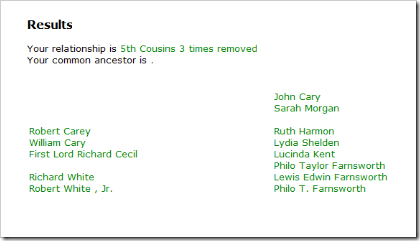
Relationship Calculator decided they were 5th cousins, 3 times removed. Oops.

RelationshipCalculator

I’ve copied the names into the table below and added birth and death dates.

Common Ancestor [not specified]
Siblings John Cary (1583-1661) Robert Carey (1457-1540)
1st Cousins Sarah Morgan (1700-1777) William Cary (1482-1528)
2nd Cousins [not specified] First Lord Richard Cecil (1495-1553)
3rd Cousins Ruth Harmon (1733-1755) [not specified]
4th Cousins Lydia Shelden (1759-1846) Richard White (1516-1578)
5th Cousins Lucinda Kent (1785-1829) Robert White , Jr. (1558-1617)
  Philo Taylor Farnsworth (1826-1887) —once removed—
  Lewis Edwin Farnsworth (1865-1924) —twice removed—
  Philo T. Farnsworth (1906-1971) —3 times removed—


Oh boy.

A little pedigree analysis shows that John Cary (1538-1661) and Robert Carey (1457-1540) can not be siblings. Nor can Sarah Morgan (b. 1700) be the daughter of John Cary (d. 1661), nor can Lydia Shelden (b. 1759) be the daughter of Ruth Harmon (d. 1755), nor is it likely that Richard Cecil (b. 1495) is the son of William Cary (b. 1482), nor is it likely that Richard White (b. 1516) is the grandson of Richard Cecil (b. 1495).

Is the problem Relationship Calculator or is it the data in the Tree? As the old saying goes, “Garbage in, garbage out.” (GIGO)

Whether Relationship Calculator works or not is immaterial while the tree is full of garbage.


Next week I compare Ancestry.com’s Famous Relatives Finder. Can it do any better? Stay tuned…

Friday, September 10, 2010

We, the Community

Gordon Clarke Tools and community connect to create great power, said Gordon Clarke in his Salt Lake Family History Expo presentation. Clarke is the FamilySearch Affiliates Manager.

“Many hands make light work,” quoted Clarke. “But have you heard, ‘many eyes make good conclusions’?” Community shared trees are one way people can connect. And the new FamilySearch Tree is not the only shared tree in town. Many online trees are available. Clarke highlighted several that also have the ability to exchange data with the new FamilySearch tree.

Clarke made the point throughout his presentation that “FamilySearch is just a drop in the bucket in the world. There is plenty for everyone to do.”

Clarke manages FamilySearch Web Services. Web Services allows multiple websites and desktop programs to interact in a standard way. “Partnering with FamilySearch makes it possible for multiple parties to be compatible,” said Clarke.

The Community Reference Links web service is an emerging FamilySearch technology that allows anyone to contribute information to the online community via links rather than making copies. “If you keep your information in one place and share it via links, then you avoid problems where genealogical data gets copied around without your ability to make corrections,” said Clarke. Photographs don’t have to be copied from one place to another. You access photos where they resides. Community Referencing Links are finding application in cemetery research, photograph and document sharing, and identifying others researching the same ancestors. (Stay tuned for a full report about Community Reference Links from Tim Cross’s BYU Genealogy Conference presentation.)

As Clarke puts its, “We are smarter than me.”

Friday, August 14, 2009

Employment Opportunities at FamilySearch

Example notification from FamilySearch employment system It takes me forever to find the link anytime anyone asks me, so as I’ve done with several other items that I always wish to find, I’m going to blog about it. Then I’ll always know where to find it.

I’m speaking of the employment website for FamilySearch. Since FamilySearch is the public brand for the Family History Department of the Church of Jesus Christ of Latter-day Saints, it may not surprise you to learn that positions are listed on the Church’s employment website or that employees must be members of the Church in good standing.

Each time I try to find it, my circumlocutious route to the website is:

This leads to what may be a semi-permanent URL for the Church Employment web site:

www.lds.org/emp

The software currently used seems most excellent. (The URL resulting from a search shows that the software used is from Taleo.)

One can submit a profile (resume, etc.) for comparison to current and future job postings. One can then sign up for automatic e-mail notifications of matching postings. (See the example, above.)

A search for “FamilySearch” currently returns two postings, although there may be others that make no mention of FamilySearch.

The first of these two posts reveals somewhat of the size and scope of FamilySearch’s future operations:

The scale of the FamilySearch infrastructure assume[s] millions of users and terabytes of structured information and tens of petabytes of image data and thousands of servers.  For these reasons the desired candidate should [have] several years of experience architecting and building infrastructures that include:

·    Enterprise class large SMP Servers (e.g. Sun M9000 or larger)
·    Enterprise class Databases with more than 4TB of synchronized storage handling thousands of transactions per second
·    5000+ slot tape libraries
·    Multiple petabyte Enterprise Storage Arrays (Hitachi, EMC, DDN)

DDN? I didn’t know I had been out of the storage industry so long, but I’ve never heard of DDN. Apparently, FamilySearch affiliate, Footnote.com has. Footnote.com’s parent company, iArchives, is one of the case studies mentioned on the DDN web site.

Anyways, its plain to see that FamilySearch has big plans. Pretty cool stuff…

Monday, May 11, 2009

The Ancestry Family History Center Edition

Logo at the top of the Ancestry Family History Center Edition Some Family History Centers (FHCs) don’t know that all FHCs can have free access to the Ancestry Family History Center Edition of Ancestry.com. Some FamilySearch employees don’t know that their computers at work have free access to the Ancestry Family History Library Edition. In both cases, the URL is www.ancestryinstitution.com.

AncestryFHLEdition The Salt Lake Family History Library (FHL) and a select number of large FHCs have access to all Ancestry databases via the Ancestry Family History Library Edition. You can see the list of the select FHCs by reading document 102722 from the FamilySearch.org Product Support section.

I’m not certain if other FHCs need to do anything special to get access to the Ancestry Family History Center Edition. I searched Product Support and found contradictory information. Some articles said the FHC Services Portal was involved and some said it wasn’t. I’m guessing, but here is what I think might be the case.

I guessing that on computers where LANDesk is running correctly and the FHC Services Portal is functioning, that the Ancestry Family History Center Edition can be used by going directly to www.ancestryinstitution.com. I guessing that the old method, an Ancestry Family History Center Edition login account, is only necessary if this method fails.

The process formerly used by FHCs to request an account is now documented as the process to use when having problems accessing the Ancestry Family History Center Edition:

Family history centers that have problems with their Ancestry access, will need to communicate with Ancestry.com via an e-mail composed in their center's LDSMail account and send it to fhcsupport@ancestry.com or call them at 800-262-3787. Ancestry will need the center's name and unit number and a concise message explaining the problem and what is being requested.

(Source: Document 105333. Also, see Document 101501.)

The databases currently available through the Ancestry Family History Center Edition are:

Database Name Index and Images? May 2007 May 2009
1841 Channel Islands Census Index Only Yes Yes*
1841 England Census Index Only Yes Yes*
1841 Isle of Man Census Index Only Yes Yes*
1841 Wales Census Index Only Yes Yes*
1851 Channel Islands Census Index Only Yes Yes
1851 England Census Index Only Yes Yes*
1851 Isle of Man Census Index Only Yes Yes
1851 Wales Census Index Only Yes Yes*
1861 Channel Islands Census Index Only Yes Yes
1861 England Census Index Only Yes Yes
1861 Isle of Man Census Index Only Yes Yes
1861 Wales Census Index Only Yes Yes
1871 Channel Islands Census Index Only Yes Yes
1871 England Census Index Only Yes Yes
1871 Isle of Man Census Index Only Yes Yes
1871 Wales Census Index Only Yes Yes
1880 United States Federal Census Index and Images Yes Yes*
1881 Channel Islands Census Index Only Yes Yes
1881 England Census Index Only Yes Yes
1881 Isle of Man Census Index Only Yes Yes
1881 Wales Census Index Only Yes Yes
1891 Channel Islands Census Index Only Yes Yes
1891 England Census Index Only Yes Yes
1891 Isle of Man Census Index Only Yes Yes
1891 Wales Census Index Only Yes Yes
1900 United States Federal Census Index and Images Yes Yes*
1916 Canada Census of Manitoba, Saskatchewan, and Alberta Index and Images No Yes*
1920 United States Federal Census Index and Images Yes Yes
Atlantic Ports Passenger Lists, 1820-1873 and 1893-1959 Index Only Yes Yes*
Baltimore Passenger Lists, 1820-1948 Index Only Yes Yes
Boston Passenger Lists, 1820-1943 Index Only Yes Yes
California Passenger and Crew Lists, 1893-1957 Index Only Yes Yes
Detroit Border Crossings and Passenger and Crew Lists, 1905-1957 Index Only Yes Yes
England & Wales, Birth Index: 1837-1983 Limited Search Yes No
England & Wales, Death Index: 1837-1983 Limited Search Yes No
England & Wales, Marriage Index: 1837-1983 Limited Search Yes No
Florida Passenger Lists, 1898-1951 Index Only Yes Yes
Galveston Passenger Lists, 1896-1948 Index Only Yes Yes
New Orleans Passenger Lists, 1820-1945 Index Only Yes Yes
New York Passenger Lists, 1820-1957 Index Only Yes Yes*
Philadelphia Passenger Lists, 1800-1945 Index Only Yes Yes
Seattle Passenger and Crew Lists, 1882-1957 Index Only Yes Yes
U.S. World War II Draft Registration Cards, 1942 Index and Images Yes Yes*
World War I Draft Registration Cards, 1917-1918 Index and Images Yes Yes*

* Available, but not listed on the Titles Available page.

Since the last time I wrote about the topic, the England & Wales 1837-1983 birth, marriage, and death indexes have been dropped and “1916 Canada Census of Manitoba, Saskatchewan, and Alberta” has been added. Does these changes portend changes in the Ancestry.com—FamilySearch relationship? Will we see any changes announced at the National Genealogical Conference this week? (I don’t know, so I can speculate along with the rest of you. If I knew one way or the other, I’d have to keep silent. What about those databases from the FamilySearch vital records CDs that I’ve seen show up on Ancestry.com lately? But I digress…)

List of titles includes but 30 of the 43 Interestingly, the list on the “Titles Available at the Family History Center” page only shows 30 of the 41 included databases. To see this page, go to the Ancestry Family History Center Edition home page and click the link in the box titled “What Can I Search?”. The same list is visible outside a center by clicking here. This isn’t the first time the list has had problems. See “Ancestry Titles Available in FHCs” for an article and screen shot I posted in September 2007 when most of the titles were left out.

If you are one of those centers or FamilySearch employees unaware of this resource, check it out at www.ancestryinstitution.com .