Thursday, February 4, 2016

#InnovatorSummit at #RootsTech - Business Sense for Family History Entrepreneurs

Ken Krogue was a keynote at the 2016 Innovator Summit in Salt Lake City.Ken Krogue was a keynote at the 2016 Innovator Summit in Salt Lake City. Ken is the president and founder of insidesales. He previously worked at Franklin Covey, and Infobases, where he worked with Paul and Dan, the founders of Ancestry.com. Ken shared some business sense for entrepreneurs. A couple of points rang especially true from my history.

Ken advised that entrepreneurs “go sell something.” That is to say, get out there and get revenues coming in. Don’t wait for a product to be perfect. Start selling it as soon as it gives value to consumers.

Raise money only when you don’t need it. In my experience, investors demand, and usually get, significant ownership in a company in exchange for money. This occurs because companies don’t seek money until they are desperate. If you ask for money only when you don’t need it, investors have to settle for less or you can walk away.

Ken made a point that is tough for a weekend blogger to utilize. Orin Hatch, a senator from Utah, once shared the 2,500 rule. Orin had figured out that for each letter he gets from a constituent, there are 2,500 others who feel the exact same way. The takeaway for entrepreneurs: every comment on your blog or social media outlet is important. Respond to each one. And do so quickly. The average company response time to a web-based lead is 39 hours! People don’t come to the web to wait that long. If you don’t respond quickly enough, they are going to go somewhere else. If you can respond within five minutes or less, you’ll be able to reach 92% of those people.

After sharing many other points of advice, he shared a couple of genealogy experiences. He had been working on his Krogue line for about two years and had hit a brick wall in Denmark in the 1700s. (See the arrow on the left in the pedigree, below.) He decided to work on one of the wife’s line instead and worked his way back to a Sode family (the arrow on the right). An exchange student from Denmark was staying in his neighborhood and her name was Sode. So he talked to her and she said that her grandmother was a big researcher in genealogy. She called her grandmother and her grandmother said, “Yes, we are related. In fact, I have 210 pages of family history and genealogy of your line!” And to think that this young lady was just two blocks away.

Ken Krogue pedigree brick wall and Sode ancestor

“How does that happen?” Ken asked. “Well, those are the kinds of adventures that happen when you get involved in family history.”

#InnovatorSummit at #RootsTech – Inside-out and Upside-down

Steve Rockwood of FamilySearch looks at problems inside-out and upside-down.As a prelude to #RootsTech, the 2016 Innovator Summit began yesterday in Salt Lake City. The opening keynotes were given by Steven Rockwood, CEO of FamilySearch, and Ken Krogue, cofounder of InsideSales.com.

Steve Rookwood said that innovators make a living by looking at different ways to approach things. FamilySearch was looking at things differently when they came up with the “crazy” idea of a shared, public family tree. Looking at things differently is something Steve’s done in his career. He likes to solve problems by looking at them “inside-out and upside-down.” (Hence the joke his staff played on him by projecting his first slide upside-down.) In 1990 he and partner, Jim Ball, created Alpine Axis in Golden, Colorado. They had the idea of creating call center technology for a center that wasn’t a center at all. They developed technology that allowed workers to work out of their homes. Calls coming into an 800 number would be routed out to the employees in their own homes.

Now as the new CEO of FamilySearch, it is a skill he is bringing to his work. Prior to becoming CEO, he served as a vice president over international concerns and as part of his responsibilities lived outside the United States. He comes to his new position as, in a way, an outsider looking in. Steve identified five areas FamilySearch is focusing on: discovery, family tree, searchable records, memories, and contextual help.

Everyone has positive feelings about family history. If someone becomes engaged, they develop skills. With those skills, they produce results. What would our industry be like if we could extend engagement to teenagers and millennials? What if we learned how to bring others into our circle, providing them the feelings, skills, and results that we experience?

What would our industry be like if we could integrate family history into our everyday lives, like we do in subtle ways with math?

Let’s grow the family history space. Let’s bring family history out, to weave it into the fabric of everyday life.

Tune In Now to #RootsTech Online

image

Just a reminder. RootsTech is being broadcast live,starting today at 8:30 am, MST (10:30 EST, 7:30 PST).


Wednesday, February 3, 2016

#BYU Family History Technology Workshop

Amy Harris gave her wish list to developers and researchers at the BYU Family History Technology Workshop.Before #RootsTech, before #InnovatorSummit, there was the Brigham Young University Family History Technology Workshop. Now in its 16th year, the one day workshop brings together developers and researchers tackling some of genealogy’s most thorny challenges.

Amy Harris, an associate professor of history at BYU and an accredited genealogist, provided the workshop’s keynote yesterday. Amy currently serves as the director of the Family History Program at BYU. She spoke to the topic “A Genealogist's Technological Wish List: Teaching, Filtering, and Mapping.”

“We are engaged in similar work,” Amy said of genealogists and technologists. “We are solving puzzles or mysteries.” Amy went through her wish list of things she wished technology would do to improve the work of historians and genealogists.

Amy wishes applications could be more instructional, teaching users to be better. It doesn’t have to be FamilySearch that makes the FamilySearch website more usable. It could be a popup app that explained in which situations a record collection might be useful. Developers wouldn’t need to develop the instructional resources. It could point users to existing resources. Apps could help with situation-specific research problems, walking users through the process of figuring out which records should be used at each step of the process.

She wished there were instructional OCR technology. She wished there was help for citation standards. She wished there was technology helping users evaluate record hints in Ancestry or FamilySearch trees. She wished tree software better assisted users work through the challenges of naming schemes that didn’t carry the same surname from one generation to the next.

Amy wishes programs helped users understand and use changing jurisdictions. It would be great to have an app that showed all the different jurisdictions for a place, overlaying the boundaries on a map and allowing for boundaries that changed over time. Just a few examples of different jurisdictions in England are civil registration districts, poor law unions, Church of England parishes and dioceses, and Quaker monthly meeting boundaries.

In short, Amy wishes there were apps that were informed by advanced research methodology and helped users utilize them.

For Technology: Some Problems, Some Solutions

Welcome to the 2016 BYU Family History Technology WorkshopAfter the opening keynote yesterday, speakers at the BYU 2016 Family History Technology Workshop gave rapid-fire, five-minute presentations for the remainder of the morning, first on genealogy problems needing technology solutions and then on some new genealogy technology solutions for genealogists.

Some Problems

Dallan Quass talked about judging tree quality. There are a lot of bad online trees. When you look at an online tree, how do you tell how good it is? Dallan feels it should be possible to apply computer technology to identify tree quality. Machine learning could examine the number of sources, including their type and variety, the number of warnings, the specificity of dates, the number of people in the file (too many signal the work of name gatherers), and how many of them are early people.

Mark Clement said there was a need for technology to help handle duplicates in Family Tree. New users find duplicates very confusing and disheartening when they see that message: “Merging is a complex process…” Mark said, “I think that this is a prime place where computer technology could assist.”

James Tanner complained about the lack of data transfer technology. There are hundreds of places where genealogical data files exist. If I put my data on MyHeritage, what do I do if I want to move it to another tree? Or how do I exchange a copy with another person? There needs to be standards for data exchange and GEDCOM is broken!

Heath Nielson spoke to several problems extracting data from Historical Documents. One of the biggest problems is image quality. There should be metrics produced as soon as a camera operator takes a picture. This could immediately alert them to the need to retake an image. Another issue is duplicate images. FamilySearch has done some work to see if it could be identified automatically. Another problem is identifying a zone of interest in a document, such as an obituary on a newspaper page. Image enhancement is an issue. Handwriting recognition of historical documents still presents a challenge.

Scott Woodfield addressed the 2016 BYU Family History Technology Workshop.Scott Woodfield spoke to the topic: “I Have No Control over My Own Information.” His mother was disheartened recently when someone changed her father’s name in Family Tree. Sometime in the past pencil and paper were replaced by PAF. Then PAF was replaced with Family Tree. This was characterized as a good thing, but users have the perception that “bad” people are out there changing their information. This triggers the fight or flee response. Users either enter into toggle wars, or they give up using Family Tree. Users believe they are the best job and that they have loss of control of their information. Some possible solutions are to give a personal view, to use branching version control, or enable better communication between users.

Some Technologies

About a dozen presenters talked about their new technologies and products. Most were applications that captured multimedia (video, audio, or photos), shared it (with flexible privacy), and preserved it. A couple unlocked memories and informed the recipient at some future time. Studio by Legacy Republic includes a scanner for photo albums.

Wesley Eames showed AncestorCloud, a website that allows users to post a need for some research, along with how much they are willing to pay. Researchers can then accept jobs of interest. They are still working the kinks out; about 1% of requests end in dispute.

James Tanner showed The Family History Guide – This site teaches users how to use the FamilySearch website. It features a structured, sequenced way of approaching the subject of genealogy. Learning resources are scattered all over the web and all over FamilySearch.org. The Family History Guide breaks learning down into measurable resources. It also includes lesson plans for teaching family history.

Joshua Mathias showed Grandma's Pie, a website that shows your ancestors’ nationalities as a pie chart.

The Ancestry Insider's ancestor nationality pie chart

Kevin King showed a concept under development, Wheel of Family Fortune. As the user guesses letters, more information comes up to teach players about their ancestors. Kevin hopes games will get younger people interested in genealogy.

clip_image004

Justin Rasband and Tom Sederberg showed One Page Genealogy, which tries to solve the problem of packing together a family tree chart and still making it look good. You can download the chart as a PDF for printing. Click on a person to change the size of the person’s box, or that of their generation, or the whole chart. By using boxes of different sizes, you can best utilize the space.

Still to come: presentations by FamilySearch employees. Be warned, however. I may not be able to write them up until after Innovator Summit and RootsTech. Innovator Summit started today and RootsTech is close on its heals.

Tuesday, February 2, 2016

Family Tree Maker to Live On

Whoa! I’ve been at the BYU Family History Technology Workshop all day today (2 February 2016) and only now saw I received this announcement from Ancestry earlier today:

New Family Tree Maker Options
By: Kendall Hulet

Since our Family Tree Maker announcement last December, we have continued to actively explore ways to develop and support Family Tree Maker and ensure you have choices to preserve your work in ways that matter to you.

Today, I am pleased to announce two options for desktop software that will work with Ancestry.

Software MacKiev is acquiring Family Tree MakerSoftware MacKiev

Software MacKiev, with whom we have a long-standing relationship, is acquiring the Family Tree Maker software line as publisher for both Mac and Windows versions. Software MacKiev has been the developer of Family Tree Maker for Mac for more than six years and is thrilled at the opportunity to publish future versions of Family Tree Maker for Mac and Windows.

This new agreement means you will receive software updates and new versions from Software MacKiev, and have the ability to purchase new versions of Family Tree Maker from Software MacKiev as they are released.   You will have continued access to Ancestry Hints, Ancestry searches, and be able to save your tree on Ancestry with Family Tree Maker moving forward.

imageRootsMagic

We have made an agreement with RootsMagic, a leading genealogy desktop software program publisher, to connect Ancestry with the RootsMagic software by the end of 2016. With this new relationship, RootsMagic can serve as your desktop family tree software, while having access to Ancestry hints, Ancestry searches, and the ability to save your tree on Ancestry.

We have heard your concerns and are working to provide the solutions you requested. These new agreements will make it possible to preserve your work on Ancestry and Family Tree Maker and enable future features and benefits to help you discover your family history. Be assured that Ancestry, in cooperation with Software MacKiev and RootsMagic, will continue to support you as you discover your family history.

We ask for your patience as we work diligently through all the details to make these solutions available. Be sure to check back on our blog as we share more information about Family Tree Maker in the next few months.

For more information on Software MacKiev and RootsMagic, click below:

Wrangling Syllabi With the #RootsTech App

Accessing conference syllabi on a smart phone or tablet at a conference is sometimes an iffy proposition, with uncertain Wi-Fi connections. At the time I wrote this (on Monday), accessing the RootsTech 2016 syllabi on an iPhone was down right painful. The method seems to be a bandaid approach, so maybe it will be fixed before you read this. Just in case, let me tell you how it is done. Then let me tell you what you should do instead.

Accessing the syllabi on the conference app requires secret knowledge available only to select initiates. Or you have to have come across the tweet by Lydia Jones. Here are the magic steps:

Tap on General Info.

Tap on FAQ.
Tap on FAQ.

Tap on the menu icon.

Tap on RootsTech.
Tap on RootsTech.

Tap on Class Syllabus.

Tap on the section header containing the desired class.

Tap on the class number. This will bring up the syllabus if it is in PDF format. There may also be an “Additional Document” link. View it as well, however, the ones I checked were either class outlines, or Word documents corresponding to the PDF file. I’m guessing the Word docs will not display correctly in the app.
Tap on the class number.

Once you are done viewing a syllabus, tapping the back arrow takes you all the way back to the FAQ step. What a pain! Hopefully, by the time you read this they will do what the NGS conference app does. For the NGS conference, you tapped on the session in the schedule, then clicked a convenient link right there next to the class description, room number, and note taking link.

In a separate article I will show you what I recommend you do, even if RootsTech fixes the app.

#RootsTech Syllabus Whispering on a Smart Phone or Tablet

Rather than wrangling your syllabi in the RootsTech app, I recommend using mostly free cloud storage or document apps to manage your syllabi. Some of the advantages are:

  • It doesn’t require Wi-Fi or a data connection at the conference, if you set things up correctly beforehand.
  • You have the syllabi in your possession even after the RootsTech 2016 webpages and app are gone.
  • You can take notes right on the syllabus.
  • If the syllabus is not in PDF format, you can convert it beforehand, or load an app capable of displaying it. I ran into one syllabus in Word format. There may be others.

I’ll illustrate the general principles with apps I’m familiar with, but others work similarly.

To get to the syllabus list:

1.  In your browser, start at RootsTech.org. 2.  Tap on the menu icon. If you screen is wide enough, there is no menu icon and you skip this step. 3.  Tap the RootsTech menu. 4.  Tap Class Syllabus. 5.  Tap the desired class number to open its syllabus.


Most of the syllabi are in PDF format and the Safari browser knows how to display them. Notice, however, that above the document are two links: “Open in…” and “Open in ‘iBooks.’” iBooks is the Apple book reading program and supports PDF documents. If you open the document in iBooks, iBooks will store a copy on the device. It can then be accessed without an Internet connection. Once you’ve opened all the desired syllabi in iBooks, select them and move them into a category such as “RootsTech 2016.”

  2016-02-01 17.10.29

While viewing the document in your browser, tap “Open in…” to copy and open the document in other apps.


Other document readers besides iBooks can keep local copies of documents. Examples include Google Play Books, Kindle, and Adobe Acrobat. I like to have the syllabi available on all my devices, so I copy them to the cloud. Cloud storage apps include Dropbox, Evernote, Box, Google Drive, and Microsoft OneDrive. I use Dropbox. Dropbox knows how to display PDF files as well as Word and other Microsoft formats. Many apps are capable of reading documents from Dropbox, including Microsoft Word and Adobe Acrobat. Dropbox makes it easy to rename documents, which I found difficult to do in the document readers.

When viewing a syllabi in the browser, I tap “Open in…,” then “Copy to Dropbox,” and then I save them to a folder such as “RootsTech 2016.”

2016-02-01 17.09.39  2016-02-01 17.09.45

There is a big gotcha with cloud storage apps. They may not keep local copies of documents unless told to do so. (Some, like Evernote, may also require that you upgrade to a paid account.) To keep a local copy of a Dropbox document, tap the circle to the right of the filename. (See examples in the screen capture, above.) Tap “Make Available Offline” (shown below, left). A purple pip indicates a document is or will be available offline (shown below, right). View the document before going offline to guarantee that it has downloaded.

2016-02-01 17.09.50  2016-02-01 17.09.55

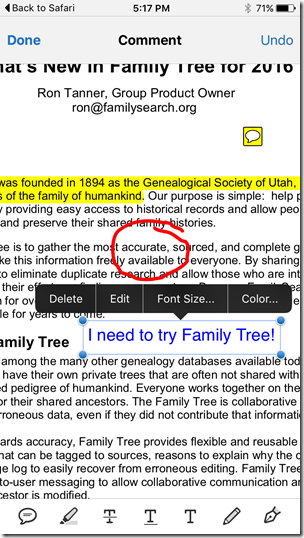
Different apps have different strengths and weaknesses. Adobe Acrobat has powerful PDF annotation features such as attaching notes, highlighting, inking, and labeling, as shown below left. (The yellow balloon icon contains the note shown below, right.) Once a session is over, an annotated PDF document can be stored back to Dropbox.

2016-02-01 17.17.16 2016-02-01 17.15.13

Myko Clelland’s syllabus for “My Ancestors are from Britain…” is in Word Format. Tap “Open in ‘Word’” and Safari copies the document to Word.

2016-02-01 17.19.16 2016-02-01 17.21.18 

Word has two views, Print Layout View (below, left) and Reflow View (below, right). I struggle to edit Word documents on my phone, but it is possible.

 2016-02-01 17.21.29 2016-02-01 17.22.14

For PDF files, the reflow mode of Readdly Documents impressed me. Readdly reflow mode can change the font and the font size. Ron Tanner’s syllabus, below left, is easily read in Readdly, below, right.

 2016-02-01 20.48.41

There’s no need to man handle your syllabi when gentle persuasion will do the trick. Use the (mostly) free, intelligent choices available for your smart phone or tablet.

Monday, February 1, 2016

Monday Mailbox - #RootsTech Advice: Run Like the Wind

RootsTech 2015 registration linesDear Ancestry Insider,

This is my 1st RootsTech. I am concerned about getting a seat in the classes I want. Would you recommend not taking any kind of break during the 30 minutes between classes and high tailing it to the next class to claim a seat? Several of my back-to-back classes are at completely different ends of the convention center and it looks to be about 400 yards from end-to-end. With 10k people attending, I'm visualizing a scene from Black Friday.... a bit ugly! Thank you for all your info, it’s much appreciated!

Lisa Brown

Dear Lisa,

I can't tell you about classes in general, but I report almost exclusively on Ancestry.com and FamilySearch and their classes fill extremely fast. I didn't get into Crista Cowan's class last year in a room that seats 780. I barely got into Ron Tanner's class in a room that seats 700.

Have a second, third, and fourth choices in mind.

Here are the maximum room capacities, according to the Salt Palace planners guide. I’m guessing that many rooms have been combined, so I am showing my guesses at combinations.

Crista Cowan's 2015 RootsTech filled within moments.Ballrooms

  • Ballroom A (and C?) – 400 (plus 400)
  • Ballroom B (and D?) – 400 (plus 400)
  • Ballroom E - 400
  • Ballroom G - 400
  • Ballroom I - 400
  • Ballroom J (and H?) – 380 (plus 400)

I don’t know about ballroom F. It is probably connected to B/D or J/H, boosting the capacity of one of those rooms by 400.

Meeting Rooms

  • 150 - 700
  • 151 - 700
  • 250 A (and B/C?) – 150 (plus 336)
  • 250 D (and E/F?) – 126 (plus 280)
  • 251 B, E (Labs) – Limited seating. Requires pre-registration.
  • 251 D - 180. (Might also include A – 126)

Hallway to the annex

  • 254 A (and B/C?) – 100 (plus 350)

North Annex

  • 155 A - 260
  • 155 B (and C?) – 340 (plus 320)
  • 155 D - 260
  • 155 E (and F?) – 340 (plus 320)
  • 255 B (and C?) – 340 (plus 320)

If my math is correct, then that all adds to 8,848. I don’t know if FamilySearch has other rooms somewhere that I’ve overlooked, but if all 10,000 people show up, over 1,000 people will be left standing each time the music stops. In any case, thousands of people will not be able to make it into the classes they desire. If there is a class you really, really want to get into, skip the class before and camp in front of the room. If a class you want is being broadcast, skip it live and watch it afterwards.

Short answer: Yes, hightail it.

Signed,
---The Ancestry Insider

Should Locals Do the $19.99 #RootsTech Expo Hall?

The RootsTech 2016 Expo Hall is bigger than ever.RootsTech starts Thursday! And with the RootsTech Expo hall one day pass costing $19.99 this year, you’ll want to know before you go that you'll get your money’s worth. But the $19.99 gets you more than the expo hall. You gain entrance to that day’s keynote. There are some fascinating people you can come see.

  • Thursday - Paula Williams Madison, Bruce Feiler and Steve Rockwood. Paula is an author, filmmaker, and retired NBC Executive. She’s just produced a movie about discovering her Chinese family. It is titled Finding Samuel Lowe: From Harlem to China. Bruce Feiler is a New York Times best-selling author, columnist, and frequent contributor to NPR, CNN, MSNBC, and Fox News. Among genealogists he is most known for his New York Times article, “The Stories That Bind Us,” wherein he reports on research showing the correlation between a child’s knowledge of her family history and her ability to cope with challenges. Steve Rockwood is the newly appointed president and CEO of FamilySearch International.
  • Friday - Naomi Davis and David Isay. Naomi Davis is known by millions of viewers online as “Taza,” from her blog, Love Taza. (Millions!? That certainly humbles someone with only 100,000 readers, plus or minus 99,999. [Thanks, Mom!]) David Isay is an author, documentarian, and founder of StoryCorps. StoryCorps is an award-winning organization that provides people of all backgrounds and beliefs the opportunity to record, share, and preserve life stories.
  • Saturday - Michael O. Leavitt and Doris Kearns Goodwin. Michael O. Leavitt served in the cabinet of President George W. Bush as Administrator of the EPA and Secretary of Health and Human Services, and as a three-time elected governor of Utah. Doris Kearns Goodwin is a world-renowned presidential historian and Pulitzer Prize–winning author. I know her best as the author of Team of Rivals: The Political Genius of Abraham Lincoln. She helped with the film Lincoln, which grossed $275 million at the box office and earned 12 Academy Award nominations, including an Academy Award for actor Daniel Day-Lewis.

RootsTech 2016 keynote speakers

The expo hall gives you access to a large assemblage of genealogy-related product vendors and organizations. Many offer show discounts. Additionally, there are some free activities and opportunities. Among them are:

RootsTech Family Discovery ZoneFamily Discovery Zone—Sponsored by FamilySearch The family discovery zone will be a fun, interactive experience and will feature new technologies to help you discover and connect your family and stories.

  • Photo Scanning Area: Bring your family photos. Make digital copies for free that you can preserve, share, and upload to FamilySearch Family Tree.
  • Recording Booth: Record your story. Your private recording session includes 10 minutes of recording time in a sound booth. You get a free copy on a flash drive.
  • Record a Call. Call a parent, grandparent, or someone who inspires you, and find out more about his or her life. The FamilySearch app will record the conversation and give you a personal copy as well.

Internet Archives book scannerFamilySearch Scanning Booth Get your family book scanned for free. They will make a digital copy, and you'll keep the original and a searchable PDF. You can do personal works, family journals, and books that are in the public domain.

Demo Theater—Sponsored by Backblaze Curious about the newest in family history products and services? Take a seat, and listen to demonstrations by RootsTech sponsors and exhibitors. The 15-minute demos will be scheduled daily during Expo Hall hours.

Cyber Café—Sponsored by Dell Refresh and recharge at the Cyber Café. The café offers wireless Internet access, recharging stations for devices, and free soda (or pop or cola, depending on where you’re from). The staff from the Family History Library will also be there to offer one-on-one help.

Innovation Alley New to the RootsTech Expo Hall will be the Innovation Alley, where you’ll get a chance to view the latest technology and tools in the family history industry.

E-Z Photo Scan Scanning Booth Attendees can have their prints and slides scanned for free. Bring your photo prints, scrapbook pages and slides to booth 1109 during exhibit hours Thursday-Saturday. To make image storage easy, E-Z Photo Scan will use technology to make photos available to attendees after the event.

RootsTech Media HubMedia Hub This is where the bloggers gather with the fiction that they will get some writing done. While the general public is not allowed inside the hub, you can walk up to the pipe-and-drape and say hello to your favorite bloggers, or get a closer look at keynote speakers while they are being interviewed. (I may or may not have photo-bombed a DearMYRTLE interview last year. I don't even remember who she was interviewing… I mean, hypothetically, if I had, which may or may not have happened.) Remember the code: if you post a picture of the Ancestry Insider you must obscure most of my face (think Wilson from Home Improvement).

Expo Hall Hours

  • Thursday, February 4, 2016: 10:00 a.m. to 6:00 p.m.
  • Friday, February 5, 2016: 10:00 a.m. to 7:00 p.m.
  • Saturday, February 6, 2016: 10:00 a.m. to 5:00 p.m.

There is a complete map of the RootsTech expo hall and list of exhibitors on the RootsTech website. What you won't find on the website is a list identifying which vendor will be in which booth. That’s a closely guarded secret. Or maybe they're doing it like Southwest Airlines. The first vendor to show up gets to pick any available booth. Seriously, booth assignments are available on the app. 

Hope to see you in the Expo Hall!

Friday, January 29, 2016

#RootsTech Posts Syllabi, Streaming Schedule

The Ancestry Insider is a RootsTech 2016 AmbassadorRootsTech 2016 has posted the Syllabi for streaming schedule for access by the public. To access the most up to date streaming schedule, go to https://www.rootstech.org/streaming-schedule. Here is the schedule as of this morning.


Day Time Class Title Speaker
Thursday 8:30 a.m.-10:00 a.m.

Thursday General Session

Steve Rockwood
Stan Ellsworth
Paula Madison
Bruce Feiler
11:00 a.m. 12:00 p.m. 7 Unique Technologies for Genealogy Discoveries
(Syllabus)
Mike Mansfield
1:30 p.m. - 2:30 p.m. Best Websites and Apps for Local History
(Syllabus)
Amy Crow
3:00 p.m. - 4:00 p.m. What’s New in Family Tree in 2016
(Syllabus)
Ron Tanner
4:30 p.m. - 5:30 p.m. Virtual Family Reunions
(Syllabus)
Joseph Richardson
Friday 8:30 a.m. - 10:00 a.m. Friday General Session
A.J. Jacobs
Ben Bennet (14:05)
Josh and Naomi Davis (Love Taza - No recording)
David Isay
10:30 a.m. 11:30 a.m. RootsTech Innovator Showdown Finals  
1:30 p.m. - 2:30 p.m. Proven Methodology for Using Google for Genealogy
(Syllabus)
Lisa Louise Cooke
3:00 p.m. - 4:00 p.m.

Finding Elusive Records on FamilySearch.org
(Syllabus)

Robert Kehrer
4:30 p.m. - 5:30 p.m. My Ancestors Are from Britain—What Do I Do Next?
(Syllabus)
Myko Clelland
Saturday 8:30 a.m. - 10:00 a.m. Saturday General Session Michael Leavitt
11:00 a.m. 12:00 p.m. Photos—Emerging Technologies in Photography
(Another no show syllabus. RT2449)
Jens Nielsen
1:30 p.m. - 2:30 p.m. Become a Master Searcher on Ancestry
(Syllabus)
Anne Mitchell
3:00 p.m. - 4:00 p.m. Homespun and Calico: Researching our Foremothers
(Syllabus)
Peggy Lauritzen
4:30 p.m. - 5:30 p.m. Using the Genealogical Proof Standard for Success
(Syllabus)
James Ison

All times are Mountain Standard Time. Add two hours for EST and subtract one for PST.

All the syllabi are available at https://www.rootstech.org/about/syllabus.

Thursday, January 28, 2016

#RootsTech Attendee Hints

The Ancestry Insider is a RootsTech 2016 AmbassadorHere some factoids and hints, current as of Tuesday night when I wrote this article.

RootsTech is very close to 10,000 registrants. There are 20,000 additional people signed up on Saturday for Family Discovery Day, but RootsTech organizers figure only about 60% of them will come. (It was free to sign up.) If you want to sign up for Family Discovery Day, you still can, but you MUST sign up ahead of time. The intended audience for Family Discovery Day is members of The Church of Jesus Christ of Latter-day Saints, but all are welcome.

Because of these crowds, the things you wish to do in the Expo Hall – do them on Thursday and Friday. And if the restrooms in the lobby are full, try the restrooms in the back of the expo hall.

Speaking of the expo hall, don’t buy your soda/coke/pop. Get it free at the Cyber Cafe. Apparently, admittance to the expo hall is limited this year. According to the RootsTech website

Anyone wanting to enter the Expo Hall will be required to purchase an Expo Hall Only pass. The Expo Hall Only pass costs just $19 and includes access to the morning keynote session. Registration for an Expo Hall Only pass is available through the registration portal.

The plan was to have the syllabus online by Wednesday. Check for a link under “About.”

#RootsTech is the official hashtag for the conference.

The streaming schedule is coming soon. The decision on sessions is still fluid. Doris Kearns Goodwin will not be broadcast. RootsTech was not able to get permission.

If this is your first RootsTech, the registration area is at the southeast end of the conference center.

Wednesday, January 27, 2016

#BYU #FamilyHistory #Technology Workshop

I’m a glutton for punishment. RootsTech is the toughest week of the Ancestry Insider’s writing schedule. Now I’m piling it on. I’ve taken the opportunity to obtain media credentials for the 2016 Brigham Young University Family History Technology Workshop. It is Tuesday, 2 February 2016, which is the day before RootsTech’s Innovator Summit. Yikes!

BYU Family History Technology Workshop

I just felt like this event is too important to miss. It is sort of the academic version of Innovator Summit. Their website describes it as

The Family History Technology Workshop has been held for 15 years, at both BYU and at RootsTech in Salt Lake City. Attendees include researchers, software developers, and professionals, brought together by their shared passion for improving family history technology.

You can see the program for last year on their website. If you have a technical bent, one presentation that might interest you is “Source Linker: Bridging the Evidence-Conclusion Gap” from Randy Wilson of FamilySearch. Here are the correct links:

Randy mentions some future directions that a year ago were being contemplated for Source Linker.

  • “Features that help a user look at what the sources all say when deciding on a conclusion.”
    Mockup from Randy Wilson of what a user interface would look like that showed all the values associated with the source relevent to a conclusion
  • Display of values taken from a source
    Mockup from Randy Wilson of what a user interface would look like that showed the values associated with sources
  • “Tools to help users split a badly merged person using what the sources say.”
    Diagram from Randy Wilson showing one stage of repairing a bad merge using information displayed from sources
  • “Features that filter out already linked records from search results.”
    Mockup from Randy Wilson of a user interface indicating records already linked to the tree

For more information about the conference, visit http://fhtw.byu.edu.

Tuesday, January 26, 2016

Ancestry.com and FamilySearch Look Back, then Forward

Happy 2016!Ancestry.com and FamilySearch separately looked back at 2015 and announced some of their plans for 2016.

It’s Ancestry’s 20th anniversary and in a New Year’s greeting sent to subscribers, Tim Sullivan noted accomplishments of 2015 and gave a peek at the coming year.

Ancestry’s users have contributed more than 70 million member trees and uploaded 300 million photographs and documents. Ancestry’s DNA database surpassed one million DNA samples. Ancestry claims more than 16 billion historical records from 80 countries. In 2015 they added the U.S. wills and probate collection as well as 200 million Mexican records.

Tim gave a nod to the retirement of Family Tree Maker, although he didn’t mention it by name. “Our team has worked hard to streamline and improve the overall Ancestry experience for everyone,” Tim wrote. “That meant saying goodbye to a few products so we can better hone our focus.” LifeStory received explicit mention as one of the products receiving focus. He also called out AncestryDNA’s exciting, new New Ancestor Discoveries.

“We’ll be launching international content to help you connect to your roots outside of the U.S.,” Tim wrote, “with more to come from Germany, the United Kingdom, Mexico, Ireland, and Scandinavia.”

I wonder if international expansion may also be in their DNA plans. Tim wrote, “We’ll bring you more global family connections using our powerful DNA network to continue to uncover family history and discover new ancestors with a more in‑depth look at your ethnic origins.” Does that mean they are seeking permission to sell their DNA kit in additional countries?

FamilySearch also celebrated the launch of Ancestry’s Mexico collection, but as a joint accomplishment.

“This announcement is about two things,” said FamilySearch International CEO, Stephen T. Rockwood. “First, it is a celebration of the joy of discovery now available to more of our patrons with Mexican heritage. Second, it is a recognition of our valued partnership with Ancestry.com and how working together has made these high impact collections searchable online much quicker for personal family history research.”

FamilySearch provided the images and Ancestry paid for the indexing. According to FamilySearch spokesperson, Paul Nauta, “without Ancestry.com’s assistance, some estimates suggest it would have taken 20 years or more for volunteers to index the records.” FamilySearch patrons can access the indexes at FamilySearch family history centers or—if they have Ancestry subscriptions—on FamilySearch.org.

For more information, see “Vast FamilySearch.org Collection of Mexico Ancestor Records Continues to Grow” on the FamilySearch blog.

12 Things to Expect from FamilySearch in 2016FamilySearch outlined 12 things they plan to accomplish in 2016.

  1. FamilySearch Family Tree will be faster and more robust.
  2. User guidance will improve. (I think they mean the onscreen helps.)
  3. A relationship feature will show how you are related to people in Family Tree.
  4. Searching will be more user-friendly, the search results will be better and easier to use.
  5. Adding photos, stories, documents, and audio files will be easier.
  6. The home page will be dynamic and personalized.
  7. There will be more partner apps.
  8. FamilySearch will add to the 319 digital camera teams that today produce 125 million images per year. The new cameras will focus on international records.
  9. There will be more mobile apps on IOS and Android platforms through FamilySearch.
  10. This is the year of the new, web-based indexing tool! (It’s a good thing, I’ve been holding my breath for how many years?)
  11. More people than ever will see RootsTech via live streaming and recordings.
  12. There will be an added emphasis on attracting youth.

There was a 13th item, combined with item 1. Perhaps FamilySearch wanted to avoid the number 13.

  • Record hinting will get faster (it used to take weeks for new hints to show up) and hints will come from more collections.

To see the list in FamilySearch’s own words, see “12 Things You Will See from FamilySearch in 2016” on the FamilySearch blog.