Wednesday, May 30, 2012

Ancestry for iPad

Ancestry.com's iPad appI got an iPad! The very first app I downloaded was Ancestry.com’s Ancestry. I love the look. It’s amazing how effective a good background and some shadow effects can be. (Click the image to the right for a larger view.)

The Ancestry app is pretty well integrated into the iPad way of doing things. The philosophy is that little or no help is necessary to use an app. Do what seems intuitive and the app works.

One minor miss is the login username. Another philosophy of the iPad is that typing is a pain and should be minimized by remembering things I’ve typed. After once entering my full username, I should never have to type it in full again. Unfortunately, the Ancestry app doesn’t drop down a box of recent usernames. Hopefully, they can get that fixed.

For the Ancestry app, the default view is a pedigree of your Ancestry Member Tree. Moving up and down the tree is simple; swish the pedigree to the left or right. Or tap any person to move him or her to the primary position.

Tap the person again and an information card slides out of the right side of the screen. I’ll talk more about that sometime in the future. First I need to tell you (and Ancestry) about a serious bug.

I planned to use the iPad and the Ancestry app while visiting archives since an iPad is much less bulky than my too ever-present laptop. I was leaving a library and heading over to a courthouse. I thought to pull out the iPad and synchronize my latest tree changes.

Little did I know that the iPad had connected to the library’s Wi-Fi, but needed an additional button click on a page in the browser.

This confused the Ancestry app. It popped up a message, saying some error had occurred. I think when I dismissed the message, the Ancestry app immediately closed down of its own accord. I knew what had happened, so I went to the browser and finished connecting the Wi-Fi. Then I started up the Ancestry app again. The app had logged me off, so I had to start over. Worse, it had flushed my tree off the iPad. With 8,000 people in my tree, it took several minutes to re-download, delaying my start at the courthouse.

I’m definitely hoping Ancestry.com can fix this one.

Tuesday, May 29, 2012

1940 Census Update for 28 May 2012

1940 census updateI don’t have much time, so I’ll make this quick. (Percentages are my own estimates.)

  • FamilySearch Indexing has reached about 50%.
  • FamilySearch has released indexes to six additional states: Alaska, Arizona, Colorado, Idaho, Nevada, and Vermont. That brings the total to 14.
  • Because these are smaller states, the index represents just about 9% of the total size of the index.
  • The Ancestry.com index is still at about 1.5%.
  • The MyHeritage index is above 0.8%, but by an unknown amount.

Sunday, May 20, 2012

RootsTech 2013 Call for Papers

imageInterested in presenting at next year’s RootsTech conference? Submit proposals at www.rootstech.org from now until 15 June 2012. According to the announcement,

We invite proposals that address technology challenges and solutions that have the potential to improve family history and genealogical research. Additional consideration will be given to proposals that provide hands-on or interactive experiences, with presenters giving step-by-step approaches and live demonstrations for using technology for genealogy, including tips and helps for using software, hardware, standards, APIs, plug-ins, etc. Since RootsTech is designed as an interactive conference, traditional lectures depending entirely on text-based slides are discouraged.

Click here for the complete text of the announcement.

Friday, May 18, 2012

Elizabeth Shown Mills Citation Website

Evidence Explained websiteAt the recent National Genealogical Society’s 2012 annual conference I was lucky enough to attend one of Elizabeth Shown Mills’s classes. But only one. Why?

First let me point out that she has published a website for her book, Evidence Explained. You can find it at

www.evidenceexplained.com

I think the website fulfills three purposes:

1. It allows perspective buyers an opportunity to evaluate the contents of the book. The website contains

2. It allows perspective buyers to purchase an e-book version of Evidence Explained or Evidence Quick Sheets.

  • FAQ – The answers to common questions for those wishing to purchase e-book or Quick Sheets.
  • Book Store – A place where buyers can purchase these publications

3. It gives book owners—and everyone else, really—a place to learn more about citations.

  • Forums – A place to discuss, ask, and answer questions about citations.
  • QuickLessons – A growing body of articles about evidence analysis and citations.

The last item is particularly easy to overlook, and a particularly good educational opportunity.

Facebook users will want to follow https://www.facebook.com/evidenceexplained, the associated Facebook page.

In case I haven’t mentioned it yet, another education opportunity offered by Mills is her website, Historic Pathways at http://historicpathways.com/. Mills has reproduced here many of her articles. A couple of the most often cited are about evidence analysis and usage.

Why did I attend only one of Mill’s NGS classes? Attendees lined up for her classes three abreast in a line snaking 100s of feet through the halls of the convention center. Do yourself a favor (besides coming to next year’s NGS conference in Las Vegas). Make use of these free, educational opportunities.

Wednesday, May 16, 2012

1940 Census Update for 16 May 2012

FamilySearch indexing status as of 16 May 2012Bad News

Images for the 1940 census were digitized from microfilm, according to Miriam Kleiman, public affairs specialist for the US National Archives. “There were many images on the microfilm that were filmed out of focus,” she said. The filming was done in the 1940s or early 1950s.

“After the microfilming was completed,” said Kleiman, “the original documents were destroyed.”

Kleiman pointed out that it was the Bureau of the Census that did the filming and destroyed the records. (Don’t flame the National Archives.)

MyHeritage Correction

Last week I reported that MyHeritage had published the index for New York, putting them at 10.51% indexed. An alert reader reported that “it appears that only Albany and Allegany counties are fully indexed and a few other counties are partially indexed.” A source inside MyHeritage confirmed that New York was not complete. (In the future I’ll have to assume that posted states are not complete.)

Race Status

Applying that correction, the race status for completed, published states is shown here. There have been no changes since FamilySearch released a bunch of states for the NGS conference.

  • Ancestry.com – 0.82%
  • FamilySearch, et. al. – 5.4%
  • MyHeritage – 0.81%

Indexing Status

Since my last update on 6 May 2012, the completion percentage has grown from 28.1% to 37.3%.

Florida has bounced back to 100%. Hawaii, Louisiana, Mississippi, and Montana have hit 100%.

Also at 100% but not published are: Alaska, Arizona, Idaho, Nevada, Utah, Vermont, and Wyoming.

Could it be that FamilySearch is not able to keep up with its own indexers? Is this list fated to grow throughout the project?

Stay tuned…

Sunday, May 13, 2012

Facial Recognition

“I work with technology that is yet to come,” said Gregory Kipper, “futurist” with General Dynamics. Kipper spoke about facial recognition in his session at the 2012 annual conference of the National Genealogical Society.

Kipper dispelled the myth that photographs can be analyzed as easily as is done on television shows and movies. He showed two video clips from YouTube that poke fun at the notion. This is the first. (To view online, click here.)

This clip makes fun of television shows and movies that perform impossible photo analyses

In the second, a CSI team supposedly zooms in 100x on an eye, rotates the photo to show parts of the eye not visible to the camera, isolates a reflection on the iris and compensates for the spoon-shape of the eye. The result is an image of a basketball. (To view online, click here.)

This clip makes fun of a scene from CSI involving image enhancement

The truth is, it doesn’t matter how good the technology gets, if the megapixels of the camera are too low, or if a photograph is scanned at too low of a resolution, nothing can be done to “correct” resolution that is too low.

But some things are happening in this field and more is coming.

Kipper said that facial recognition falls into the category of biometric identification. Other types of identification are attribute and biographical. To me, the latter two sound like what we are used to as genealogists: names, dates, events, places, and relationships. Kipper identified more commercial aspects that are driving current technology development: cell phone location, credit card usage, buying patterns, and social network activity. (Facebook and Twitter are forms of social networking.) He said that in the future facial recognition will not be used in isolation, but in combination with these other forms of identification.

Photo: David Stuart; Retouching: Smalldog ImageworksA currently popular concept is augmented reality. Imagine looking around the room through special glasses (or pointing your iPhone around the room) and seeing computer generated messages overlaid on top of what you see. Imagine scanning the horizon and seeing pop ups indicating nearby cemeteries, along with distances and cemetery names. Imagine looking out over a cemetery and seeing ghost-like transparent photographs of the deceased hanging in the air over their graves, along with facts about their lives.

Imagine looking into a film drawer at the Family History Library and seeing the titles of the films overlaid on the tops of the boxes. Or seeing the film you want marked in red.

Imagine little balloons pop up over people’s heads, the balloons containing their names and their relationships to you, such as 5th cousin, 12th cousin twice removed, and so forth. Or seeing names of common relatives or common research interests.

The technology to automatically identify ancestors in photographs is a little immature right now. But it will come. To prepare, make certain you scan photographs with enough resolution so that when the technology comes, you will be ready.

Thursday, May 10, 2012

Ancestry.com VIP Briefing

Fruit-ka-bob trees at Ancestry.com VIP receptionI was lucky enough to get an invitation to Ancestry.com’s Wednesday evening VIP briefing at the 2012 annual conference of the National Genealogical Society. Here’s some of the stuff they covered:

First, the presentation of the refreshments was fantastic. Fruit-ka-bobs stuck into pineapple-trunks of tropical trees. Eye-popping good.

Ancestry favored us with three presenters.

Ancestry DNA

John Pereira spoke about AncestryDNA. You’ve heard most of the hoopla and I talked a little bit about it yesterday. (See “Ancestry.com Q & A at NGS Conference.”)

To give you an idea of the scope of the new product, while the old Y-test compared 46 markers, the new one uses 700,000.

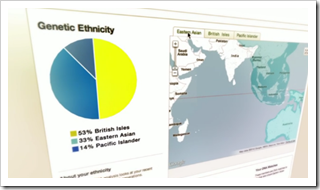
Ancestry DNA ethnicity pie chart and mapAs shown to the right, the test shows your ethnicity divided up on a pie chart and marked on an adjoining map.

Possible cousins are identified. First to Fourth cousins are indicated with percentage confidence level. More distant cousins are shown with a confidence level of 50% or less.

If you have an Ancestry tree, the Map and Location feature indicates the number of ancestors from each region of the world. If your cousin also has a tree, the Pedigree and Surname feature shows your common ancestor and the lines of descent for your cousin and yourself.

Content

Dan Jones talked about Ancestry’s content. I thought it was a great sign that Ancestry values content enough to have a person dedicated to acquire and manage it.

Statistics (most are current as of the end of March):

  • Years spent acquiring, digitizing, indexing, and publishing content: 15
  • Dollars spent so doing: $115 million
  • Records online: 10 billion
  • Collections online: 30,000
  • Trees created: 33 million
  • People in trees: 4 billion
  • Photos and stores uploaded: 115 million
  • User additions and corrections: 44 million
  • New collections in 2011: 485

Recent 2012 releases:

  • Massachusetts Vital Records 1620-1920 (the Holbrook Collection)
  • They finished the 1911 UK Census on Thursday
  • Pennsylvania Church and Town Records 1708-1985
  • Titanic Collection
  • London Land Tax
  • London Electoral Registers

Ancestry has republished their city directories using a fielded OCR technology that makes the city directories much easier to search and use. (See my recent article, “Data Extraction Technology at Ancestry.com.”) At the same time, they’ve doubled the size of the collection.

As shown in the graphic below, the comparison of before and after is impressive. Searching the directories before was about the same as looking through a “bag of words.” Today, fielded information makes it possible to reliably search for names and places. The change has produced a major uptick in Ancestry’s record count. If I understand their counting methodology correctly, the old collection contained 6.6 million records (bags of words), whereas now it contains 1 billion records (the people named in the directories). These new records can be attached to trees and can be corrected. Already, users have discovered 6.2 million people (110,000 a day) and submitted 92,000 corrections.

Ancestry.com U.S. City Directories - Then & Now

Ancestry is looking at additional printed content for this technology, such as printed family histories. I think if they can get that working, that would be phenomenal.

When it comes to the 1940 census, Jones said that Ancestry considered joining the 1940 U.S. Census Community Project, but ultimately decided that controlling their own index put them in a better position. They are indexing more fields and have made a partnership with IPUMS, the Minnesota Population Center at the University of Minnesota.

Jones presented the timeline for Ancestry’s first release of the census. He warned us that he had some of the time zones wrong. I think I fixed them, but you’ve been warned.

  • 2 April 12:01am – Sabrina & Josh (Ancestry employees) pick up images from NARA
  • 2 April 12:20am – Images arrive at Ancestry DC office
  • 2 April 12:37am – First 4 rolls imported and converting
  • 2 April 1:22am – First images live on Ancestry.com
  • 2 April 2:00am – Drives containing images fly back to HQ
  • 3 April 3:00pm – First indexed data arrives at Ancestry.com HQ
  • 5 April 4:00pm – Complete DE and NV live on Ancestry.com.
  • 6 April 4:15am – All images live on Ancestry.com

The collection has been popular. On April 6th alone, the 1940 census images were viewed more than all eight open UK censuses are viewed in a typical month!

Product Improvements

Eric Shoup talked about Ancestry product improvements. Ancestry has improved several things about its hinting feature. Notifications occur in the website header in addition to the old e-mail system. Hinting has been extended to your entire tree. (I didn’t know it wasn’t doing the entire tree.) Ancestry is generating more photo and story hints as well as hints on new collections. Hints can be turned off for individual trees. An All Hints page allows quick review and disposition of new hints across an entire tree. Soon, possible extensions to family trees will be indicated on the pedigree itself.

The Ancestry mobile app continues to be popular; they have reached 3 million downloads. They are ready to release a new family view. The application is no where close to where they want it to be. As he mentioned at RootsTech, they are increasingly thinking of mobile applications before desktop, so they are forced into the discipline imposed by a mobile application.

Synchronizing Family Tree Maker (FTM) with Ancestry Member Trees has been popular. Since September over 140 thousand people have set up synchronizing between their trees. Trees can be quite complex. They’re seeing an average of 2,047 source citations per tree and 130 media items. I’ve told you my experience. I have so many media items that it took hours to synchronize. Fortunately, FTM did the operation in the background.

Shoup showed off their new census viewer, currently available for U.S. 1930 and U.K. 1911. As you scroll about the census, the viewer displays the people’s names even when scrolled off the page. They will soon show column headers. Hover over a field and a popup shows the contents for those who have problems reading the handwriting. The person of interest is highlighted in yellow and the household is highlighted in green.

Ancestry.com new image viewer has headers, highlights, and field popups

Eric Shoup answers questions at VIP receptionShoup also took questions from attendees.

He couldn’t give answers to several questions about life after the Archives.com acquisition.  “We can’t plan our lives together until we’re together.” We’ll do what makes sense.

One attendee asked if Ancestry will open up its APIs to allow 3rd party vendors to synchronize with Ancestry Member Trees. Shoup said that they have no strategic objection, but there are tactical concerns. Getting FTM to synch was a major undertaking. Ancestry would hate to establish all the support necessary for an outside vendor and then not have sufficient interest.

To index the 1940 census, Ancestry is using a select number of offshore vendors, vendors with which they have an established relationship. Shoup said they are “dialing up” everything about the 1940 census: size, scope, quality, number of fields, and so forth.

Stay tuned for more National Genealogical Society Conference coverage…

Wednesday, May 9, 2012

Ancestry.com Q & A at NGS Conference

Ancestry.com's Crista Cowan answered questions at the NGS conferenceCrista Cowan, Ancestry.com’s barefoot genealogist, conducted a question and answer session in the company’s booth Wednesday morning at the 2012 National Genealogical Society annual conference. Audience members had three lines of questioning:

1940 U.S. Census

Cowan said that people don’t always understand that Ancestry.com and FamilySearch’s indexing efforts are separate. Ancestry has their own effort. They are using several commercial keying vendors to index the census. Ancestry will publish each state as it is completed, but they don’t know what the order will be. Cowan told me that they have assigned a particular order for each vendor, but they don’t know in which order the vendors will finish the state they are working on.

They also don’t know when the entire effort will be completed, but they are committed to having it done by the end of the year.

Attendees suggested they publish each county as it is complete. Cowen explained that doing so would make the entire effort take longer. There is a certain amount of work that must be done regardless of how much is published. Incurring that work 50 times is not nearly as expensive as 3000 times.

DNA

There were several questions about Ancestry’s new DNA offering.

Attendees were interested to learn that the new autosomal tests are not gender specific. The old Y chromosome test targeted the father-to-son male chromosome. Consequently, the test worked only on men and only showed ancestry along one line (typically the “top line”) of a pedigree. The old mitochondrial test also worked on only one pedigree line (typically the “bottom line”). Autosomal testing can show ethnicity for all pedigree lines.

The $99 price is a discount available only to Ancestry members. Cowan didn’t know if the price would continue long-term. Ancestry is also “throttling” participation so they are not overwhelmed.

A single person can purchase multiple tests, but not at the same time. Once one test is purchased, the person returns to the end of the queue. The multiple tests—for multiple people—can all be attached within a single tree. Also, a single test can be attached to a single person present in multiple trees.

Family Tree Maker

Coming to Cincinnati, Cowan performed the same operation on her tree that I did on mine. (See “Family Tree Maker 2012.”) She searched for Cincinnati and found out she had ancestors who lived here for several years. Using the information, she was able to do some research while she was here.

People also had lots of questions about synchronizing online and offline trees. Attendees didn’t all understand the concept of having one tree on the desktop and one tree in the cloud.

Stay tuned for more NGS conference news…

NGS Conference Begins with a Click

Patricia Van Skaik presented the 2012 NGS Conference opening keynoteThe annual conference of the National Genealogical Society began Wednesday morning with a click. But not just any click; it was the click of a daguerreotype photograph. Patricia Van Skaik gave the opening session keynote address spoke about the Cincinnati Panorama of 1848.

Van Skaik is the Manager of the Genealogy and Local History Collection at the Public Library of Cincinnati and Hamilton County.

image“On September 24, 1848, Charles Fontayne and William S. Porter set up their camera on a rooftop in Newport, Kentucky,” says the library website, “and panned across the Ohio River capturing on eight separate daguerreotype plates a panorama of the nation's sixth largest city, Cincinnati.” At 160 years old, the panorama is “the oldest comprehensive photograph of any American city,” according to a library brochure.

Van Shaik presented the history of the panorama, including the fascinating story of the detective work used to identify when the photograph was taken, down to the day and minute!

Thanks to a state of the art microscope and the incredible details captured by daguerreotype photography, the photography reveals details of life on the Cincinnati river front. For more information, and for a chance to explore the detail of the photograph for yourself, visit http://1848.cincinnatilibrary.org/.

Tuesday, May 8, 2012

'Twas the Night Before NGS and FamilySearch Was Stirring

Paul Nauta of FamilySearch addresses bloggers Tuesday
You must know I am prejudiced in favor of the National Genealogical Society (NGS), for which I serve as a volunteer. I must say I loved the NGS conference in Salt Lake City. I’m lucky a job assignment has made it possible for me to attend every year.

And so as I write this Tuesday evening I am perched waiting for another NGS conference to begin.

Earlier Tuesday evening I attended a pre-NGS news briefing by FamilySearch and learned a thing or two.

  • FamilySearch has published 530 million images and 1.7 billion indexed records.
  • FamilySearch has signed an agreement with the Italian government to digitize all their civil registration records.
  • More than 650 societies are helping index the 1940 census.
  • More than 460 “blog ambassadors” are helping spread the word.
  • Just over 30% of the census has been indexed.
  • By the time you read this, there supposedly will be indexes published for six states. Do I remember which they were? Ummm. Delaware and Colorado, then Kansas. New Hampshire, Oregon, and Virginia. By my calculation, that amounts to 5.47% of the census. (On a related note, I noticed today that MyHeritage added New York to their index. That’s a huge state and boosts their completed percentage to 10.51%. Their horse bounds into the published index lead at nearly double the FamilySearch total.)
  • Eight additional states are at 100%. After hitting an indexing project hits 100%, FamilySearch does a time-consuming audit, spot checks errors, bundles up the data ready for publication, shares it with her Community Project partners, gives them a chance to get published, and then publishes it on FamilySearch. (Now if FamilySearch’s publishing arm could speed up to the velocity of her indexers…)
  • FamilySearch’s goal for image publication for the year is 400 million images. Compare that to the 4 million images of the 1940 census. Even bigger, the Granite Mountain Record Vault is thought to contain 3.5 billion images. The point: FamilySearch needs indexing volunteers to stick around after the 1940 census and it needs a whole lot more.
  • FamilySearch teams are out capturing more records all the time. A system called Field Express adds 75 million images annually.
  • The current projection is that 1940 indexing will be complete in July.
  • Within weeks, the index from A Billion Graves will be posted on FamilySearch.
  • FamilySearch hopes to ship by the end of the year a feature that would allow you to annotate records with corrections.
  • They are working on new arbitration models that would cut down on the amount of arbitration that must be made.

Besides the U.S. status map at www.familysearch.org/1940census, there is also a secret status dashboard at https://the1940census.com/dashboard/ that gives various statistics about the indexing project. One graph shows number of records indexed per day (lately about 1.3 million records):

imageAnother shows the number of active indexers per day (which has been running about 22,000 a day):

imageAnother shows the numbers for the current day, which you can watch like a stock ticker of your IRA, except that the indexing numbers go up.

Stay tuned for more NGS Conference news…

(Private message: Happy Birthday, Mr. Myrt.)

Ancestry.com Launches AncestryDNA

imageLast week Ancestry.com announced the release of AncestryDNA. Ancestry said “the new DNA test analyzes a person’s genome at over 700,000 marker locations, cross referencing an extensive worldwide DNA database with the aim of providing…insights into their ethnic backgrounds.”

Sorenson Molecular Genealogy Foundation simultaneously announced that Ancestry had acquired GeneTree and the DNA related assets from the non-profit Sorenson Molecular Genealogy Foundation(SMGF). According to GeneTree, SMGF “has collected more than 100,000 DNA samples…from volunteers in more than 150 countries around the world.”

As a contributor to the SMGF DNA database, I must confess that when I donated a DNA sample, I never envisioned my DNA would be sold to a large commercial enterprise like Ancestry. The number of ways in which a DNA sample can be misused makes this an ominous announcement for anyone contemplating submission of a DNA sample to any organization. For information about some of the ethical issues of DNA testing, watch “Cracking Your Genetic Code,” a recent episode of the PBS TV series, Nova.

Will I participate in AncestryDNA? I declined participation in the beta. Will I now? Probably. But first I’ll have to carefully read “AncestryDNA Terms and Conditions,” “AncestryDNA Consent Agreement,” and “AncestryDNA Privacy Statement.”

The new service will cost $99. The announcement did not say if previous DNA contributors to Ancestry or SMGF will be given a discount in recognition of the value Ancestry is taking from their previous contributions.


To read the entire Ancestry.com announcement, visit http://corporate.ancestry.com/press/press-releases/2012/05/ancestry.com-dna-launches/.

To read the brief announcement from the Sorenson Molecular Genealogy Foundation, visit www.genetree.com/ or www.smgf.org/.

To read more about Ancestry’s historical dealings with SMGF, read my July 2007 article, “Remember Ancestry.com’s 1st DNA Project?

Access the service itself at www.ancestrydna.com.

Monday, May 7, 2012

1940 Census Status Update for 6 May 2012

FindMyPast.com 1940 Census status mapI haven’t been watching the Find My Past horse. I’m not certain why; they are a 1940 U.S. Census Community Project member. The map on FindMyPast.com (shown to the right) shows that they are almost complete in their posting of census images and they have posted the same three indexes as other Project members (Delaware, Colorado, Kansas).

It appears that the Project members publish indexes more or less simultaneously, so I will report on the group via the progress of FamilySearch.org. There are basically four indexes under development:

The IIMI RootsPoint index is interesting. You’ll recall from my earlier mention that IIMI is an offshore keying vendor. If you are Ancestry or MyHeritage and you are paying an offshore company to key the Census for you, IIMI is one of your choices. If either of them are using IIMI, then there are three, not four, indexes under production.

This weekend I saw another thing for the first time. Indiana dropped from 100% to 19%! A few point drop is expected. (See “When a State is 100% Indexed, Why Would that Number Reverse?”) Indeed, Indiana dropped below 100% once already. I guess we’ll see today (Monday) if that was for real.

In addition to Indiana, several states have performed their pre-publication bounce below and back to 100%. These I deem close to publication: Oregon, Virginia

The states hitting 100% for the first time last week are Arizona, Florida, Idaho, and Vermont.

This past week the 1940 project passed some big milestones (not to be confused with kidney stones). The project passed 25% completion. It may pass the 1/3rd mark before my next update. It also passed one million images indexed.

My hat’s off to the wonderful volunteers giving this legacy to the world. (Volunteer yourself at Indexing.FamilySearch.org.)

Thursday, May 3, 2012

Data Extraction Technology at Ancestry.com

Ancestry.com’s Crista Cowan recently interviewed Laryn Brown, senior product manager, about Ancestry’s new data extraction technology. Ancestry is using the technology to make it easier to find people in their U.S. City Directory collection. The collection has been available for some time using an OCR index.

OCR, optical character recognition, is a software process wherein a computer program attempts to read the images and create a matching document with all the words found on the image. After the task of recognizing words, the computer still doesn’t know what the words mean. What you and I easily recognize as a person’s name is beyond the computer’s ability to identify with any degree of certainty. That’s why in the past it has been so difficult to find someone in a city directory. That is, until now.

Ancestry has developed a technology that uses the regular layout of a city directory to help the computer recognize names, addresses, occupations, and so forth. The technology makes it possible to create a regular database with a regular index (rather than an OCR index). You can link records to your tree. You can make corrections to the index. You can search using fields such as name, address, and so forth.

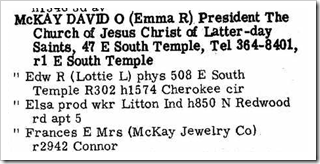
David O McKay in 1965 city directory of Salt Lake City, UtahTo test the technology, I performed the same search in “U.S. City Directories, 1821-1989 (Beta)” and “U.S. City Directories.”

I searched for David O McKay in Salt Lake City, Utah with spouse name “Emma.” With the old database and the old technology, Ancestry was not able to find any results.

With the new (beta) technology, I easily found 12 instances from 1929 to 1965.

That’s impressive.

Looking at the three subsequent names (see image to the above/right) I found that Ancestry correctly interpreted all the names, spouses, and occupations. It got all but one address, misinterpreted the address of Edw R McKay to be a person named “Temple McKay.”

Still quite impressive.

To see the interview, click on the video below, or click here to watch it online.

Behind the Scenes: Data Extraction Technology and City Directories

Ancestry executives demonstrated the technology at RootsTech. Click here and skip to time index 30:00 to see a behinds-the-scenes look at the production tool.

Wednesday, May 2, 2012

Inside View of FamilySearch Indexing the 1940 Census

Thomas McGill gave an insider’s view of FamilySearch indexing in a presentation to the Utah Genealogical Association (UGA) on 19 April 2012. The presentation was hosted by UGA president, Janet Hovorka (“the Chart Chick”).

Thomas McGill's indexing presentation to UGA

McGill shared internal information about FamilySearch’s indexing work. Prior to the release of the 1940 census, FamilySearch set a number of goals.

FamilySearch planned to have one or more indexing projects available by 6pm on 2 April 2012, the day they received the images. They exceeded this goal with five states live by 4pm. They had all states live by Friday, 13 April.

FamilySearch hoped to have all images published by 17 April and beat the goal by five days.

FamilySearch set the goal to have the entire census indexed in six months. To meet that goal, volunteers will need to index about 30 million names a month and arbitrate about 15 million. If indexing rates continue, the project may not take the entire six months. From April 2 to 19 volunteers indexed 41 million records and arbitrated 19 million.

McGill said that FamilySearch has a concern.

FamilySearch Active Indexers and Arbitrator GrowthHe showed the graph to the right. It shows the number of active indexers (in blue) and arbitrators (in red) since July 2011.

He explained the saw tooth as a weekly pattern that peaks each week from 6pm Sunday evening to 6pm Monday evening.

He said the big dip was Christmas day and pointed out that since then FamilySearch has had even, healthy growth in the number of indexers. That growth accelerated with the release of the 1940 census.

The same is not true for the growth of arbitrators as shown by the red line. “We are beginning to fall behind on arbitration,” he said and noted that there are lots of experienced indexers who could be good arbitrators.

Arbitration is necessary because FamilySearch uses dual keying. Each batch of records is sent to two indexers. If the two indexers specify different information, as might happen with a hard to read name, then the batch is sent to a third person, an arbitrator, to examine the discrepancy and choose a value.

In closing, McGill urged attendees to consider becoming arbitrators. To become an arbitrator, contact your group administrator (or your stake indexing director if you are a member of the Church of Jesus Christ of Latter-day Saints) and ask to be given arbitration rights. To see the name and contact information of the person you need to contact, run the FamilySearch Indexing application, click on Help, and then click on Local Support.

Tuesday, May 1, 2012

Ancestry.com Offers Free Scanning, Volunteers Sought

Ancestry.com offers free document digitization at major conferences

Once again Ancestry.com is offering a free scanning service to attendees of the National Genealogical Society Conference in Cincinnati next week. Scanning will take place in room 238 at the convention center. You need to come by the room and set up an appointment for a 30 minute session. Sessions will run from 9 until 5, Wednesday through Friday, and 9 to 1 on Saturday. You provide the documents and photographs, Ancestry provides flash drives to contain the scanned images.

To facilitate this free service, NGS is recruiting volunteers to facilitate scheduling and check-in. Two volunteers are needed for each time slot, to take sign-ups for the day, help return items, and bring items to the scanning rooms.

If you can help out to make this free scanning service possible, please contact Shirley Wilcox at slwilcox@juno.com.

Monday, April 30, 2012

#1940Census Status Update for 28 April 2012

FamilySearch Indexing 1940 Census Progress as of 28 April 2012On Saturday horses changed positions in the race to post 1940 census indexes.

FamilySearch.org jumped from last place into a tie with lead horse, Archives.com, both having now published Colorado and Delaware. As I last reported, the two members of the 1940 U.S. Census Community Project ought to always be tied, since they are sharing the same index. While it was surprising that FamilySearch didn’t post Colorado first, one can imagine FamilySearch holding off publication to allow more-or-less simultaneous publication with its partners.

MyHeritage.com and Ancestry.com remain unchanged.

Saturday I also witnessed something new on the FamilySearch indexing progress map. Two states, Indiana and Virginia, dropped from 100% to 99%. I understand this can occur when problems are discovered during the audits performed after indexing is finished for a state. For example, auditing may discover that many indexers are incorrectly indexing column 2, house number, rather than column 3, number of household. Double keying detects some of these problems, but if both indexers make the same mistake, then arbitrators aren’t alerted and can’t fix the mistake. When auditing detects problems, the batches have to be sent back for indexing.

States at 100% (not published): Alaska, Kansas, Nevada, New Hampshire, Oregon, Utah, Wyoming.

States at 99%: Arizona, Florida, Idaho, Indiana, Virginia.

Louisiana had the largest percentage increase from Friday to Saturday at 10%. You Louisiana indexers keep that up and you’ll be done in eight days!

Indexing big states is going to take some time. New York is ten times as big as the recently completed Colorado. However, indexers are making great inroads. Good job if you’re indexing the great (and big) state of Texas; you are 16% done. But you California indexers. Wow! Fourth largest state, 27% complete, 2% of that on Friday! If you could keep doing 2% a day, you’d be done in five more weeks.

You are Still Needed

The rate of indexing will slow if we don’t get more help. Why? When I am familiar with the regional place and people naming patterns, I can index much faster. Pseudo-French Utah names and Book of Mormon names could be a problem for someone else, but I grew up with Lapriel and Lavell and Moroni and Alma (a man) and the others. I know what towns are in Cache County. For me, indexing was a breeze.

You are needed for your state and for the states of your ancestors. Sign up at indexing.familysearch.org.

Saturday, April 28, 2012

1940 First Indexer Award

1940 Census First Indexer AwardThe displayer of this badge certifies that he or she is a proud indexer of the 1940 Census.

1. Name: Ancestry Insider

2. First Indexed: April 2012

3. First Batch: I think it was Philomath, Oregon

4. Favorite experience: My first batch was in block letters! Boy, that gave me the wrong expectation.

5. I learned about this award from the blog of: The Ancestry Insider (http://ancestryinsider.blogspot.com/2012/04/1940-first-indexer-award.html)

If you want to help index, visit http://indexing.familysearch.org.


Award Rules

To earn this award you must index or arbitrate at least one batch of the 1940 Census. Once you have submitted a batch:

1. Copy this entire post, including the rules.
2. Replace the answers to the questions.
3. If you wish, replace the badge with a different size or background. Pick from the choices at http://ancestryinsider.blogspot.com/2012/04/1940-census-award-badges.html
3. Post on your blog.
4. Display the award with pride alongside other awards and badges on your site.

1940 Census Award Badges

If you are helping index the 1940 U.S. Census, give yourself a pat an the back in the form of the “1940 Census First Indexer Award.”

Choose one of the following options and proudly display it on Facebook, Twitter, your blog or website.

For display on white or light backgrounds (100 pixels wide):

1940 Census First Indexer Award

For display on white or light backgrounds (200 pixels wide):

Blue Ribbon, 1940 on white, 200

For display on black or dark backgrounds (100 pixels wide):

Blue Ribbon, 1940 on black, 100

For display on black or dark backgrounds (200 pixels wide):

Blue Ribbon, 1940 on black, 200

See also, “1940 First Indexer Award.”

#1940Census Who Has the Best Images?

In my “1940 Census Image Viewer Comparison” article I noted how different websites took more or less time to display images. Ancestry.com took more than 3 seconds, Archives.gov took about 4, MyHeritage.com took about 17 seconds, and FamilySearch about 34.

The most significant factor affecting download time is the size of the image file. The most significant factor affecting file size is image quality. Thus, there is a tradeoff between download speed and image quality. The faster the download, the worse the quality. The better the quality, the slower the download.

Back on 9 April 2012 in the Monday Mailbox I made a stupid statement. “The Rowdy” asserted that Ancestry.com had the highest quality images. I replied that “NARA did the image scanning so Ancestry.com’s images can’t be better than everybody else’s.” I knew at the time that websites might modify the images prior to publication. But it seemed silly to say something like “Ancestry.com’s images can’t be better than everybody else’s unless everyone else messes up their images worse than Ancestry.” (Thank you to the several of you who kindly wrote pointing out different image qualities of different websites.)

Last time I talked about the quality of the images provided by the National Archives and Record Administration (NARA). As you look at the images provided on the different websites, keep in mind that the focus problems are largely NARA’s fault.

Ancestry.com

Ancestry.com applies an algorithm to its images to increase contrast. Whites become whiter and blacks become blacker. Most people like the resulting effect, as it matches our expectation as to what a black and white record should look like. On the plus side, it makes legible text more legible. On the minus side, it makes illegible text more illegible. The increased contrast also makes it easy to compress the images. Ancestry’s images are half the size of the NARA originals. That in turn allows Ancestry to display images twice as quickly.

image

While not as noticeable, Ancestry also straightened the images; the originals seeming to slope a little down to the right.

Archives.gov

Archives.gov used more compression to decrease the file size by three. You can see the effect if you zoom in close to the image. As shown below, compression causes squares to form in the background and fuzz to grow on the writing. The effect may not be noticeable at normal magnification, so long as the compression isn’t too aggressive.

image

FamilySearch.org

FamilySearch.org did nothing to compress its images. Consequently, FamilySearch has the slowest display time. As Ancestry, they rotated the images slightly to straighten them. FamilySearch also sharpened the images. To some degree, sharpening repairs some of the focus problems. However, sharpening exaggerates errors as much as the real stuff in the image. The original NARA images have weird vertical lines covering the entire image. Sharpening makes these easier to see in the FamilySearch images, even at normal magnification.

image

MyHeritage.com

MyHeritage reduced the size of the images, decreasing the number of pixels by four and increasing the fuzzy appearance of the images.

image

Conclusion

In a side by side comparison, below, it is clear that FamilySearch.org has the sharpest images. As one might expect, the website with the slowest image display has the crispest images.

image

Comparison Table

  Straightened Contrast Resized Compression File Size (MB) Display Speed
Original       1.0 4.712  
Ancestry.com Yes Increased   2.19 2.151 >3
Archives.gov       3.05 (largest) 1.545 4
FamilySearch.org Yes Sharpened   1.07 4.414 34
MyHeritage.com     Smaller 2.60 1.814 17

Thursday, April 26, 2012

Ancestry.com Intends to Acquire Archives.com

Archives.com + Ancestry.comAncestry.com announced Wednesday that they have signed an agreement to purchase Archives.com for $100 million plus assuming some of their debt.

“Since Archives.com’s launch in January 2010, the site has rapidly grown to more than 380,000 paying subscribers who pay approximately $39.95 a year,” said the Ancestry announcement.  “Archives.com offers access to over 2.1 billion historical records, including birth records, obituaries, immigration and passenger lists, historical newspapers, and U.S. and U.K. Censuses.”  Archives.com is owned and operated by Inflection, LLC.

“I want to emphasis that our plan is to keep Archives.com as a distinct brand and site, to continue to nurture its existing partnerships, and to continue to invest in new content, product and technology,” said Tim Sullivan, CEO of Ancestry.com.

Following the announcement, Sullivan convened a conference call with genealogy news writers to answer questions about the acquisition. Sullivan was joined by Joe Godfrey, general manager of Archives.com.

“Like we did with fold3, we’re only going to increase the investment,” Sullivan told us. “We’re going to do what we can to support their vision.”

“We’re not terribly worried about cannibalization.” Sullivan said there is an opportunity to have product and feature differentiation. Sullivan avoided saying how much content will be shared between the websites. Instead he stated that even with similar content, users will interact with that content in different ways. Godfrey explained that the user experience will differ on each site, such as complexity of search options and data presentation.

Sullivan said that one of the big values of the acquisition is the staff coming with the assets. “We wouldn’t do this deal if we weren’t incredibly excited about the Archive.com people that will be part of it.” Ancestry hopes to acquire a team of about 40 talented engineers, digital marketers, and family history innovators, including some offshore.

According to DearMYRTLE, volunteer indexers for the 1940 U.S. Census Community Project were already expressing concerns about the acquisition, wondering if they wanted to continue indexing if the index would be subsumed by Ancestry.

“I would encourage them to continue digitizing this important collection,” said Godfrey. Sullivan applauded efforts by the project’s volunteers and reassured indexers. Their work would be published free on Archives.com and Ancestry will continue to pursue its own index through their paid indexers. He said that having two or three indexes is good for the category.

Sullivan admired Archives.com’s partnership with the National Archives and Record Administration (NARA). Archives.com hosts NARA’s 1940 census website. While Sullivan denied the acquisition was influenced by brightsolid’s entry into the U.S. market, the acquisition places Ancestry squarely into the same business model brightsolid uses in the United Kingdom: offering the same content through multiple websites, partnershipping with the National Archive, and hosting websites for the archive.

I asked about monopoly concerns. The acquisition of one website by another in the same category always raises the question as to whether the acquisition will harm consumers by decreasing competition. Sullivan declined to say much concerning the company’s efforts to acquire governmental approval. “We’re pretty confident we can get through [the antitrust review],” said Sullivan. “We’re doing this to increase investment, increase choice. There is no negative to consumers.”

I asked about genealogy.com, another website that Ancestry acquired and subsequently allowed to decay into disrepair. “We made a decision that we didn’t have the bandwidth to do Ancestry.com and still support genealogy.com, our second brand.” Sullivan acknowledged the parallel in the acquisition of an additional brand, and admitted that they haven’t decided what they can do with genealogy.com. He said that part of the problem is that genealogy.com is built on old technology . “We are thinking, what can we do? What should it be?”

I asked who approached whom. Sullivan would not say. He and Matthew Monahan, Inflection president, had talked before Inflection created Archives.com and the two had kept in touch ever since. Several months ago the two had decided that the deal made sense.

According to Godfrey, “Ultimately, we and Ancestry have a shared view on what we want to create and fulfilling that vision is something we’re excited about.”