Wednesday, April 16, 2014

FamilySearch Breaks, Fixes Image URLs

Several weeks ago users of the FamilySearch.org website reported that bookmarked URLs to images on FamilySearch.org stopped working. Users received this error:

image

A year ago Robert Kehrer, FamilySearch product manager explained that “[links to] FamilySearch person records and their associated images are built on a technology called Persistent Archival Links [PALs]. That is what the pal portion of the record URL means (ex. https://familysearch.org/pal:/MM9.1.1/X79S-N78). This is a technology that makes it so that the links should not change.”

In reporting the error above, “GeneJ” complained about “PALs that aren't PALs for long.” Users were angry and fearful.

Randy Wilson, rock star and FamilySearch Information Architect, responded to the report. He said, “This looks like a bug. I will get some engineers working on it.” A couple days later the bug was fixed and old URLs worked as expected.

Wilson explained why the URLs stopped working. FamilySearch had just switched the system it uses to hold records. This caused the URLs of all its images to change. An image that used to be

https://familysearch.org/pal:/MM9.3.1/TH-1942-36329-6301-93?cc=2106411&wc=M9QJ-NDD:n306540615

became

https://familysearch.org/pal:/MM9.3.1/TH-1942-36329-6301-93?cc=2106411&wc=MCBG-FW5:361613201,361916501

and the old URL stopped working.

Trouble was, the old URLs were supposed to continue to work. The guts of the PAL (the part before the question mark) didn’t change, so an old URL was supposed to still work. It didn’t. FamilySearch fixed it. Everyone’s (mostly) happy now.

Wilson also revealed that this change won’t be the last. In the coming months FamilySearch will switch from PALs to industry standard ARKs: Archival Resource Keys. He said old PALs will continue to work.

Citation Goobledeegook

This makes me think about some citation principles and why you should always copy and paste the FamilySearch suggested image citation rather than just the URL.
  • Persistent identifiers are not persistent.
  • Redundant information in citations is sometimes a good thing.

I have a family group sheet that lists one source: a Family History Library film number. The problem is, the FHL changed its numbering scheme since that sheet was authored. I have a PAF file that lists a single source: a Pedigree Resource File (PRF) submission identification number. The problem is, FamilySearch changed its numbering scheme when it republished the PRF on the current website. There are citations consisting of nothing more than Dewey call numbers for libraries now using LOC call numbers. Today’s ISBN numbers will be replaced by tomorrow’s ID du jour. Using a lone identification number (or URL) in lieu of a full citation is short sighted.

Redundancy in citations is generally avoided to avoid overly long citations. But in its suggested image citations, FamilySearch is redundant. Consider this citation:

"Massachusetts, Land Records, 1620-1986", images, FamilySearch (https://familysearch.org/pal:/MM9.3.1/TH-1942-36329-6301-93 : accessed 12 Apr 2014), Essex > Deeds 1728-1731 vol 56-58 > image 554 of 792.

It has both the PAL URL and the bread crumb trail. If the image is moved from "Massachusetts, Land Records, 1620-1986" to another collection, the PAL will get you to the image no matter what collection it is in. If the PAL breaks, the bread crumb trail will still get you to the image. If the bread crumb trail is changed, the PAL will still work. If several of these change, there is enough raw metadata that with some effort you will be able to relocate the image.

FamilySearch has made copying the image citation convenient. Click Show Citation and Copy Citation. You can then paste the citation where ever it is needed. One day you will be glad you did.

Tuesday, April 15, 2014

Win Ancestry.com Subscription, DNA Test, and Research Package

imageThis month you can win a free Ancestry.com sub-scription and other prizes worth more than $3,000. In Ancestry.com’s Branch Out Contest six lucky Grand Prize winners will receive:

  • One (1) Ancestry.com World Membership,
  • One (1) Ancestry.com DNA kit
  • One (1) 8x8 Premium Leather Photo Book from MyCanvas.com, and
  • Twenty (20) hours of ProGenealogists research.

The research time can be used in a variety of ways, such as to start your tree, or teach you how to use Ancestry.com to build your tree, or help you break through a brick wall.

To enter, go to the Branch Out Sweepstakes page. To enter you must provide your:

  • Name,
  • Address,
  • Email Address,
  • Phone Number, and
  • Provide a brief story (500 words or less) about your family history.

Ancestry.com says the story will not be judged or graded. You must consent to have it displayed in connection with the sweepstakes, so you have to own the story or have the story owner’s permission. Ancestry.com may wish to display photographs of the people in the story, so you’ll need to be prepared to obtain permissions to display those as well.

With the tax deadline today, its time to think about getting some money back. The sweepstakes deadline is the end of the month.

Monday, April 14, 2014

Monday Mailbox: More RootsTech Sessions Than I Thought

The Ancestry Insider's Monday MailboxDear Readers,

Two weeks ago I told Claire that all the recorded RootsTech sessions were available on the RootsTech website. Several readers wrote in to set me straight.

Dear Ancestry Insider,

I am chairing a Family History Fair in Naperville, IL on April 26, 2014. As a Roots Tech satellite, we have many more programs available to present than those view able online. Of the 10 presentations being shown at our family history fair, only 2 of them are available online.

Signed,
Christine Bell

Dear Ancestry Insider,

I counted the number available on the RootsTech Website, there were 19 (of course, I'm pretty mathmatically challenged, so it is possible I counted wrong, but I'm going with 19) I counted the number of videos available under the Fair Organizer's resources (videos that I counted were not specifically aimed at [members of the Church of Jesus Christ of Latter-day Saints]) and came up with 32. There were two additional videos that I considered of interest to both [members and non-members] but which had been included specifically in the LDS portion, so if you add those in there were 34 that were not available for viewing on the RootsTech website.

Signed,
Cathleen

Looks like you should use the “Find a Fair” page to check out what locations in your area might be available. There’s a page titled “List of Recorded Classes” that gave a list of classes RootsTech planned to record, subject to change. As you can tell from the comments, local organizers choose which sessions to rebroadcast.

Signed,
The Ancestry Insider

Friday, April 11, 2014

Darned Family Disagreements

Records say the darnedest things

We depend upon records to reveal the “truth” about our pasts.

Yet sometimes records have anomalies.
Some are amusing or humorous.
Some are interesting or weird.
Some are peculiar or suspicious.
Some are infuriating, even downright laughable.

Yes, “Records Say the Darnedest Things.”

Darned Family Disagreements

Not long ago names were often spelled phonetically. As spelling solidified, siblings sometimes adopted different spellings. Clytee Kleager Gold experienced this within her own family. Members of the family, all buried within two rows of each other, spelled their names three different ways. Clytee provided these pictures:

Grave marker of Henry Klaeger, 1884-1932 Grave marker of the wife of Aug. Klager, died 1919.

Grave marker of August Kleager, died 1925.Clytee’s favorite is August Kleager’s, pictured to the right. Apparently, not all his survivors were willing to help pay for the grave marker. Notice the inscription at the bottom: “Bought by Henry only.”

“What a lasting epitaph,” wrote Clytee. “Way to go Henry, we are proud that you would pony up for a tombstone!”

“Yup, that's my family!”

Darned family disagreements!

Thanks you, Clytee, for sharing.

Wednesday, April 9, 2014

Ancestry.com Publishes 900 Million International Records

Ancestry.com spokesperson, Crista CowanIn her February 2014 “What’s New at Ancestry.com,” Crista Cowan, Ancestry.com spokesperson, introduced viewers to 900 million new international records published by Ancestry.com in January. The records are from around the world and include 27 countries new to Ancestry.com. A special International page introduces the new collections. Searching from this landing page searches all the new collections, but Cowan recommends using the Card Catalog to locate particular countries and collections of interest.

The 27 new countries are:

  • NORTH and CENTRAL AMERICA: Costa Rica, El Salvador, Guatemala, Honduras, Mexico, Panama
  • CARIBBEAN: Bahamas, Barbados, Dominican Republic, Grenada, Jamaica
  • SOUTH AMERICA: Argentina, Bolivia, Brazil, Chile, Colombia, Ecuador, Paraguay, Peru, Uruguay
  • ASIA/PACIFIC: India, Philippines, Samoa
  • EUROPE: Iceland, Liechtenstein, Luxembourg, Ukraine
  • Coming soon are 17 more: Armenia, Estonia, Ghana, Haiti, Indonesia, Ivory Coast, Japan, Korea, Micronesia, Moldova, Nicaragua, Slovakia, Slovenia, South Africa, Sri Lanka, Venezuela, and Zimbabwe.

    An announcement on the Ancestry.com blog provided further clarification.

    “We are pleased to announce an extension of our collaborative efforts with FamilySearch International that will make more than one billion additional records from 67 countries available on Ancestry.com,” said the announcement. “These additional records will start being added in January and fully published over the next few months.”

    FamilySearch is also making the records available to FindMyPast.com and MyHeritage.com. (See “FamilySearch Gives Further Details on Partnerships.”) Tim Sullivan, Ancestry.com CEO, has said that Ancestry.com is not very concerned with FindMyPast and MyHeritage also getting copies of the data. Because of the amount of data Ancestry.com holds exclusively, FindMyPast and MyHeritage are not affecting Ancestry.com’s growth, according to Sullivan. (See “RootsTech Ancestry.com Blogger Breakfast.”)

    Some of the new collections are apparently from historical record collections that FamilySearch extracted from the International Genealogical Index (IGI). These collections are problematic from a coverage point of view. The IGI extraction program was not comprehensive across geography or time. As I’ve mentioned before, even individual parish registers or record volumes were not comprehensively extracted; some extracted names were simply thrown away. (See “Why Was the IGI?”)

    Ancestry.com releases new international collections
    Ancestry.com has released new collections spanning the globe.

    The “England Births and Christenings, 1538-1975” collection on FamilySearch.org corresponds to the “England, Select Births and Christenings, 1538-1975” collection on Ancestry.com. I like that Ancestry.com includes the word select in the title. It immediately communicates the Swiss cheese nature of the records. However, the Ancestry.com description makes no warnings to users. It states, in totality, “This collection includes birth and christening records from England. You can learn more about this collection at the FamilySearch website.” The hotlink takes users to a FamilySearch wiki article where users are warned:

    This index is an electronic index for the years 1538 to 1975. It is not necessarily intended to index any specific set of records. This index is not complete for any particular place or region. This collection may include information previously published in the International Genealogical Index or Vital Records Index collections.

    The wiki article fails to repeat some of the warnings from the FamilySearch collection description:

    Index to selected England births and christenings. Only a few localities are included and the time period varies by locality. Due to privacy laws, recent records may not be displayed. The year range represents most of the records. A few records may be earlier or later.

    FamilySearch used to publish a list of the parishes included in this collection. The incomprehensive nature of the collection makes it incomprehensible without one. Unfortunately, FamilySearch has failed to republish it.

    Bottom line: nothing can be assumed about a negative search in one of these collections.

    Monday, April 7, 2014

    Monday Mailbox: AncestryDNA Abroad

    The Ancestry Insider's Monday MailboxDear Ancestry Insider,

    Will the Ancestry DNA test be available in Canada soon? Can you explain the delay, please?

    Thanks,
    Sue

    Dear Sue,

    I contacted Ancestry.com. This was their reply:

    There are many factors when offering a DNA test at large scale internationally. These include issues relating to international logistics and regulations, which we are reviewing. It is our hope to offer AncestryDNA internationally and we will let our members know as soon as an AncestryDNA test is available in their market.

    --The Ancestry Insider

    Friday, April 4, 2014

    Darned Double Death Certificate

    We depend upon records to reveal the “truth” about our pasts.

    Yet sometimes records have anomalies.
    Some are amusing or humorous.
    Some are interesting or weird.
    Some are peculiar or suspicious.
    Some are infuriating, even downright laughable.

    Yes, “Records Say the Darnedest Things.”

    I found Jennette E. Britt’s death certificate on both Ancestry.com and FamilySearch.org. I was sore amazing when they didn’t look the same.

    FamilySearch.org copy, death certificate for Jennette E Britt
    Source: "North Carolina, Davidson County Vital Records, 1867-1984," images, FamilySearch (https://familysearch.org/pal:/MM9.3.1/TH-266-11026-151471-57 : accessed 15 Mar 2014), Death records > 1918, Vol 005 > image 356 of 392; citing Register of Deeds, Lexington.


    Ancestry.com copy, death certificate for Jennette E Britt
    Source: Ancestry.com. North Carolina, Death Certificates, 1909-1975 [database on-line]. Provo, UT, USA: Ancestry.com Operations Inc, 2007.
    Original data: North Carolina State Board of Health, Bureau of Vital Statistics. North Carolina Death Certificates. Microfilm S.123. Rolls 19-242, 280, 313-682, 1040-1297. North Carolina State Archives, Raleigh, North Carolina.


    What gives? Are these certificates for two different people? Why are they so different?

    If they are for the same person, why are there two different certificates?

    Would you give more evidentiary value to one than the other? Why or why not?

    What role, if any, do source citations play in evaluating this conundrum?

    Does one of these corroborate the other? Why or why not?

    Post your thoughts. I’d like to hear what you have to say. Don’t click Reply; instead, click the Comments link just after the article.

    Darned Double Death Certificate. Yes, “Records Say the Darnedest Things.”

    Thursday, April 3, 2014

    CreateFan.com Offers New Charts, Features

    I’ve mentioned before a free website for FamilySearch Family Tree users called CreateFan.com. As you can tell from the name, it is a website that creates fan charts. A coworker pointed out that they now do much more.

    CreateFan.com supports six different chart types which can be downloaded as PDF files that you can print or take to a print shop for enlargement. Or you can buy prints from CreateFan.com. CreateFan.com also produces name clouds. And it has a cool new feature called “Source Tracker.” You no longer have to be a FamilySearch Family Tree user to create charts; CreateFan.com supports GEDCOM upload.

    CreateFan.com generates nine-generation fan charts in black and white or color. I find the coloring more useful and aesthetic than the FamilySearch seven-generation chart, which CreateFan.com can create, giving you a one-stop shop for fan charts.

    CreateFan.com fan charts

    I didn’t care much aesthetically for the four-generation photo pedigree and the standard pedigree charts, but do you remember those old, 12-generation fold-out charts? The nine-generation chart has that same look-and-feel and looks pretty good (shown below, left). It is designed to be printed at 34 x 33 inches, which Adobe Reader can do on a standard printer using Poster mode. Don’t be surprised if seeing that number of generations all at once doesn’t reveal numerous errors in Family Tree. There is also a run-on problem, where long locations overlap the following generation (see below, right).

    CreateFan.com 9-generation chart CreateFan.com run-on problem on 9-gen charts

    A fun feature is the given-name cloud. If you have English ancestry, yours may look a lot like mine:

    CreateFan.com given-name cloud

    The most exciting new feature to me is Source Tracker. In census mode it lists each ancestor and indicates for each U.S. census if a source from that census has been attached. Where a source for a census is not attached, it gives a link that launches a search for that census.

    CreateFan.com Source Tracker feature shows missing census sources

    In Vital Events mode it indicates for each ancestor if sources have been attached and tagged for basic vital facts. Again, links are provided to initiate searches for missing sources.

    CreateFan.com Source Tracker feature shows missing vital fact sources

    This is yet another great tool added by a third party to the FamilySearch Family Tree ecosystem.


    CreateFan.com is a product of Misbach Enterprises, TreeSeek.com.

    Wednesday, April 2, 2014

    FamilySearch Migrates New FamilySearch Sources

    Migration from New FamilySearch to Family TreeOn 11 February 2014, Bryce Roper of FamilySearch made this announcement:
    We started another round of migrating some of the user contributed sources from NFS to Family Tree.  This migration will take about 6 weeks to complete. Sources that are migrated will be attached to the proper ancestor in the tree and will also be added to the original contributors Source Box with the title Legacy Source....

    We made the decision to load these sources into the contributors source box so they would know what sources had been migrated.  If you don't want them in your source box you can check the box to the left of the source title and then click the Move tab and select Remove from Source Box.  Remember removing a source from your source box does not delete it from the persons it is attached too, it only removes it from your source box.

    In New FamilySearch sources had many fields. Here is an example source documenting a death (“4 February 1884; Erie, Pennsylvania, United States”) and a burial (“Wheelock Cemetery, Erie, Pennsylvania, United States”).

    • Source type: Published information
    • Source detail: Cemetery record or headstone
    • Media type: Website
    • Title: findagrave.com
    • Author: Ted Keniston? and Bimmy Urso
    • Publication information: Record added 15 October 2005
    • Repository name: Find A Grave
    • Repository address: www.findagrave.com,
    • Page number: http://www.findagrave.com/cgi-bin/fg.cgi?page=gr&GScid=&GRid=12065390&
    • Actual text: Birth: 1820 Oneida County New York, USA Death: Feb. 4, 1884 Erie County Pennsylvania, USA son of Lewis Napoleon Raymond and Martha Howard; husband of Lucy M Barker Family links: Parents: Lewis Napoleon Raymond (1788 - 1852) Martha Howard Raymond (1793 - 1854) Children: William Howard Raymond (1846 - 1887)* Marcellus Alonzo Raymond (1850 - 1878)* Viva Adelaide Raymond Brown (1857 - 1888)* Spouse: Lucy M Barker Raymond (1822 - 1898)* *Point here for explanation Burial: Wheelock Cemetery Erie County Pennsylvania, USA Maintained by: Bimmy Originally Created by: Ted Record added: Oct 15, 2005 Find A Grave Memorial# 12065390,

    When FamilySearch transferred sources to Family Tree, it had to decide how to take the information from the ten fields supported by New FamilySearch and save them into three fields in Family Tree. This is a difficult task, even under the best of situations. Here’s how this example was transferred:

    • Title: Legacy NFS Source: Alonzo G. Raymond - Published information: Cemetery record or headstone: burial: ; Wheelock Cemetery, Erie, Pennsylvania, United States
    • Citation: Website, findagrave.com, Ted Keniston? and Bimmy Urso, Record added 15 October 2005, Find A Grave, www.findagrave.com, Page number: http://www.findagrave.com/cgi-bin/fg.cgi?page=gr&GScid=&GRid=12065390&
    • Notes: Published information: Cemetery record or headstone: burial: ; Wheelock Cemetery, Erie, Pennsylvania, United States

      Birth: 1820 Oneida County New York, USA Death: Feb. 4, 1884 Erie County Pennsylvania, USA son of Lewis Napoleon Raymond and Martha Howard; husband of Lucy M Barker Family links: Parents: Lewis Napoleon Raymond (1788 - 1852) Martha Howard Raymond (1793 - 1854) Children: William Howard Raymond (1846 - 1887)* Marcellus Alonzo Raymond (1850 - 1878)* Viva Adelaide Raymond Brown (1857 - 1888)* Spouse: Lucy M Barker Raymond (1822 - 1898)* *Point here for explanation Burial: Wheelock Cemetery Erie County Pennsylvania, USA Maintained by: Bimmy Originally Created by: Ted Record added: Oct 15, 2005 Find A Grave Memorial# 12065390
      Published information: Cemetery record or headstone: death: 4 February 1884; Erie, Pennsylvania, United States

      Birth: 1820 Oneida County New York, USA Death: Feb. 4, 1884 Erie County Pennsylvania, USA son of Lewis Napoleon Raymond and Martha Howard; husband of Lucy M Barker Family links: Parents: Lewis Napoleon Raymond (1788 - 1852) Martha Howard Raymond (1793 - 1854) Children: William Howard Raymond (1846 - 1887)* Marcellus Alonzo Raymond (1850 - 1878)* Viva Adelaide Raymond Brown (1857 - 1888)* Spouse: Lucy M Barker Raymond (1822 - 1898)* *Point here for explanation Burial: Wheelock Cemetery Erie County Pennsylvania, USA Maintained by: Bimmy Originally Created by: Ted Record added: Oct 15, 2005 Find A Grave Memorial# 12065390
    • Reason This Source Is Attached: Migrated from user-supplied source citation: urn:familysearch:source:3121801825

    The resulting source is confusing on a number of fronts.

    It doesn’t look like FamilySearch followed English language punctuation rules. Problems like the adjacent colon and semicolon in the title make it confusing. Quotation marks, colons, commas, and semicolons, properly used, might have produced a more understandable result.

    FamilySearch put some technical stuff (urn:familysearch:source:3121801825) into the reason statement. This confuses users. If it provides some value to FamilySearch, they should have found a way to hide it from them.

    A design change results in further confusion. In New FamilySearch (NFS) one could say, “Here is a source and here are the facts that came from it.” That is no longer possible. Now one says, “Here are a bunch of sources and here is the conclusion I draw from them.” In migrating sources, FamilySearch had to deal with this design change. It had to stick the facts somewhere. It stuck them in the title and in the notes.

    It is confusing in the example above that the title mentions a burial fact when back in NFS the source applied to both death and burial. And it is confusing that the information in the notes is repeated twice, once for death and once for burial.

    The confusion is great enough that at first glance a user felt the useful information had been stripped from migrated sources, leaving nonsense.

    FamilySearch carefully preserved and migrated everything specified by the user in the example above. I think that’s a great thing. Is that true in all cases? Let me know. (URLs and PIDs required!)

    We need to stop settling for sources like “FamilySearch,” “unknown4470317,” or “Jerry Brown [no contact information specified].” But no source at all is even worse. Have you ever tried to disprove a value for which there is no source? There’s always the real possibility that there’s a source for that value and you haven’t found it yet. There is real power in knowing where a value came from.

    FamilySearch has made extra effort to migrate sources from New FamilySearch. Given FamilySearch’s historical propensity to throw sources away (see “FamilySearch Values Sources?”), I’m ecstatic. You should be too.

    Tuesday, April 1, 2014

    Scientists Discover Oldest Citation Ever

    In the Abri de la Madeleine archeological site of southwest France, scientists think they have discovered the oldest citation ever found.

    “We were actually evaluating a possible connection between the Magdalenian culture and the earlier Aurignacian,” said paleontologist Jean-Marie Hillaire. “As we compared and contrasted artifacts at La Madeleine with those at Chauvet [Cave in France], we were excited to find what we thought might be the same written thought in both locations. However, because the information documented an event of the solar calendar, there was the real possibility that the correspondence was coincidental. But the more we studied the two, the more convinced we became that the two were connected. The breakthrough came when we were able to deduce that some symbols at La Madeleine are a quote. Once we knew we were working with a quote, it was relatively easy to spot the name of the author in both locations.”

    They, literally, had discovered the first source citation.

    “This discovery proves, once again, the need to cite one’s sources,” said Kate L. Turabian, creator of the Turabian citation guide. “Until a people learn to civilly build upon the ideas of those who have come before them, they will never develop the discipline necessary for modern thought.”

    Coincidentally enough, the quoted information—the information about an event in the solar calendar—is best translated into English as “Happy April Fool’s Day.”

    Monday, March 31, 2014

    Monday Mailbox: Satellite #RootsTech Locations

    The Ancestry Insider's Monday MailboxIn “#RootsTech FamilySearch Blogger Dinner Report” I reported that FamilySearch was planning on having satellite sites utilize recordings of RootsTech sessions in local family history conferences.

    Dear Ancestry Insider,

    You said: "They have 622 locations signed up across the world, covering ten languages." Where are those locations? Is there a list of them somewhere? I looked at the RootsTech site and can't find them listed. I googled "roots tech Satellite locations" and still don't get a list. Thanks for more information.

    Signed,
    Claire Bettag

    Dear Claire,

    What is it about FamilySearch.org and hiding things on their websites?

    I could not find anything on either RootsTech.org or FamilySearch.org. I did, however, find a page on www.lds.org that might help. (Lds.org is the website of FamilySearch’s sponsor, the Church of Jesus Christ of Latter-day Saints.)

    There is a page titled “Host a 2014 Stake Family History Fair” that states, “The classes, training and workshops are provided to the stakes from RootsTech.” (Stakes are ecclesiastical units of the Church composed of about a dozen congregations.) It links through a page titled “Family History Day” to a page titled “Find a Fair” at https://www.lds.org/topics/family-history/host-a-family-history-fair/search. Go to that page and enter your address. The webpage will show the five closest fairs to your location. (See below for an example.) I’m guessing the number of sites has grown beyond 622.

    I would call and ask if and which of the RootsTech sessions they will present and if the fair is open to the general public.

    All of the RootsTech sessions they will present are posted on RootsTech.org. If you’re not interested in attending the local classes taught at the fair, you may find it easier to watch the RootsTech sessions online.

    Signed,
    The Ancestry Insider

    image

    Friday, March 28, 2014

    Darned Online Trees

    Records say the darnedest things

    We depend upon records to reveal the “truth” about our pasts.

    Yet sometimes records have anomalies.
    Some are amusing or humorous.
    Some are interesting or weird.
    Some are peculiar or suspicious.
    Some are infuriating, even downright laughable.

    Yes, “Records Say the Darnedest Things.”

    Records Say the Darnedest Things: Online Trees

    Do you hate those online trees like I do? You too may be guilty of “source snobbery.”

    “Disdained sources may contain accurate information found nowhere else,” Thomas W. Jones wrote in a recent article in Onboard, the newsletter of the BCG. “Some source types have higher error rates than others, but no type is error-free or worthless.”

    In the article, “Perils of Source Snobbery,” Jones lists “undocumented and unverified databases, family and local histories, genealogical compendiums, heritage books, old lineage-society applications, [and] online family trees” as disdained source categories.

    However, these sources might contain information from eye witnesses, or from destroyed, hard to find, or unknown records. I experienced this myself. Only by checking a compiled genealogy did I discover the existence of a journal containing the direct evidence I sought.

    Jones gives examples of the contrary situation, preferred sources like government birth and death records that contain erroneous information. All would be worthy of spotlight in this column. Preferred sources are the mainstay of careful research, but their accuracy is not guaranteed.

    “A source’s accuracy is unknown until the researcher has accumulated enough evidence for tests of correlation—the comparison and contrasting of sources and information to reveal points of agreement and disagreement.”

    So if you too are guilty of “source snobbery,” you may want to think again. Darned source snobbery.


    You can read Jones’s entire article on the BCG website.

    Thursday, March 27, 2014

    Obfuscated FamilySearch Family Tree Manual

    One complaint I hear made about FamilySearch Family Tree is that there is no manual. It turns out, there is a manual. But the contents are secret so FamilySearch keeps it hidden. Just kidding. The part about it being secret is not true. The part about keeping it hidden, well that is more true than you might think.

    The secret to finding the FamilySearch Family Tree manual is to stop looking for it among manuals. Instead, look among videos.

    1. Click Get Help in the upper-right corner of the page. (Illustration below.)
      FamilySearch.org home page
    2. In the drop-down menu, click Product Support. (Illustration above.)
    3. Scroll down to the blue rectangle labeled Family Tree. (Illustration below.)
      FamilySearch.org Product Support page
    4. Click More Training Videos. (Yes. “More Training Videos.”) (Illustration above.)
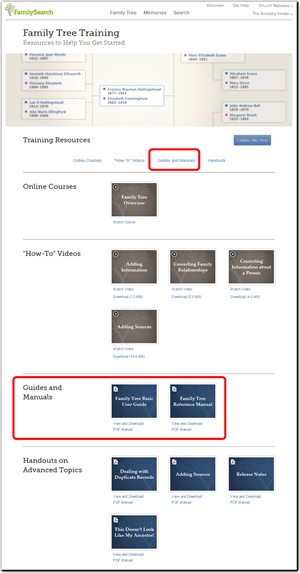
    5. FamilySearch.org Family Tree training pageLog in the FamilySearch.org, if not already. There is different training and manuals for members of the Church of Jesus Christ of Latter-day Saints and non-members. FamilySearch needs you to log in to determine which set to present to you.
    6. Click the Guides and Manuals shortcut, or scroll down to that section of the page. (Illustration to the right.)
    7. View or download either the Family Tree Quick Start Guide or the Family Tree Reference Manual. (Illustration to the right.)

    Pretty straight forward; not.

    One last caveat. Family Tree changes so fast, the manual is always out of date.

    Maybe that’s why FamilySearch hides it so intently.

    Tuesday, March 25, 2014

    #RootsTech 2014 Sessions Online, 2015 Free Passes

    The Ancestry Insider is an official RootsTech 2014 bloggerI think I’m done with my RootsTech coverage. It’s only taken me a month. Oh well.

    Now that RootsTech is over, you can view videos of some of the popular classes online. Classes are available from both 2014 and 2013.

    RootsTech has also announced a contest to give away five all-access passes to RootsTech 2015. To be entered in the contest, go to Familystorytelling.com and find an article you enjoy or a project that you plan to do this year. Share the link on any social media site with the hashtags #RootsTech and #FamilyStorytelling. You'll be automatically entered into the contest and five winners will randomly be drawn.

    My experience is that not a lot of people enter these types of conferences, so your chances of winning are pretty good. So far, there are only four entries via Twitter.

    Monday, March 24, 2014

    Monday Mailbox: Duplication Service

    The Ancestry Insider's Monday MailboxDear Ancestry Insider,

    I recently received from someone a comment that you can now request a document from FamilySearch by email. My feeble brain cannot remember who wrote that. Is it true and how do i do it?

    Love your column. It keeps me going when i hit the wall. Started 35 years ago going blind looking at microfiche in the Chicago archives.

    Thanks,
    Richard E. A'Hern

    Dear Richard,

    Thank you for your kind comment. We do practice a grand hobby, don’t we?

    You heard mostly correct. The Salt Lake FamilySearch Family History Library does offer a photo duplication service. Results are delivered via email. They won’t copy anything online or illegal. Requests are limited to once per month of up to five images. The service is provided free, but you may have to wait some time for the results.

    For more information, visit “Photoduplication Services” in the FamilySearch wiki.

    Signed,
    The Ancestry Insider

    Friday, March 21, 2014

    Darned Half Records

    Records say the darnedest things

    We depend upon records to reveal the “truth” about our pasts.

    Yet sometimes records have anomalies.
    Some are amusing or humorous.
    Some are interesting or weird.
    Some are peculiar or suspicious.
    Some are infuriating, even downright laughable.

    Yes, “Records Say the Darnedest Things.”

    Records Say the Darnedest Things: Half Records

    Here’s a citation FamilySearch supplies to a record on FamilySearch.org:

    "Utah, Tooele County Records, 1855-1956," images, FamilySearch (https://familysearch.org/pal:/MM9.3.1/TH-1942-30788-543-19?cc=1992424&wc=M9MH-KCF:n1741450760 : accessed 08 Mar 2014), Probate records > Index to wills 1887-1955 > image 5 of 51.

    This is a perfectly fine citation to the record. One can quibble about dropping the word “digital” from before “image.”1 Rather than cite the URL of an individual record, it is best to cite the website homepage to guard against broken URLs.2 FamilySearch has broken that general practice, but presumably FamilySearch knows how persistent these URLs are. So while an entire URL is a bad practice for you and me, it isn’t necessarily so for a website publisher. (I wish FamilySearch would implement a shorter URL, but it is what it is.)

    Still, these are quibbles insofar as citing the online image.

    But what they’ve provided for this record is only half a citation! A complete citation to an online record needs to cite both the online record and the offline original from whence it was derived. Why is it so important to cite both the online derivative and the offline original?

    Here’s the image cited by the above citation:

    image

    Without knowing where the original was, one would not be able to track down the original to see the other half of this record. (I’ve informed FamilySearch about this record set. Hopefully it isn’t too late for them to retake the photographs.) Fortunately, this citation, as is, contains enough information that with a little effort one could track down the original. But that isn’t always the case.

    Darned half citations to half records!

    [After I wrote the above article, I was pleased to see that FamilySearch added the missing half to many of its citations. Hat’s off to FamilySearch. In some cases the citations to the offline originals are still incomplete, so you may still want to examine and supplement them. I’ve learned from FamilySearch why this is so and I may explain it in future articles.]


    Sources

         1.  See Elizabeth Shown Mills’s comments about the practice in “Citing FamilySearch images,” forum comment, Evidence Explained: Historical Analysis, Citation & Source Usage, website (http://www.evidenceexplained.com : accessed 18 March 2014), path: Forums > Evidence Explained > Citation Issues > Citing FamilySearch images > comment #14.

         2.  Elizabeth Shown Mills, Evidence Explained: Citing History Sources from Artifacts to Cyberspace, 1st ed. (Baltimore: Genealogical Publishing Company, 2007), 59. The page is the same in the second edition.

    Thursday, March 20, 2014

    Ancestry.com Government Filing

    Ancestry.com 2013 Form 10-KAncestry.com recently filed a form with the government that contained some interesting information.

    Ancestry.com has 2.1 million subscribers on the Ancestry.com website as of the end of last year. That goes up by only 600,000 when including their other websites: Archives.com, Fold3.com and Newspapers.com. (Have you ever felt like they ignore Genealogy.com?)

    They had over 12 billion records at the end of the year. (I went through their card catalog and could only account for 10 billion, but, hey, what’s 2 billion among friends.) That’s an increase of 1.2 billion records during last year.

    Users have created 55 million trees containing more than 5 billion persons. (I just found the two billion records missing from the catalog!) Users have uploaded 207 million photographs, scanned documents, and written stories. Users accepted about 1.3 billion shakey leaf hints last year alone.

    About 65% of their subscribers have subscriptions of six months or longer.

    Ancestry.com identified what they felt were their key business highlights for the year:

    • added more than 1.2 billion records to their content collections;
    • completed an agreement with FamilySearch, one of the largest genealogy organizations in the world, to make approximately 1 billion global records available online over the next five years;
    • total subscribers to Ancestry.com branded websites increased to approximately 2.1 million or 6% compared to December 31, 2012;
    • acquired Find A Grave, Inc., which provides a significant collection of burial information with more than 105 million records and 81 million photos;
    • the AncestryDNA database more than doubled in size in 2013, and the AncestryDNA test now maps a test taker’s ethnic origins to 26 global regions, including expanded regions for people of European and West African descent;
    • their mobile apps have now been downloaded more than 10 million times across the Android and iOS platforms; additionally, the redesigned iOS app includes new social and other features;
    • launched the StoryView product experience that enables users to create a highly sharable narrative around a person in their family tree; and
    • released a new version of Family Tree Maker software that includes updates on editing, sharing, tree viewing and TreeSync to make collaboration even easier.

    You can read the entire, rather boring, report online.

    Wednesday, March 19, 2014

    #NGS2014GEN National Genealogical Society Streaming Conference

    The Ancestry Insider is a member of the Official Social Media Press for NGS 2014Interest in this year’s National Genealogical Society (NGS) conference has been high. Hotel after hotel has sold out. The conference will be held 7-10 May 2014 in Richmond, Virginia.

    The deadline for registering with the early-bird discount is coming up quick. Register by Monday, 24 March 2014, to receive the discount and to order a printed syllabus. The price for members of the society will increase from $195 to $230. The price for non-NGS members will increase from $230 to $265.

    For more information about attending the conference in Richmond, Virginia, visit the NGS Conference website.

    Now, those who can’t attend in person can have access to five or ten of the 175 sessions.

    This is the first time that NGS has offered some sessions remotely. Sessions can be viewed live and for three months thereafter. NGS has selected some of the most popular topics and nationally known speakers. Sessions have been organized into two tracks. Registrants for live streaming can select one or both tracks. A single track of five sessions is $65 for society members and $80 for non-members. Both tracks, all ten classes, are available for $115 for members and $145 for others.

    For more information about watching sessions remotely, and to register, visit the Live Streaming page of the NGS Conference website.


    Track One: Records and Research Techniques

    Thursday, 8 May 2014

    2:30 p.m.  T241 - Using Evidence Creatively: Spotting Clues in Run-of-the-Mill Records, Elizabeth Shown Mills, CG, CGL, FASG, FUGA, FNGS

    4:00 p.m.  T252 - Can a Complex Research Problem Be Solved Solely Online?, Thomas W. Jones, CG, CGL, FASG, FUGA, FNGS

    Friday, 9 May 2014

    8:00 a.m.  F308 - Using NARA’s Finding Aids and Website, Pamela Boyer Sayre, CG, CGL

    9:30 a.m.  F311 - Disputes and Unhappy Differences: Surprises in Land Records, Sharon Tate Moody, CG

    11:00 a.m.  F321 - “Of Sound Mind and Healthy Body”: Using Probate Records in Your Research, Michael Hait, CG


    Track Two:  Virginia Resources and Migration Patterns

    Friday, 9 May 2014

    2:30 p.m. F342 - From Ulster to Virginia and the Carolinas, David E. Rencher, AG, CG, FIGRS, FUGA

    4:00 p.m.  F355 - Researching a Civil War Soldier in Virginia, Craig Roberts Scott, CG

    Saturday, 10 May 2014

    8:00 a.m. S403 - The Migration Triangle: Virginia, the Carolinas, and Tennessee, J. Mark Lowe, CG, FUGA

    9:30 a.m. S415 - A Treasure Trove of Rarely Used Records, Barbara Vines Little, CG, FNGS, FVGS

    11:00 a.m. S425 - Colonial Migrations In and Out of the Shenandoah Valley, Vic Dunn, CG

    Tuesday, March 18, 2014

    Ancestry.com Search Sliders

    Ancestry.com has released a feature intended to make it easier to deal with the thousands and tens of thousand of results returned when not using Exact search mode: search sliders. “Search Filters,” as Ancestry.com calls them, are located in the upper-left corner of the search results page.

    Ancestry.com new Search Filters

    For each search term users specify, they can broaden the number of results by moving a slider to the left, or narrow down the number of results by moving a slider to the right.

    Five positions are available on name sliders. Names can be set to return matches that are

    • Not exact [Left most position. Returns the most results.]
    • Exact, similar, sounds like, and initials
    • Exact, sounds like, and similar
    • Exact and similar
    • Exact [Right most position. Returns the fewest results.]

    The six positions for date sliders are

    • Not exact
    • +/– 10 years
    • +/- 5 years
    • +/– 2 years
    • +/– 1 year
    • Exact

    The positions for locations, using a U.S. city as an example, are

    • Not exact
    • Country
    • State and adjacent states
    • State
    • County and adjacent counties
    • County
    • Exact

    The number of positions for locations can be less, depending on the location. In fact, if a location is not selected from a drop-down list at the time it is entered, the only positions available are Not Exact and Exact.

    “Not exact” basically means the results may not match the search term at all, but matches other criteria so closely that the result may still be a match. This might be the case for a previously unknown nickname, for example.

    Ancestry.com advanced mode search filters for namesThe feature opens up in a friendly way the advanced search options that are available as drop downs beneath fields in advanced search mode. (See the illustration to the right.)

    While I didn’t see any help information in the few minutes I looked at the feature, I know that the various terms are defined in help windows designed for the advanced mode drop downs. Help is available for names and places. How the slider works for dates is pretty obvious.

    In a private briefing with members of the social media press back at the NGS Conference in May of last year, Ancestry.com first broached the concept of search sliders and showed us some mockups. It looked like a great idea so I am glad to see it come to fruition.

    For more information about search sliders, see the Ancestry.com five minute video, “Start Small, Go Big – How Sliders Can Improve Your Searching.”

    Monday, March 17, 2014

    Ancestry.com Retires Old Search

    Old Search gravestoneThe luck of the Irish may have been wanting last week, depending on who you are. Ancestry.com announced they had shut down Old Search.

    “Over the years, we have been maintaining two separate search experiences – ‘Old Search’ and ‘Primary Search.’” said Katharine Nester, director of product management at Ancestry.com. “We’ve consolidated the two systems….  This consolidated search brings forward and improves the best features of both search experiences.”

    Maintaining old search was problematic. Having two technologies increased the complexity of adding improvements. The technology used to support old search was outdated and fragile. (You’ve probably experienced this yourself. You find your computer so old that the manufacturer will no longer sell parts for it. Or you find Microsoft no longer provides support for your operating system, which by the way, is happening next month for Windows XP. If something breaks, you’re toast. That means Ancestry.com can gracefully retire Old Search, or one day a blown transistor will catastrophically do it for them.)

    Retiring Old Search brings benefits as well. “[It will] allow us to direct more investment into other areas like adding more record collections and correcting transcriptions on existing collections,” said Nester. Meanwhile, improvements in what used to be called ‘New Search’ will continue. “We will be continuing to improve our search over this year and have improvements planned in our location data, relevancy, results filtering, and more.”

    As might be expected, users response from those feeling strongly enough to respond has been almost completely negative. Users have complained variously that New Search is too complex and forces them to change while providing no increase in productivity. Many of the users complaints are addressed by using “Category Exact Mode,” which interestingly, Ancestry.com didn’t mention in the shutdown announcement. I wonder if they are backing away from it. If you want to try it out see, “How to simulate old search using category exact mode” in the Ancestry.com help system.

    To read the entire announcement, see “A Fond Farewell to ‘Old Search’” on the Ancestry.com blog.

    Friday, March 14, 2014

    Darned Grave Markers

    Records say the darnedest things

    We depend upon records to reveal the “truth” about our pasts.

    Yet sometimes records have anomalies.
    Some are amusing or humorous.
    Some are interesting or weird.
    Some are peculiar or suspicious.
    Some are infuriating, even downright laughable.

    Yes, “Records Say the Darnedest Things.”

    Records Say the Darnedest Things: Darned Grave Markers

    Good genealogists extract subtle clues from records while simultaneously holding that same record suspect. The two are at odds, but both are necessary. Many records have additional value waiting for the careful, well-informed researcher. However, no record is above verification.

    A case in point is the grave marker of Donald N. Hall and Dorothy N, pictured here.

     image

    What clues can you discern from this marker? Are there any clues about religion or economic circumstances? If you deduced that Dorothy is still living, you are correct. However, you might have made another, incorrect assumption without even thinking. Can you guess what it might be?

    If you assumed that Donald and Dorothy were married, you are correct; BUT NOT TO EACH OTHER!

    They are, however, related. They are twins.

    Darned grave markers!

    Credit Mike Hall for the photograph and the example. Thanks, Mike!

    Thursday, March 13, 2014

    RootsMapper: Another FamilySearch Family Tree Extension

    Dennis Brimhall mentioned a couple of FamilySearch Family Tree extensions, FamilyMap and Puzilla, in his RootsTech keynote address. (See “RootsTech Thursday’s Opening Session.”)

    The ecosystem growing up around FamilySearch Family Tree is an increasingly compelling reason to add your data. Here’s another interesting program and an interesting way to visualize your data.

    RootsMapper.com is a free website that shows your “pedigree” in geographical format. For the map below I mapped myself, although I could have specified any Family Tree PID (person identifier).  I specified four generations (which doesn’t include the root person.) RootsMapper then animated backwards the migration of my ancestors.

    A circle with a generation number indicates the birthplace of each ancestor. Blue indicates male, and pink, female. The root person is indicated with numeral “0” (which is currently highlighted in yellow in the map below). Parents are indicated with the numeral “1,” grandparents with “2,” and so on. Just like a pedigree chart, lines link each person to their parents (although they can be turned off).

    Hover over a circle and RootsMapper pops up a box with the person’s name, birth year, and death year. Click on a circle and it pops up a person card with name, full birth and death information, a photograph (if available), the PID, and options to remove that circle or extend the pedigree beyond that point.

    RootsMapper shows a geographic map of your pedigree

    The first time I ran this four generation map several points jumped out at me.

    I have southern roots! Lots of them! I have an Irish line! And I have a Scandinavian line! Of course I already knew all that, but I’ve been suppressing it to avoid collisions with burned counties, Irish research, and patronymic names. (You’d think someone comfortable with pseudonymic names would be fine with patronymic names, but apparently not.)

    The program can map up to eight generations of all ancestral lines, but that takes an extremely long time. A better approach is to map several generations and then extend particular lines. That can be done up to 20 generations.

    The program has several options. One displays the number of births per country. Another displays a small pedigree of the mapped generations. Another isolates the display to only one line.

    To run the program, you’ll need a (free) FamilySearch account. And of course, you’ll only see what information you or a relative have added to Family Tree. If there are errors in your tree you’ll have to fix them in Family Tree before the RootsMapper map is accurate. While free, donations are accepted.

    Wednesday, March 12, 2014

    #NGS2014GEN Releases Mobile App for 2014 Annual Conference

    NGS 2014 Conference AppThe National Genealogical Society (NGS) has released the conference app for their upcoming conference to be held 7‒10 May 2014, in Richmond, Virginia. 

    The NGS Conference App is available for iOS and Android. Search the respective app store for “NGS 2014”. For Blackberry, Windows Phone, and web-enabled devices, access the app at http://m.core-apps.com/ngs2014. It also works for laptops and even desktop computers and can be synched to your mobile device.

    Conference apps have become increasingly important in recent years. If you haven’t yet decided to attend the conference, it can be used to review the classes being offered, the presenters teaching them, and the vendors in the exhibition hall. If you’ve already registered for the conference, it can be used to review the schedule and plan your time. Once at the conference it can be used to manage your time, receive conference announcements, and follow Twitter message about the conference. (That’s what the #NGS2014GEN tag in the title of this article is all about.)

    New this year is a five-minute video that reviews highlights of the app and explains how to use key features. The video can be found on the NGS conference website at http://conference.ngsgenealogy.org/attend/mobile-app/. Click on the App Video Tutorial.

    The Ancestry Insider is an official member of the conference social media press.

    The Ancestry Insider is a member of the Official Social Media Press for NGS 2014

    Tuesday, March 11, 2014

    Ancestry.com Releases Find-A-Grave App

    image“As promised, we have recently released the first version of the Find A Grave mobile app," said Mike Lawless of Ancestry.com’s Find A Grave app team. “With the app, you’ll be able to bring the most important aspects of Find A Grave with you.” The new app can:

    • Access burial info
    • Locate grave sites through a simple search
    • Search grave marker, cemetery, and memorial photos
    • Request headstone photos
    • Find cemeteries
    • Fulfill photo requests, posting the photographs instantly
    • Create memorials with bios and photos
    • Share discoveries through Facebook, emails, and texts

    I don’t know if the Find A Grave people had an app in development when Ancestry.com purchased them. I’m guessing they did not. This would then be the first big value the public has enjoyed because of the purchase. Along with the app, users get access to Ancestry.com’s large, full-time support organization. The app, like Find A Grave itself, remains free.

    “This release is just the beginning and we have a road map of features for our users which will keep the Find A Grave mobile app improving over time,” said Lawless.

    I was not able to install the app on my iPhone because it requires 7.0 or later and my phone’s stuck on 6.1. An Android app is in the works, but Ancestry.com hasn’t yet announced a date. The current Find Grave Android app was not official and I’m not certain if it is still available. I would assume Ancestry.com would ask them to remove it.

    The marriage of cell phone, camera, and GPS is a natural for grave marker photography, but Find A Grave is not the first to offer such an app. BillionGraves released its app three years ago. While they don’t actual have a billion grave marker photos, they have grown from nothing to six million markers in a very short amount of time. The Ancestry.com Find A Grave app may curtail BillionGraves’s encroachment on Find A Grave’s domestic market, but last month BillionGraves and MyHeritage announced a partnership to make the BillionGraves app available in 25 languages and expand its use worldwide.

    Tombfinder from SaasSoft is a similar app, but is approaching the market differently. Thy have partnered with 230 cemeteries to provide visitors a finding aid to cemetery plots in those cemeteries. NMCP Finder provides the same service, but is dedicated to the National Memorial Cemetery of the Pacific (the Punchbowl Cemetery). Beloved by Eilon Fulman allows users to mark the GPS location of gravesites, but doesn’t support photos.

    The Find A Grave app can be downloaded from the iTunes app store.

    Friday, March 7, 2014

    Serendipity at #RootsTech 2014

    Boy "Unknown1" was David Franklin RawlinsI’ve already mentioned Judy Russell had a serendipitous meeting at RootsTech.1 (Read her account, “The Cousin Who Isn’t.”)

    She was not alone.

    I experienced one myself. I have several photographs from a great aunt with people I haven’t been able to identify. One of a cute, freckled faced young boy proved useful in my “Do It Yourself Photo Restoration” class. Cleaning light dust specks and dark dust specks from a digital photograph takes two steps. For a complete tutorial, I needed a photograph that suffered from both problems. After looking through numerous digital photographs, I found one that fit the bill: the photograph of the cute young boy. The photograph became a part of both my live presentation and the lengthy syllabus accompanying it.

    When I arrived in the hall (pictured in a previous article) for my presentation, a kind-looking lady excitedly approached me.

    “We must be related!” she said excitedly. “You have a picture of my father in your syllabus!” She showed me the photograph. It was the young, unidentified boy. We spoke for a moment, exploring our connections. I learned the name of my unidentified little boy: David Franklin Rawlins.

    That’s serendipity in genealogy.

    The third story comes from an article in the LDS Church News by Rayn Morgenegg. The complete, original story is on their website.2

    Just weeks before RootsTech, Hayley Elizabeth Heineken started doing genealogy. She wanted to go to RootsTech, but just couldn’t afford to. Then she just happened to be scheduled to fly through Salt Lake on business. By chance she just happened to meet a woman who gave her a place to stay. The woman just happened to mention Hayley to her niece who just happened to start working for the Church of Jesus Christ of Latter-day Saints a few months earlier.

    Just days before RootsTech, someone scheduled to help in three of the four training sessions for new family history consultants just happened to come down with pneumonia. The niece just happened to ask Hayley to fill in.

    Just hours before, a person helping in the fourth session just happened to cancel. They just happened to ask Hayley to fill in.

    During the session, they just happened to display Hayley’s fan chart on the large projection screen.

    That’s when someone in the large hall stood and yelled, “We are related!”

    The two met after the session. They hugged. They talked genealogy. They exchanged contact information.

    We call that, serendipity in genealogy.


    Sources

         1.  Judy G. Russell, “The Cousin Who Isn’t,” The Legal Genealogist, 8 February 2014 (http://www.legalgenealogist.com : accessed 1 March 2014).
         2.  Ryan Morgenegg, “RootsTech 2014: Family History Miracle,” Deseret News: LDS Church News, 2 March 2014; online edition (http://www.ldschurchnews.com : accessed 1 March 2014).

    Thursday, March 6, 2014

    Annual Fine Print

    Once a year I like to make sure you know where I stand.

    I am not a spokesperson for FamilySearch. I write the Ancestry Insider independently of my work at FamilySearch. In this column I call it the way I see it, sometimes disagreeing with FamilySearch, albeit trying not to get fired. I try to be helpful and supportive. If I criticize FamilySearch, I try to suggest how they might improve.

    I am not a spokesperson for Ancestry.com. I do not work for Ancestry.com. The name “Ancestry Insider” does not apply to Ancestry.com. Again, I try to criticize constructively.

    The Ancestry Insider is written independently of Ancestry.com and FamilySearch. The opinions expressed herein are those of the author, and do not necessarily reflect those of Ancestry.com or FamilySearch.

    The Ancestry Insider may be biased by the following factors: 1) The Ancestry Insider accepts products and services free of charge for review purposes. 2) The author of the Ancestry Insider is employed by the Corporation of the President of the Church of Jesus Christ of Latter-day Saints, owner and sponsor of FamilySearch. 3) The author is a believing, practicing member of the same Church. 4) The author is a former stock-holder and employee of the business now known as Ancestry.com and maintains many friendships established while employed there. 5) It is the editorial policy of this column to be generally supportive of Ancestry.com and FamilySearch. 6) The author is an active volunteer for the National Genealogical Society.

    All content is copyrighted by the Ancestry Insider unless designated otherwise. For content copyrighted by the Ancestry Insider, permission is granted for non-commercial republication as long as you give credit and you link back to the original.

    Wednesday, March 5, 2014

    #RootsTech – FamilySearch Family Tree: What’s Next

    Ron Tanner speaks at RootsTech 2014On Thursday, Ron Tanner, a FamilySearch product manager, presented the session, “FamilySearch Family Tree: What’s New and What’s Next.”

    “Some reports estimate that we duplicate up to 80% of our research,” said Tanner. “I want us to quit doing that.” He said that using Family Tree, we can eliminate duplication by working together.

    “I’ve got a few ideas I’d like to share with you as you consider working in Family Tree together,” he said.

    • Be objective.
    • Be courteous.
    • Be patient.
    • If you edit, share your email.
    • Assume the other person is well intentioned.
    • Write good reason statements.
    • Don’t make changes just because you “know.” Use sources.
    • Rarely delete a person. Usually, the person belongs to a different family. Don’t delete the person, just remove them from the family.
    • Don’t guess when merging. Do your homework.
    • If the possible duplicates list presents a person who is not a duplicate, use “not a match” to remove them from the list.

    New FamilySearch is now read-only; that is, users can’t change it directly. However, FamilySearch still synchronizes new FamilySearch and Family Tree. That’s because behind the scenes there are still necessary parts of the system that work only for new FamilySearch. When those parts have been implemented for Family Tree, then the synchronization between the two can be broken. Until that happens, it will not be possible to merge IOUSes. (See “Medieval IOUSes in FamilySearch Family Tree.”)

    “Family Tree continues to evolve. We release a new version approximately every two weeks,” said Tanner. “We only do that to make it better, not to keep you confused.”

    FamilySearch is working on an Android and iOS app that will allow you to interact with Family Tree. (For a little more information, see my story, “Find A Grave App Coming Soon, FamilySearch to Follow.”)

    FamilySearch is working on a smart phone app for Family Tree

    FamilySearch is also working on adding support for living persons into Family Tree. Matching deceased persons exist in both New FamilySearch and Family Tree and are synchronized between the two. This is not the case for living persons. Behind the scenes, living persons are stored only in New FamilySearch. There are no living persons in Family Tree. The software just makes it look like there are. Consequently, you can’t attach a source to a living person or attach a life sketch, or see a change log. If you and the living person are members of the Church of Jesus Christ of Latter-day Saints, you can’t even change vital information about them. These limitations will all go away after FamilySearch adds living persons into Family Tree.

    The living persons you add will remain private to you. You don’t have to worry that they will be shown to other people. In the future, probably not this year, you will be able to share your living persons with others so you can work together as a living family.

    FamilySearch is also adding record hinting. (It sounds like Ancestry.com’s shakey leaves.) On the person page FamilySearch will list possible matching records, both from their own records and from as many of their partners as they can.

    Hints to matching records are coming to FamilySearch Family Tree

    Clicking “Show All” will take you to a page that lists all the matching records.

    Another thing FamilySearch is doing is a descendancy view.

    A descendancy view is planned for FamilySearch Family Tree

    FamilySearch Family Tree Numbers

    310,000 people visit or use Family Tree each week.

    500,000 conclusions (birth, death, burial, and other facts) are added each week.

    320,000 new persons are added every week.

    In New FamilySearch 1 out of every 4 combines was undone. In Family Tree, 1 out of every 100 merges is undone.

    12 million sources have been added to Family Tree.

    320,000 new sources are added each week.

    When Tanner made this presentation to members of the Church on Saturday, he mentioned another feature. Members have asked for the ability to show all an ancestor’s temple ordinances. That will be possible on the new Ordinances tab.

    FamilySearch will be trying again (perhaps before you read this) to move the old New FamilySearch sources over to Family Tree. In their last attempt they experienced a glitch and missed several million.

    Tanner is going to try to add a feature allowing users to send private messages to other users without knowing their email addresses.

    “I know that when we all work together, we can do amazing things,” said Tanner. “I know that we can do that in Family Tree and document the genealogy of the world.”

    You can watch Ron Tanner’s presentation in full on the RootsTech.org website.

    Tuesday, March 4, 2014

    #RootsTech 2014 Syllabus Wanting

    The Ancestry Insider is an official RootsTech 2014 bloggerThere were 238 sessions at RootsTech. Just 162 of them provided materials for the syllabus. Part of the value you expect from a conference is the syllabus.

    • At the conference when deciding what sessions to attend, I check the syllabus. It’s a better way to judge the contents than the 20 word descriptions in the program.
    • During sessions I pay attention better when there is a good handout. I don’t feel the same pressure to take complete notes.
    • Since I can’t attend every session, I draw additional value from the conference through the handouts of other sessions.
    • After conferences I store the syllabi on my computer. I search across them all to find answers to questions. I check bibliographies to identify good reference texts.

    I realize there are challenges for presenters. Syllabus handout deadlines are many months before most conferences. RootsTech is a technology conference and technology changes quickly. Web sites like Ancestry.com or FamilySearch.org, can change dramatically during that time.

    People pay big money to attend RootsTech. I think RootsTech can be better.